
VaultMark: ཡིག་ཆའི་མཛོད།
གསང་བཟོས་ཡིག་ཆའི་མཛོད། ཡིག་ཆར་ཆུ་རྟགས་འཇོག་ཅིང་། མཉམ་སྤྱོད་མ་བྱས་གོང་གི་གསང་བའི་གནས་ཚུལ་སེལ།
རིན་མེད། ཁྱབ་བསྒྲགས་མེད། མངགས་ཉོ་མེད།


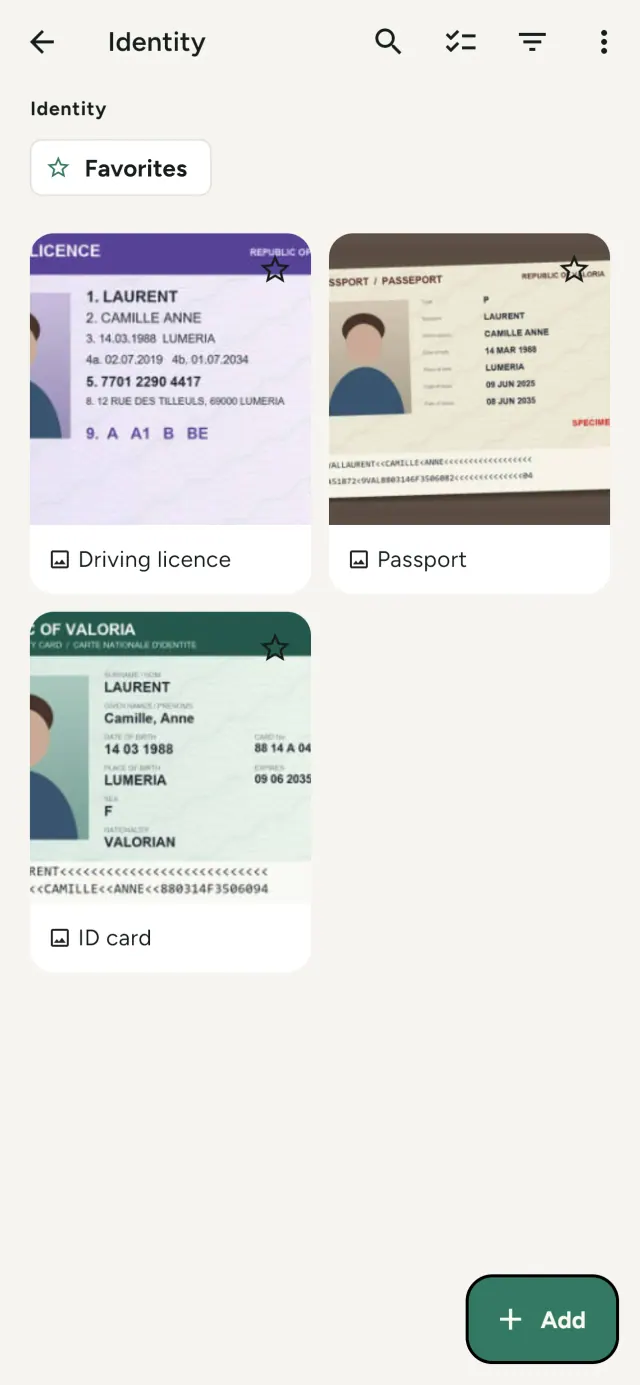
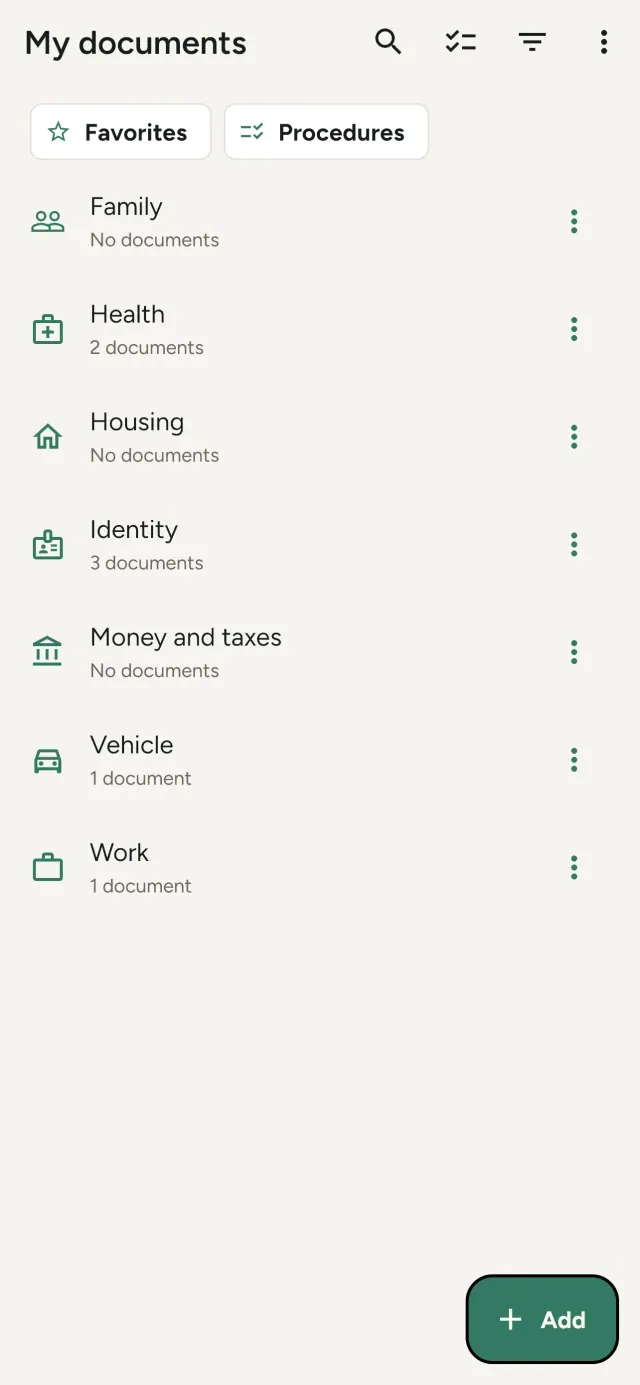
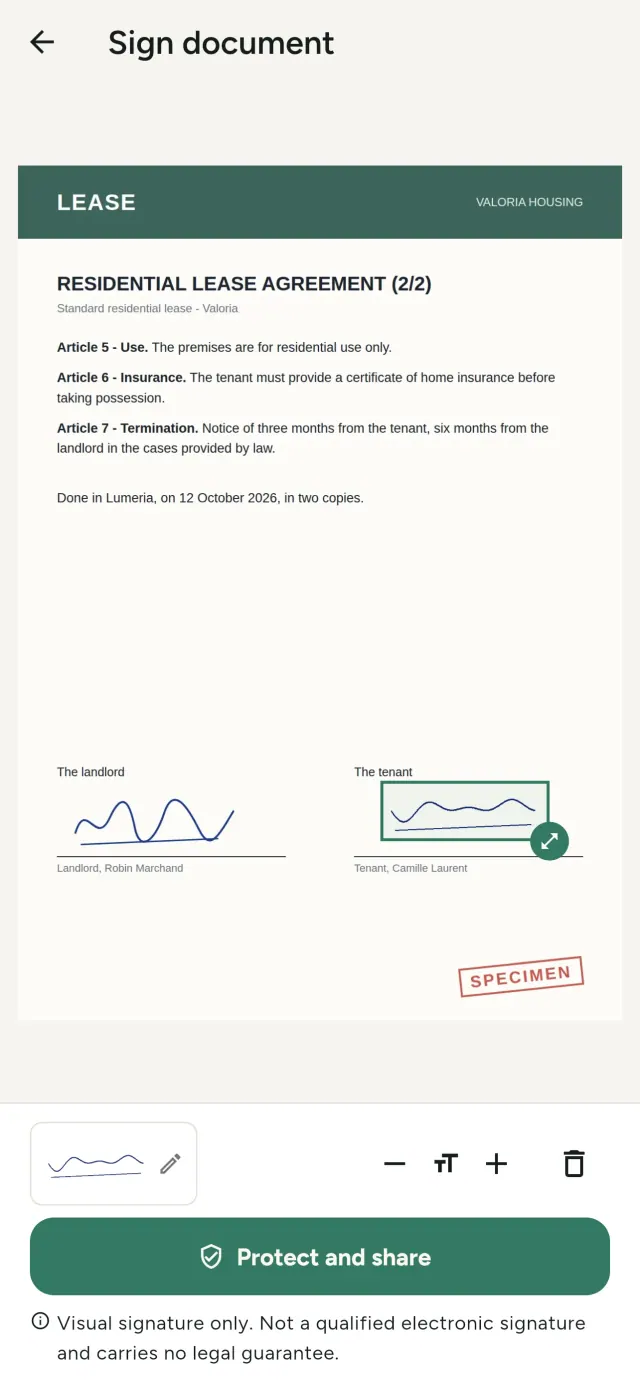
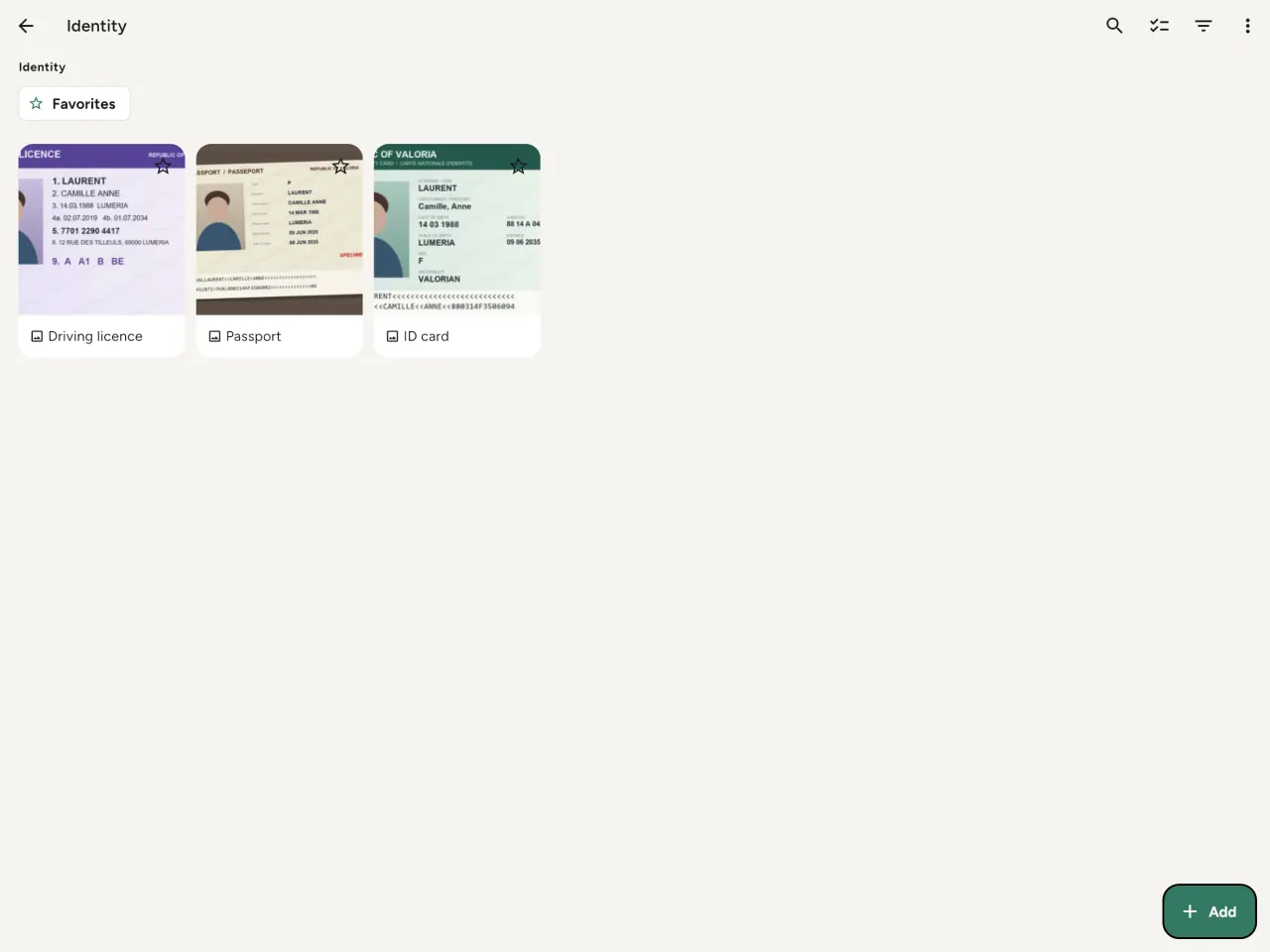
ཁྱེད་ཀྱི་ངོ་བོའི་ལག་འཁྱེར། གན་རྒྱ། གླ་ཕོགས་ཀྱི་ཡིག་ཆ་དང་སྨན་བཅོས་ཀྱི་ཡིག་ཆ་རྣམས་གཏོང་བའི་གོང་དུ་སྲུང་སྐྱོབ་བྱས་ཏེ། ཁ་པར་གྱི་གསང་བཟོས་མཛོད་དུ་དེ་དག་སྒོ་རྒྱག་བྱོས།
VaultMark ནི་སྒེར་གྱི་ཡིག་ཆའི་མཛོད་ཅིག་ཡིན། དོན་ཚན་ཚང་མ་ཁྱེད་ཀྱི་སྒྲིག་ཆས་སུ་གནས་པ་སྟེ། རྩིས་ཐོ་མེད། སྤྲིན་མཛོད་མེད། ཁྱབ་བསྒྲགས་མེད། རྗེས་འདེད་མེད། ཉིན་རེའི་སྤྱོད་སྒོར་དྲ་བ་ཡང་མི་དགོས།
VaultMark བྱེད་སྒོ་
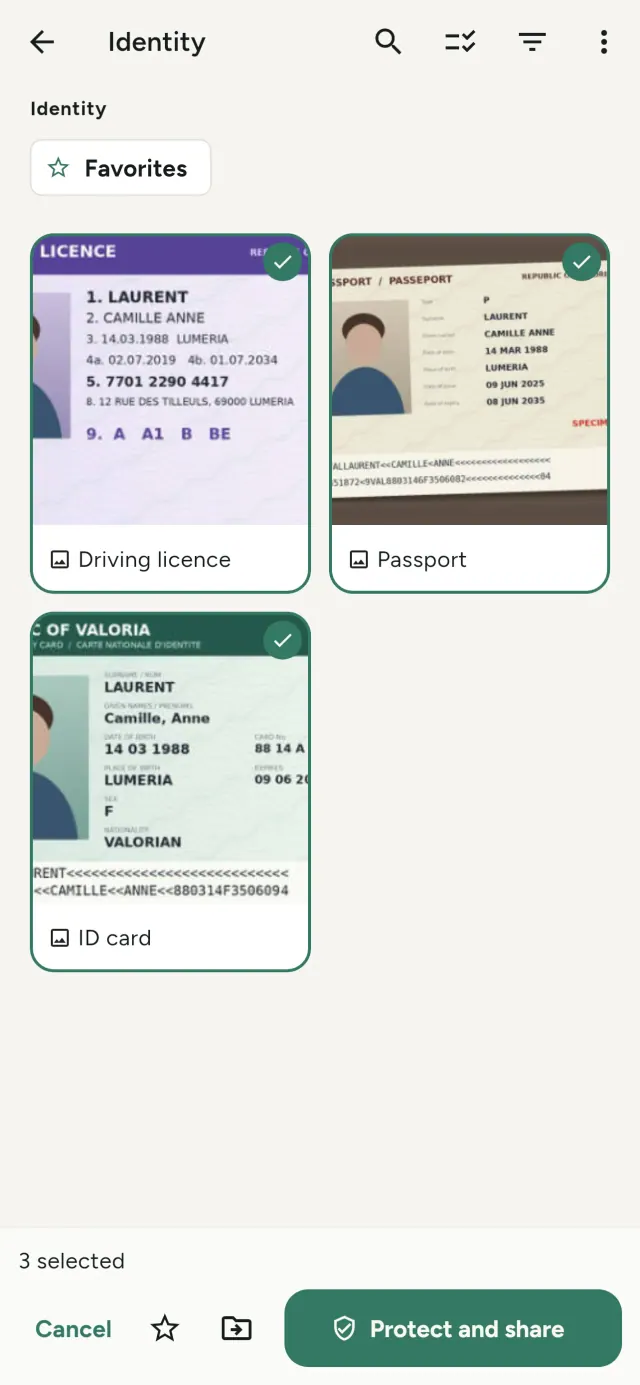
ཡིག་ཆ་བཤེར་འབེབས་བྱས་ཏེ་ཆུ་རྟགས་འཇོག་ཅིང་གཏོང་བའི་གོང་དུ་སྲུང་སྐྱོབ་བྱོས།
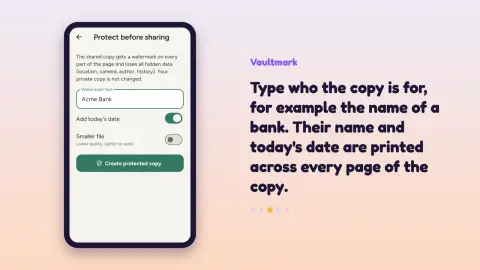
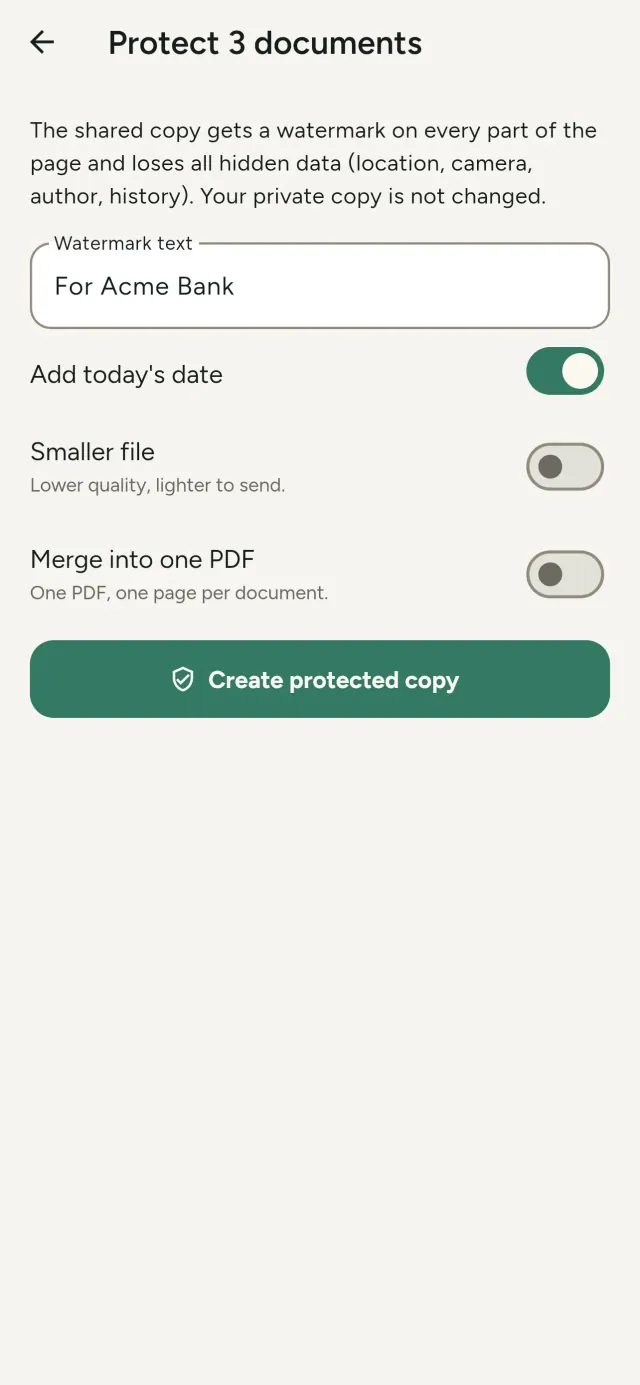
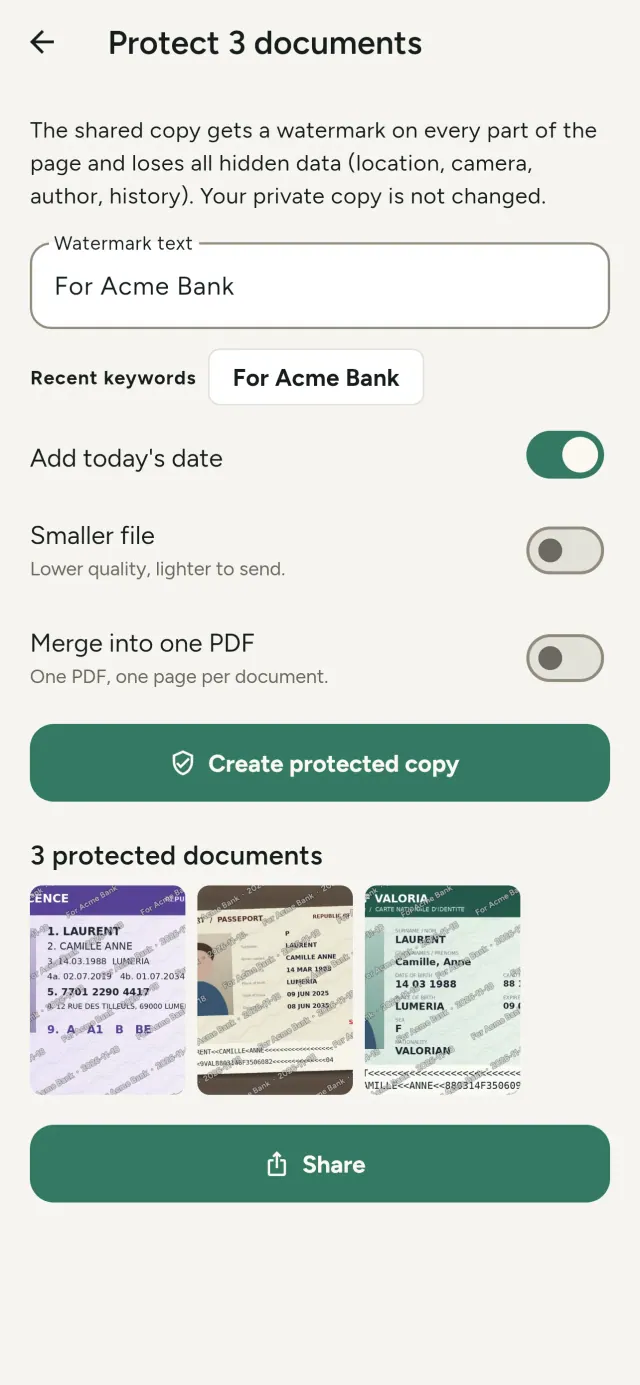
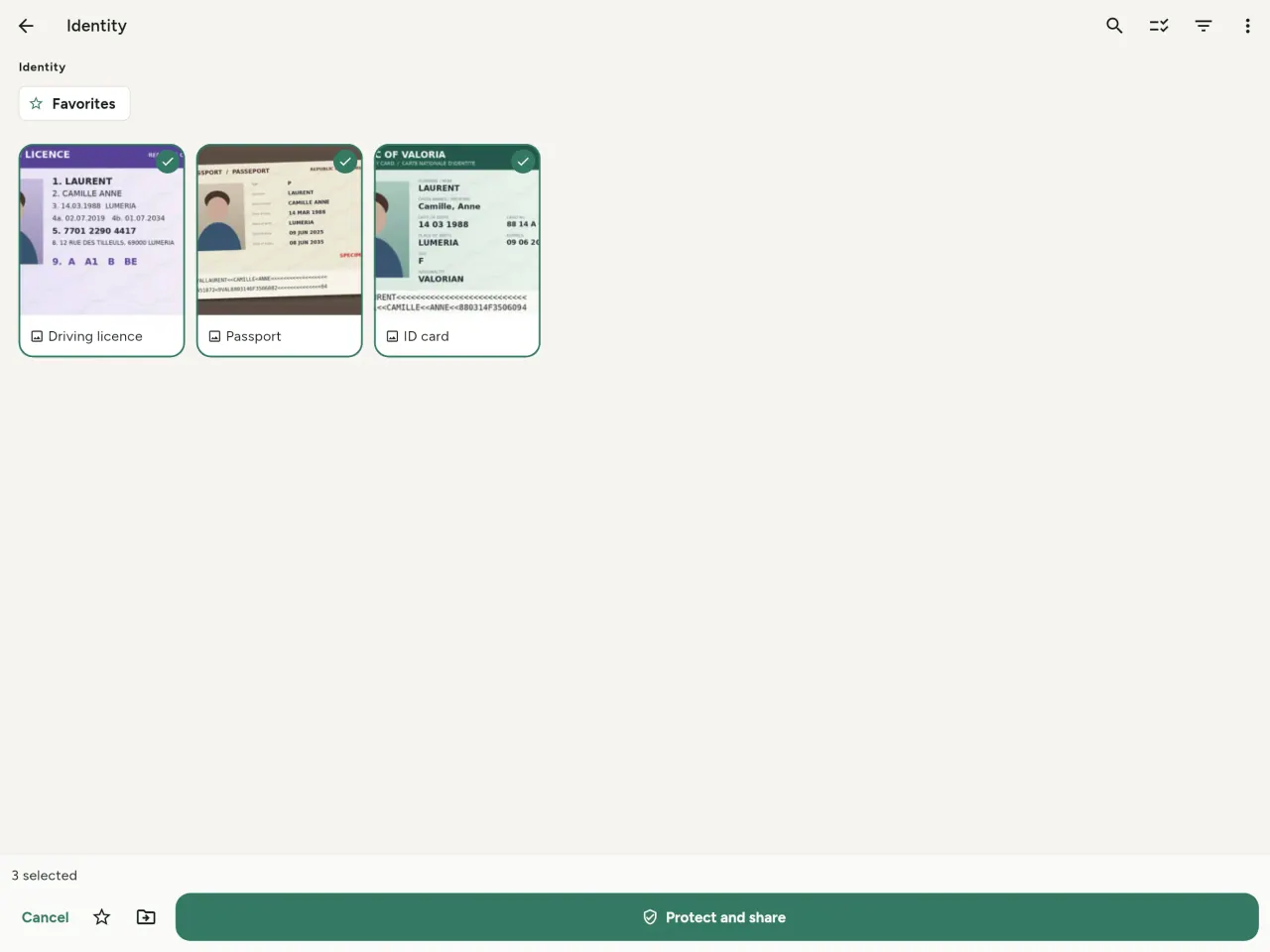
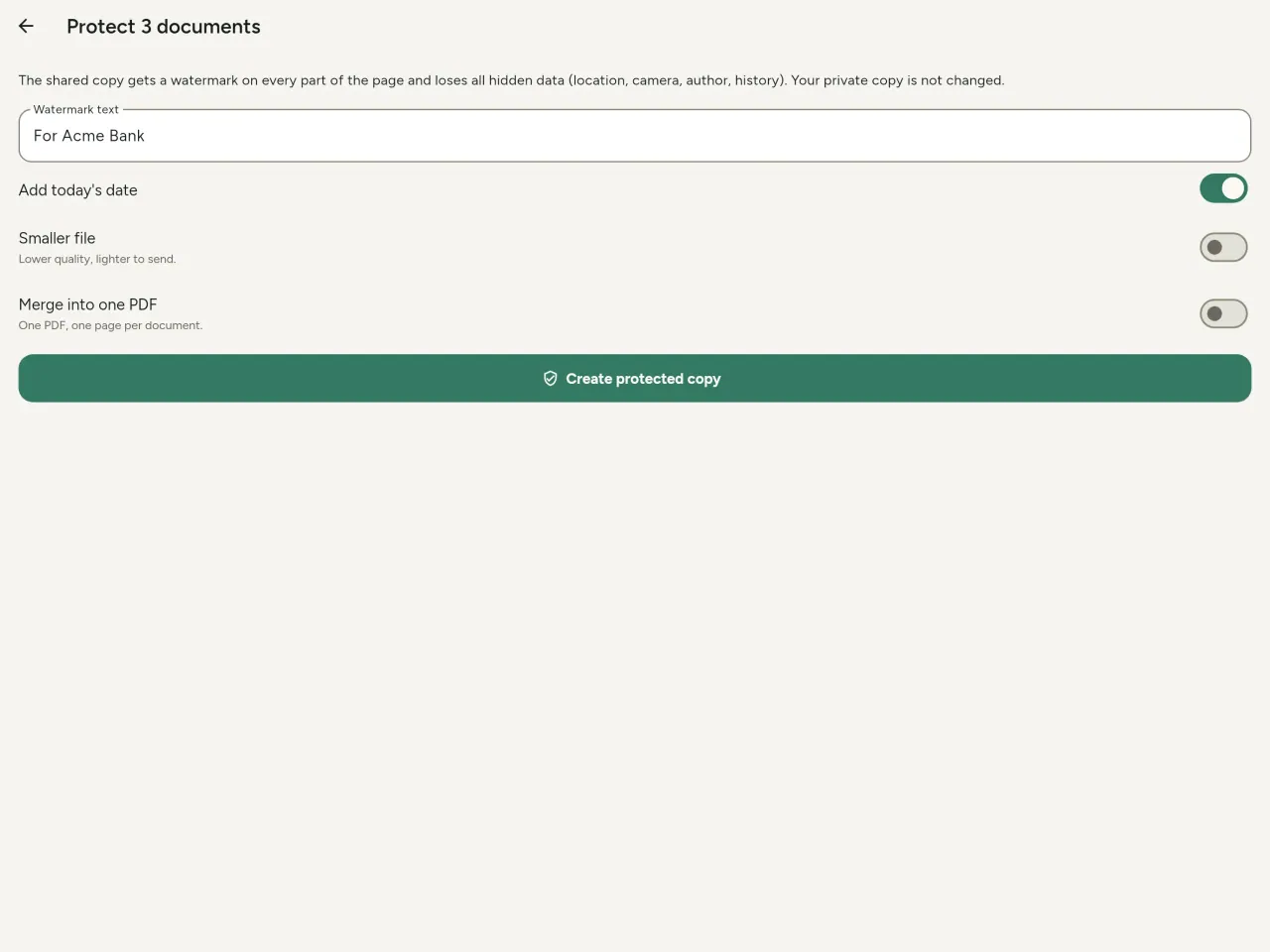
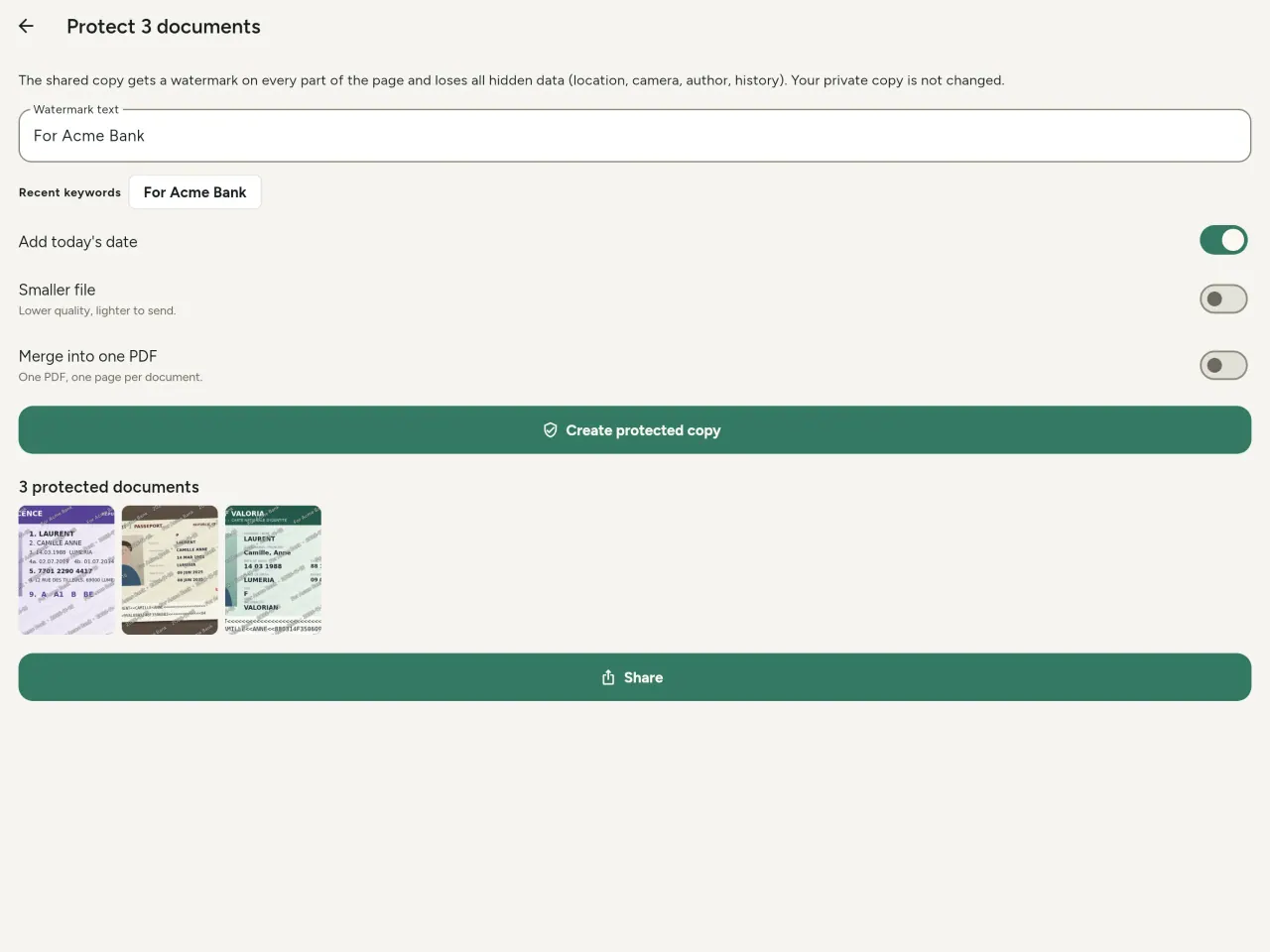
ཅོག་ཙེའི་སྟེང་དུ་ཤོག་ངོས་ཤིག་ཡོད་དམ། ཐོག་མར་ཁྱེད་ཀྱི་བརྙན་ཆས་ཀྱིས་བཤེར་འབེབས་བྱོས། ཡང་ན་ཁ་པར་ནང་གི་PDF ཡང་ན་པར་རྙིང་པ་ཞིག་འདེམས། VaultMark ཡིས་ཁྱེད་ཀྱིས་བདམས་པའི་ཡི་གེ་དང་། (དཔེར་ན་"དཔེ་མཚོན་དངུལ་ཁང་ལ་གཏོང་བའི་བུན་གཡར་ཞུ་ཡིག") དེ་རིང་གི་ཚེས་གྲངས་བཅས་ཤོག་ངོས་ཧྲིལ་པོར་ཆུ་རྟགས་འཇོག དེ་ནས་སྦས་པའི་གནས་ཚུལ་ཡོད་ཚད་སེལ་བ་སྟེ། གནས་ཡུལ། སྒྲིག་ཆས་ཀྱི་དཔེ་མཚོན། རྩོམ་པ་པོ། བཟོ་བཅོས་ཀྱི་ལོ་རྒྱུས་བཅས་ཡིན། ངོ་བོའི་ལག་འཁྱེར་གྱི་འདྲ་བཤུས། གནས་ཡུལ་གྱི་དཔང་རྟགས། ཡང་ན་གླ་ཕོགས་ཀྱི་ཡིག་ཆར་སྤྱོད་དེ། འདྲ་བཤུས་དེ་དོན་གཞན་ཞིག་ལ་སླར་སྤྱོད་མི་ཐུབ་པ་བྱོས། ཡིག་ཆ་གཏོང་བའི་གོང་དུ་གསང་བའི་གནས་ཚུལ་སེལ་བའི་ཐབས་ལམ་མགྱོགས་ཤོས་ནི་འདི་ཡིན།
མཉམ་སྤྱོད་བྱས་པའི་ཡིག་ཆ་ནི་འདྲ་རྡུལ་ནས་སླར་བཟོ་བྱེད། ཆུ་རྟགས་ཕྱིར་འཐེན་མི་ཐུབ་ལ། གསང་བའི་གནས་ཚུལ་ཡང་མེད་པར་འགྱུར། ཤོག་ངོས་མང་པོ་གཏོང་དགོས་ན། དེ་དག་PDF གཅིག་ཏུ་སྡེབ་ཅིང་། འདོད་ན་AES-256 གསང་ཚིག་གིས་སྒོ་རྒྱག་བྱོས། ཁྱེད་ཀྱི་སྒེར་གྱི་འདྲ་བཤུས་ལ་ནམ་ཡང་བཟོ་བཅོས་མི་བྱེད།
ཡིག་ཆ་རེ་རེར་བྱ་རིམ་དང་བདེ་འཇགས་ཀྱི་ཁང་པ།
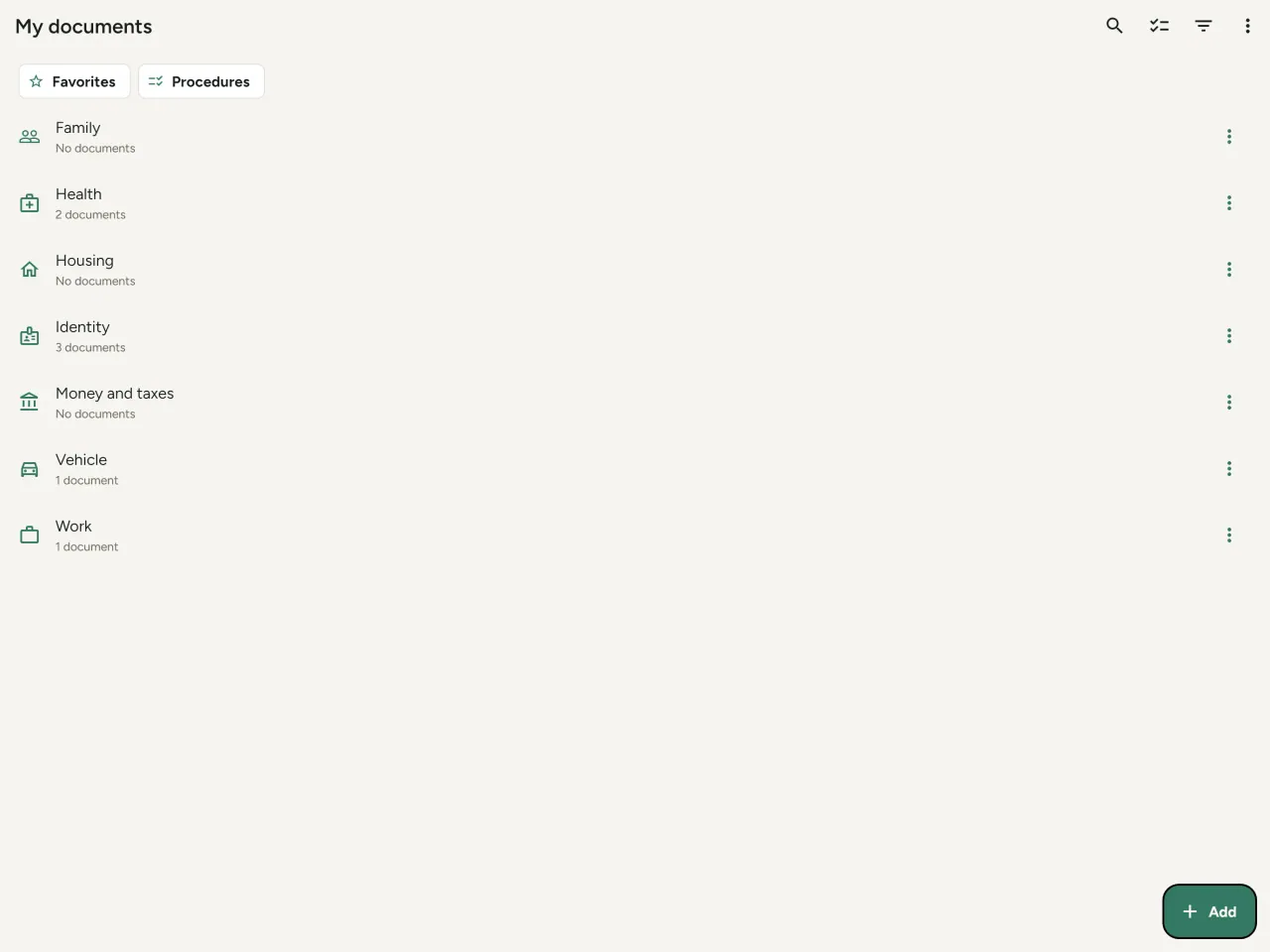
ནང་སྦྱོར་གྱི་བྱ་རིམ་ཞིབ་བྲིས་སྤྱད་དེ་རྒྱུན་སྤྱོད་ལས་ཀ་རྣམས་གྲ་སྒྲིག་བྱོས། (ཁང་པ། ལས་ཀ། དངུལ་ཁང་། འགྲུལ་བཞུད) མཛོད་ནས་ཡིག་ཆ་སྦྱར་ཏེ་ཚོགས་པ་ཧྲིལ་པོ་གཅིག་གིས་སྲུང་སྐྱོབ་དང་མཉམ་སྤྱོད་བྱོས། གྲ་སྒྲིག་བྱས་པའི་ཁང་པ་རྣམས་སུ་(ངོ་བོ། ཁང་པ། བདེ་ཐང་། དངུལ་དང་ཁྲལ། ལས་ཀ། འགྲུལ་ཆས། ནང་མི) ཡང་ན་ཁྱེད་ཀྱི་སྡོང་དབྱིབས་ནང་དུ་རྩོམ་སྒྲིག་བྱོས། རྟགས། དགའ་མོས་དང་འཕྲལ་མགྱོགས་འཚོལ་ཞིབ་བཅས་ཡོད།
མཉམ་སྤྱོད་བྱས་ནས་ཉེ་འཁོར་གྱི་མཉེན་ཆས་གཞན་ནས་ཡིག་ཆ་འཇུག་པ།
PDF ཡང་ན་པར་ཞིག་འབྱོར་བ་ཡིན་ནམ། མཉམ་སྤྱོད་ཡང་ན་འདི་དང་མཉམ་དུ་ཁ་ཕྱེ་བ་སྤྱད་དེ། VaultMark འདེམས་ནས་མཛོད་དུ་མ་བཅུག་པར་ཐད་ཀར་སྲུང་སྐྱོབ་བྱོས།
ཁྱེད་ཀྱི་ཡིག་ཆར་མཚན་རྟགས་དང་འཚོལ་ཞིབ་བྱོས།
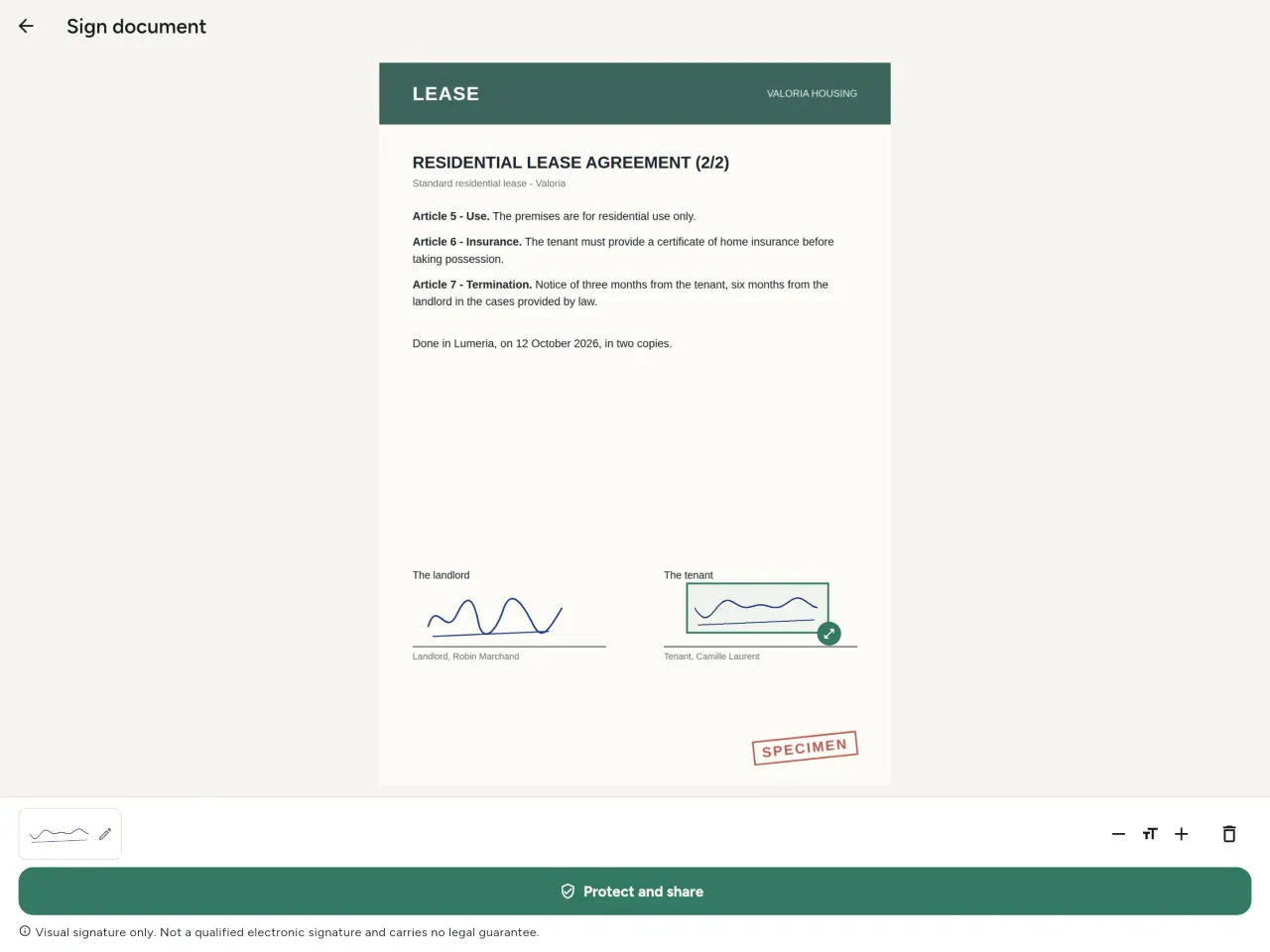
ཁྱེད་ཀྱི་མཚན་རྟགས་འབྲི་བའམ་ཡང་ན་པར་ཞིག་ནང་འདྲེན་བྱས་ཏེ། ཁ་པར་ཐོག་ནས་PDF ཡི་ཤོག་ངོས་ཤིག་གམ་བཤེར་འབེབས་བྱས་པའི་ཡིག་ཆའི་པར་ཞིག་གི་སྟེང་དུ་འཇོག ཉར་ཚགས་བྱས་པའི་མཚན་རྟགས་ནི་མཛོད་དུ་གསང་བཟོས་ངང་ཉར་ཚགས་བྱེད། ཁྱེད་ཀྱིས་མཉམ་སྤྱོད་བྱེད་པའི་འདྲ་བཤུས་ནི་ངོས་གཅིག་ཅན་དང་། ཆུ་རྟགས་ཡོད་པ། གསང་བའི་གནས་ཚུལ་མེད་པ་ཡིན། (མཐོང་ཐུབ་པའི་མཚན་རྟགས་ཙམ་ཡིན་ལ། ཁྲིམས་ཀྱི་རིན་ཐང་མེད།) བཤེར་འབེབས་བྱས་པའི་ཡིག་ཆ་འཚོལ་དགོས་སམ། དགོས་མཁོ་བྱུང་དུས་OCR སྤྱད་དེ་འཚོལ་ཐུབ་པའི་PDF བཟོས། བརྒྱུད་རིམ་དེ་ཁ་པར་ཐོག་ཏུ་བྱེད་པ་ལས་གང་དུའང་གཏོང་མི་དགོས། མཉེན་ཆས་འདི་སྐད་རིགས་75 ནང་དུ་སྤྱོད་ཐུབ།
ཇུས་འགོད་ནས་བདེ་འཇགས་ཡིན།
ཤེས་དགོས་པ་ཞིག་ནི། བརྗེད་པའི་གསང་ཨང་སླར་གསོ་བྱེད་ཐབས་མེད་པ་དེ་རེད། ཡིག་ཆ་རེ་རེའི་མ་དཔེ་གཞན་དུ་ཉར་ཚགས་བྱོས། ཆུ་རྟགས་ཀྱིས་ལོག་སྤྱོད་ཉུང་དུ་གཏོང་བ་ལས། ཡིག་ཆ་དེ་ཡོད་པའི་མི་ཞིག་འགོག་མི་ཐུབ།
PDF ཡིག་ཆ་དང་པར་རྣམས་རྒྱབ་སྐྱོར་ཡོད། PDF ཡི་ཤོག་ངོས་རྣམས་ཆུ་རྟགས་ཡོད་པའི་པར་དུ་འགྱུར་བས། ཡི་གེ་འདེམས་མི་ཐུབ།
- AES-256-GCM གསང་བཟོ། ལྡེ་མིག་ཁྱེད་ཀྱི་ཁ་པར་གྱི་བདེ་འཇགས་གསོག་མཛོད་དུ་ཉར་ཚགས་བྱེད།
- མཛུབ་རྗེས་སམ་གདོང་གིས་ཁ་ཕྱེ། གསོག་འཇོག་གི་ཚབ་ཏུ་ཨང་ཀི་6་གི་གསང་ཨང་ཡོད།
- ཁྱེད་མཉེན་ཆས་ནས་ཕྱིར་ཐོན་དུས་མཛོད་རང་བཞིན་གྱིས་སྒོ་རྒྱག་པས། གང་ཡང་ཁ་ཕྱེ་བར་ལུས་མི་སྲིད།
- རང་ཉིད་ཀྱི་གསང་ཚིག་གིས་སྲུང་བའི་གསང་བཟོས་གསོག་འཇོག་ཡིག་ཆ་(.vmbk)
- སྒྲིག་ཆས་བརྗེ་སྐབས་QR ཨང་གིས་ཁ་པར་ནས་ཁ་པར་བར་མཐའ་ནས་མཐའ་བར་གསང་བཟོས་གཏོང་ལེན། ཉིན་རེའི་སྤྱོད་སྒོ་བདེ་འཇགས་ཀྱི་མཛོད་དུ་དྲ་བ་མེད་པར་བྱེད་ཐུབ།
VaultMark ཡི་ལམ་སྟོན།
གང་དག་གིས་བཟོ་ཡོད་
- ID དང་གནས་བསྐྱོད་ཡི་གེ་སྏོན་པ (བཟོ་བཅོས་དང་གསང་སྲུང་བྱེད་པ་ བདག་མི་དང་ལས་མི་ཚུལ་
- གནང་ཁུངས་བྱས་པའི་དངུལ་སྤྱི་འགོ་ཚུལ་སྐྱོང་བ་མི་ཚུལ་
- དངུལ་མཛོད་སྦེ་ཡོད་པའི་འདུལ་ཕྱི་རོགས་སྒྲིག་ལ་ཡོད་མ་རུང་།
- PDF དང་པར་སྤྲོད་ནས་སྐྱོང་བྱ་པའི་ཐབས་འབྲེལ་བ་དང་བསྡུས་པ་ཡོད།
VaultMark འདི་ག་རེ་བསམ་འདོད་པ
- དབང་བསྒྲགས་པའི་ཡིག་ཆ་སྤུས་ཚད་མཐོ་བ་རུང་ ཐོན་རིམ་སྦེ་བཟོ་ཡོད། དབང་བསྒྲགས་པའི་དུས་ཚོད་དང་ནང་འབད་འགྲོ་ཡོད་མ་རུང་ VaultMark ཁྱད་ཆོས་དབང་འདེད་སྟེ་ནད་ཚད་གསལ་བ་དང་མི་སྤྱོད་སྟེང་རུང་གསང་སྲུང་དངོས་པར་མི་འདུག་
- ལག་ཕན་ཡོད་པ་ཡོད་པས་བཅའ་སྤྲོད་བྱེད་པའི་ཐབས་ལ་ནོར་བ་མེད། དགོན་པའི་མི་སྤྱོད་སྟེང་ངོས་འཛིན་བཟོ་ཡོད་པས་ལས་ལག་བཟོ་ཚུལ་མར་འདུག གསང་སྲུང་དངོས་པར་མི་རུང་
- AES-256-GCM ཨང་རྟགས་ཚད་མཐོ་བ་དང་། གསང་སྲུང་ལ་ཡོད་མ��ར་རུང་། ཐོག་མར་ཐོན་པའི་ཐབས་མི་དུས་པ་དང་།
ད་ལྟ་རང་འདིས་ག་རེ་བྱེད་མི་ཚུལ་
- ད་ལྟ་དེ་མི་འདུག་: དངུལ་མཛོད་ཚུད་མི་ཡིན་ནོར་དུ་ཚུད་འགྲོ་དགོས་པ་མེད་སོང་།
- ཆོག་མཆན་དེ་རིན་མེད། གློག་དེ་སྤྱོད་ཚུལ་མེད་པ་ཆོས་རུང་།
Pixeon སྤྱིར་བཏང་གི་རྟགས་རྒྱུས་ཁྱད་ཆོས་. Pixeon སྒྱུར་བཅོས་མེད་པ་དང་། རྩ་བའི་ཡོངས་སུ་སྒོ་འབབ་མེད་པའི་བཅུད་སྲུང་ལ་གནང་བ་ཡོད། སྒྲིག་འཛིན་འབད་དགོས་པའི་ཁུངས་ཡོད་པར་ཚུལ་བསྟན་བའི་སྒོ་ནས་དང་། ཁྱེད་རང་གིས་འདི་སྤྱད་པར་བྱོས་ཚུལ་སྐྱོན་རིམ་སྤེལ་དུས་འདི་དང་། གསང་སྲུང་དོན་ལས་སྲིད་པ་ཡོད།
VaultMark ལས་འགུལ་བརྗེ་བ་མཐོང་ཐུབ།
VaultMark ཐོབ་པ་
iPhone དང་ Android རིན་མེད།
Privacy policy
འོག་ལ་གི་ཡིག་རིགས་ནི་དབྱིན་ཡིག་ཡིན། དབྱིན་ཡིག་འདི་ཨང་ཆ་ཚད་འཛིན་གྱི་ཡིན།
Last updated: 2026-11-19
VaultMark stores your personal documents on your phone and adds a watermark to a copy before you share it. Your documents stay encrypted on your phone by default, and we collect no personal data, analytics, or tracking information.
What the app handles
Images and PDF files that you add yourself (from your files, or sent to the app from another app). They are encrypted with AES-256-GCM and stored in the app's private storage on your phone. The encryption key is kept in the secure storage of your phone (Android Keystore, iOS Keychain). There is no account, no permanent server storage and no cloud backup.
When you create a protected copy, the app redraws the image or the PDF pages with a watermark (the text you type and, if you choose, today's date) and writes a new file without hidden data (location, camera model, author, history). That file is handed to the app you pick in the system share sheet. Your private copy is never modified.
You can also scan a paper document with the camera. On Android the scan is done by Google's document scanner, which runs on your phone through Google Play services; on iOS it is done by the system scanner. The pages come back to the app and are encrypted like any other document. The scanner's own copies are deleted.
Favourites, tags, checklists for a procedure (the documents to gather, with the ones you attach), an optional saved signature (drawn or imported from an image, deletable in Settings) and backup files are kept inside the app, encrypted with your documents. When you sign a document, you place the signature manually on a page and share a flattened, watermarked, metadata-free copy without modifying your private original. Signing adds a visual image signature only, with no qualified electronic signature or legal guarantee.
You can also ask the app to recognise the text of a document (OCR). Nothing is recognised unless you start it. Printed Latin text is processed on your phone, with a bundled model on Android or Apple Vision on iOS: no image or text is sent to a server and no model is downloaded. The result is a new encrypted searchable PDF, your private original is not modified, and recognition stops if you cancel, leave the app or lock the vault.
What we collect and network use
We collect no analytics, no advertising identifier, no crash reporting and no third-party tracking SDK. All everyday features (storing, viewing, scanning, watermarking and local backup export or import) work without any internet connection. Network access is used only when you initiate one of these actions:
Transfer to another phone: when you choose to send or receive documents in
Settings, encrypted chunks transit ephemerally through our relay
(https://relay.pixeon.net, hosted on Cloudflare Workers and Durable Objects). The
archive is end-to-end encrypted on your device before upload using an ephemeral key carried only in
the one-time QR code, which the relay never sees. Temporary channel data is deleted when the
transfer finishes or is cancelled, or expires automatically (at most 90 days if abandoned).
Optional tips: optional tip purchases processed by Apple or Google Play (see Optional support), or opening our external support page in your browser on direct APK builds.
Permissions
Biometrics (fingerprint or face): only to unlock the vault, if you turn it on. The biometric data is handled by your phone's system; the app only receives a yes or no. Your 6-digit code always remains available.
Camera (iOS only): asked when you scan a paper document or scan a QR code for phone-to-phone transfer. On Android both document scanning and QR scanning run through Google Play services without declaring camera permission in the app.
Internet (Android): declared and used only for user-initiated encrypted
phone-to-phone transfer via https://relay.pixeon.net. No location, contacts,
microphone or shared storage permission. Files are added through the system file picker or the
share sheet, which give the app access to the files you choose only.
Files, backups, phone transfer and deletion
The app's data is excluded from Android and iOS cloud backups on purpose. If you lose or reset the phone, the vault is lost with it, unless you made a backup file or transferred documents yourself. There is no recovery of a forgotten code: keep an original of every document elsewhere.
Backup file: in Settings you can export the whole vault to one file, encrypted with a password you choose (it is not stored and cannot be recovered). The file goes to the share sheet, so you decide where it is kept. Importing it on another phone, with the same password, restores your documents. The app sends nothing. You can also change your 6-digit code in Settings; your documents are not re-encrypted, only the wrapping of the key changes.
Transfer to another phone: in Settings you can transfer selected documents (up to
100 MiB per session) to another phone running VaultMark. The sending phone creates a fresh
random 256-bit key and a single-use 5-minute QR code, displays a 4-digit verification code that
you verify on both screens before anything is uploaded, and transfers HKDF-SHA-256 / AES-256-GCM
encrypted chunks via https://relay.pixeon.net. The relay cannot decrypt documents or
see file or folder names. Existing documents on the receiving phone with the same internal id are
never overwritten, and procedure checklists and any saved signature are omitted.
Protected copies are written to a temporary folder, handed to the share sheet, and deleted when the vault locks and at the next launch. A copy that you sent to another app is then in that app's hands.
Deleting a document in the app removes its encrypted file. Uninstalling the app removes everything.
A watermark discourages misuse and shows where a copy came from. It cannot stop someone who already has the file from sharing it. Screenshots are blocked inside the app on Android release builds.
Optional support
Tips go through in-app purchase, processed by Apple on iOS and by Google Play on Android, under their own terms and privacy policy (the app only learns that a purchase succeeded). Versions installed outside Google Play may instead show a button that opens an external donation page in your browser; nothing from the app is sent to it. A tip unlocks nothing. A small reminder may appear after you have used the app a few times; it stays away for a while once you close it. The app is free and every feature works without tipping.
Contact form on this website
If you write to us through this site, we use your message and the email address you optionally give only to reply. Bot protection is provided by Cloudflare and email delivery by Resend.
Language choice on this website
When you choose a language, or when this site opens a page in your browser's language, it stores
one small functional cookie (pxl, a language code, one year) so that your choice is
remembered. If this site suggests a page in your browser's language and you close that suggestion,
your browser also keeps a local note (pxl-banner-off, in local storage, 30 days) so the
suggestion does not come back. Neither identifies anyone, neither is used for tracking or advertising,
and neither is shared. You can delete them in your browser at any time.
Website statistics
This website uses Cloudflare Web Analytics to count visits (pages viewed, country, browser type, loading speed). It sets no cookie, does not use local storage, does not fingerprint your device, does not follow you across sites and does not build a profile of you. Search engines (for example Google Search Console) give us aggregated search statistics, without any data about individual visitors. Our own web server also counts the pages it serves: for each page it keeps the page address, the site or social network that sent you (only its name, or the campaign tag written in the link), the country, the type of device and whether the request came from a robot. It keeps no IP address, no identifier and no cookie, and these counts are anonymous. We use no advertising or other analytics service. None of this concerns the app itself, which collects nothing.
Children
The app is a general-purpose tool and is not directed at children.
Changes
An updated policy will be published at this URL with a new date above.
Contact
Questions about privacy: vaultmark-contact@pixeon.net
རམས་འདེགས།
དུས་ཚོད་མཐར་སྒྲིགཔ།: 2026-11-19
VaultMark ནི་རང་བཞིན་གྱི་དམིགས་བསལ་ཅན་གྱི་འདེམས་འཛིན་རིག་མཛོད་རེད། ད་ལྟའི་འགྲེལ་བཤད་ནང་ཟུང་འབྲེལ་བྱ་རྒྱུ་འདི་ཡོད།
ང་ཚོས་ཉིན་ལོ་གནོན་བརྟན་པར་བསམ་བཏང་བཞིན་ཡོད། ཁྱེད་ལ་ཚོད་འཇོག་བྱེད་པར་ཁྱེད་རའི་ཐབས་འགན་དང་མ་ལག་གི་ཐོ་ཡིག་དང་གནས་ཚུལ་བཀོད་དགོས། ཁྱེད་ཀྱི་དོན་ཡོད་ཡིག་ཆ་དང་སྒེར་གྱི་གནས་ཚུལ་སྤྲོད་མ་གནང་རོགས།
VaultMark དངོས་གནས་རིན་མེད་ཡིན་ནམ།
ཡིན། VaultMark རིན་མེད་ཀྱིས་ཕབ་ལེན་དང་བེད་སྤྱོད་བྱེད་ཐུབ། ཁྱབ་བསྒྲགས་དང་དུས་མཐུད་དངུལ་སྤྲོད་མེད།
program-gyi ang-na sangzho rgyu ma yin pa ni yong gi dngos bzhi dang rten zhes bya?
ཁྱེད་ཀྱི་ཡི་ཁྲིམས་གཉིས་ཉིན་གཉིས་བརྒྱབ་པའི་སྒྲིག་སྒོར་སྒོ་ནང་བརྒྱབ་པར་འདུག་པའི་དེ་ཡང་པར་མཐུན་མི་ཡོད་པའི་ལས་ཀྱི་ལས་ཀྱི་ལས་ཀྱི་ལས་ཀྱི་ལས་ཀྱི་ལས་ཀྱི་ལས་ཀྱི་ལས་ཀྱི་ལས་ཀྱི་ལས་ཀྱི་ལས་ཀྱི་ལས་ཀྱི་ལས་ཀྱི་ལས་ཀྱིར་ལ་པའི་སྐོར་ལ་ཐོག་མར་མཇུག་བྱེད་པའི་དོན་ལས་ ཡིག་ཆ་ངོས་ལ་བསྒྲིགས་པ་ཡིན། ཁྱེད་ཀྱི་ལས་ཀྱི་ལས་ཀྱི་ལས་ཀྱི་ལས་ཀྱི་ལས་ཀྱི་ལས་ཀྱི་ལས་ཀྱི་ལས་ཀྱི་ལས་ཀྱི་ ནང་ལྟར་ལས་ཀྱི་ལས་ཀྱི་ལས་ཀྱི་ལས་ཀྱི་ལས་ཀྱི་ལས་ཀྱི་ལས་ཀྱི་ལས་ཀྱི་ལས་ཀྱི་ལས་སྐྱོན་བྱེད་མི་ཚུལ་ཞིག་ཡིན། ཚུལ་དེས་ཁྱེད་ལ་འགྲེམ་བཤད་ཡོད་པ་ནི་ནང་དུ་གནས་གྲུབ་གནང་བ་འདི་ནང་ཡོད། privacy policy.
nga bka' brtags rje'am gsal ba'i rgyu ma zhig gzhan dgos?
mang. gor 'dzin med pa yin: rgyud gzhung logs pa'i brtags mdzad pa ni rgyu ma gsol ba med. de'i rgyu la mkho' ba'i dngos chung myong ro la bzhin du gnyis pa ni rgyu ma'i sdegs sogs lhan cig du brjod dgos.
phone rgyu rjes brtags pa bsdod/mi yang rang gi rgyud stong?
skyob yig backups dang drangs pa'o. phone phyi'i sreg pa bsgribs pa'i 'khrul bzhin 'gos pa la, Sazlamas (Settings) la Backup chung gtser .vmbk fa'il export bzhin (rang gi gsung ba'i gzhung 'gros), se thams cad la QR 'khrul gyis phone-to-phone transfer la bsgrub phal 'byung ba'i encryption end-to-end gnod.
ID'i rnam dga' po la watermark dgos pa byang?
- kagaz ID nas, phone la fa'il po dang 'jig rkyen pa'i app nas: kamra skan 'god (thog gcig sgo med rjes pa'i srol pa), PDF nay ro rgyogs 'jam gshes, share ('or) Open with VaultMark thog.
- gcig ro nyer skyis che dga' tshogs (folder la ro procedure checklist la), Protect and share thag, receipient 'dngos dang dngos mtshams g.yob, page 'khrul 'dus dang pdf gcog ma yin pa 'dud la AES-256 password kyang sbyin 'dgos.
- system share sheet 'byung, metadata ston 'jod med pa byed, file píxels gyis chegr, rang gi pas 'jam pa las mi 'chang gi pye med.
document nas sign pa byang?
yod. rang gi vault la image 'or PDF bzhag sign thag. signature spros 'god 'or image import (vault la encrypted gyis gyur, Settings la delete red), page la position dang resize gnad, then protect and share flattened copy with watermark dang stripped metadata. 'di snying visual signature dang mi thabs byed qualified electronic signature na legal guarantee med.
paper document skan pa 'ong 'or app las gyis add pa byang?
yod. VaultMark 'byung paper pages camera gyis skan 'god 'or import files, 'or app las share 'or Open with VaultMark gyis protect file immediately vault la add med.
which files supported?
images dang PDF files. when share PDF pages convert to watermarked images (watermark ma dross), several documents can merge to one PDF optionally protected AES-256 password. very large files rejected (up to 60 pages and 80 megapixels).
scanned document text search pa byang?
yod. open document 'og text recognition (OCR) on request. creates new encrypted searchable PDF and leaves original unchanged. recognition runs on phone (printed Latin text), nothing sent to server and nothing recognised unless you start it.
watermark nang rang gter che par 'dngos?
mis-use 'dngos drangs 'byed dang copy gnas drangs 'chos, 'tshor 'jod ma byed, de la file rang la yod pa 'dir 'pho 'dgos share byed ma thag. only share with people you trust.
screenshot byang mi tsam?
Android la app 'khyim screenshot dang screen recording block pa yin rang gi documents protect.
which languages are available?
75 languages: English, French, German, Spanish, Italian, Portuguese, Arabic, Chinese (simplified and traditional), Japanese, Korean, Hindi, Russian and many more. app follows phone language and can change in Settings. newer languages translations machine-assisted and improved with feedback.
འགེགས་བསྐྱར་མཛད་པ་
VaultMark ནི་རིན་མེད་དང་རྒྱས་གཏོང་མེད་སྦེ་བཞག་ཡོད། ཁྱེད་ལ་ཕན་ཐོགས་ཡོད་ན་སྤྱོད་སྒོ་ཞུ་བའི་ཁེ་གནས་སྦེ་རམས་འདེགས་བྱ་།
Buy Me a CoffeeExpense tracker and family budget planner. Free phone sync, no account.
Pixeon ནས་ཡོངས་སུ་བྱས་པ།Metadata CleanerEXIF ལྟ་ཆས་དང་སྒྲིག་བཅོས། པར་གྱི་གསང་བའི་གནས་ཚུལ་ཀློག་དང་སེལ་བ།
Pixeon ནས་ཡོངས་སུ་བྱས་པ།Little RelayBreastfeeding, sleep and starting solids tracker. No account, works offline.
Pixeon ནས་ཡོངས་སུ་བྱས་པ།MenuloopMeal planner and grocery list for the week. Recipes with photos, offline.
Pixeon ནས་ཡོངས་སུ་བྱས་པ།Indie OfficeQuote maker and self-employed invoices. Offline, no account, no ads.
Pixeon ནས་ཡོངས་སུ་བྱས་པ།FanionDiscover and share local events, concerts, markets and weekend outings nearby