VaultMark: Claddgell Dogfennau
Claddgell ddogfennau wedi'i hamgryptio. Rhowch ddyfrnod ar ddogfennau, tynnwch fetadata cyn eu rhannu.
Am ddim. Dim hysbysebion. Dim tanysgrifiad.

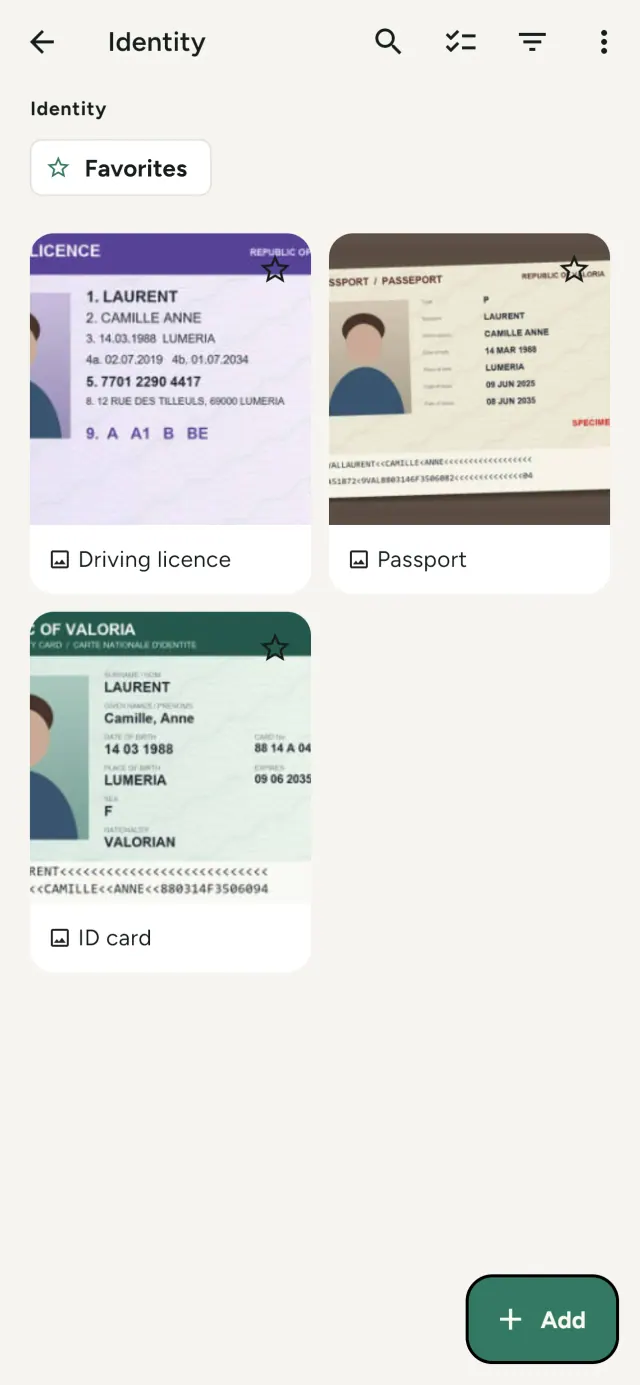
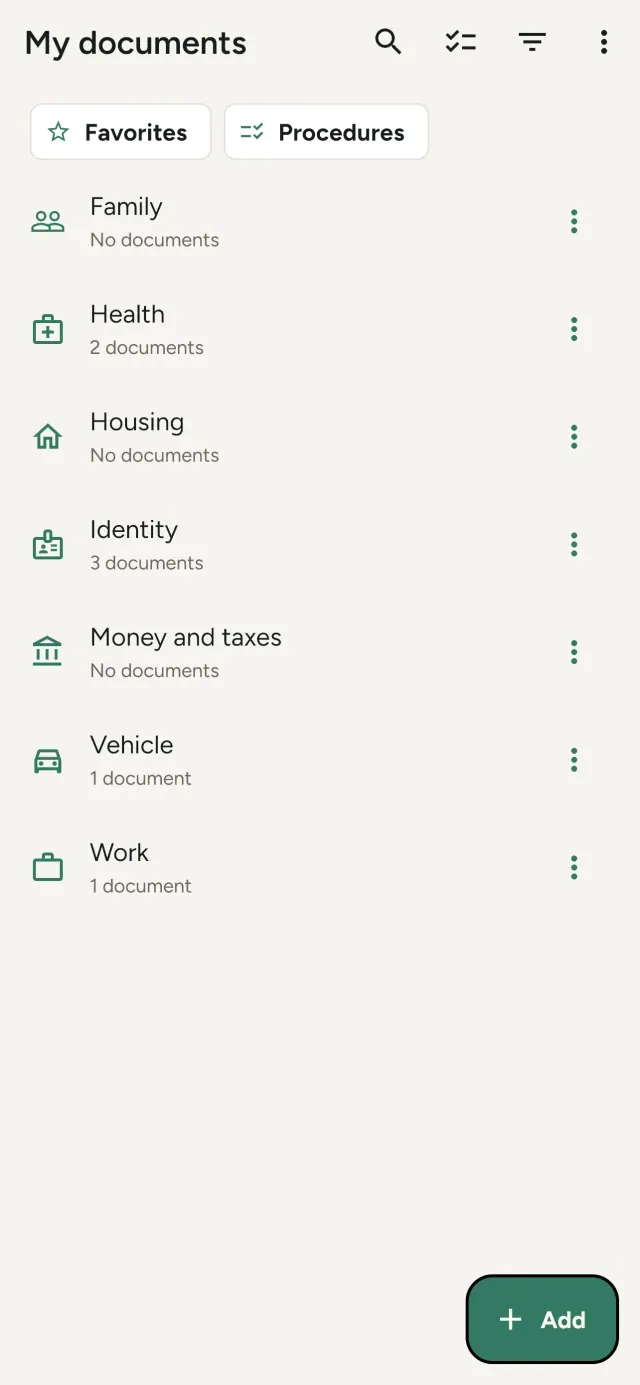
Diogelwch eich cerdyn adnabod, contractau, slipiau cyflog a phapurau meddygol cyn eu hanfon, a'u cloi mewn claddgell wedi'i hamgryptio ar eich ffôn.
Mae VaultMark yn gladdgell breifat ar gyfer dogfennau. Mae popeth yn aros ar eich dyfais: dim cyfrif, dim cwmwl, dim hysbysebion, dim tracio, ac nid oes angen rhwydwaith ar gyfer defnydd bob dydd.
Beth mae VaultMark yn ei wneud
Sganiwch, rhowch ddyfrnod ar ddogfennau a'u diogelu cyn eu hanfon
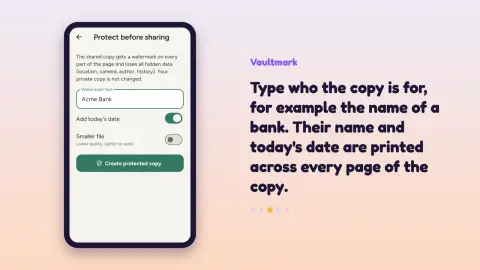
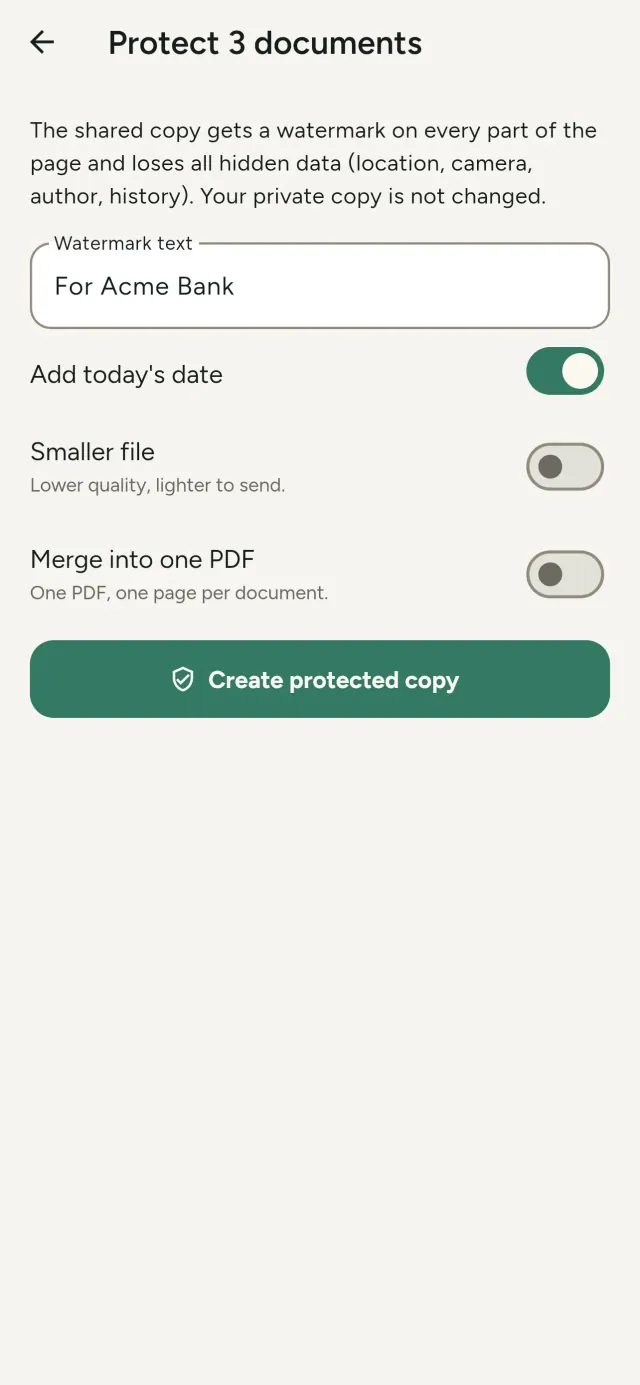
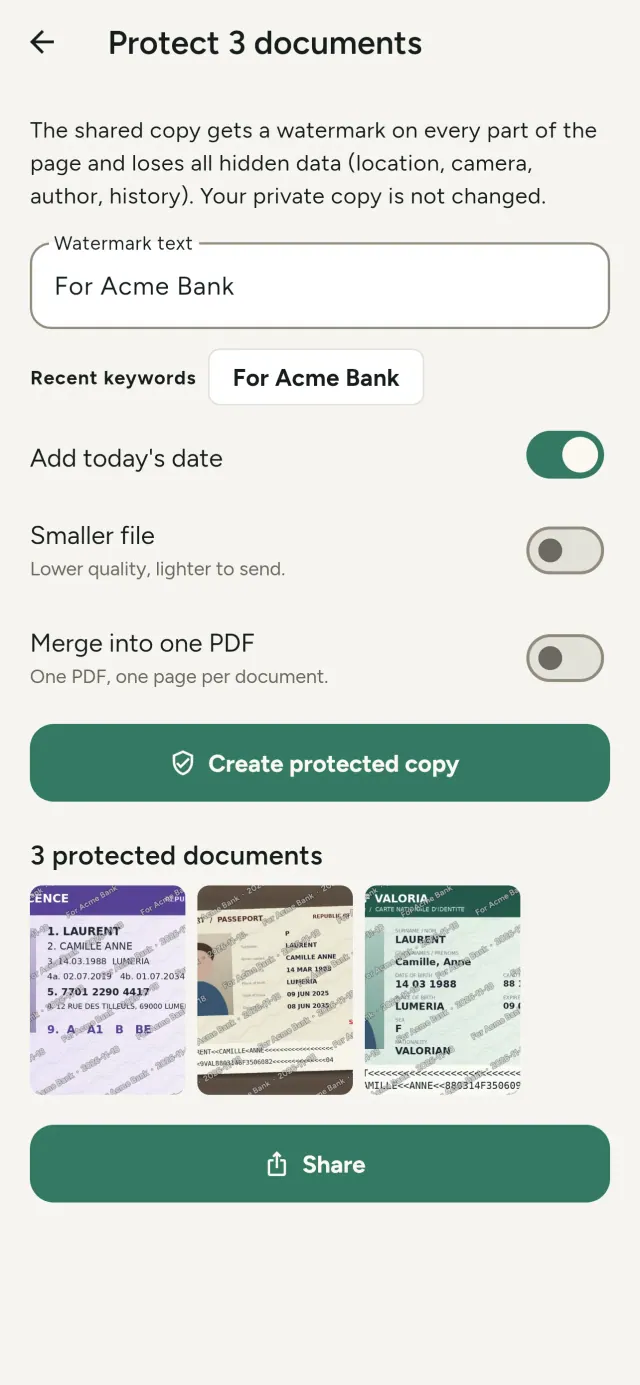
Oes gennych bapur ar y bwrdd? Dechreuwch drwy ei sganio â'ch camera, neu dewiswch PDF neu ddelwedd sy'n bodoli eisoes ar eich ffôn. Mae VaultMark yn gosod dyfrnod dros y dudalen gyfan gyda'r testun a ddewiswch (er enghraifft "Ar gyfer Banc Enghreifftiol, cais am fenthyciad") a dyddiad heddiw, yna'n tynnu pob darn o ddata cudd: lleoliad, model dyfais, awdur, hanes golygu. Defnyddiwch ef ar gopi o gerdyn adnabod, prawf cyfeiriad neu slip cyflog fel na ellir ailddefnyddio copi at rywbeth arall. Dyma'r ffordd gyflymaf o dynnu metadata cyn anfon ffeil.
Mae'r ffeil a rennir yn cael ei hailadeiladu o'r picseli: ni ellir plicio'r dyfrnod i ffwrdd ac mae'r metadata wedi diflannu. Anfon sawl papur? Cyfunwch nhw yn un PDF a'i gloi gyda chyfrinair AES-256 os dymunwch. Nid yw eich copi preifat byth yn cael ei newid.
Gweithdrefnau a ffolder ddiogel ar gyfer pob papur
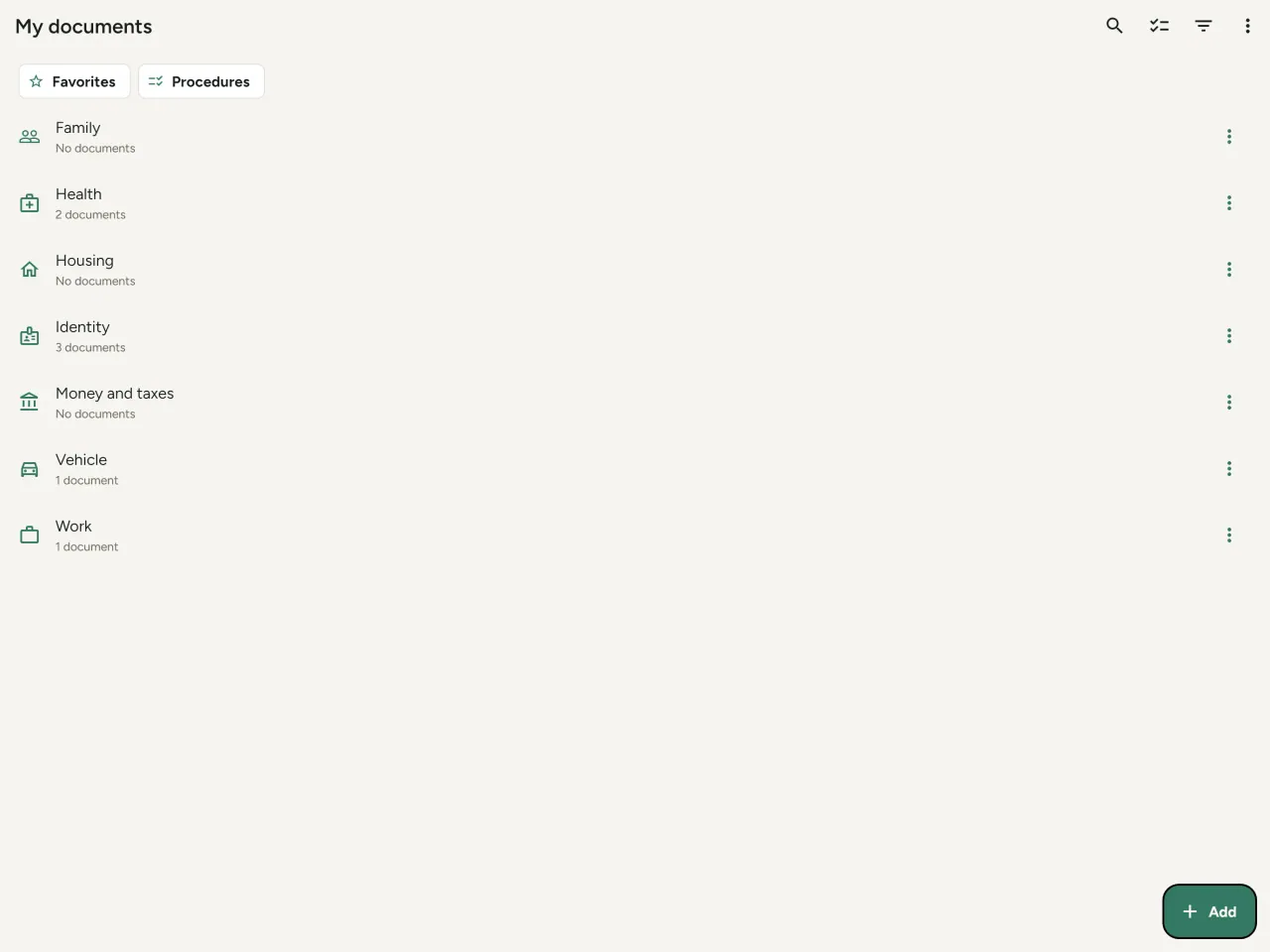
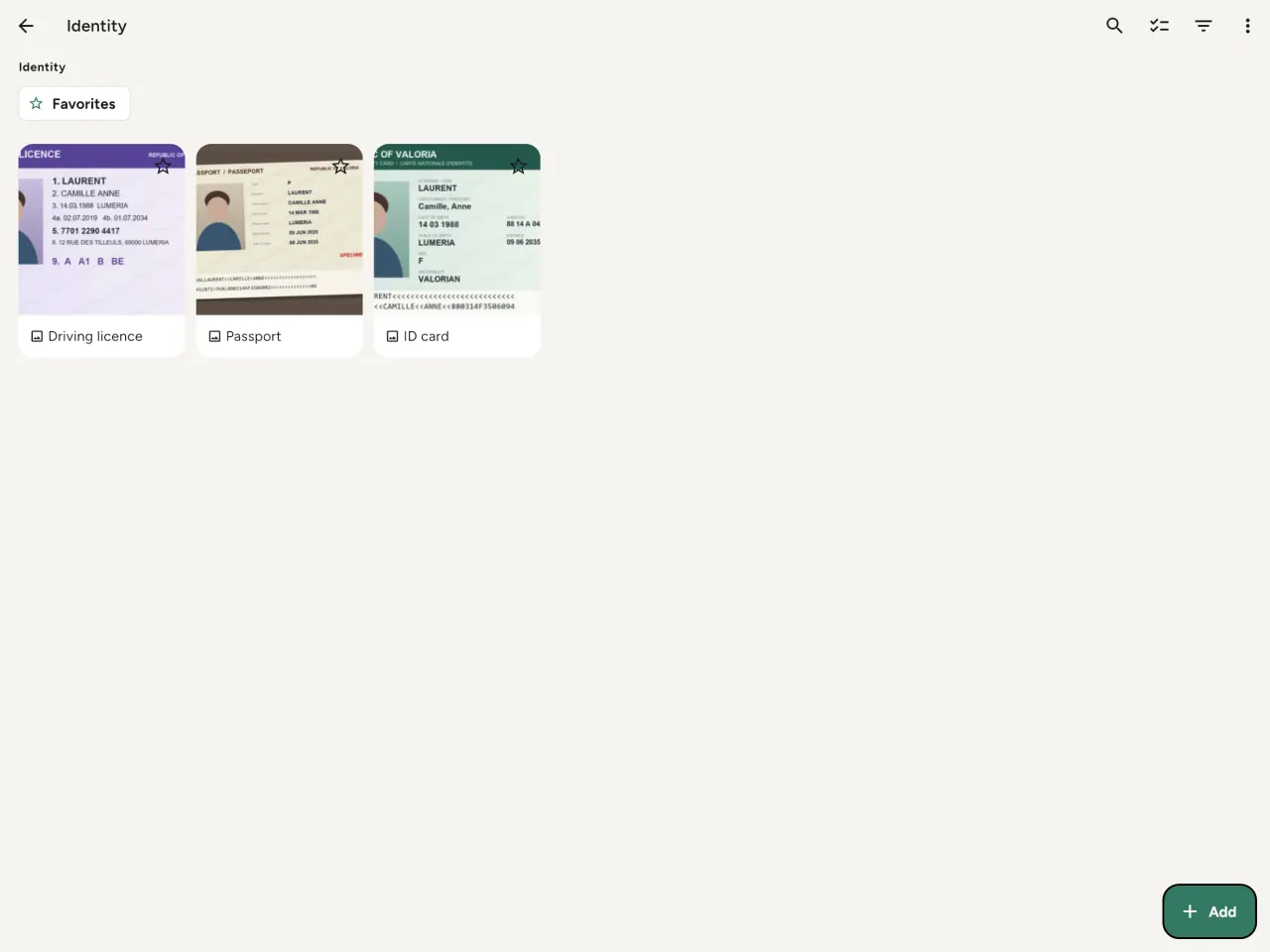
Paratowch dasgau cyffredin gyda rhestrau gwirio gweithdrefnau integredig (tai, gwaith, banc, teithio), atodwch ddogfennau o'ch claddgell, a diogelwch a rhannwch y set gyfan ar unwaith. Trefnwch bopeth mewn ffolderi parod (hunaniaeth, tai, iechyd, arian a threthi, gwaith, cerbyd, teulu) neu eich coeden eich hun, gyda thagiau, ffefrynnau a chwiliad sydyn.
Rhannwch i mewn o apiau eraill
Wedi derbyn PDF neu ddelwedd? Defnyddiwch Rhannu neu Agor gyda, dewiswch VaultMark, a'i ddiogelu ar unwaith heb hyd yn oed ei ychwanegu at y gladdgell.
Llofnodwch a chwiliwch eich dogfennau
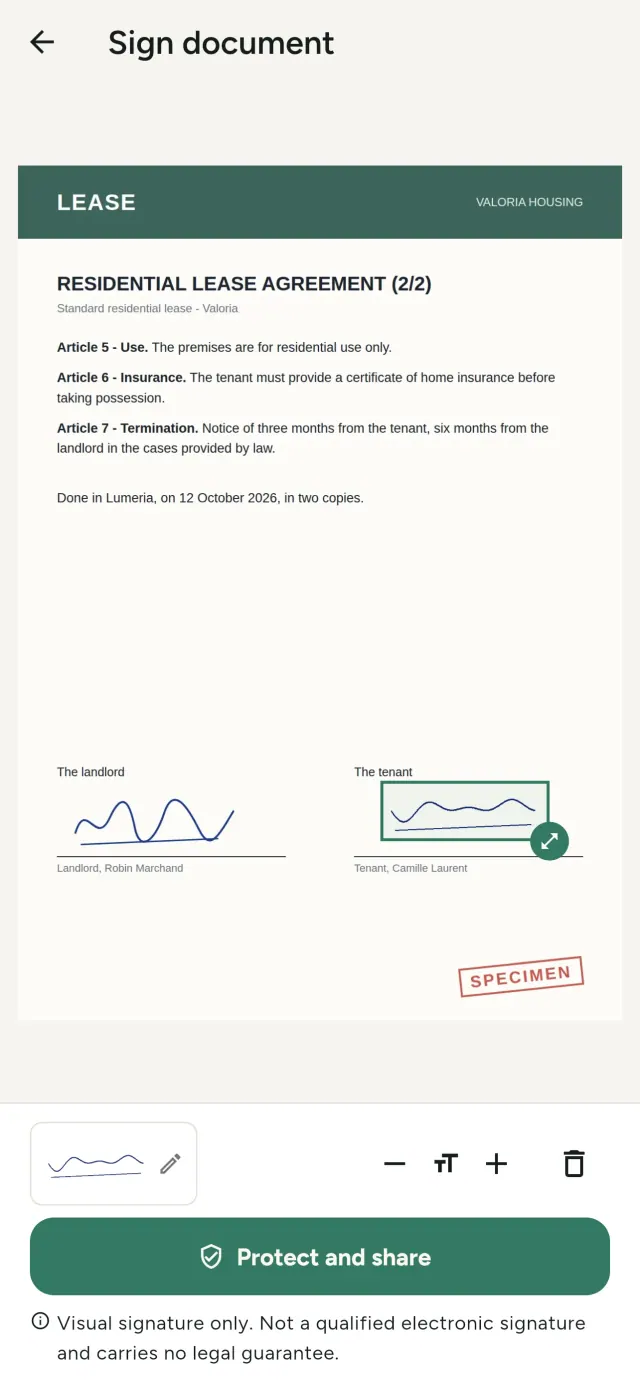
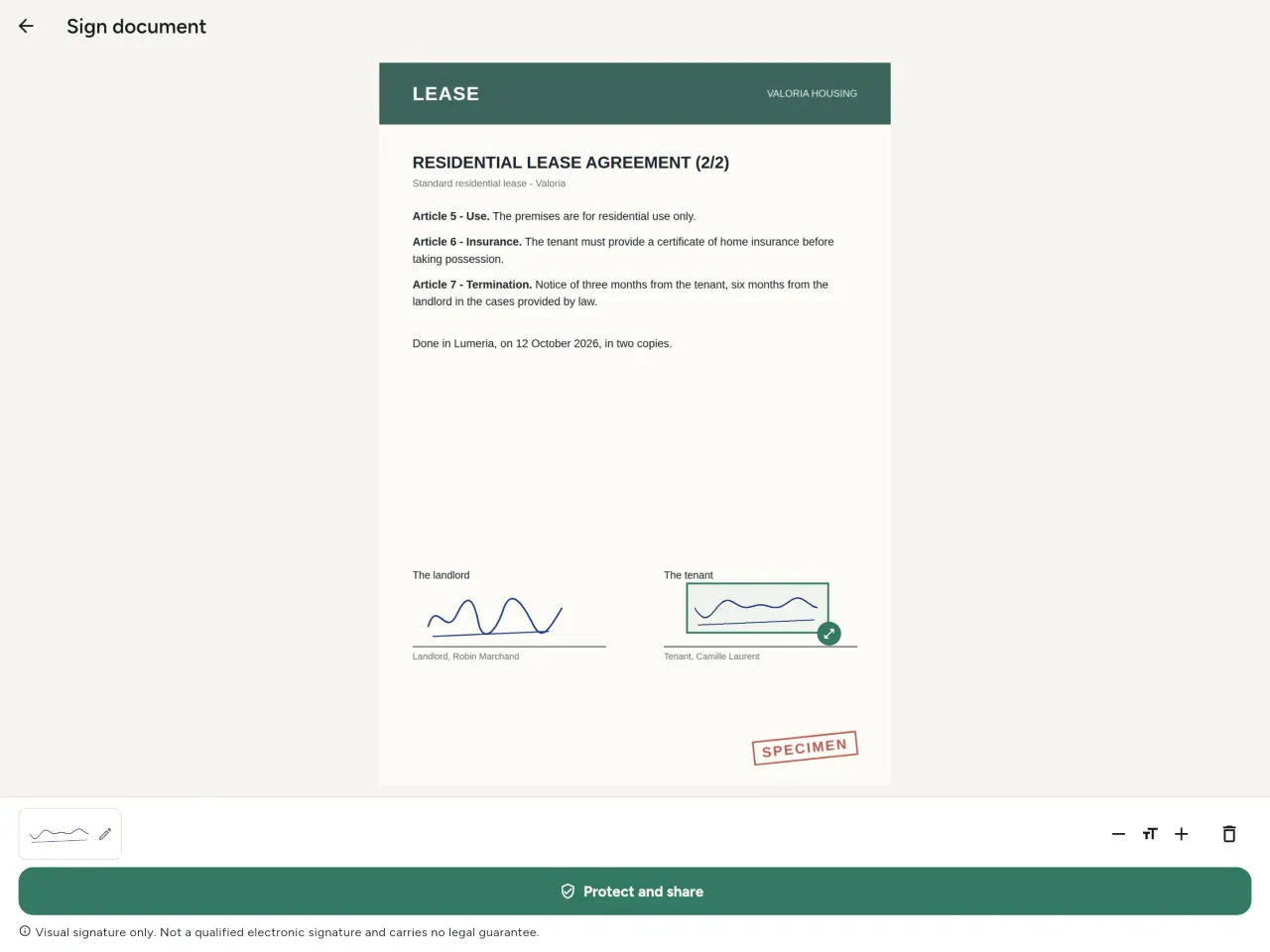
Tynnwch eich llofnod neu fewnforiwch ddelwedd, yna gosodwch ef ar dudalen o PDF neu ddelwedd wedi'i sganio o ddogfen, yn syth ar eich ffôn. Mae eich llofnod a gadwyd yn cael ei storio wedi'i hamgryptio yn y gladdgell, ac mae'r copi a rennir yn wastad, â dyfrnod ac yn rhydd o fetadata (llofnod gweledol yn unig, heb werth cyfreithiol). Angen chwilio sgan? Rhedwch OCR ar alw i greu PDF chwiliadwy, wedi'i brosesu ar eich ffôn a byth ei anfon i unrhyw le. Mae'r ap ar gael mewn 75 o ieithoedd.
Diogel yn ôl ei ddyluniad
Da gwybod: nid oes modd adfer cod anghofiedig, yn fwriadol. Cadwch gopi gwreiddiol o bob dogfen yn rhywle arall. Mae dyfrnod yn atal camddefnyddio, ond ni all atal rhywun sydd â'r ffeil yn barod.
Cefnogir ffeiliau PDF a delweddau. Mae tudalennau PDF yn troi'n ddelweddau â dyfrnod, felly ni ellir dewis y testun mwyach.
- Amgryptio AES-256-GCM, gyda'r allwedd yn storfa ddiogel eich ffôn
- Datgloi â'ch olion bys neu'ch wyneb, gyda chod 6 digid wrth gefn
- Mae'r gladdgell yn cloi ei hun pan fyddwch yn gadael yr ap, felly nid oes dim yn aros ar agor
- Ffeil wrth gefn wedi'i hamgryptio (.vmbk) wedi'i diogelu gan ei chyfrinair ei hun
- Trosglwyddiad ffôn-i-ffôn wedi'i amgryptio o'r dechrau i'r diwedd drwy god QR wrth newid dyfeisiau; mae defnydd bob dydd yn aros all-lein mewn claddgell ddiogel
Canllawiau VaultMark
Ar gyfer pwy mae'n
- Unrhyw un sy'n gorfod anfon copi o ID, prawf o gyfeiriad neu slip cyflog (cais rhentu, banc, cyflogwr, gweinyddiaeth).
- Pobl sydd wedi blino ar ollwng data ac eisiau adennill rheolaeth dros eu data personol a'i ddiogelu'n well pan nad oes dewis ond ei rannu.
- Pobl sy'n dymuno cadw contractau, papurau meddygol ac eraill o ddogfennau pwysig wedi'u hamgryptio ar eu ffôn.
- Pobl sy'n derbyn PDF neu lun ac eisiau ei ddiogelu ar unwaith, heb ei ychwanegu at y seiff.
Pam dewis VaultMark
- Dogfennau personol yw'r peth sydd ei angen ar dwristiaid hunaniaeth i agor credyd, llofnodi contract neu rentu fflat yn eich enw. Gall copi o ID neu slip cyflog a anfonwyd heb warchodaeth gael ei ailddefnyddio at rywbeth arall, amser maith ar ôl i chi ei anfon. Mae VaultMark yn rhoi dŵr-nod ar draws y dudalen gyfan gyda'r derbynnydd a'r dyddiad (er enghraifft 'I Banc Enghraifft, cais rhentu, 2026-10-05'), felly mae copi a ollyngir yn ddiwerth at unrhyw ddiben arall ac yn gallu cael ei olrhain i'r pwrpas y cafodd ei rannu ar ei gyfer.
- Mae'r ffeil a gaiff ei rhannu yn cael ei hailadeiladu o'r picseli: ni all y dŵr-nod gael ei dynnu i ffwrdd a mae'r metadata cudd (lleoliad, awdur, hanes golygu) wedi mynd. Nid yw'ch copi preifat byth yn cael ei newid.
- Amgryptiad AES-256-GCM, gyda'r allwedd yn cael ei gadw yn storfa ddiogel y ffôn. Dim cyfrif, dim cwmwl, dim olrhain.
Beth nad yw'r ap yn ei wneud eto
- Dim storfa cwmwl neu gysoni rhwng dyfeisiau eto: mae'r seiff yn byw ar y ffôn yn unig.
- Mae dŵr-nod yn gwneud copi'n anodd ei ailddefnyddio ac yn hawdd ei olrhain. Nid yw'n atal rhywun rhag cadw copi a ddewiswch ei anfon.
Egwyddor Pixeon. Mae apiau Pixeon yn lleol yn gyntaf: dim cyfrif, dim olrhain, a bydd eich data yn aros ar eich ffôn. Os bydd ap erioed yn cysylltu â'r rhwydwaith, dim ond pan ddewiswch droi nodwedd ymlaen y mae ei angen arnoch, ac mae'r polisi preifatrwydd yn cael ei ddiweddaru cyn ei ryddhau.
Gweld VaultMark ar waith.
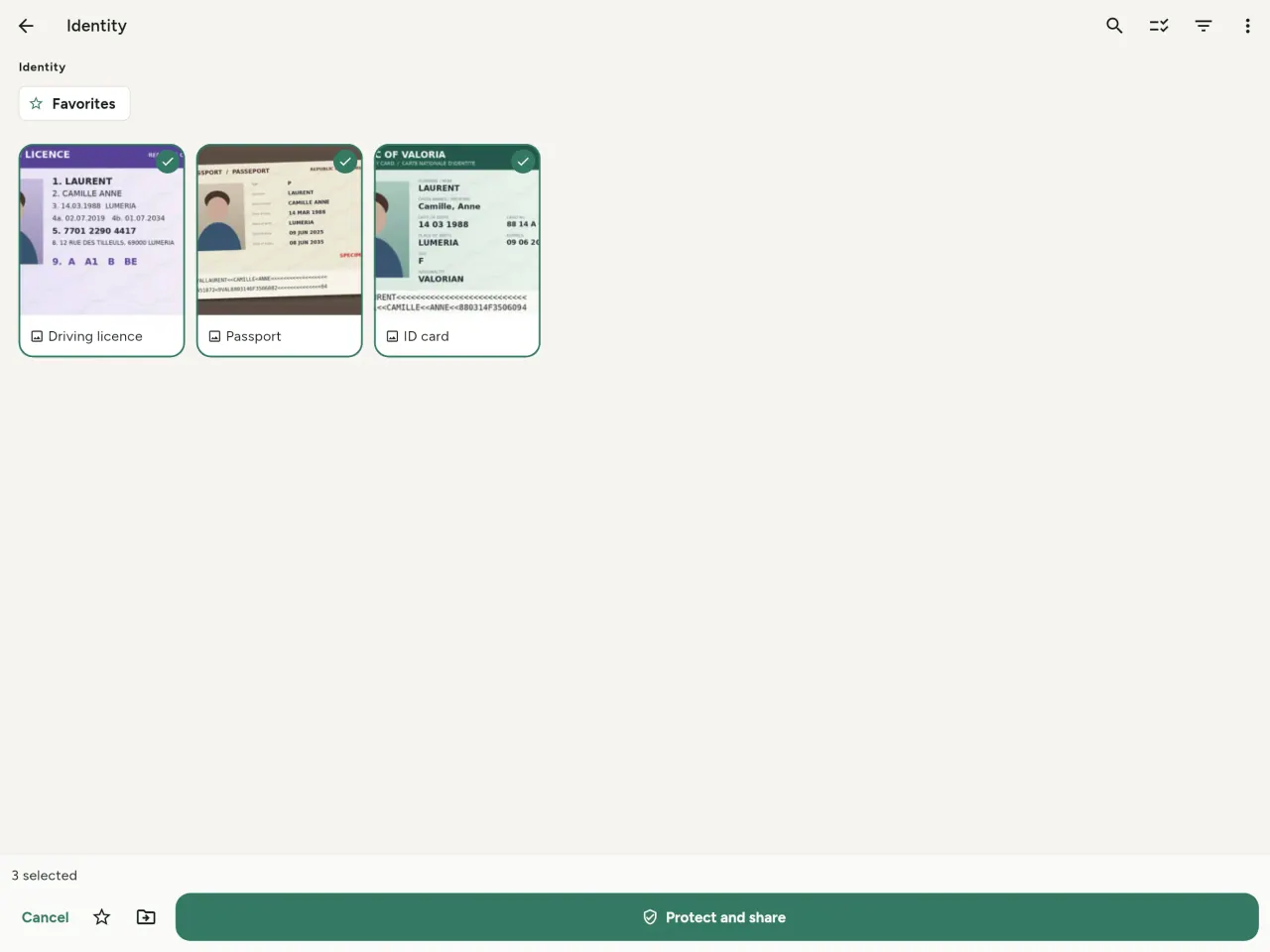
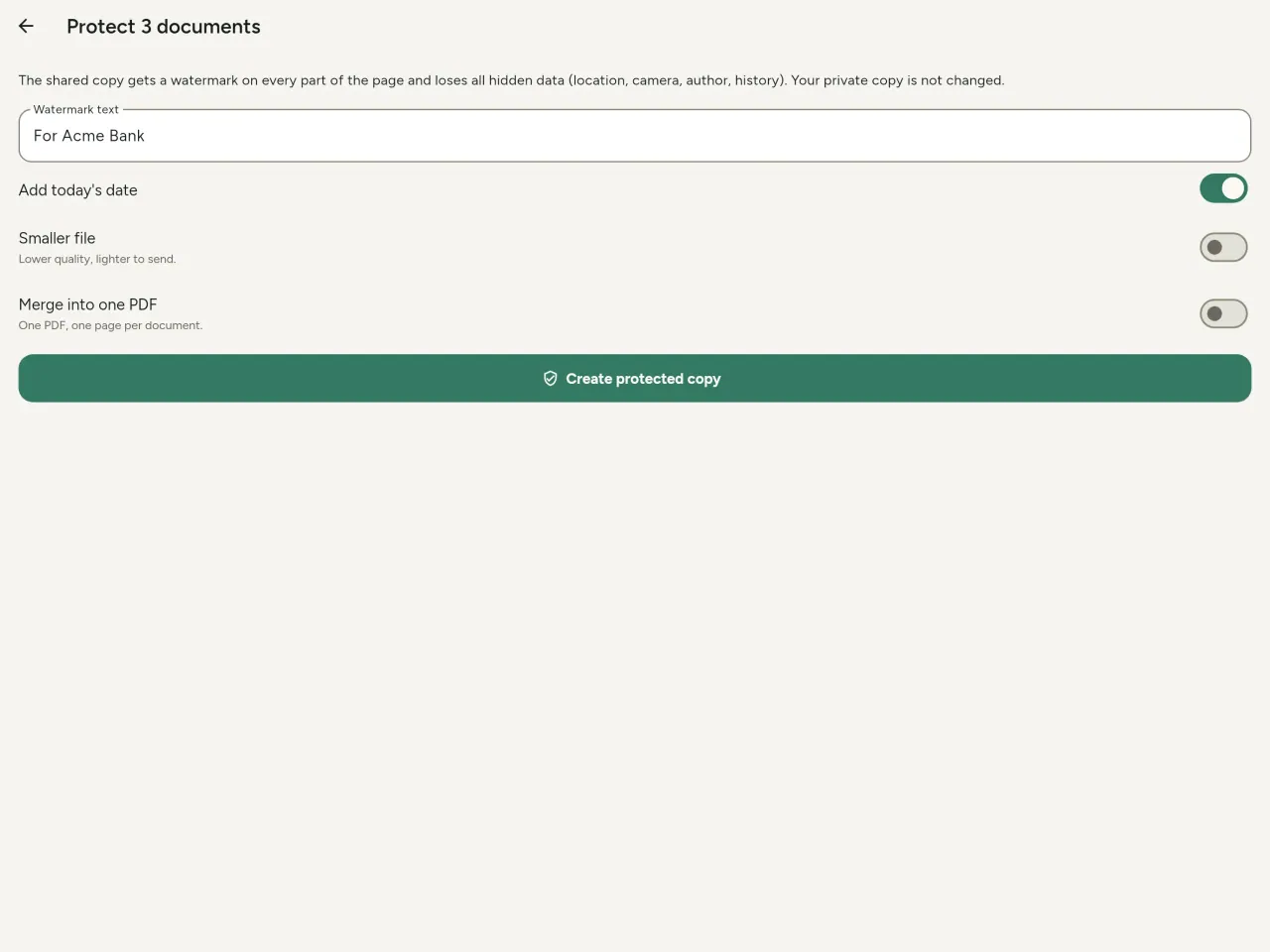
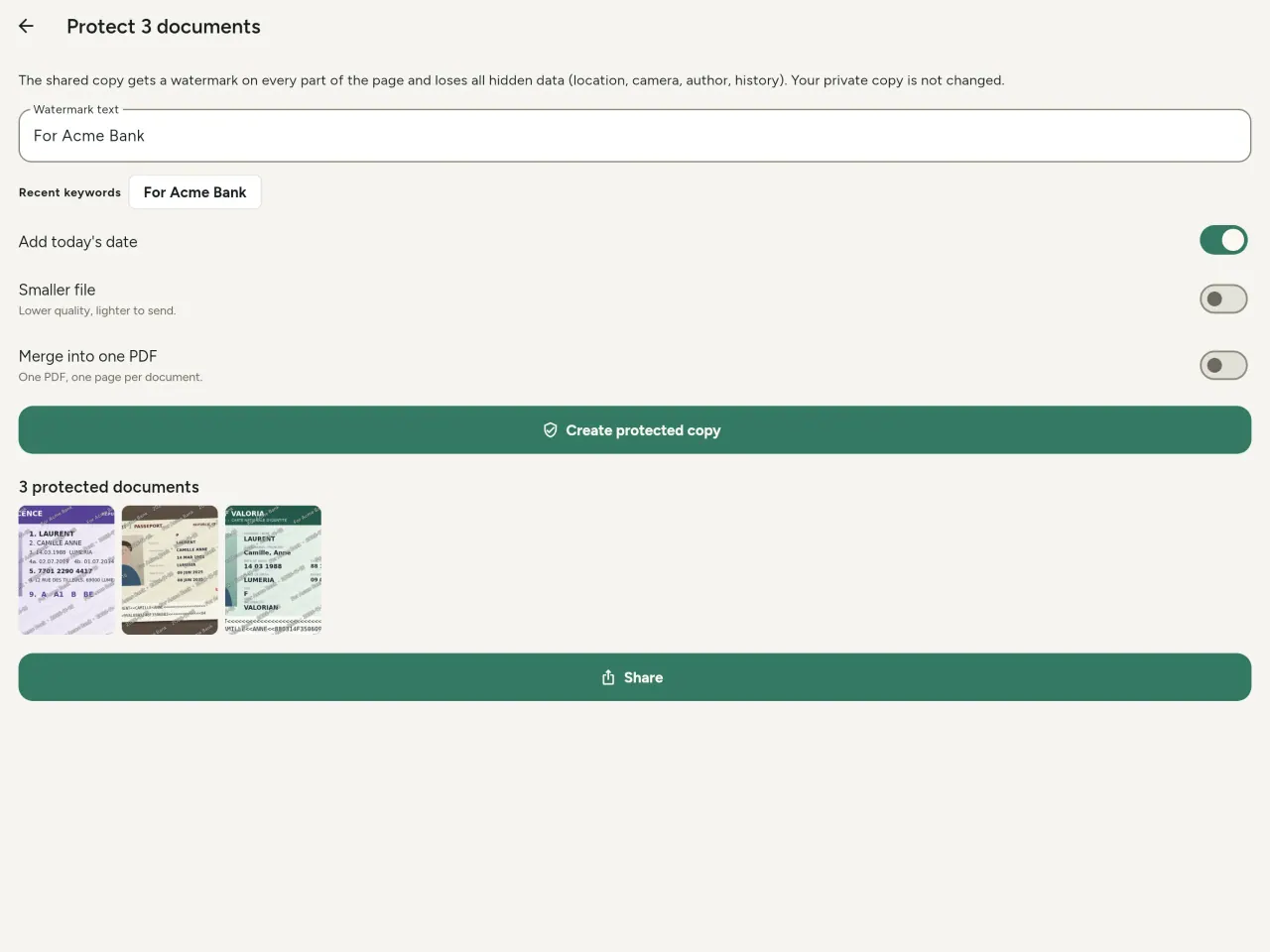
Cael VaultMark.
Am ddim ar iPhone ac Android.
Privacy policy
Mae'r testun isod yn Saesneg. Y fersiwn Saesneg sy'n drech.
Last updated: 2026-11-19
VaultMark stores your personal documents on your phone and adds a watermark to a copy before you share it. Your documents stay encrypted on your phone by default, and we collect no personal data, analytics, or tracking information.
What the app handles
Images and PDF files that you add yourself (from your files, or sent to the app from another app). They are encrypted with AES-256-GCM and stored in the app's private storage on your phone. The encryption key is kept in the secure storage of your phone (Android Keystore, iOS Keychain). There is no account, no permanent server storage and no cloud backup.
When you create a protected copy, the app redraws the image or the PDF pages with a watermark (the text you type and, if you choose, today's date) and writes a new file without hidden data (location, camera model, author, history). That file is handed to the app you pick in the system share sheet. Your private copy is never modified.
You can also scan a paper document with the camera. On Android the scan is done by Google's document scanner, which runs on your phone through Google Play services; on iOS it is done by the system scanner. The pages come back to the app and are encrypted like any other document. The scanner's own copies are deleted.
Favourites, tags, checklists for a procedure (the documents to gather, with the ones you attach), an optional saved signature (drawn or imported from an image, deletable in Settings) and backup files are kept inside the app, encrypted with your documents. When you sign a document, you place the signature manually on a page and share a flattened, watermarked, metadata-free copy without modifying your private original. Signing adds a visual image signature only, with no qualified electronic signature or legal guarantee.
You can also ask the app to recognise the text of a document (OCR). Nothing is recognised unless you start it. Printed Latin text is processed on your phone, with a bundled model on Android or Apple Vision on iOS: no image or text is sent to a server and no model is downloaded. The result is a new encrypted searchable PDF, your private original is not modified, and recognition stops if you cancel, leave the app or lock the vault.
What we collect and network use
We collect no analytics, no advertising identifier, no crash reporting and no third-party tracking SDK. All everyday features (storing, viewing, scanning, watermarking and local backup export or import) work without any internet connection. Network access is used only when you initiate one of these actions:
Transfer to another phone: when you choose to send or receive documents in
Settings, encrypted chunks transit ephemerally through our relay
(https://relay.pixeon.net, hosted on Cloudflare Workers and Durable Objects). The
archive is end-to-end encrypted on your device before upload using an ephemeral key carried only in
the one-time QR code, which the relay never sees. Temporary channel data is deleted when the
transfer finishes or is cancelled, or expires automatically (at most 90 days if abandoned).
Optional tips: optional tip purchases processed by Apple or Google Play (see Optional support), or opening our external support page in your browser on direct APK builds.
Permissions
Biometrics (fingerprint or face): only to unlock the vault, if you turn it on. The biometric data is handled by your phone's system; the app only receives a yes or no. Your 6-digit code always remains available.
Camera (iOS only): asked when you scan a paper document or scan a QR code for phone-to-phone transfer. On Android both document scanning and QR scanning run through Google Play services without declaring camera permission in the app.
Internet (Android): declared and used only for user-initiated encrypted
phone-to-phone transfer via https://relay.pixeon.net. No location, contacts,
microphone or shared storage permission. Files are added through the system file picker or the
share sheet, which give the app access to the files you choose only.
Files, backups, phone transfer and deletion
The app's data is excluded from Android and iOS cloud backups on purpose. If you lose or reset the phone, the vault is lost with it, unless you made a backup file or transferred documents yourself. There is no recovery of a forgotten code: keep an original of every document elsewhere.
Backup file: in Settings you can export the whole vault to one file, encrypted with a password you choose (it is not stored and cannot be recovered). The file goes to the share sheet, so you decide where it is kept. Importing it on another phone, with the same password, restores your documents. The app sends nothing. You can also change your 6-digit code in Settings; your documents are not re-encrypted, only the wrapping of the key changes.
Transfer to another phone: in Settings you can transfer selected documents (up to
100 MiB per session) to another phone running VaultMark. The sending phone creates a fresh
random 256-bit key and a single-use 5-minute QR code, displays a 4-digit verification code that
you verify on both screens before anything is uploaded, and transfers HKDF-SHA-256 / AES-256-GCM
encrypted chunks via https://relay.pixeon.net. The relay cannot decrypt documents or
see file or folder names. Existing documents on the receiving phone with the same internal id are
never overwritten, and procedure checklists and any saved signature are omitted.
Protected copies are written to a temporary folder, handed to the share sheet, and deleted when the vault locks and at the next launch. A copy that you sent to another app is then in that app's hands.
Deleting a document in the app removes its encrypted file. Uninstalling the app removes everything.
A watermark discourages misuse and shows where a copy came from. It cannot stop someone who already has the file from sharing it. Screenshots are blocked inside the app on Android release builds.
Optional support
Tips go through in-app purchase, processed by Apple on iOS and by Google Play on Android, under their own terms and privacy policy (the app only learns that a purchase succeeded). Versions installed outside Google Play may instead show a button that opens an external donation page in your browser; nothing from the app is sent to it. A tip unlocks nothing. A small reminder may appear after you have used the app a few times; it stays away for a while once you close it. The app is free and every feature works without tipping.
Contact form on this website
If you write to us through this site, we use your message and the email address you optionally give only to reply. Bot protection is provided by Cloudflare and email delivery by Resend.
Language choice on this website
When you choose a language, or when this site opens a page in your browser's language, it stores
one small functional cookie (pxl, a language code, one year) so that your choice is
remembered. If this site suggests a page in your browser's language and you close that suggestion,
your browser also keeps a local note (pxl-banner-off, in local storage, 30 days) so the
suggestion does not come back. Neither identifies anyone, neither is used for tracking or advertising,
and neither is shared. You can delete them in your browser at any time.
Website statistics
This website uses Cloudflare Web Analytics to count visits (pages viewed, country, browser type, loading speed). It sets no cookie, does not use local storage, does not fingerprint your device, does not follow you across sites and does not build a profile of you. Search engines (for example Google Search Console) give us aggregated search statistics, without any data about individual visitors. Our own web server also counts the pages it serves: for each page it keeps the page address, the site or social network that sent you (only its name, or the campaign tag written in the link), the country, the type of device and whether the request came from a robot. It keeps no IP address, no identifier and no cookie, and these counts are anonymous. We use no advertising or other analytics service. None of this concerns the app itself, which collects nothing.
Children
The app is a general-purpose tool and is not directed at children.
Changes
An updated policy will be published at this URL with a new date above.
Contact
Questions about privacy: vaultmark-contact@pixeon.net
Cefnogaeth
Diweddarwyd ddiwethaf: 2026-11-19
Mae VaultMark yn ap bach annibynnol. Ceir atebion i'r cwestiynau mwyaf cyffredin isod.
Rydym yn gwneud ein gorau i ymateb o fewn ychydig ddyddiau. I'n helpu, dywedwch wrthym fodel eich dyfais, ei fersiwn system a'r hyn yr oeddech yn ei wneud. Peidiwch â anfon eich dogfennau na data personol.
Ydy VaultMark yn wirioneddol rhad ac am ddim?
Ydy. Mae modd lawrlwytho a defnyddio VaultMark am ddim. Nid oes hysbysebion na thanysgrifiad.
Pa ddata mae'r ap yn ei storio neu'n ei anfon?
Mae eich dogfennau'n aros wedi'u hamgryptio ar eich ffôn, ac mae nodweddion bob dydd yn gweithio heb rwydwaith. Os dewiswch Trosglwyddo o ffôn i ffôn yn Gosodiadau, mae darnau wedi'u hamgryptio'n teithio dros dro trwy'n relay (relay.pixeon.net) gan ddefnyddio allwedd sydd wedi'i storio yn unig yn y cod QR un-amser, ac wedyn yn cael eu dileu. Manylion yn y polisi preifatrwydd.
Anghofiais fy nghôd. A allwch adennill fy dogfennau?
Nac ydy. Nid oes adferiad, yn fwriadol: nid oes neb, gan gynnwys ni, yn gallu agor y vault heb y côd. Dyna pam rydym yn argymell cadw gwreiddiol o bob dogfen mewn man arall.
Es i newid neu gollais fy ffôn. Ble mae fy vawlt?
Mae copïau wrth gefn cwmwl wedi'u diffodd er pwrpas. Cyn ailosod neu newid ffôn, allforiwch ffeil copi wrth gefn wedi'i hamgryptio (.vmbk, wedi'i ddiogelu gan ei chyfrinair ei hun) mewn Gosodiadau, Copïo wrth gefn, neu defnyddiwch Trosglwyddo o ffôn i ffôn yn Gosodiadau i gopïo dogfennau drwy god QR gyda amgryptio diwedd-i-ddiwedd.
Sut ydw i'n ychwanegu dyfrnod at gopi adnabod neu ddogfen?
- Dechreuwch o ID papur, ffeil ar eich ffôn neu ap arall: sganio gyda'r camera (cam cyntaf i'w diogelu cyn anfon), dewis PDF neu ddelwedd, neu defnyddiwch Rhannu neu Agor gyda VaultMark.
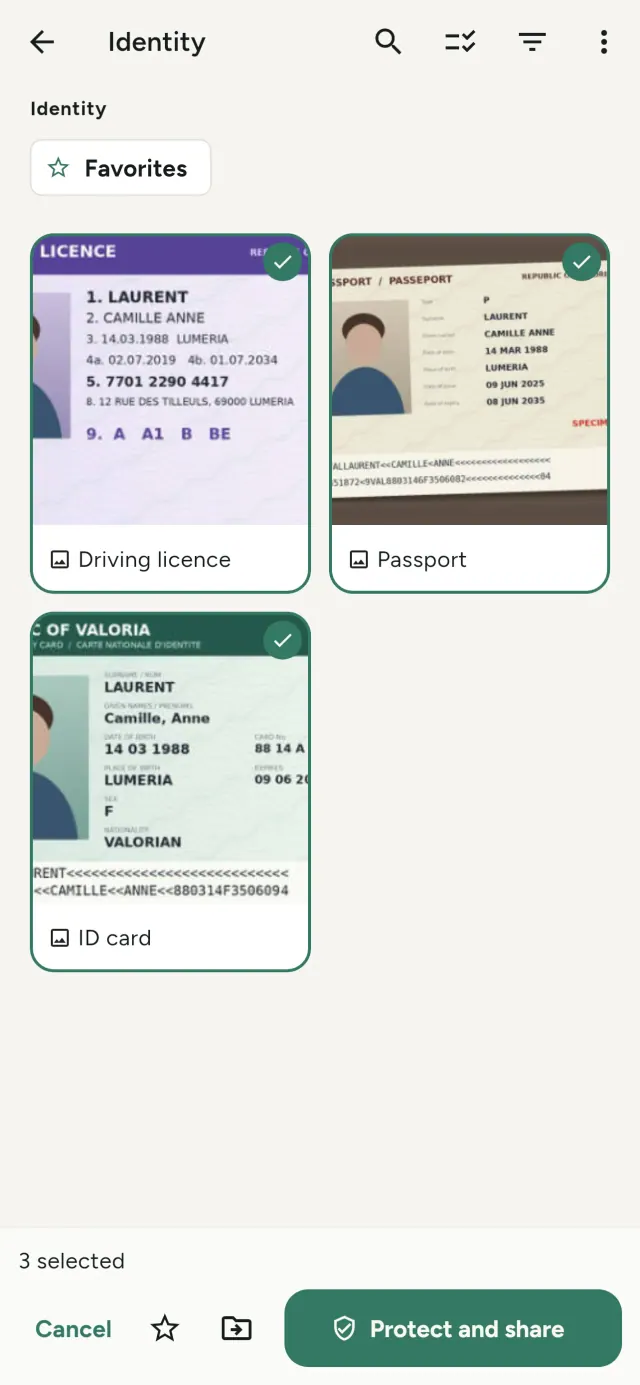
- Dewiswch un neu sawl dogfen (o'ch ffolderi neu rhestr wirio gweithdrefn), tapiwch Amddiffyn a rhannu, teipiwch y derbynnydd a dyddiad dewisol, a dewiswch a ddylech gyfuno tudalennau i un PDF neu eu cloi gyda chyfrinair AES-256.
- Anfonwch drwy'r system share sheet: caiff metadata cudd ei dynnu, adnewyddir y ffeil o'r picseli, ac ni cheir newid ar eich copi preifat.
A allaf arwyddo dogfen yn lleol?
Yes. Agorwch ddelwedd neu PDF yn eich vault a tapiwch Llofnodi. Lluniwch lofnod neu mewnforiwch ddelwedd (wedi'i chadw wedi'i hamgryptio yn y vawlt, a gellir ei dileu o dan Gosodiadau), lleoli a newid maint yn llaw ar dudalen, ac yna amddiffyn a rhannu copi fflat gyda dyfrnod a metadata wedi'u tynnu. Mae hyn yn ychwanegu llofnod gweledol yn unig, heb lofnod electronig cymwys na gwarant gyfreithiol.
A allaf sganio dogfen papur neu ychwanegu un o ap arall?
Iawn. Oddi mewn i VaultMark gallwch sganio tudalennau papur gyda'r camera neu fewnforio ffeiliau, ac o ap arall gallwch ddefnyddio Rhannu neu Agor gyda VaultMark i amddiffyn ffeil ar unwaith heb ei chynnwys yn y vawlt.
Pa ffeiliau sy'n cael eu cefnogi?
Delweddau a ffeiliau PDF. Pan fyddwch yn rhannu, caiff tudalennau PDF eu troi'n ddelweddau gyda dyfrnod (felly ni ellir tynnu'r dyfrnod), a gellir uno sawl dogfen i un PDF sydd, os dymunir, wedi'i ddiogelu gan gyfrinair AES-256. Gwrthodir ffeiliau llawer iawn o faint (hyd at 60 tudalen a 80 megapicsel).
A allaf chwilio testun dogfen sganiedig?
Iawn. Agorwch ddogfen a dechreuwch adnabod testun (OCR) ar gais. Creuir PDF chwiliadwy newydd wedi'i hamgryptio ac mae'ch gwreiddiol yn aros heb ei newid. Mae'r adnabod yn rhedeg ar eich ffôn (testun Lladin wedi'i argraffu), nid oes dim yn cael ei anfon i weinydd ac nid oes dim yn cael ei adnabod oni bai eich bod yn ei gychwyn chi.
A yw'r dyfrnod yn fy mharhau'n llwyr?
Mae'n annog defnydd dyrys ac yn dangos o ble daeth copi, ond ni all rwystro rhywun sydd eisoes yn meddu ar y ffeil rhag ei rhannu. Rhannwch ddogfennau ond gyda phobl yr ydych yn ymddiried ynddynt.
Pam na allaf dynnu cipriflun?
Ar Android, caiff cipio sgrin a chofnodi sgrin eu blocio o fewn yr ap er mwyn diogelu eich dogfennau.
Pa ieithoedd sydd ar gael?
75 o ieithoedd: Saesneg, Ffrangeg, Almaeneg, Sbaeneg, Eidaleg, Portiwgaleg, Arabeg, Tsieinëeg (syml a thraddodiadol), Japaneg, Corea, Hindi, Rwsieg a llawer mwy. Mae'r ap yn dilyn iaith eich ffôn a gallwch ei newid yn Gosodiadau. Mae cyfieithiadau'r ieithoedd newyddach wedi'u cynorthwyo gan beiriant ac yn cael eu gwella gyda'ch adborth.
Cefnogi'r prosiect
Mae VaultMark yn parhau'n rhad ac yn rhydd o hysbysebion. Os yw'n ddefnyddiol i chi, gallwch gefnogi ei ddatblygiad (dewisol):
Buy Me a CoffeeExpense tracker and family budget planner. Free phone sync, no account.
Hefyd gan PixeonMetadata CleanerGwyliwr, golygydd a thynnwr EXIF: darllen, trwsio neu ddileu metadata lluniau.
Hefyd gan PixeonLittle RelayBreastfeeding, sleep and starting solids tracker. No account, works offline.
Hefyd gan PixeonMenuloopMeal planner and grocery list for the week. Recipes with photos, offline.
Hefyd gan PixeonIndie OfficeQuote maker and self-employed invoices. Offline, no account, no ads.
Hefyd gan PixeonFanionDiscover and share local events, concerts, markets and weekend outings nearby