
VaultMark: Ibi ipamọ awọn iwe aṣẹ
Ibi ipamọ awọn iwe aṣẹ ti a fi pamọ. Fi ami omi si awọn iwe aṣẹ, yọ metadata kuro ṣaaju pinpin.
Ọfẹ́. Kò sí ìpolówó. Kò sí ṣiṣe alabapin.

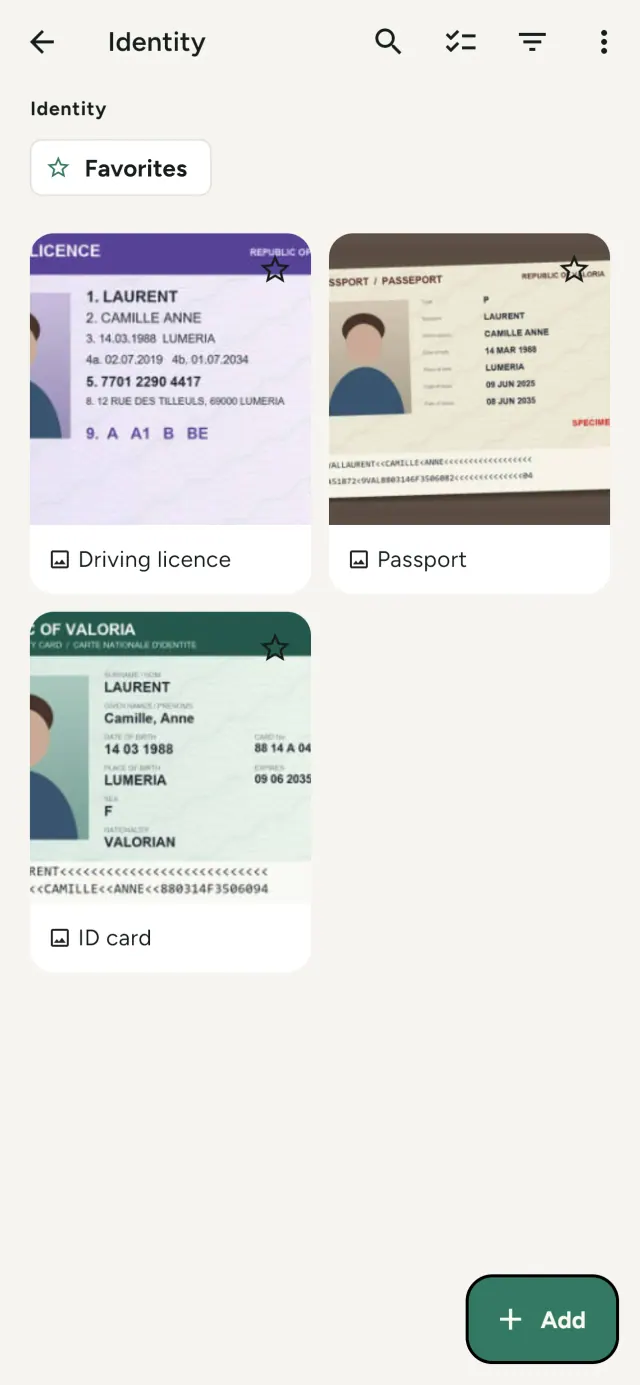
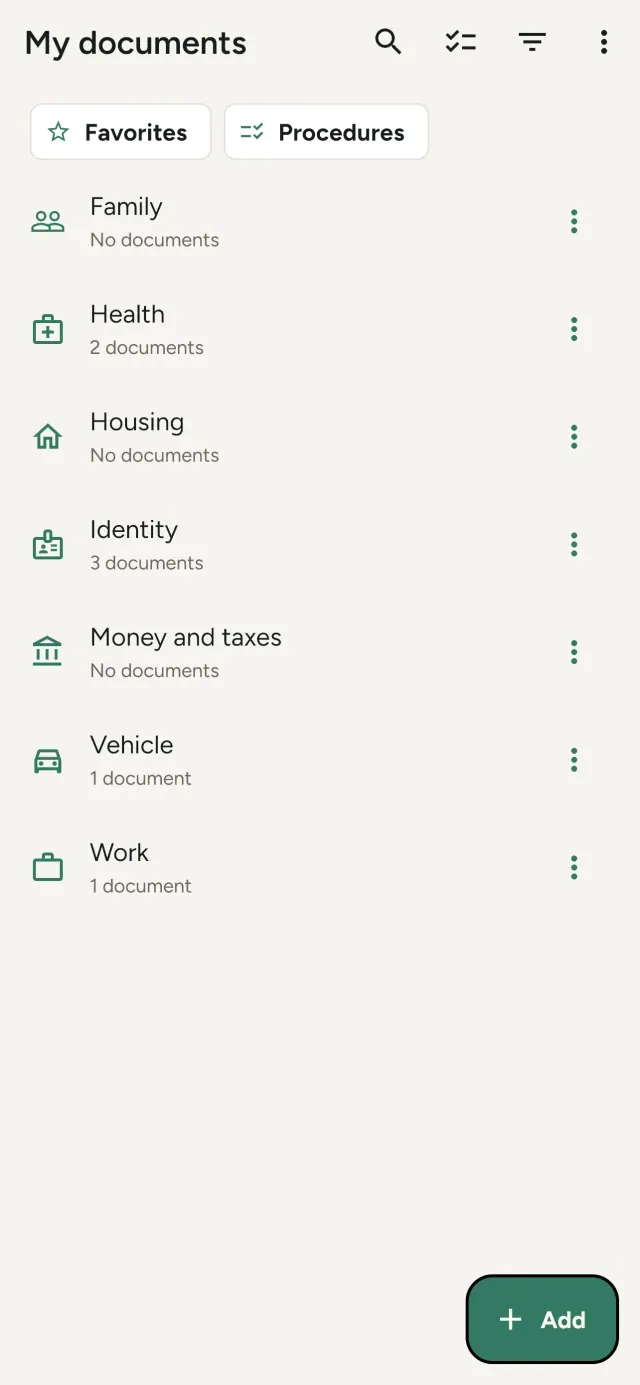
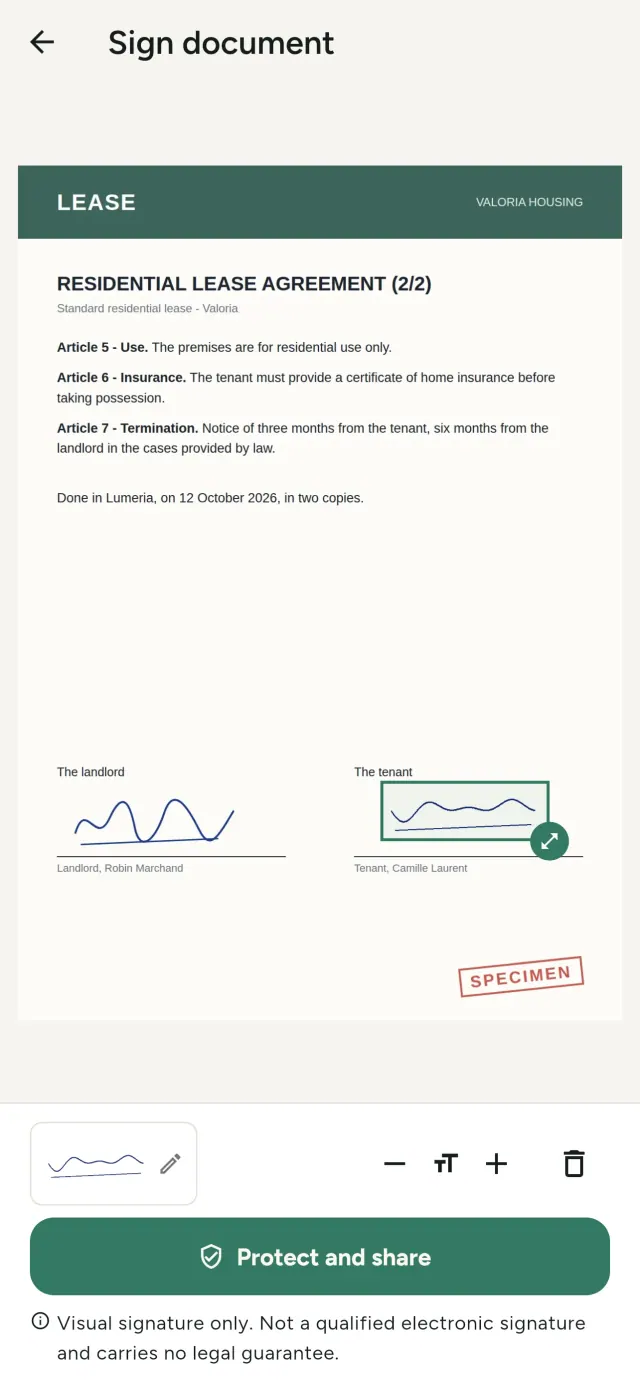
Dá kaadi idanimọ rẹ, awọn adehun, awọn iwe isanwo ati awọn iwe iṣoogun rẹ bo ṣaaju fifiranṣẹ wọn, ki o si ti wọn sinu ibi ipamọ ti a fi pamọ lori foonu rẹ.
VaultMark jẹ ibi ipamọ iwe aṣẹ ikọkọ. Ohun gbogbo wa lori ẹrọ rẹ: ko si akọọlẹ, ko si awọsanma, ko si ipolowo, ko si titele, ati lilo ojoojumọ ko nilo nẹtiwọọki.
Kí ni VaultMark ṣe
Ṣayẹwo awọn iwe aṣẹ, fi ami omi si wọn ki o daabobo wọn ṣaaju fifiranṣẹ
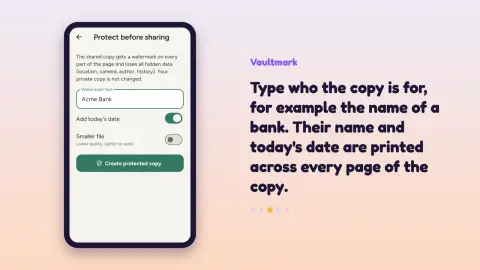
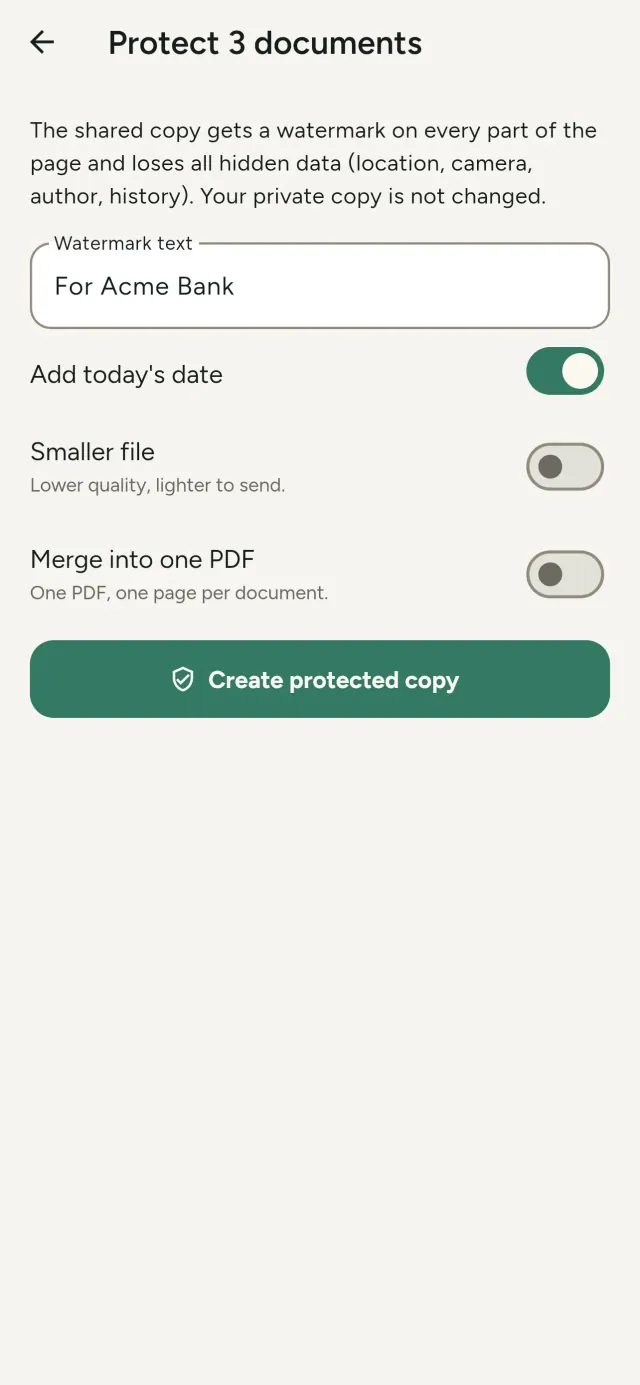
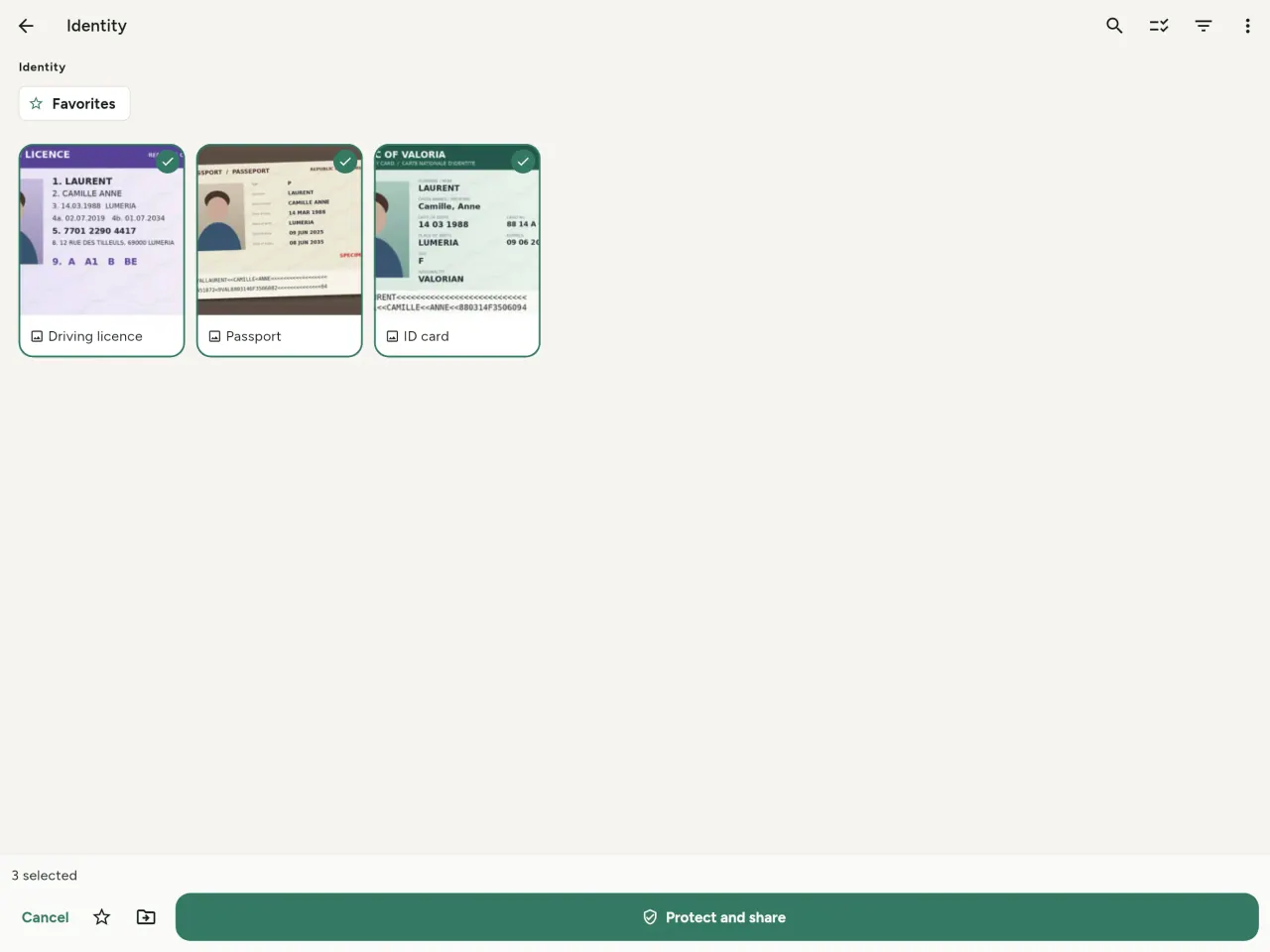
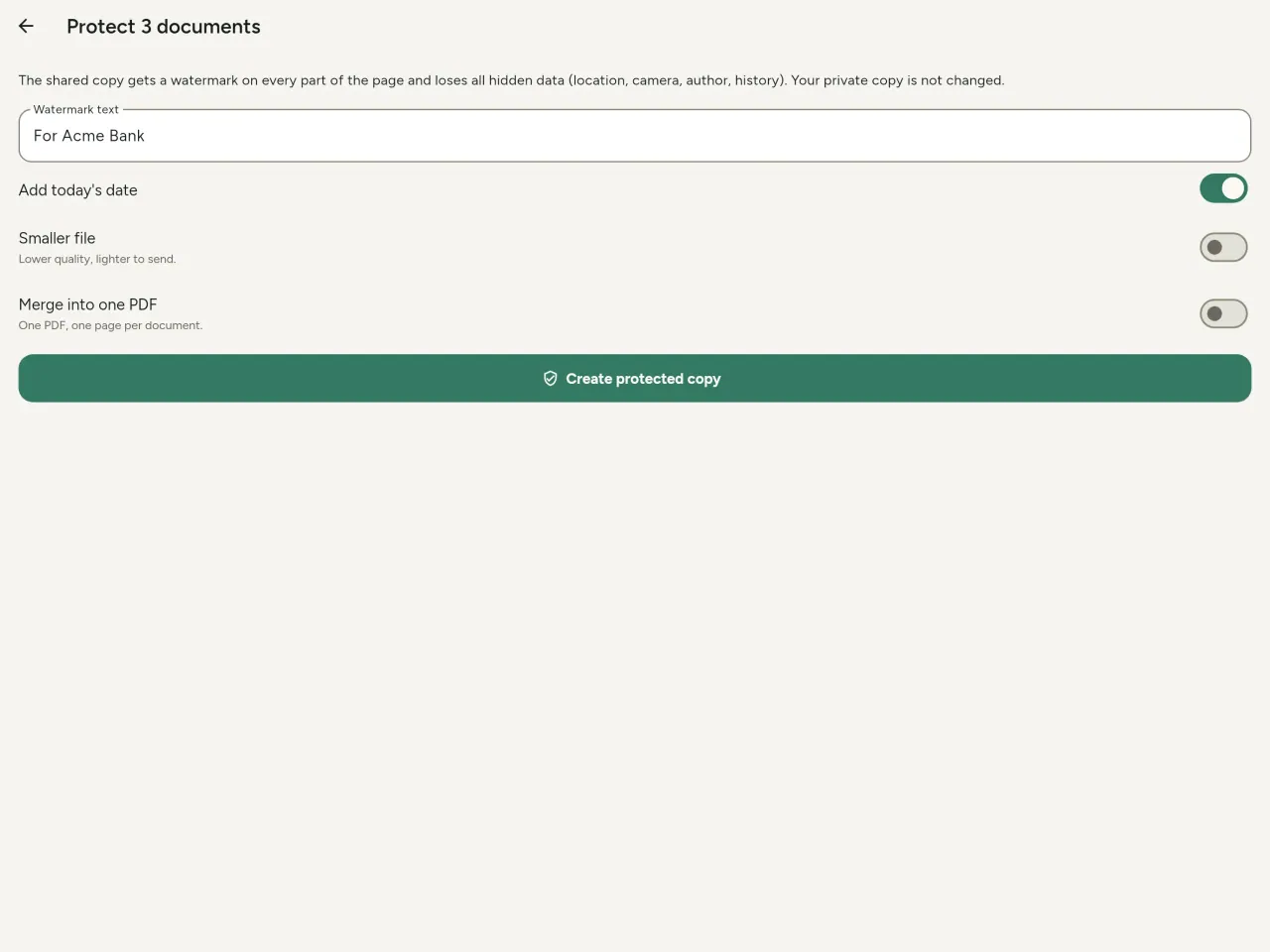
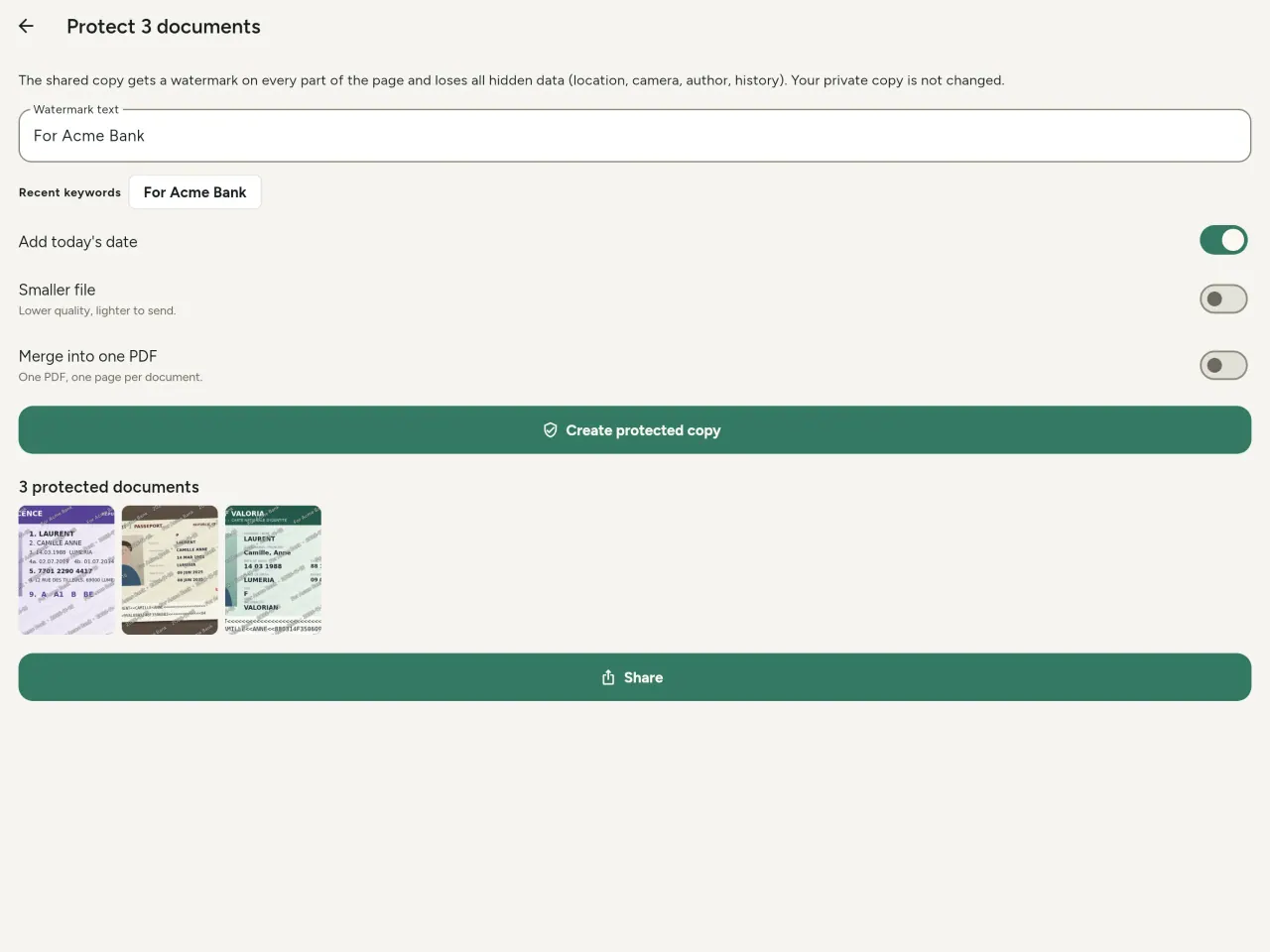
Ṣe o ni iwe lori tabili? Bẹrẹ nipa ṣayẹwo rẹ pẹlu kamẹra rẹ, tabi yan PDF tabi aworan ti o wa lori foonu rẹ. VaultMark gbe ami omi ka gbogbo oju-iwe pẹlu ọrọ ti o yan (fun apẹẹrẹ "Fun Banki Àpẹẹrẹ, ohun elo awin") ati ọjọ oni, lẹhinna yọ gbogbo data ti o farapamọ kuro: ipo, awoṣe ẹrọ, onkọwe, ati itan atunṣe. Lo o lori ẹda kaadi idanimọ, ẹri adirẹsi tabi iwe isanwo ki a ma ba le tun lo ẹda naa fun nkan miiran. Eyi ni ọna ti o yara ju lati yọ metadata kuro ṣaaju fifiranṣẹ faili.
Faili ti a pin ni a tun kọ lati awọn piksẹli: a ko le bó ami omi naa kuro, metadata ko si mọ. Ṣe o nfi awọn iwe pupọ ranṣẹ? Darapọ wọn sinu PDF kan ki o si ti i pẹlu ọrọigbaniwọle AES-256 ti o ba fẹ. Ẹda ikọkọ rẹ ko yipada rara.
Awọn ilana ati folda to ni aabo fun gbogbo iwe
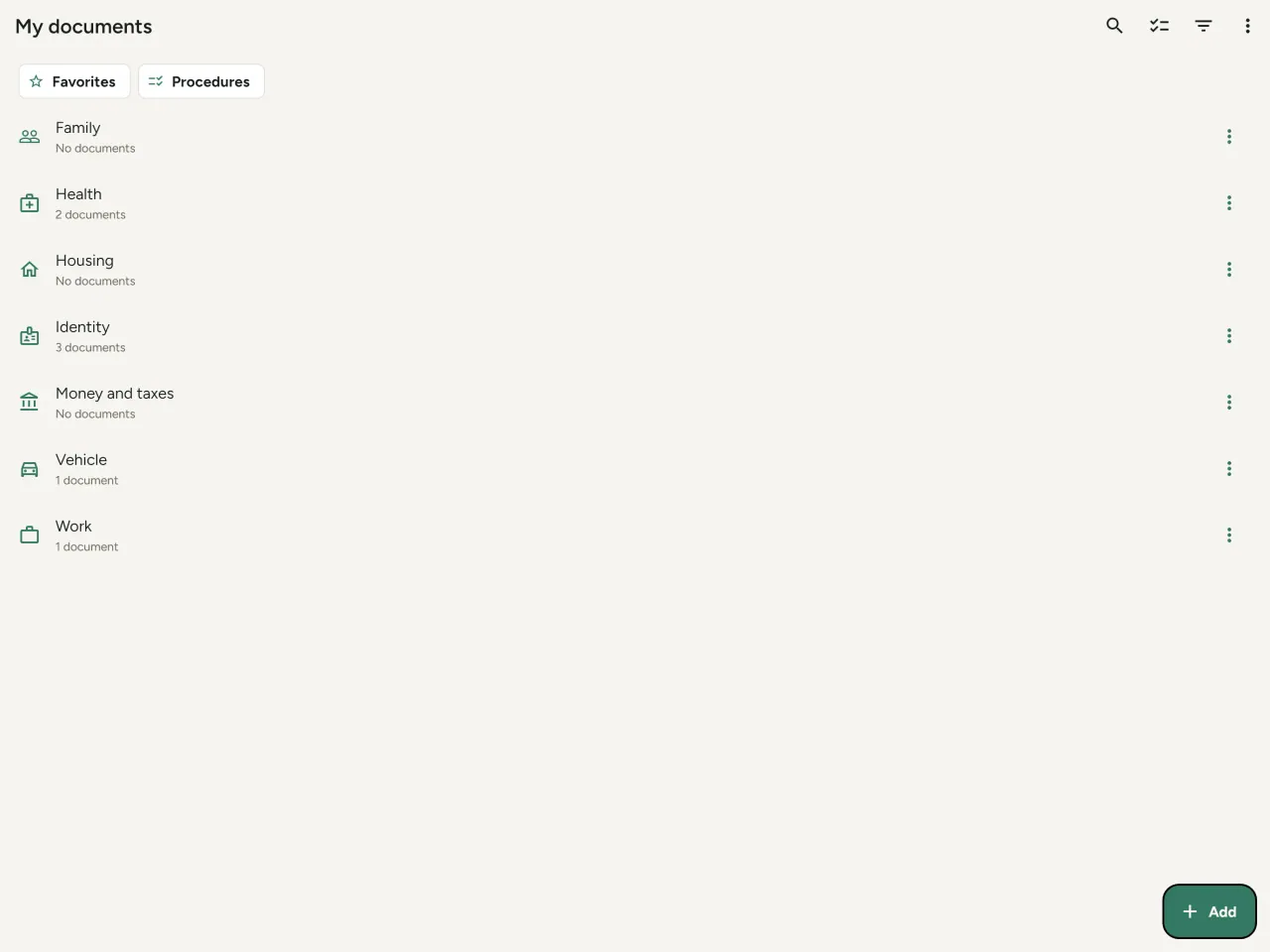
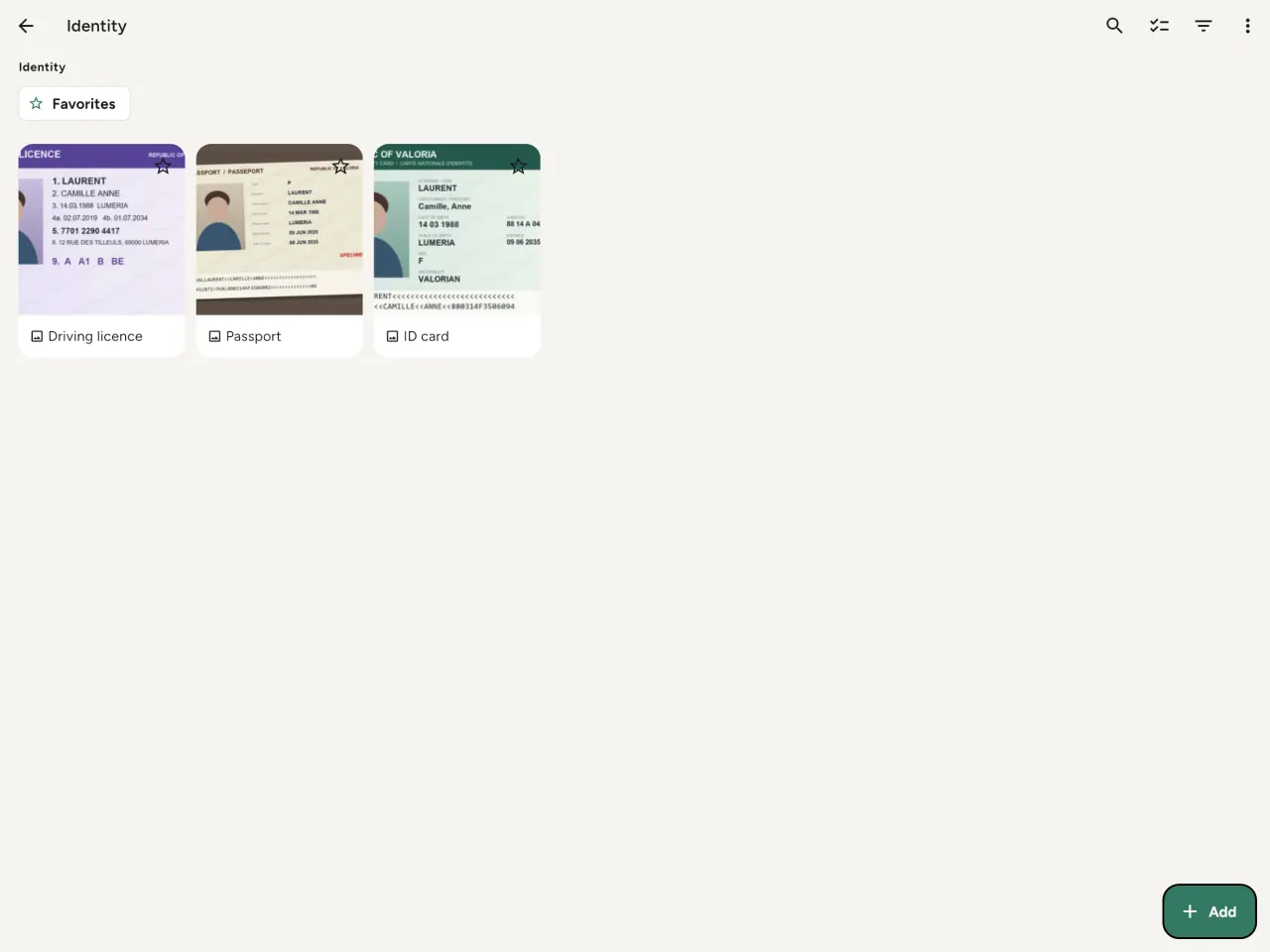
Mura awọn iṣẹ ti o wọpọ pẹlu awọn atokọ ayẹwo ilana ti a ṣe sinu rẹ (ile, iṣẹ, banki, irin-ajo), so awọn iwe aṣẹ lati ibi ipamọ rẹ pọ, ki o daabobo ati pin gbogbo akojọpọ naa ni ẹẹkan. Ṣeto ohun gbogbo sinu awọn folda ti a ti pese (idanimọ, ile, ilera, owo ati owo-ori, iṣẹ, ọkọ, ẹbi) tabi igi tirẹ, pẹlu awọn aami, awọn ayanfẹ ati wiwa lẹsẹkẹsẹ.
Pin lati awọn ohun elo miiran
Ṣe o gba PDF tabi aworan kan? Lo Pin tabi Ṣi pẹlu, yan VaultMark, ki o daabobo rẹ lẹsẹkẹsẹ lai fi kun si ibi ipamọ paapaa.
Fọwọsi ki o wa awọn iwe aṣẹ rẹ
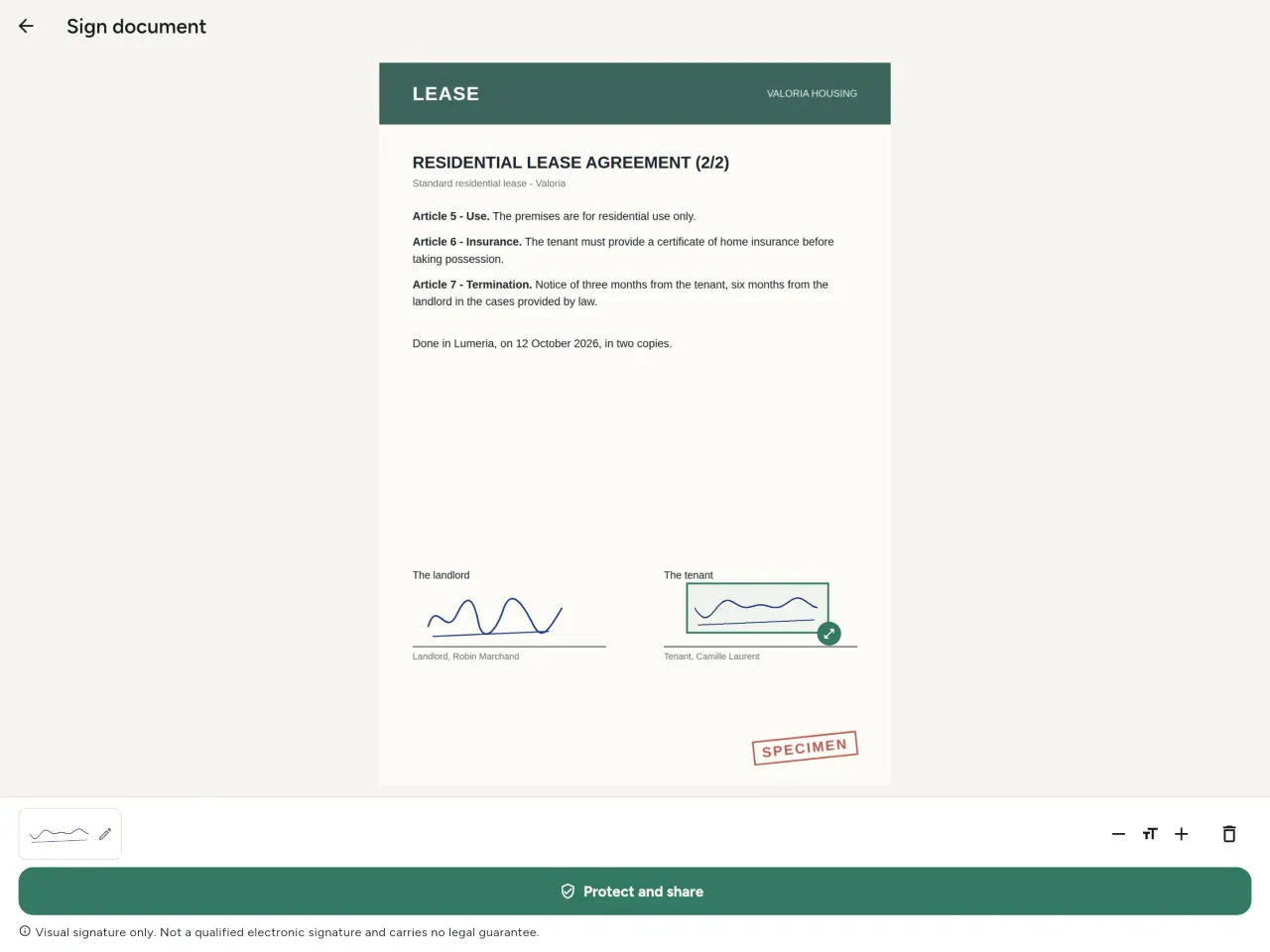
Ya ibuwọlu rẹ tabi gbe aworan wọle, lẹhinna gbe e sori oju-iwe PDF kan tabi aworan ti a ṣayẹwo ti iwe aṣẹ kan, taara lori foonu rẹ. Ibuwọlu ti o fipamọ wa ni fifi pamọ ninu ibi ipamọ, ẹda ti o pin si jẹ pẹlẹbẹ, o ni ami omi, ko si ni metadata (ibuwọlu wiwo nikan, ko ni iye ofin). Ṣe o nilo lati wa ninu iwe ti a ṣayẹwo? Ṣiṣẹ OCR nigbati o ba nilo lati ṣẹda PDF ti a le wa, ṣiṣe rẹ lori foonu rẹ lai fi ranṣẹ si ibikibi. Ohun elo naa wa ni awọn ede 75.
A ṣe e ni ọna ti o ni aabo
O dara lati mọ: ko si imupadabọ koodu ti o gbagbe, eyi jẹ imomose. Tọju atilẹba ti gbogbo iwe aṣẹ ni ibomiiran. Ami omi n dena ilokulo, ṣugbọn ko le da ẹni ti o ti ni faili duro.
Awọn faili PDF ati awọn aworan ni a ṣe atilẹyin. Awọn oju-iwe PDF di awọn aworan ti o ni ami omi, nitorina a ko le yan ọrọ mọ.
- Ìfipamọ́ AES-256-GCM, bọtini wa ni ibi ipamọ to ni aabo ti foonu rẹ
- Ṣii pẹlu ika tabi oju, pẹlu koodu oni-nọmba 6 gẹgẹ bi afẹyinti
- Ibi ipamọ naa ti ara rẹ nigbati o ba kuro ninu app, nitorinaa ko si ohun ti o ṣi silẹ
- Faili afẹyinti ti a fi pamọ (.vmbk) ti ọrọigbaniwọle tirẹ daabobo
- Gbigbe ti a fi pamọ lati opin de opin lati foonu si foonu nipasẹ koodu QR nigba iyipada ẹrọ; lilo ojoojumọ wa laisi nẹtiwọọki ninu ibi ipamọ to ni aabo
Àwọn ìtọ́sọ́nà VaultMark
Tà ni ó yẹ
- Ẹnikẹ́ni tí ó ní láti ránṣẹ́ pẹ̀lú ID, ẹ̀rí àdírẹ́sì tàbí owó oṣù (ilé-rẹ, ilé-ifowopamọ́, òga, ìjọba).
- Àwọn ti rẹ̀ ẹ̀sùn data tí ń jáde fẹ́ gba àkóso data ìkẹyìn wọn, kí wọ́n dáabòbo pọ̀ sí i nígbà tí wọ́n kò ní ààyè ayé kankan.
- Àwọn tó fẹ́ tọju iwe àkọ́kọ́, iwe ìtọ́jú àti iwe pàtàkì míì lórí fóònù, pẹ̀lú ìmúlùdàn.
- Àwọn tí ó gba PDF tàbí àwòrán, tí wọ́n fẹ́ dáàbòbo rẹ lọ́rọ̀-ọ́rọ̀, láìfi kún Vault.
Ìdí tí o fi yan VaultMark
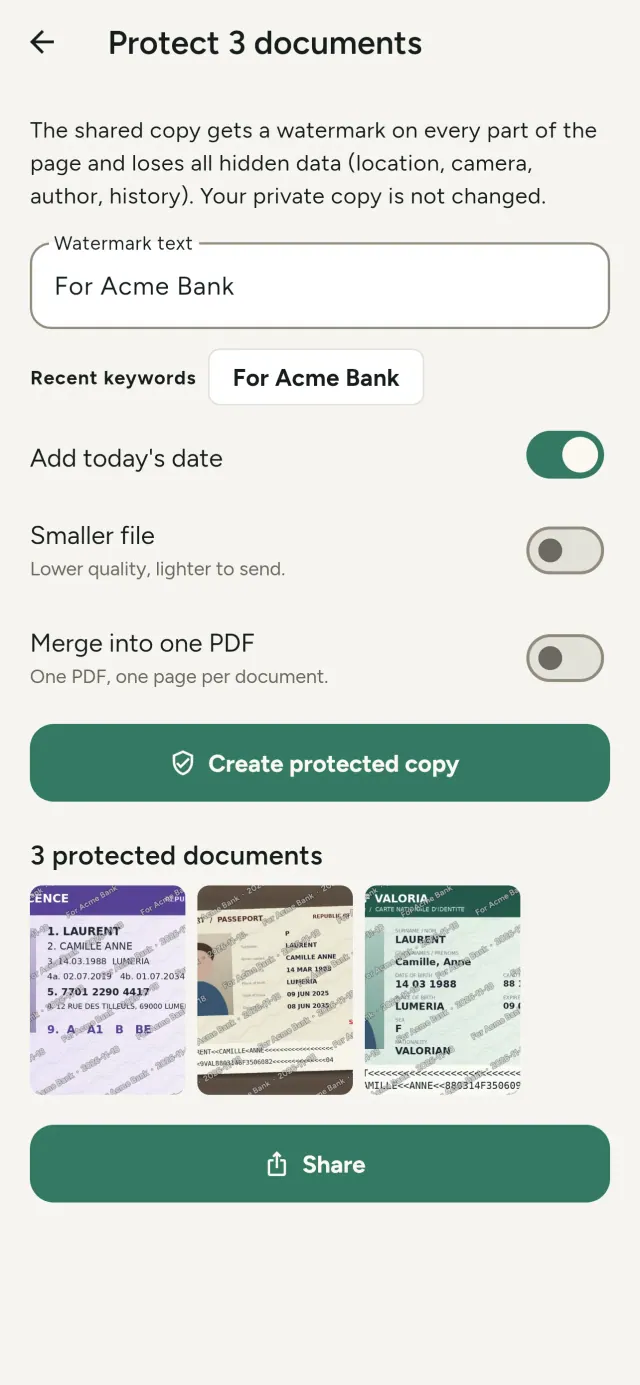
- Àwọn iwe ìkòrítaà ń jẹ́ ohun tí àwọn apanirun ààmú fẹ́, wọn le lò fún gbígbà kírẹ́dítì, ìforúkọsílẹ̀ adehun tàbí nílé ni orúkọ rẹ. Ojúwe ID tàbí owó oṣù tó ránṣẹ́ láì fi ìdábòbo le pawọn fún àkókò pípẹ́. VaultMark ń fi watermark kọjá ojúewé gbogbo pẹ̀lú ẹni tó ń gba, ọjọ́ (gẹ́gẹ́ bí “Fun Àpẹẹrẹ Banki, ìbéèrè ilé, 2026-10-05”), nítorí náà àwòrán tó jàde ko wulo fún ohun míì, a lè tọ́ka sí ibi tí a ti rán án.
- Fáìlì tí a pín ni a tún kọ láti píksẹ́lì: watermark kò le yọ, metadata tí ó farapamọ́ (ipo, akọlé, itan ìtúpalẹ̀) ko si mó. Ẹ̀dà tirẹ kò ní yí pa dà.
- Ìmúlùdàn AES-256-GCM, pẹ̀lú kóòdù tó wà nínú ipamọ́ ẹrọ. Kò sí àkọọlẹ, kò sí awọsanma, kò sí amúnisẹ̀yọ.
Ohun tí app ṣi kò le ṣe
- Kò tíì sí ipamọ́ awọsanma tàbí iṣọkan ọ̀pọ̀ ẹrọ: Vault wà lórí fóònù nikan.
- Watermark ń jẹ́ àwòrán nira láti fi lò sí ibi míì, ó rọrùn láti tọ́pa. Kò le dá ẹni tó gbàwé rẹ lówó láti pa àdàkọ kan tì.
Ìlànà Pixeon. App Pixeon jẹ́ amúlúdáni àkọ́kọ́: kò sí àkọọlẹ, kò sí amúnisẹ̀yọ, data rẹ sì wa lórí fóònù. Bí app bá yá lórí nẹ́tíwọ́ọ̀kì, o jẹ́ nígbà tí o bà yàn pátá, àti àsà aṣiri ni a ṣe àtúnṣe ṣáájú.
Wo VaultMark nínú ìṣẹ́.
Gba VaultMark.
Ọfẹ́ lórí iPhone àti Android.
Privacy policy
Ọ̀rọ̀ tó wà ni isalẹ yìí wà ní Gẹ̀ẹ́sì. Ẹ̀dà Gẹ̀ẹ́sì ni wà fún àkipẹ̀.
Last updated: 2026-11-19
VaultMark stores your personal documents on your phone and adds a watermark to a copy before you share it. Your documents stay encrypted on your phone by default, and we collect no personal data, analytics, or tracking information.
What the app handles
Images and PDF files that you add yourself (from your files, or sent to the app from another app). They are encrypted with AES-256-GCM and stored in the app's private storage on your phone. The encryption key is kept in the secure storage of your phone (Android Keystore, iOS Keychain). There is no account, no permanent server storage and no cloud backup.
When you create a protected copy, the app redraws the image or the PDF pages with a watermark (the text you type and, if you choose, today's date) and writes a new file without hidden data (location, camera model, author, history). That file is handed to the app you pick in the system share sheet. Your private copy is never modified.
You can also scan a paper document with the camera. On Android the scan is done by Google's document scanner, which runs on your phone through Google Play services; on iOS it is done by the system scanner. The pages come back to the app and are encrypted like any other document. The scanner's own copies are deleted.
Favourites, tags, checklists for a procedure (the documents to gather, with the ones you attach), an optional saved signature (drawn or imported from an image, deletable in Settings) and backup files are kept inside the app, encrypted with your documents. When you sign a document, you place the signature manually on a page and share a flattened, watermarked, metadata-free copy without modifying your private original. Signing adds a visual image signature only, with no qualified electronic signature or legal guarantee.
You can also ask the app to recognise the text of a document (OCR). Nothing is recognised unless you start it. Printed Latin text is processed on your phone, with a bundled model on Android or Apple Vision on iOS: no image or text is sent to a server and no model is downloaded. The result is a new encrypted searchable PDF, your private original is not modified, and recognition stops if you cancel, leave the app or lock the vault.
What we collect and network use
We collect no analytics, no advertising identifier, no crash reporting and no third-party tracking SDK. All everyday features (storing, viewing, scanning, watermarking and local backup export or import) work without any internet connection. Network access is used only when you initiate one of these actions:
Transfer to another phone: when you choose to send or receive documents in
Settings, encrypted chunks transit ephemerally through our relay
(https://relay.pixeon.net, hosted on Cloudflare Workers and Durable Objects). The
archive is end-to-end encrypted on your device before upload using an ephemeral key carried only in
the one-time QR code, which the relay never sees. Temporary channel data is deleted when the
transfer finishes or is cancelled, or expires automatically (at most 90 days if abandoned).
Optional tips: optional tip purchases processed by Apple or Google Play (see Optional support), or opening our external support page in your browser on direct APK builds.
Permissions
Biometrics (fingerprint or face): only to unlock the vault, if you turn it on. The biometric data is handled by your phone's system; the app only receives a yes or no. Your 6-digit code always remains available.
Camera (iOS only): asked when you scan a paper document or scan a QR code for phone-to-phone transfer. On Android both document scanning and QR scanning run through Google Play services without declaring camera permission in the app.
Internet (Android): declared and used only for user-initiated encrypted
phone-to-phone transfer via https://relay.pixeon.net. No location, contacts,
microphone or shared storage permission. Files are added through the system file picker or the
share sheet, which give the app access to the files you choose only.
Files, backups, phone transfer and deletion
The app's data is excluded from Android and iOS cloud backups on purpose. If you lose or reset the phone, the vault is lost with it, unless you made a backup file or transferred documents yourself. There is no recovery of a forgotten code: keep an original of every document elsewhere.
Backup file: in Settings you can export the whole vault to one file, encrypted with a password you choose (it is not stored and cannot be recovered). The file goes to the share sheet, so you decide where it is kept. Importing it on another phone, with the same password, restores your documents. The app sends nothing. You can also change your 6-digit code in Settings; your documents are not re-encrypted, only the wrapping of the key changes.
Transfer to another phone: in Settings you can transfer selected documents (up to
100 MiB per session) to another phone running VaultMark. The sending phone creates a fresh
random 256-bit key and a single-use 5-minute QR code, displays a 4-digit verification code that
you verify on both screens before anything is uploaded, and transfers HKDF-SHA-256 / AES-256-GCM
encrypted chunks via https://relay.pixeon.net. The relay cannot decrypt documents or
see file or folder names. Existing documents on the receiving phone with the same internal id are
never overwritten, and procedure checklists and any saved signature are omitted.
Protected copies are written to a temporary folder, handed to the share sheet, and deleted when the vault locks and at the next launch. A copy that you sent to another app is then in that app's hands.
Deleting a document in the app removes its encrypted file. Uninstalling the app removes everything.
A watermark discourages misuse and shows where a copy came from. It cannot stop someone who already has the file from sharing it. Screenshots are blocked inside the app on Android release builds.
Optional support
Tips go through in-app purchase, processed by Apple on iOS and by Google Play on Android, under their own terms and privacy policy (the app only learns that a purchase succeeded). Versions installed outside Google Play may instead show a button that opens an external donation page in your browser; nothing from the app is sent to it. A tip unlocks nothing. A small reminder may appear after you have used the app a few times; it stays away for a while once you close it. The app is free and every feature works without tipping.
Contact form on this website
If you write to us through this site, we use your message and the email address you optionally give only to reply. Bot protection is provided by Cloudflare and email delivery by Resend.
Language choice on this website
When you choose a language, or when this site opens a page in your browser's language, it stores
one small functional cookie (pxl, a language code, one year) so that your choice is
remembered. If this site suggests a page in your browser's language and you close that suggestion,
your browser also keeps a local note (pxl-banner-off, in local storage, 30 days) so the
suggestion does not come back. Neither identifies anyone, neither is used for tracking or advertising,
and neither is shared. You can delete them in your browser at any time.
Website statistics
This website uses Cloudflare Web Analytics to count visits (pages viewed, country, browser type, loading speed). It sets no cookie, does not use local storage, does not fingerprint your device, does not follow you across sites and does not build a profile of you. Search engines (for example Google Search Console) give us aggregated search statistics, without any data about individual visitors. Our own web server also counts the pages it serves: for each page it keeps the page address, the site or social network that sent you (only its name, or the campaign tag written in the link), the country, the type of device and whether the request came from a robot. It keeps no IP address, no identifier and no cookie, and these counts are anonymous. We use no advertising or other analytics service. None of this concerns the app itself, which collects nothing.
Children
The app is a general-purpose tool and is not directed at children.
Changes
An updated policy will be published at this URL with a new date above.
Contact
Questions about privacy: vaultmark-contact@pixeon.net
Ìtìlẹ́yìn
Àtúnṣe tó kẹ́yìn: 2026-11-19
VaultMark jẹ́ ohun elo olóògbé kekere. Ìbéèrè àti ìdáhùn tó wọ́pọ̀ jùlọ wà ní isalẹ yìí.
A máa gbìyànjú láti dáhùn nínú ọ̀sẹ̀ díẹ̀. Láti ràn wá lọ́wọ́, jọ̀wọ́ sọ awoṣe ẹrọ rẹ, àtúnṣe ètò rẹ àti ohun tí o ń ṣe. Jọ̀wọ́, má ṣe ránṣẹ́ pẹ̀lú àwọn iwe tàbí data ìkẹyìn rẹ.
Ṣé VaultMark jẹ́ ọ̀fẹ́ gan-an?
Bẹ́ẹ̀ ni. O lè ṣe àgbàsílẹ̀ VaultMark kí o sì lò ó lọ́fẹ̀ẹ́. Kò sí ìpolówó tàbí ìforúkọsílẹ̀.
Ìwọ̀n ìtàn tí app n tọju tàbí fí ranṣẹ́ sí ibikí ni?
Àwọn ìwé rẹ ń wà ní ìpamọ́ lórí fóònù rẹ, àti pé àwọn iṣẹ́ ojoojúmọ́ ń ṣiṣẹ́ láìní nẹ́tíwọ́ọ̀kì. Tí o bá yan Phone-to-phone transfer ní Settings, àwọn apá àkọpamọ́ tí a ti ṣìfọ́ọ̀nù máa rin kiri fún ìgbà díẹ̀ nípasẹ̀ relay wa (relay.pixeon.net) ní lílo bọtini tí a fipamọ́ ní QR koodu ọjọ́kan péré, lẹ́yìn náà a máa pa wọn. Àlàyé síi wà nínú ìlànà ìpamọ́.
Mo gbàgbé kóòdù mi. Ṣe e lè gba ìwé mi padà?
Rárá. Kò sí ìmúlòpadà, nípa ìpèjọ: kò sí ẹnikẹ́ni, pẹ̀lú wa pàápàá, tí yóò lè ṣí vault láì mọ kóòdù. Ìdí nìyẹn tí a fi máa ṣàbẹwò kí o pa àtúnṣe àkọ́kọ́ síbi míì.
Mo yí fóònù mi padà tàbí mo sọnù rẹ. Níbo ni vault mi wà?
Àwọn afẹ́yinti ojú ọ̀run (cloud backups) ti wa ni pipa ní ìfọkànsin. Kí o tó tún fóònù ṣe tàbí kí o yí ẹ̀rọ padà, export fáìlì àfẹ́yinti tí a ti ṣìfọ́ọ̀nù (.vmbk, tí ó ní ọ̀rọ̀ aṣínà tirẹ) ní Settings, Backup, tàbí lo Phone-to-phone transfer ní Settings láti da àwọn ìwé dúró nípasẹ̀ QR pẹ̀lú ìpamọ́ end-to-end.
Báwo ni mò ṣe lè fi watermark kun ẹ̀dà ID tàbí ìwé kan?
- Bẹ̀rẹ̀ láti ID ìwé, fáìlì lórí fóònù rẹ tàbí app míì: sàńsẹ̀ rẹ pẹ̀lú kamẹra (ìgbésẹ̀ àkọ́kọ́ láti dáàbò bo kí o tó rán), yan PDF tàbí àwòrán, tàbí lo Share tàbí Open with VaultMark.
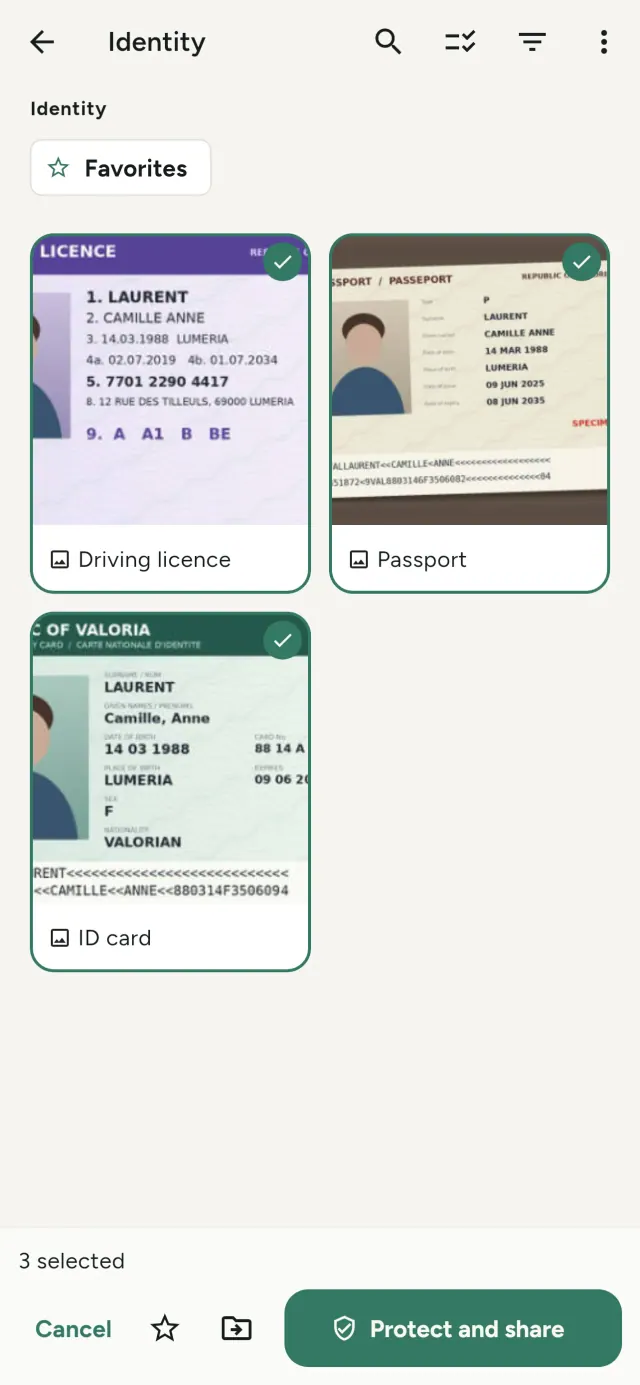
- Yan ìwé kan tàbí ọ̀pọ̀ (láti inú folda rẹ tàbí atokọ iṣẹ́), tẹ Protect and share, kọ orúkọ ẹni tí yóò gba àti ọjọ́ tí kò ṣe pàtàkì, kí o sì yan bí wọ́n ṣe fẹ́ darapọ̀ ojúewé pọ̀ sí PDF kan tàbí tii-lock pẹ̀lú ọ̀rọ̀ aṣínà AES-256.
- Rán nípasẹ̀ system share sheet: metadata tí ó farapamọ́ ni a yọ, fáìlì náà ni a tún ṣe láti píksẹ́lì, àti ẹ̀dà aládùúgbò tí ìwọ ni kò ní yípadà rárá.
Ṣe mo lè ṣe ìbuwọlu (sign) sí ìwé kan níbẹ̀?
Bẹ́ẹ̀ni. Ṣí àwòrán tàbí PDF nínú vault rẹ kí o tẹ Sign. Ya fọ́ọ̀rù ìbuwọlu tàbí gbe àwòrán wọlé (ti a ó fi pamọ́ ní ìpamọ́ nínú vault, tí ó sì lè parí ní Settings), gbe e sílẹ̀ kí o sì ṣètò ìwọn rẹ ní ọwọ́, lẹ́yìn náà dáabò bo kí o sì pín ẹ̀dà tí a ti flatten pẹ̀lú watermark àti metadata tí a ti yọ. Èyí kàn ń fi ìbuwọlu hàn lórí; kò jẹ́ ìbuwọlu ọkọ ayélujára tó ní ìtẹ́wọ́gba òfin tàbí ìdániloju ìtọ́kasí.
Ṣe mo lè sàńsẹ̀ ìwé alápẹrẹ tàbí fi ọkan kun láti app míì?
Bẹ́ẹ̀ni. Ní VaultMark o lè sàńsẹ̀ ojúewé alápẹrẹ pẹ̀lú kamẹra tàbí gbe wọlé fáìlì, àti láti app míì o lè lo Share tàbí Open with VaultMark láti dáàbò bo fáìlì lẹ́sẹkẹsẹ láì fi kun vault.
Àwọn fáìlì wo ni a ṣe atilẹyin wọn?
Àwòrán àti fáìlì PDF. Nígbà tí o bá pín, àwọn ojúewé PDF ni a yí padà sí àwọn àwòrán tí ó ní watermark (nítorí náà watermark kò le yọ), àti ọ̀pọ̀ ìwé le ní a darapọ̀ sí PDF kan tí ó lè ni aabo pẹ̀lú ọ̀rọ̀ aṣínà AES-256. Àwọn fáìlì tó pọ̀ gan-an ni a kọ (to 60 ojúewé ati 80 megapixels).
Ṣe mo lè wá ọrọ̀ inú ìwé tí a sàńsẹ̀?
Bẹ́ẹ̀ni. Ṣí ìwé kan kí o bẹrẹ ìmọ̀ràn ọrọ̀ (OCR) ní ìbéèrè. Ó dá PDF tuntun tí a ti ṣìfọ́ọ̀nù tí ó lè wá àti kì í ṣe àtúnṣe asọye ìbẹ̀rẹ̀ rẹ. Ìmòye naa n ṣiṣẹ́ lórí fóònù rẹ (ọrọ̀ Latin tí a tẹ), kò sí ohun tí a fi ranṣẹ́ sí olupin àti kò sí ohun tí a mọ́lẹ̀ ayafi tí ìwọ bá bẹ̀rẹ̀ rẹ.
Ṣe watermark yóò da mí dúró patapata?
Ó dín ìmíjàgbẹ̀jẹ́ lórí lilo àìtọ́ àti fi hàn ibiti ẹ̀dà ti wá, ṣùgbọ́n kò le dá ẹni tí ó ti ní fáìlì náà dúró kíkosílẹ̀ rẹ. Má pín ìwé ayélujára bíi pé káwọn èèyàn tí o gbẹ́kẹ̀lé nìkan.
Kí nìdí tí mi ò fi lè ya sikirinisọ́ọ̀tì?
Lórí Android, ya sikirinisọ́ọ̀tì àti gbigbasilẹ iboju ni a dina lára app láti dabobo ìwé rẹ.
Àwọn èdè wo ni ó wà?
Àwọn èdè 75: English, French, German, Spanish, Italian, Portuguese, Arabic, Chinese (simplified and traditional), Japanese, Korean, Hindi, Russian àti púpọ̀ síi. App n tọ́pa èdè fóònù rẹ àti o lè yí i padà ní Settings. Ìtumọ̀ ti àwọn èdè tuntun ni a ṣe pẹ̀lú iranwọ́ ẹrọ ká àti a túntúnṣe pẹ̀lú esi rẹ.
Tíìlẹ́ṣẹ́ agbára
VaultMark wà lórí owó ọfẹ́, kò sí ipolówó. Bí ó bá wúlò fún ọ, o lè ṣèrànwọ́ sí ìdàgbàsókè rẹ (aṣàyàn):
Buy Me a CoffeeExpense tracker and family budget planner. Free phone sync, no account.
Tun wá láti ọdọ PixeonMetadata CleanerKà, ṣe àtúnṣe tàbí yọ metadata fọto (GPS, ọjọ) lórí fónú rẹ ní ààbò.
Tun wá láti ọdọ PixeonLittle RelayBreastfeeding, sleep and starting solids tracker. No account, works offline.
Tun wá láti ọdọ PixeonMenuloopMeal planner and grocery list for the week. Recipes with photos, offline.
Tun wá láti ọdọ PixeonIndie OfficeQuote maker and self-employed invoices. Offline, no account, no ads.
Tun wá láti ọdọ PixeonFanionDiscover and share local events, concerts, markets and weekend outings nearby