VaultMark: د اسنادو خزانه
د اسنادو کوډ شوې خزانه. اسناد واټرمارک کړئ او له شریکولو مخکې مېټاډاټا لرې کړئ.
وړیا. اعلانونه نشته. ګډون نشته.

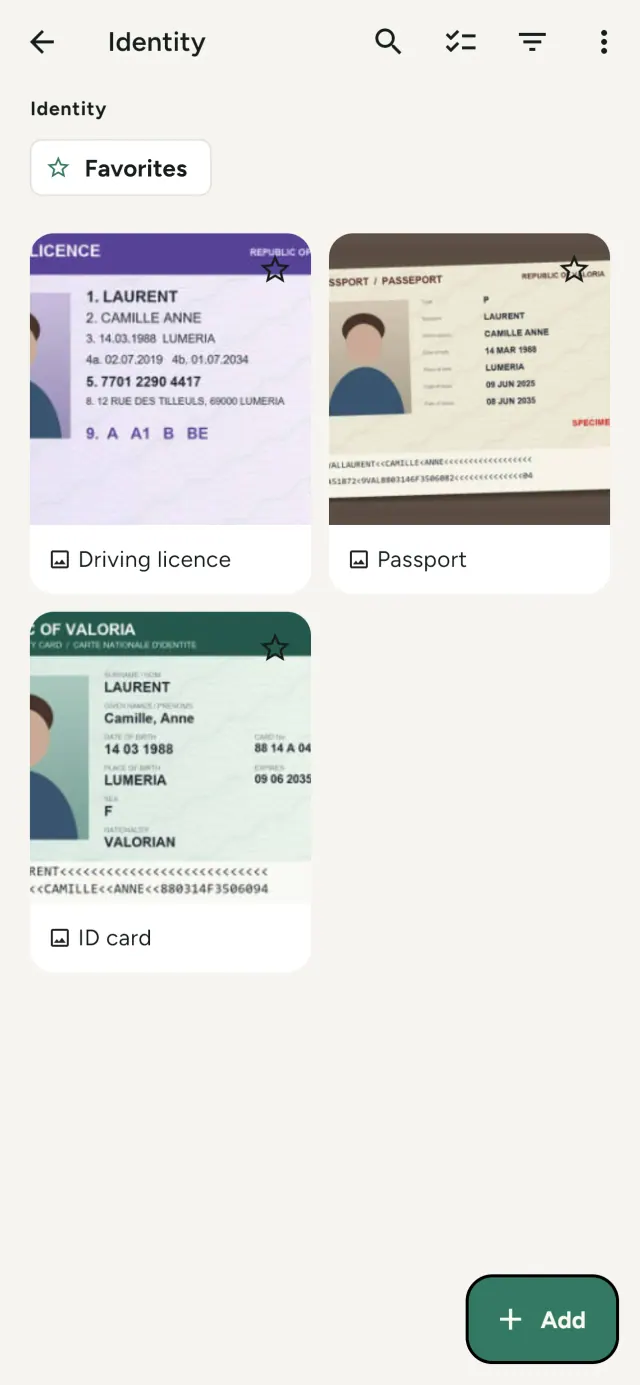
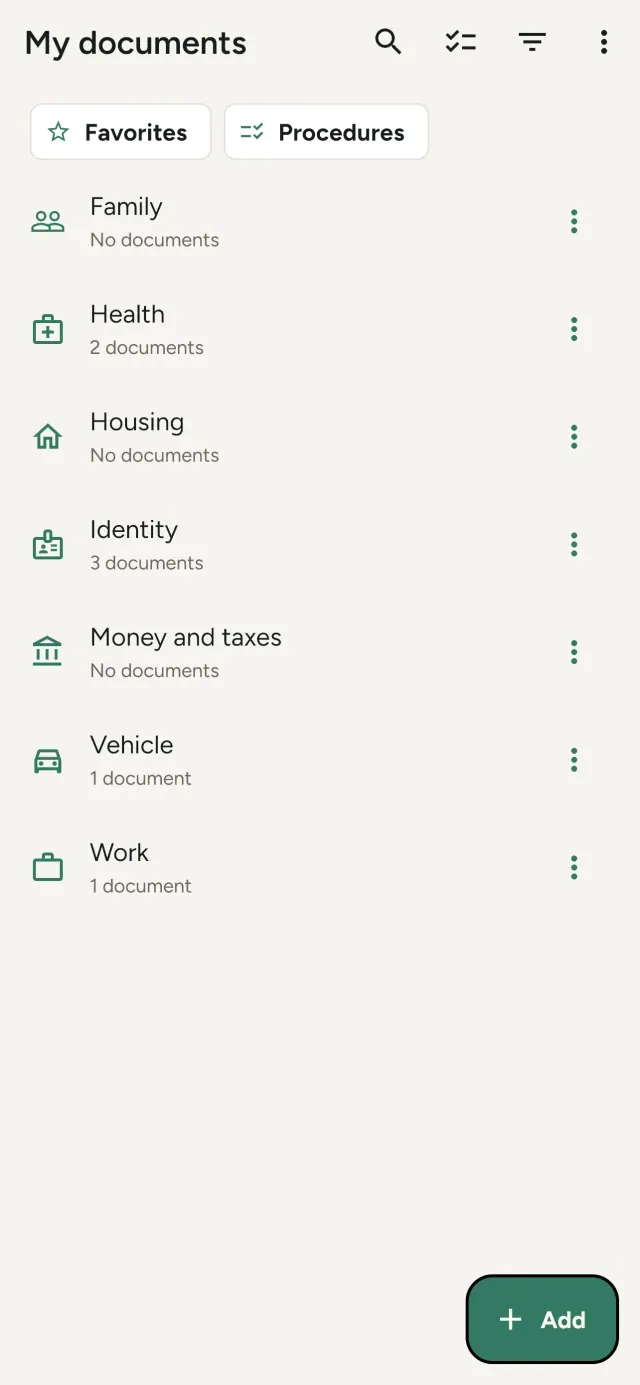
خپل پېژندپاڼه، قراردادونه، معاش پاڼې او طبي اسناد له لېږلو مخکې خوندي کړئ او په خپل تلیفون کې یې په کوډ شوې خزانه کې قلف کړئ.
VaultMark یوه شخصي د اسنادو خزانه ده. هر څه ستاسو په وسیله کې پاتې کېږي: حساب نه غواړي، کلاوډ نه لري، اعلانونه او څارنه نه لري، او ورځنی استعمال شبکې ته اړتیا نه لري.
VaultMark څه کوي
اسناد سکن، واټرمارک او له لېږلو مخکې خوندي کړئ
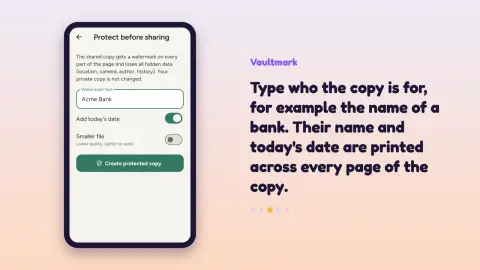
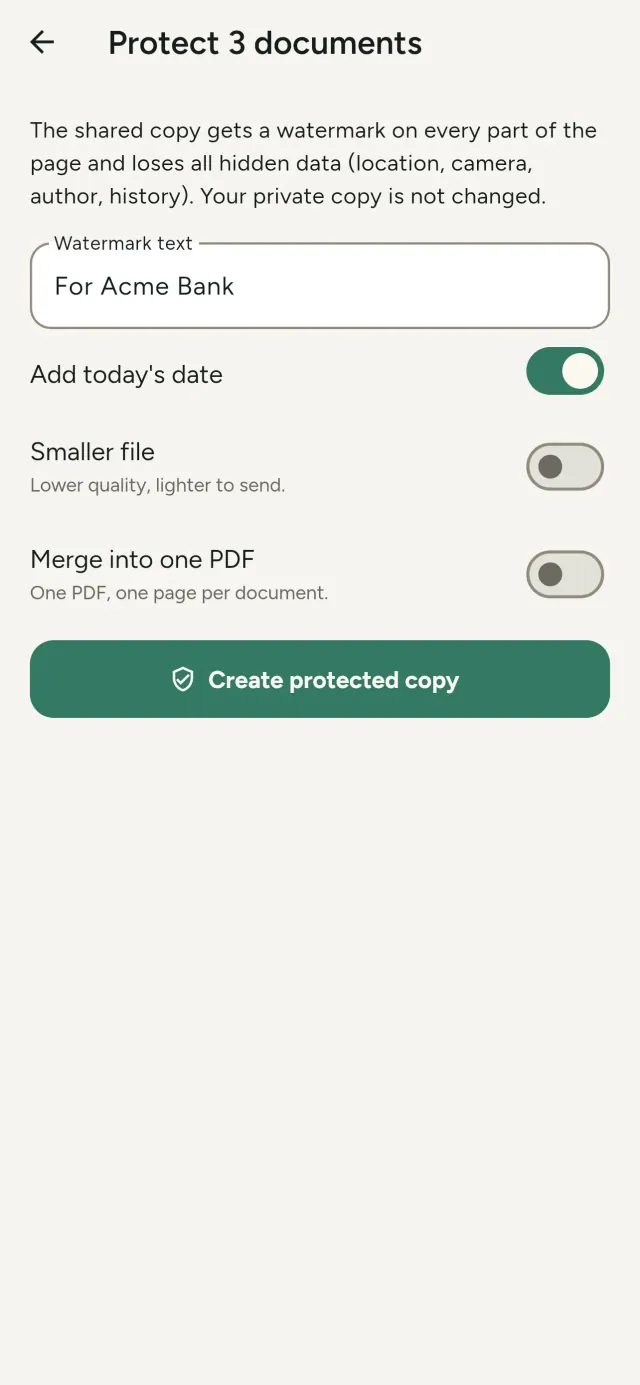
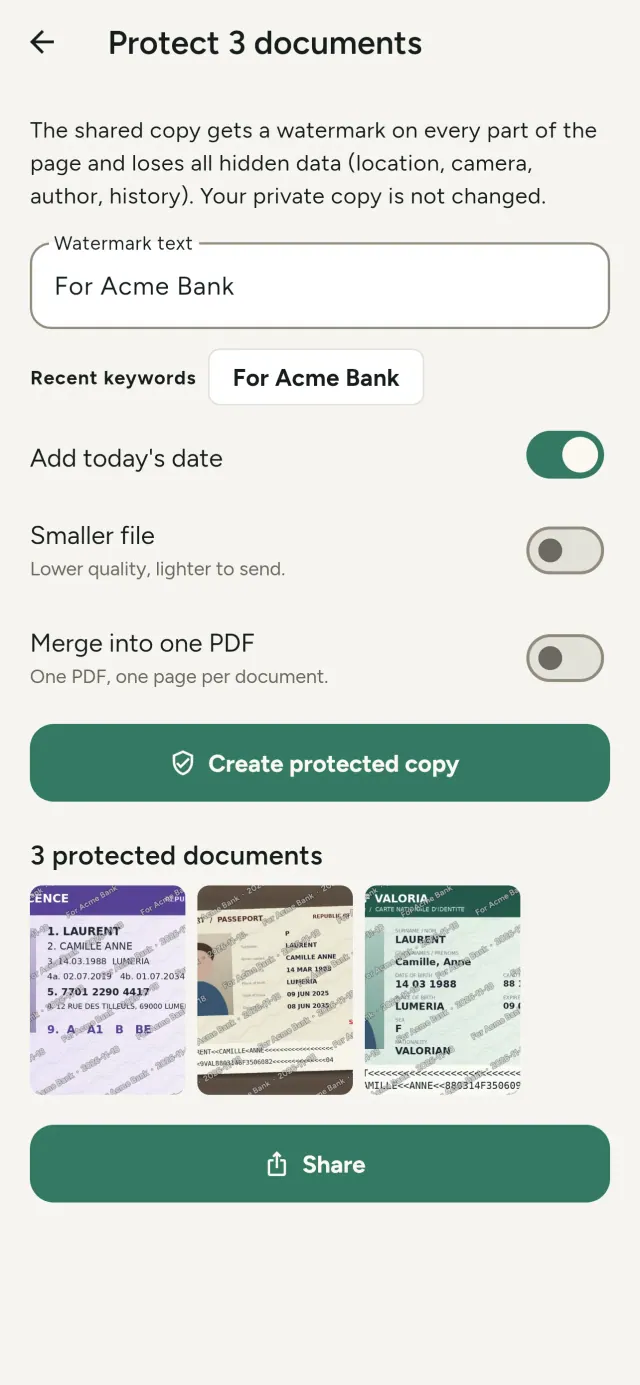
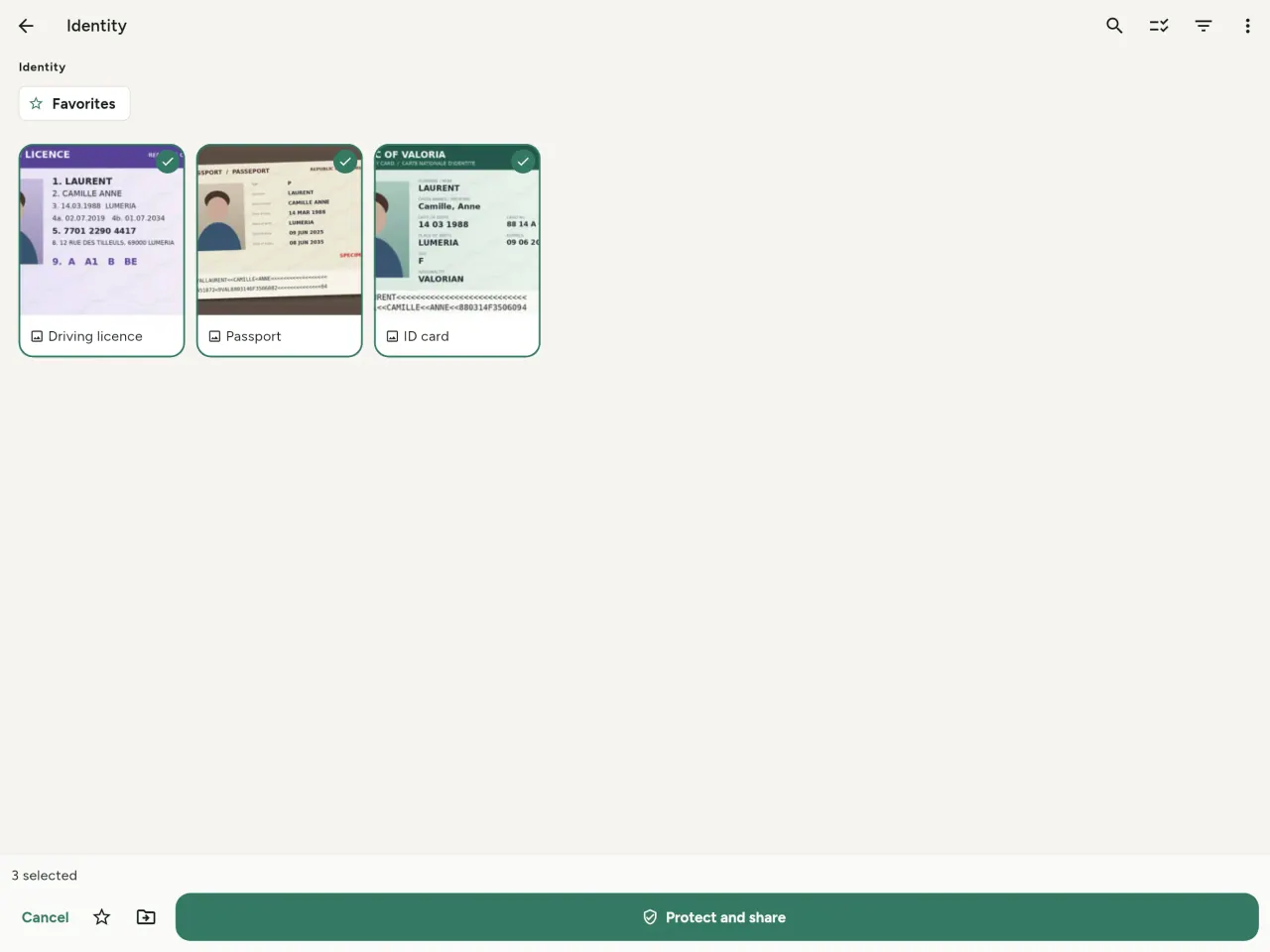
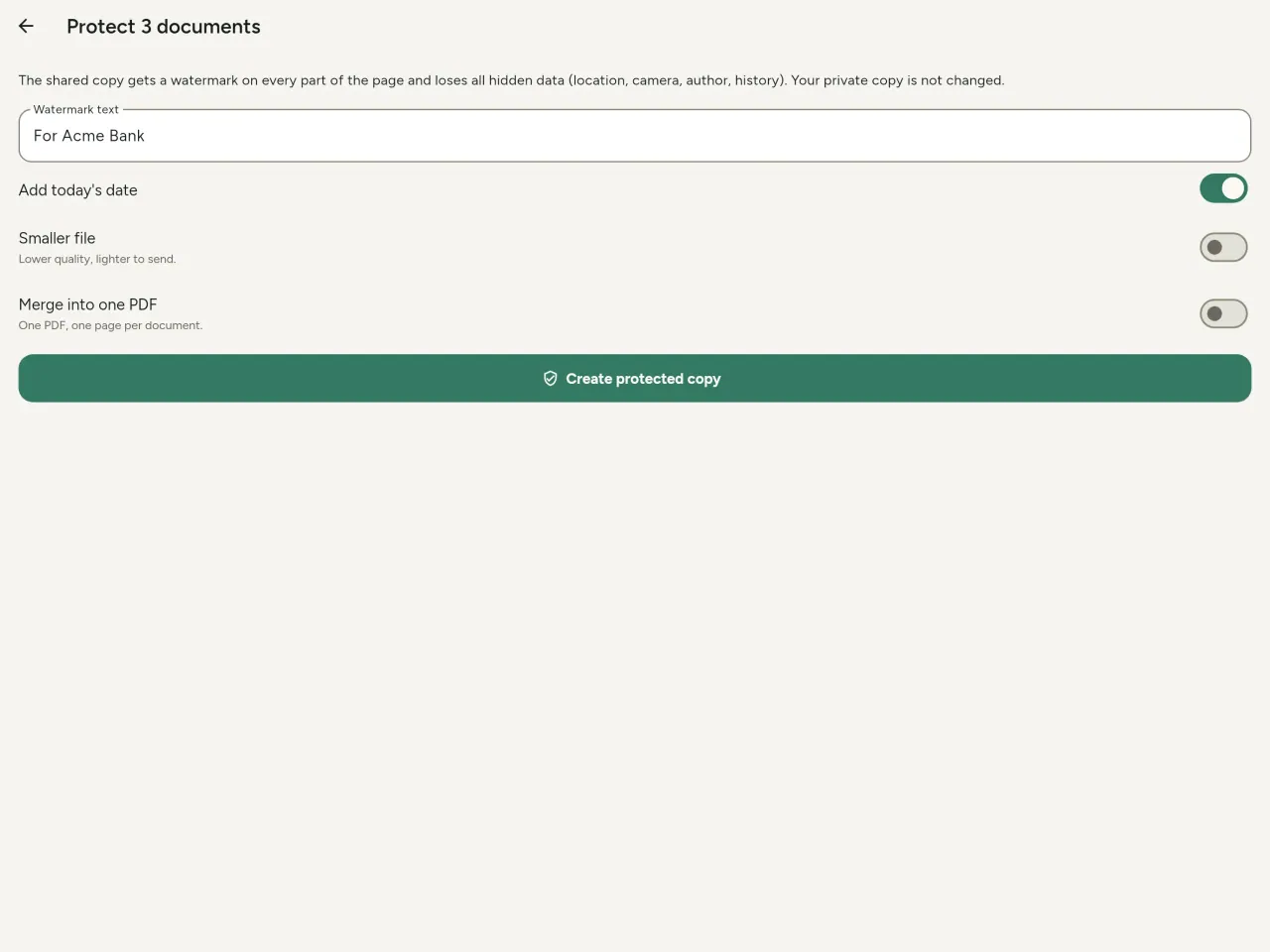
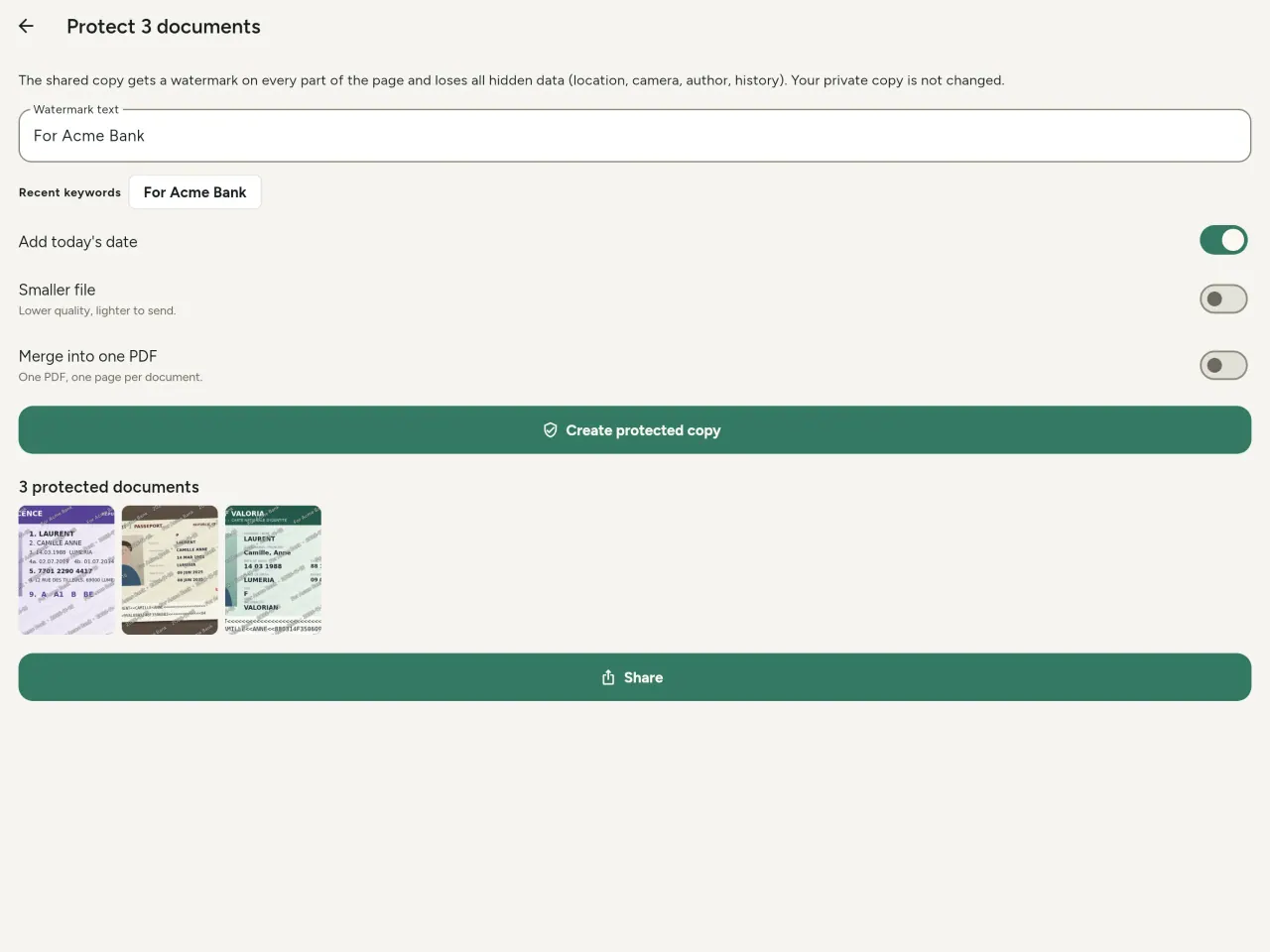
پر مېز کاغذ لرئ؟ له خپلې کمرې یې سکن کړئ، یا په خپل تلیفون کې موجود PDF یا انځور وټاکئ. VaultMark په ټوله پاڼه کې ستاسو ټاکل شوی متن (د بېلګې په توګه "د بېلګې بانک لپاره، د پور غوښتنلیک") او د نن ورځې نېټه د واټرمارک په توګه ږدي، بیا ټول پټ معلومات لرې کوي: ځای، د وسیلې ماډل، لیکوال او د سمون تاریخچه. دا د پېژندپاڼې، د استوګنې د ثبوت یا معاش پاڼې پر کاپي وکاروئ، څو کاپي د بل کار لپاره بیا ونه کارول شي. له فایل لېږلو مخکې د مېټاډاټا لرې کولو تر ټولو چټکه لار ده.
شریک شوی فایل له پیکسلونو څخه بیا جوړېږي: واټرمارک نه شي جلا کېدای او مېټاډاټا له منځه ځي. څو اسناد لېږئ؟ په یوه PDF کې یې سره یوځای کړئ او که غواړئ د AES-256 پټنوم پرې ولګوئ. ستاسو شخصي کاپي هېڅکله نه بدلېږي.
د هر سند لپاره کړنلارې او خوندي پوښۍ
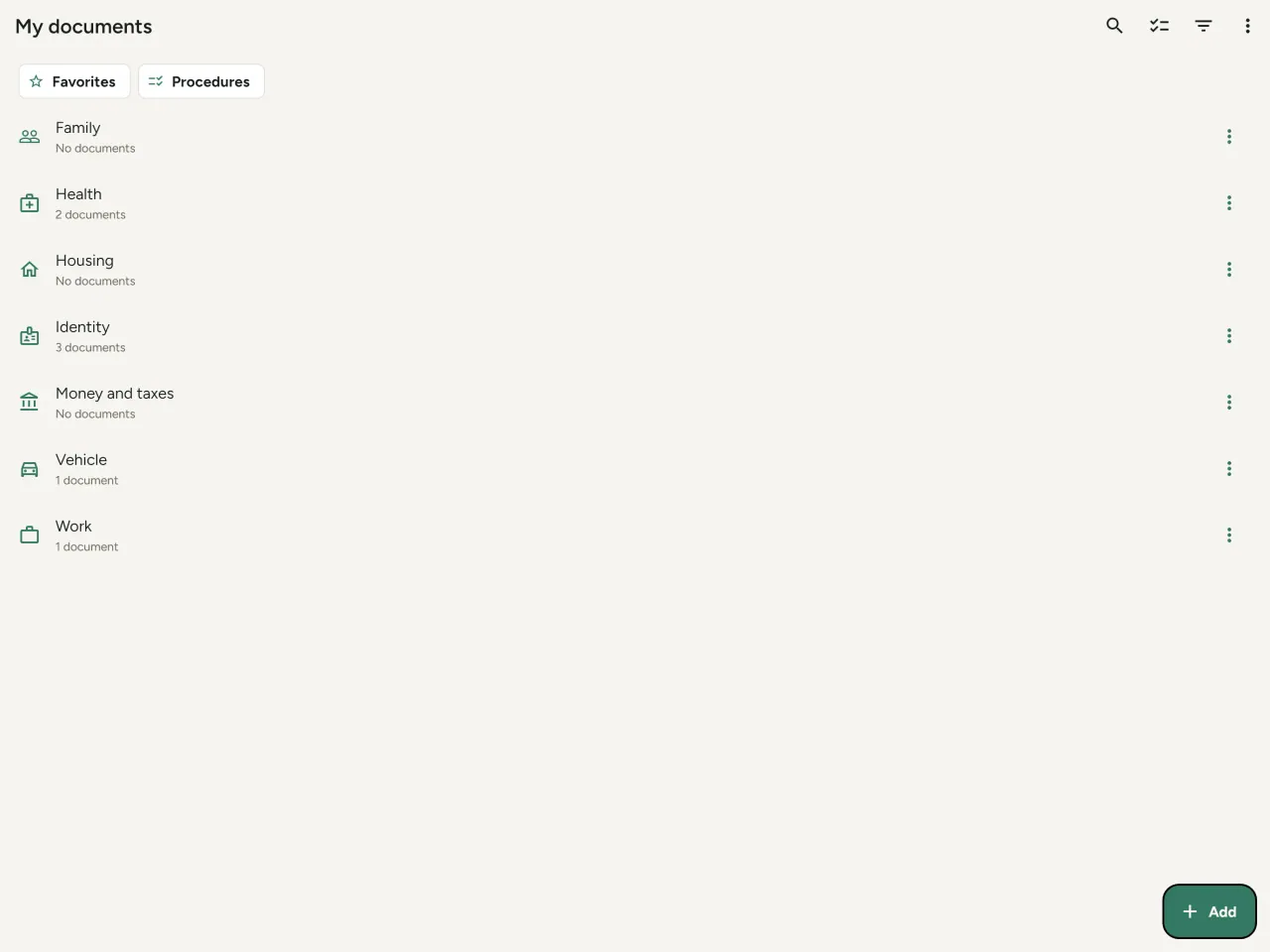
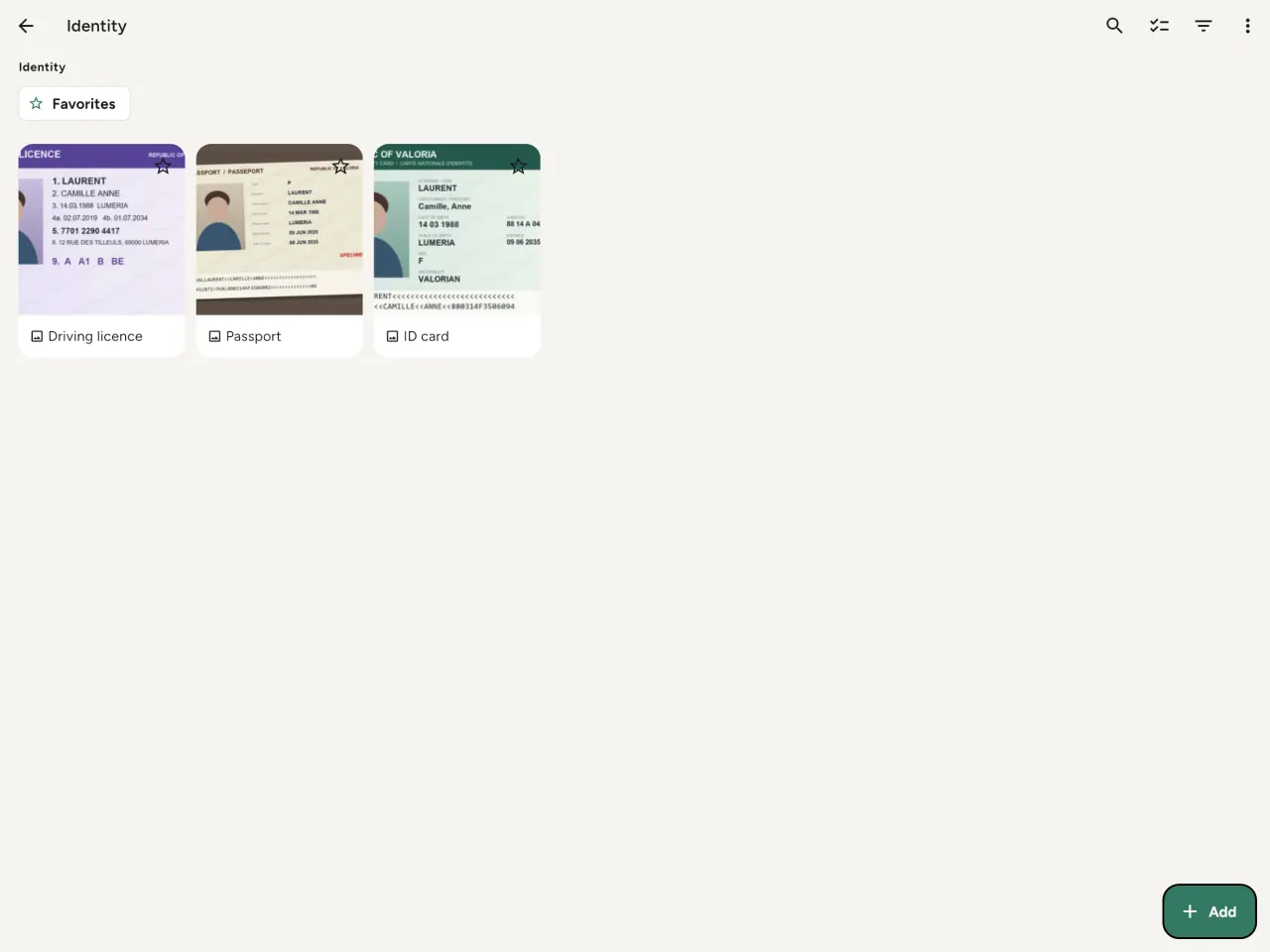
عام کارونه د جوړو شوو کړنلارو له چکلېستونو سره چمتو کړئ (کور، کار، بانک، سفر)، له خپلې خزانې اسناد ورسره ونښلوئ، او ټوله مجموعه په یوه ځل خوندي او شریکه کړئ. هر څه په چمتو پوښیو (هویت، کور، روغتیا، پیسې او مالیات، کار، موټر، کورنۍ) یا خپله جوړه شوې ونې کې تنظیم کړئ، د نښانونو، خوښو او فوري لټون سره.
له نورو اپونو څخه شریکول
PDF یا انځور مو ترلاسه کړی؟ Share یا Open with وکاروئ، VaultMark وټاکئ، او سمدستي یې خوندي کړئ، حتا که خزانې ته یې نه ورزیاتوئ.
خپل اسناد لاسلیک او ولټوئ
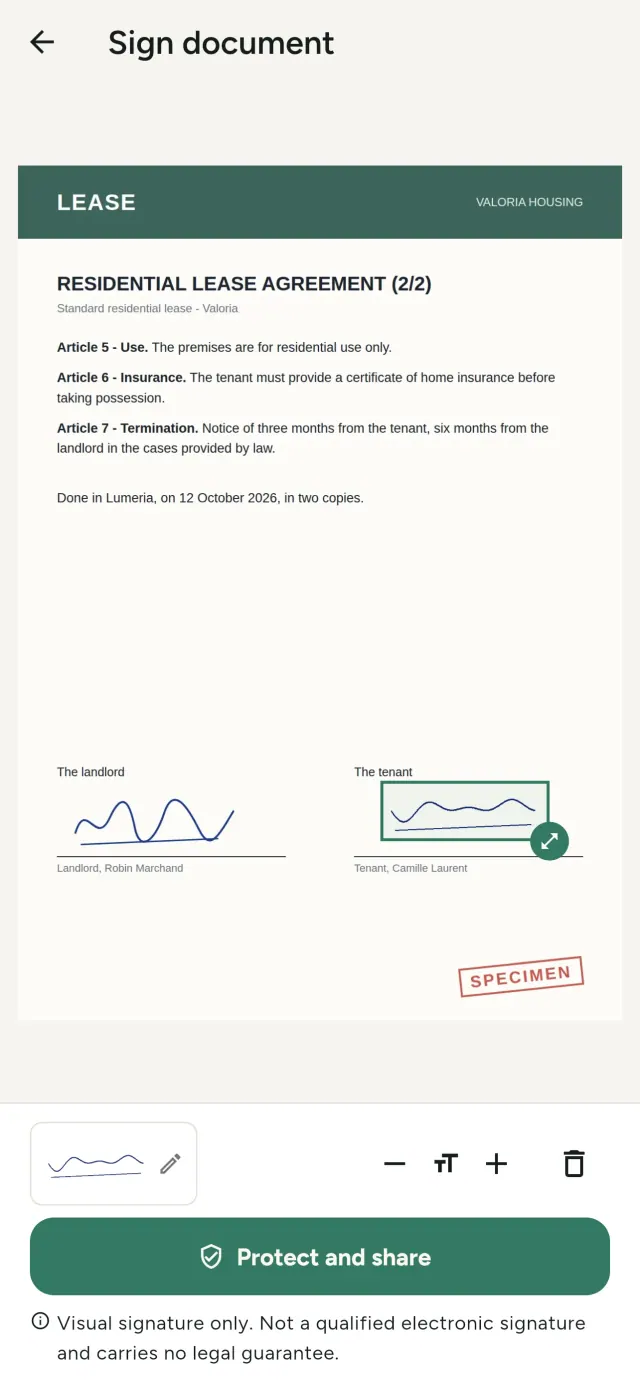
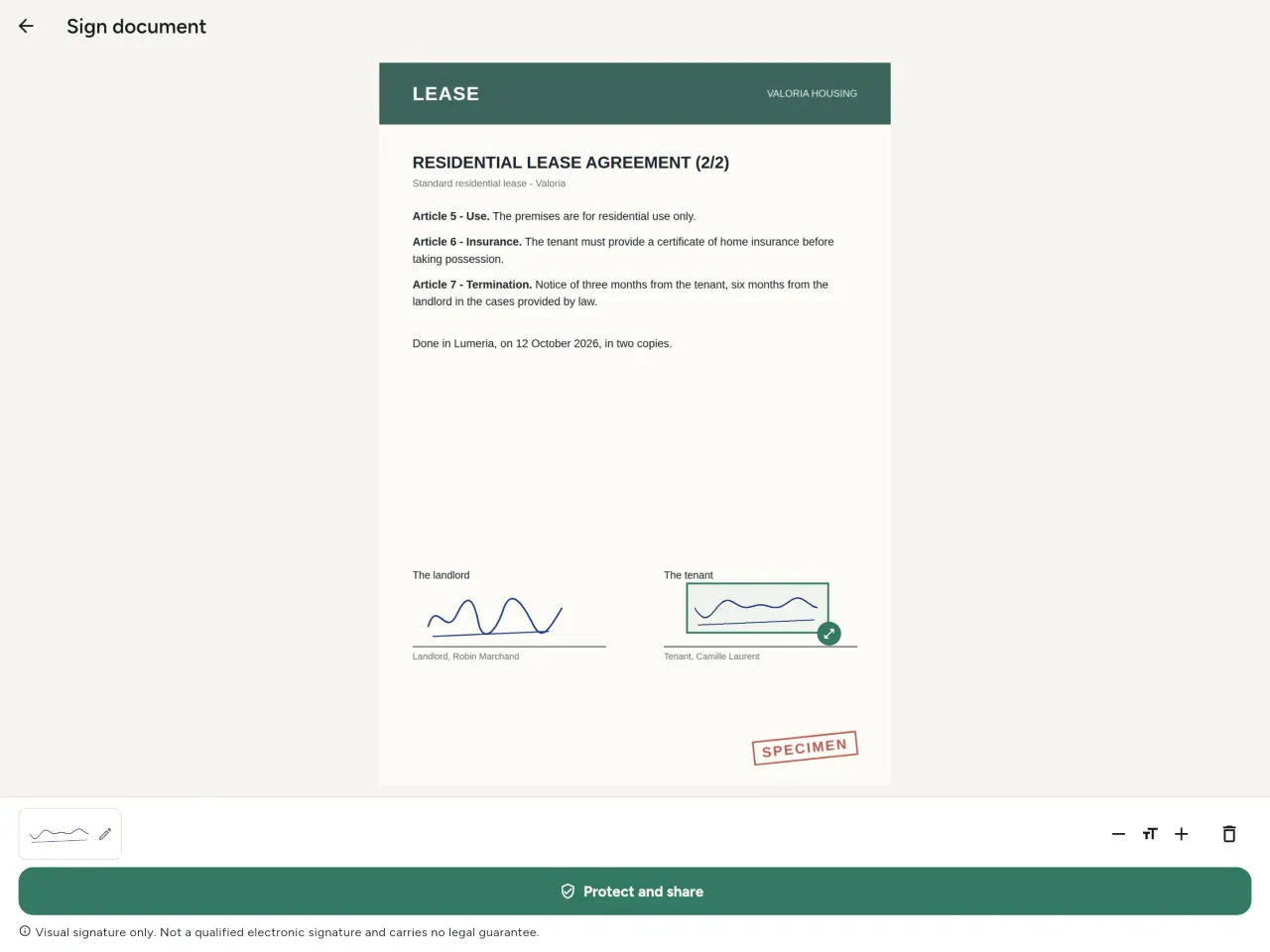
خپل لاسلیک رسم کړئ یا یو انځور وارد کړئ، بیا یې د PDF پر پاڼه یا د سند په سکن شوي انځور کې، هماغه پر خپل تلیفون، کېږدئ. ستاسو ساتل شوی لاسلیک په خزانه کې کوډ شوی ساتل کېږي، او هغه کاپي چې شریکوئ فلیټ، واټرمارک شوې او له مېټاډاټا پاکه وي (یوازې بصري لاسلیک، قانوني ارزښت نه لري). د سکن لټون ته اړتیا لرئ؟ د غوښتنې پر مهال OCR وچلوئ څو د لټون وړ PDF جوړ شي؛ پروسس ستاسو په تلیفون کې کېږي او هېڅ ځای ته نه لېږل کېږي. اپ په 75 ژبو کې شته.
له ډیزاین څخه خوندي
ښه ده چې پوه شئ: د هېر شوي کوډ د بېرته ترلاسه کولو لاره نشته، په قصدي ډول. د هر سند اصلي یوه کاپي بل ځای وساتئ. واټرمارک ناوړه استعمال کموي، خو هغه څوک نه شي درولای چې فایل یې لا دمخه په لاس کې وي.
PDF فایلونه او انځورونه ملاتړ کېږي. د PDF پاڼې واټرمارک شوو انځورونو ته اړول کېږي، نو متن یې بیا نه شي ټاکل کېدای.
- AES-256-GCM کوډګري، کیلي ستاسو د تلیفون په خوندي زېرمه کې ساتل کېږي
- د ګوتې نښې یا مخ له لارې پرانیستل، د بدیل په توګه ۶ عددي کوډ
- کله چې له اپ څخه ووځئ، خزانه خپله قلفېږي، نو هېڅ شی پرانیستی نه پاتې کېږي
- د کوډ شوې بیکاپ فایل (.vmbk) چې په خپل پټنوم خوندي دی
- د وسیلې د بدلولو پر مهال د QR code له لارې له پای څخه تر پای کوډ شوی د تلیفون-تر-تلیفون لېږد؛ ورځنی استعمال په خوندي خزانه کې آفلاین پاتې کېږي
د VaultMark لارښودونه
دا د چا لپاره ده
- هر څوک چې باید د پیژندپاڼې یا د پته تصدیق یا تنخوا پاڼه واستوي (کور کرایه، بانک، کار ورکونکی، اداره).
- هغوی چې له ډیټا لیک ستړي شوي او غواړي د شخصي معلوماتو کنټرول بیرته واخلي او خوندي یې وساتي کله چې مجبوره شي شریک یې کړي.
- هغوی چې غواړي تړونونه، طبي اسناد او نور مهم اسناد رمز کړي توګه پر موبایل وساتي.
- هغوی چې PDF یا عکس ترلاسه کړي او غواړي ژر یې خوندي کړي، پرته له دې چې والټ ته یې زیات کړي.
ولې VaultMark غوره کړئ
- شخصي اسناد هغه دي چې هویت غلو ته اړتیا ده تر څو پور واخلي، تړون ته لاسلیک کړي یا ستاسو پر نوم کرایه واخلي. د پیژندپاڼې یا تنخوا پاڼې نقل چې بې خوندیتوب واستول شي، ډېر وروسته بله چاره کې بیا کاریدلای شي. VaultMark د ټولې پاڼې اوبو نښه (watermark) د اخیستونکي او نیټې سره لګوي (لکه "For Example Bank, rental application, 2026-10-05"), نو لیک شوې نقل بله چاره نشي کېدای او تعقیبولای شي.
- شریک شوی فایل بیا د پکسلونو نه جوړېږي: اوبو نښه نشي شلولای او پټ میټاډیټا (ځای، لیکوال، د ایډیټ تاریخچه) ورک دي. ستاسو شخصي کاپي هیڅکله نه بدلیږي.
- AES-256-GCM رمزونه، کلیدي د موبایل خوندي ذخیره کې ساتل کېږي. حساب نشته، کلاوډ نشته، تعقیب نشته.
اپلیکیشن څه لا نه کوي
- کلاوډ ذخیره یا د وسایلو ترمنځ همغږي لا نشته: والټ یوازې په موبایل کې ژوندي دی.
- اوبو نښه نقل ګرانه کوي او تعقیبول یې اسانه کوي. دا نشي کولای مقابل لوری چې تاسو فایل ورکړی، له نقل ساتنې منعه کړي.
د Pixeon اصل. د Pixeon اپلیکیشنونه لومړی ځايي دي: حساب نشته، تعقیب نشته، او ستاسو معلومات په ټاکلي ډول ستاسو په موبایل کې پاتې کیږي. که اپلیکیشن کله شبکه ته ونښلي، دا یواځې هغه وخت وي چې ځانګړې بڼه فعاله کړئ او د اپلیکیشن د محرمیت پالیسۍ تازه کول به د وړاندې کولو وړاندې وشي.
VaultMark په عمل کې وګورئ.
VaultMark ترلاسه کړئ.
په آیفون او اندروید کې وړیا.
Privacy policy
لاندې متن په انګلیسي دی. هماغه نسخه غوره ګڼل کېږي.
Last updated: 2026-11-19
VaultMark stores your personal documents on your phone and adds a watermark to a copy before you share it. Your documents stay encrypted on your phone by default, and we collect no personal data, analytics, or tracking information.
What the app handles
Images and PDF files that you add yourself (from your files, or sent to the app from another app). They are encrypted with AES-256-GCM and stored in the app's private storage on your phone. The encryption key is kept in the secure storage of your phone (Android Keystore, iOS Keychain). There is no account, no permanent server storage and no cloud backup.
When you create a protected copy, the app redraws the image or the PDF pages with a watermark (the text you type and, if you choose, today's date) and writes a new file without hidden data (location, camera model, author, history). That file is handed to the app you pick in the system share sheet. Your private copy is never modified.
You can also scan a paper document with the camera. On Android the scan is done by Google's document scanner, which runs on your phone through Google Play services; on iOS it is done by the system scanner. The pages come back to the app and are encrypted like any other document. The scanner's own copies are deleted.
Favourites, tags, checklists for a procedure (the documents to gather, with the ones you attach), an optional saved signature (drawn or imported from an image, deletable in Settings) and backup files are kept inside the app, encrypted with your documents. When you sign a document, you place the signature manually on a page and share a flattened, watermarked, metadata-free copy without modifying your private original. Signing adds a visual image signature only, with no qualified electronic signature or legal guarantee.
You can also ask the app to recognise the text of a document (OCR). Nothing is recognised unless you start it. Printed Latin text is processed on your phone, with a bundled model on Android or Apple Vision on iOS: no image or text is sent to a server and no model is downloaded. The result is a new encrypted searchable PDF, your private original is not modified, and recognition stops if you cancel, leave the app or lock the vault.
What we collect and network use
We collect no analytics, no advertising identifier, no crash reporting and no third-party tracking SDK. All everyday features (storing, viewing, scanning, watermarking and local backup export or import) work without any internet connection. Network access is used only when you initiate one of these actions:
Transfer to another phone: when you choose to send or receive documents in
Settings, encrypted chunks transit ephemerally through our relay
(https://relay.pixeon.net, hosted on Cloudflare Workers and Durable Objects). The
archive is end-to-end encrypted on your device before upload using an ephemeral key carried only in
the one-time QR code, which the relay never sees. Temporary channel data is deleted when the
transfer finishes or is cancelled, or expires automatically (at most 90 days if abandoned).
Optional tips: optional tip purchases processed by Apple or Google Play (see Optional support), or opening our external support page in your browser on direct APK builds.
Permissions
Biometrics (fingerprint or face): only to unlock the vault, if you turn it on. The biometric data is handled by your phone's system; the app only receives a yes or no. Your 6-digit code always remains available.
Camera (iOS only): asked when you scan a paper document or scan a QR code for phone-to-phone transfer. On Android both document scanning and QR scanning run through Google Play services without declaring camera permission in the app.
Internet (Android): declared and used only for user-initiated encrypted
phone-to-phone transfer via https://relay.pixeon.net. No location, contacts,
microphone or shared storage permission. Files are added through the system file picker or the
share sheet, which give the app access to the files you choose only.
Files, backups, phone transfer and deletion
The app's data is excluded from Android and iOS cloud backups on purpose. If you lose or reset the phone, the vault is lost with it, unless you made a backup file or transferred documents yourself. There is no recovery of a forgotten code: keep an original of every document elsewhere.
Backup file: in Settings you can export the whole vault to one file, encrypted with a password you choose (it is not stored and cannot be recovered). The file goes to the share sheet, so you decide where it is kept. Importing it on another phone, with the same password, restores your documents. The app sends nothing. You can also change your 6-digit code in Settings; your documents are not re-encrypted, only the wrapping of the key changes.
Transfer to another phone: in Settings you can transfer selected documents (up to
100 MiB per session) to another phone running VaultMark. The sending phone creates a fresh
random 256-bit key and a single-use 5-minute QR code, displays a 4-digit verification code that
you verify on both screens before anything is uploaded, and transfers HKDF-SHA-256 / AES-256-GCM
encrypted chunks via https://relay.pixeon.net. The relay cannot decrypt documents or
see file or folder names. Existing documents on the receiving phone with the same internal id are
never overwritten, and procedure checklists and any saved signature are omitted.
Protected copies are written to a temporary folder, handed to the share sheet, and deleted when the vault locks and at the next launch. A copy that you sent to another app is then in that app's hands.
Deleting a document in the app removes its encrypted file. Uninstalling the app removes everything.
A watermark discourages misuse and shows where a copy came from. It cannot stop someone who already has the file from sharing it. Screenshots are blocked inside the app on Android release builds.
Optional support
Tips go through in-app purchase, processed by Apple on iOS and by Google Play on Android, under their own terms and privacy policy (the app only learns that a purchase succeeded). Versions installed outside Google Play may instead show a button that opens an external donation page in your browser; nothing from the app is sent to it. A tip unlocks nothing. A small reminder may appear after you have used the app a few times; it stays away for a while once you close it. The app is free and every feature works without tipping.
Contact form on this website
If you write to us through this site, we use your message and the email address you optionally give only to reply. Bot protection is provided by Cloudflare and email delivery by Resend.
Language choice on this website
When you choose a language, or when this site opens a page in your browser's language, it stores
one small functional cookie (pxl, a language code, one year) so that your choice is
remembered. If this site suggests a page in your browser's language and you close that suggestion,
your browser also keeps a local note (pxl-banner-off, in local storage, 30 days) so the
suggestion does not come back. Neither identifies anyone, neither is used for tracking or advertising,
and neither is shared. You can delete them in your browser at any time.
Website statistics
This website uses Cloudflare Web Analytics to count visits (pages viewed, country, browser type, loading speed). It sets no cookie, does not use local storage, does not fingerprint your device, does not follow you across sites and does not build a profile of you. Search engines (for example Google Search Console) give us aggregated search statistics, without any data about individual visitors. Our own web server also counts the pages it serves: for each page it keeps the page address, the site or social network that sent you (only its name, or the campaign tag written in the link), the country, the type of device and whether the request came from a robot. It keeps no IP address, no identifier and no cookie, and these counts are anonymous. We use no advertising or other analytics service. None of this concerns the app itself, which collects nothing.
Children
The app is a general-purpose tool and is not directed at children.
Changes
An updated policy will be published at this URL with a new date above.
Contact
Questions about privacy: vaultmark-contact@pixeon.net
ملاتړ
وروستی تازه کول: 2026-11-19
VaultMark یوه کوچنۍ خپلواکه اپلیکیشن ده. د عامو پوښتنو ځوابونه لاندې دي.
موږ هڅه کوو چې تاسو ته په څو ورځو کې ځواب ووایو. د مرستې لپاره، مهرباني وکړئ د خپل وسیله ماډل، د سیسټم نسخه او څه چې تاسو کول، ولیکئ. خپلې سندونه یا شخصي معلومات مه ارسالوئ.
ایا VaultMark رښتیا وړیا دی؟
هو. تاسو کولی شئ VaultMark وړیا ډاونلوډ او وکاروئ. هېڅ اعلانونه او ګډون نشته.
اپلیکیشن کوم معلومات ساتي یا لېږي؟
ستاسو اسناد پر تلیفون کې کوډ شوي پاتې کېږي، او ورځني کارونه له شبکې پرته هم ترسره کېږي. که په Settings کې Phone-to-phone transfer وټاکئ، کوډ شوې برخې په لنډمهال کې زموږ له relay (relay.pixeon.net) څخه تېرېږي، د داسې کیلي په کارولو چې یوازې په یو ځل کارېدونکي QR code کې ساتل شوې وي، او بیا ړنګېږي. جزئیات په privacy policy کې دي.
خپل کوډ مې هېر کړی. ایا اسناد مې بېرته ترلاسه کولی شئ؟
نه. د طرحې له مخې د بېرته ترلاسه کولو لاره نشته: هېڅوک، زموږ په ګډون، له کوډ پرته خزانه نه شي خلاصولی. له همدې امله سپارښتنه کوو چې د هر سند یوه اصلي کاپي بل ځای هم وساتئ.
تلیفون مې بدل یا ورک شوی. خزانه مې چېرته ده؟
د کلاوډ بیک اپونه قصداً غیر فعال دي. له بیا تنظیمولو یا تلیفون بدلولو مخکې په Settings، Backup کې یو کوډ شوی بیک اپ فایل (.vmbk، د خپلې پاسورډ په وسیله خوندي) صادر کړئ، یا په Settings کې Phone-to-phone transfer وکاروئ چې اسناد د QR code له لارې د پای تر پای کوډونې سره نقل کړئ.
د پېژندپاڼې پر کاپي یا سند واټرمارک څنګه زیاتولی شم؟
- د کاغذي پېژندپاڼې، په تلیفون کې د فایل یا بل اپلیکیشن څخه پیل وکړئ: هغه د کامرې په وسیله سکین کړئ (له لېږلو مخکې د ساتنې لومړی ګام)، PDF یا انځور وټاکئ، یا Share یا Open with VaultMark وکاروئ.
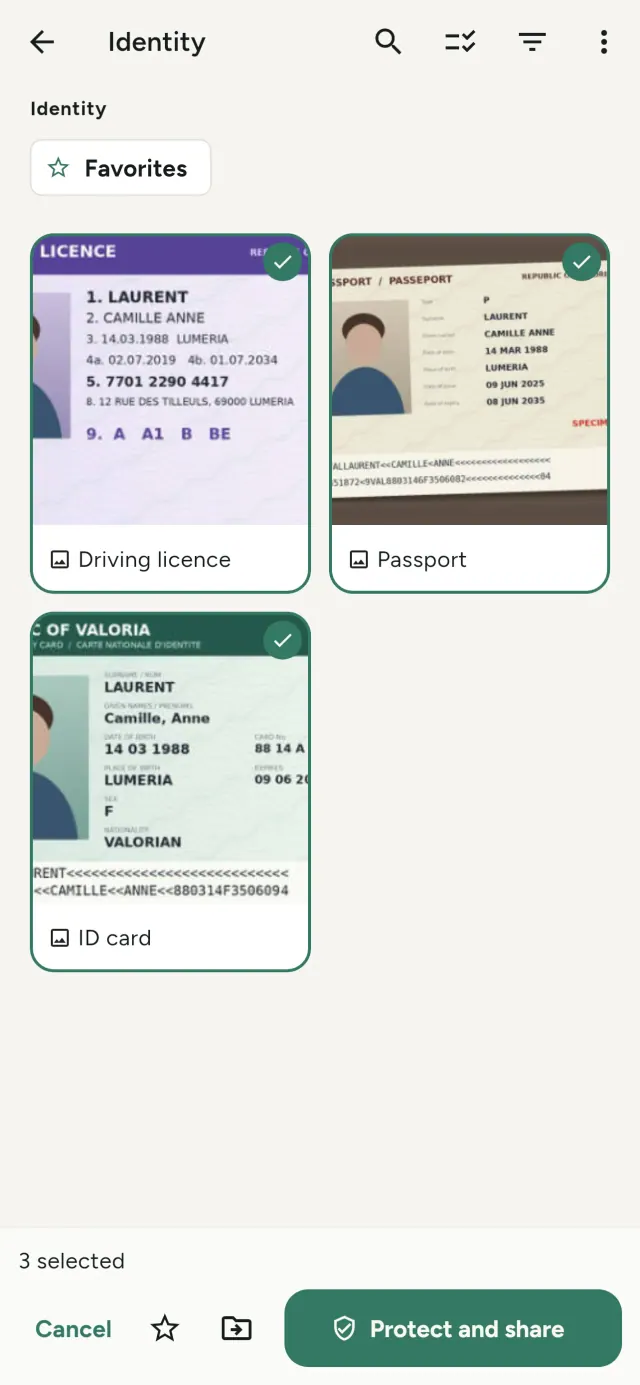
- یو یا څو اسناد وټاکئ (له خپلو فولډرونو یا د کړنلارې له چکلېست څخه)، Protect and share ټک کړئ، ترلاسه کوونکی او اختیاري نېټه ولیکئ، او وټاکئ چې پاڼې په یوه PDF کې یوځای کړئ که یې د AES-256 پاسورډ په وسیله قفل کړئ.
- د سیسټم د شریکولو له پاڼې یې ولېږئ: پټ مېټاډاټا لرې کېږي، فایل له پکسلو څخه بیا جوړېږي، او ستاسو شخصي کاپي هېڅکله نه بدلېږي.
ایا کولی شم یو سند په محلي ډول لاسلیک کړم؟
هو. په خپله خزانه کې یو انځور یا PDF پرانیزئ او Sign ټک کړئ. لاسلیک رسم کړئ یا یو انځور وارد کړئ (په خزانه کې کوډ شوی ساتل کېږي او په Settings کې حذفېدلی شي)، هغه په یوه پاڼه کې په لاس ځای پر ځای او اندازه یې بدله کړئ، بیا د واټرمارک او لرې شوو مېټاډاټا سره هواره شوې کاپي خوندي او شریکه کړئ. دا یوازې بصري لاسلیک زیاتوي، هېڅ وړ برېښنایي لاسلیک یا قانوني ضمانت نه لري.
ایا کاغذي سند سکین کولی شم یا له بل اپلیکیشن څخه یې زیاتولی شم؟
هو. په VaultMark کې دننه د کامرې په وسیله کاغذي پاڼې سکین یا فایلونه واردولی شئ، او له بل اپلیکیشن څخه Share یا Open with VaultMark کارولی شئ چې فایل سمدستي خوندي کړئ، پرته له دې چې خزانه ته یې ورزیات کړئ.
کوم فایلونه ملاتړ کېږي؟
انځورونه او PDF فایلونه. کله چې شریکوئ، د PDF پاڼې په واټرمارک لرونکو انځورونو بدلېږي (نو واټرمارک نه شي جلا کېدای)، او څو اسناد په اختیاري ډول په یوه PDF کې یوځای کېدای شي چې د AES-256 پاسورډ په وسیله خوندي وي. ډېر لوی فایلونه ردېږي (تر ۶۰ پاڼو او ۸۰ مېګاپکسلو پورې).
ایا د سکین شوي سند متن لټولی شم؟
هو. سند پرانیزئ او د غوښتنې پر مهال د متن پېژندنه (OCR) پیل کړئ. دا یو نوی، کوډ شوی او د لټون وړ PDF جوړوي او ستاسو اصلي سند بدلوي نه. پېژندنه ستاسو پر تلیفون ترسره کېږي (چاپ شوی لاتیني متن)، هېڅ شی سرور ته نه لېږل کېږي او تر هغه هېڅ پېژندل نه کېږي چې تاسو یې پیل نه کړئ.
ایا واټرمارک ما په بشپړه توګه خوندي کوي؟
دا ناوړه کارول کموي او ښيي چې کاپي له کومه راغلې، خو د هغه چا مخه نه شي نیولی چې فایل لا دمخه لري او غواړي یې شریک کړي. اسناد یوازې له باوري کسانو سره شریک کړئ.
ولې سکرینشاټ نه شم اخیستلی؟
په Android کې د اسنادو د ساتنې لپاره د اپلیکیشن دننه سکرینشاټونه او د سکرین ثبتول بند شوي دي.
کومې ژبې شته؟
۷۵ ژبې: انګلیسي، فرانسوي، جرمني، هسپانوي، ایټالوي، پرتګالي، عربي، چینایي (ساده او دودیزه)، جاپاني، کوریایي، هندي، روسي او ډېرې نورې. اپلیکیشن ستاسو د تلیفون ژبه تعقیبوي او په Settings کې یې بدلولی شئ. د نویو ژبو ژباړې د ماشین په مرسته شوې او ستاسو د نظرونو له لارې لا ښه کېږي.
د پروژې ملاتړ وکړئ
VaultMark وړیا او بې اعلانه پاتې کېږي. که تاسو ته ګټوره وي، کولای شئ ددې پرمختګ ملاتړ وکړئ (اختیاري):
Buy Me a CoffeeExpense tracker and family budget planner. Free phone sync, no account.
هم له Pixeon څخهMetadata Cleanerد عکس معلومات وګورئ، تنظیم کړئ یا پاک یې کړئ (EXIF, GPS, نیټه)
هم له Pixeon څخهLittle RelayBreastfeeding, sleep and starting solids tracker. No account, works offline.
هم له Pixeon څخهMenuloopMeal planner and grocery list for the week. Recipes with photos, offline.
هم له Pixeon څخهIndie OfficeQuote maker and self-employed invoices. Offline, no account, no ads.
هم له Pixeon څخهFanionDiscover and share local events, concerts, markets and weekend outings nearby