
VaultMark: Tahirin-taratasy
Tahirin-taratasy voaaro amin'ny fanafenana. Asio mari-drano ny taratasy, esory ny metadata alohan'ny hizarana.
Maimaim-poana. Tsy misy dokam-barotra. Tsy misy famandrihana.


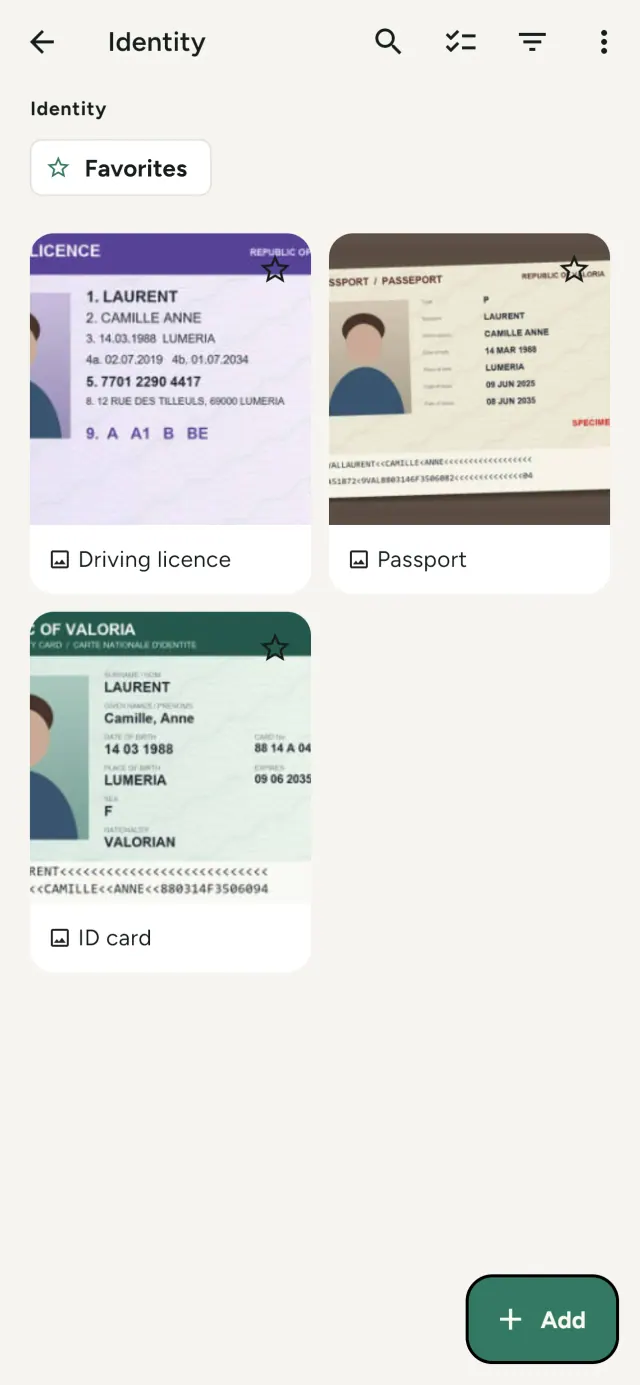
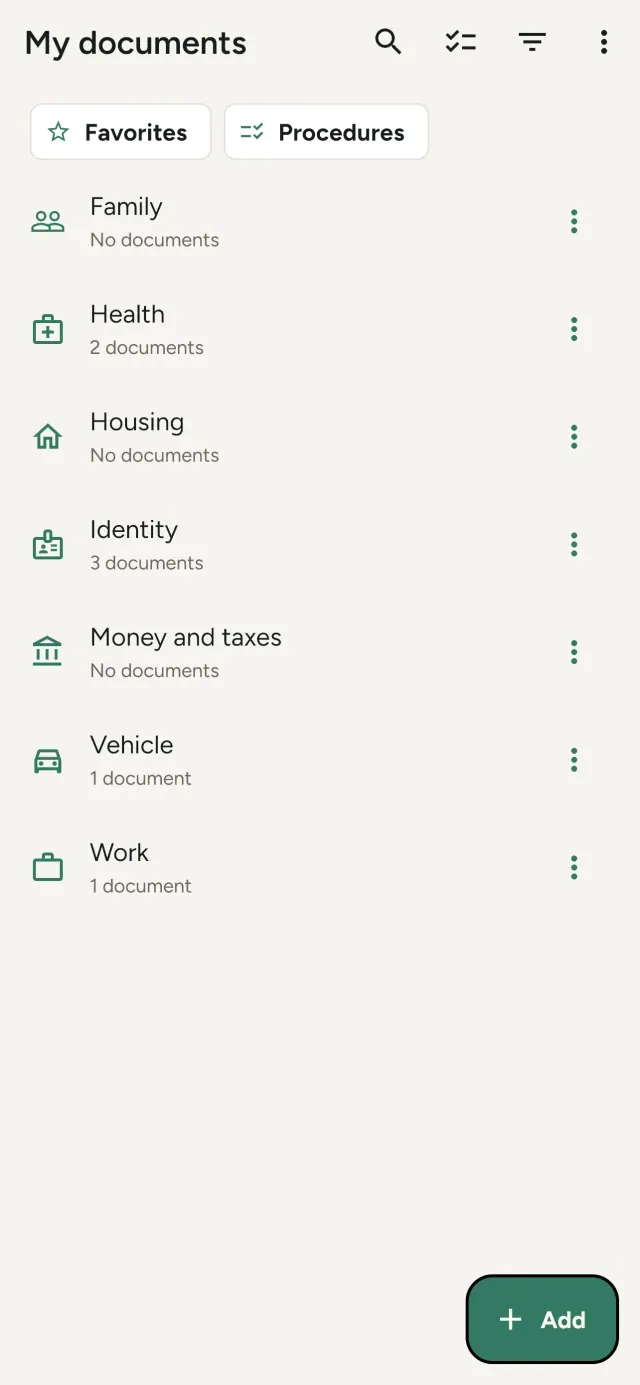
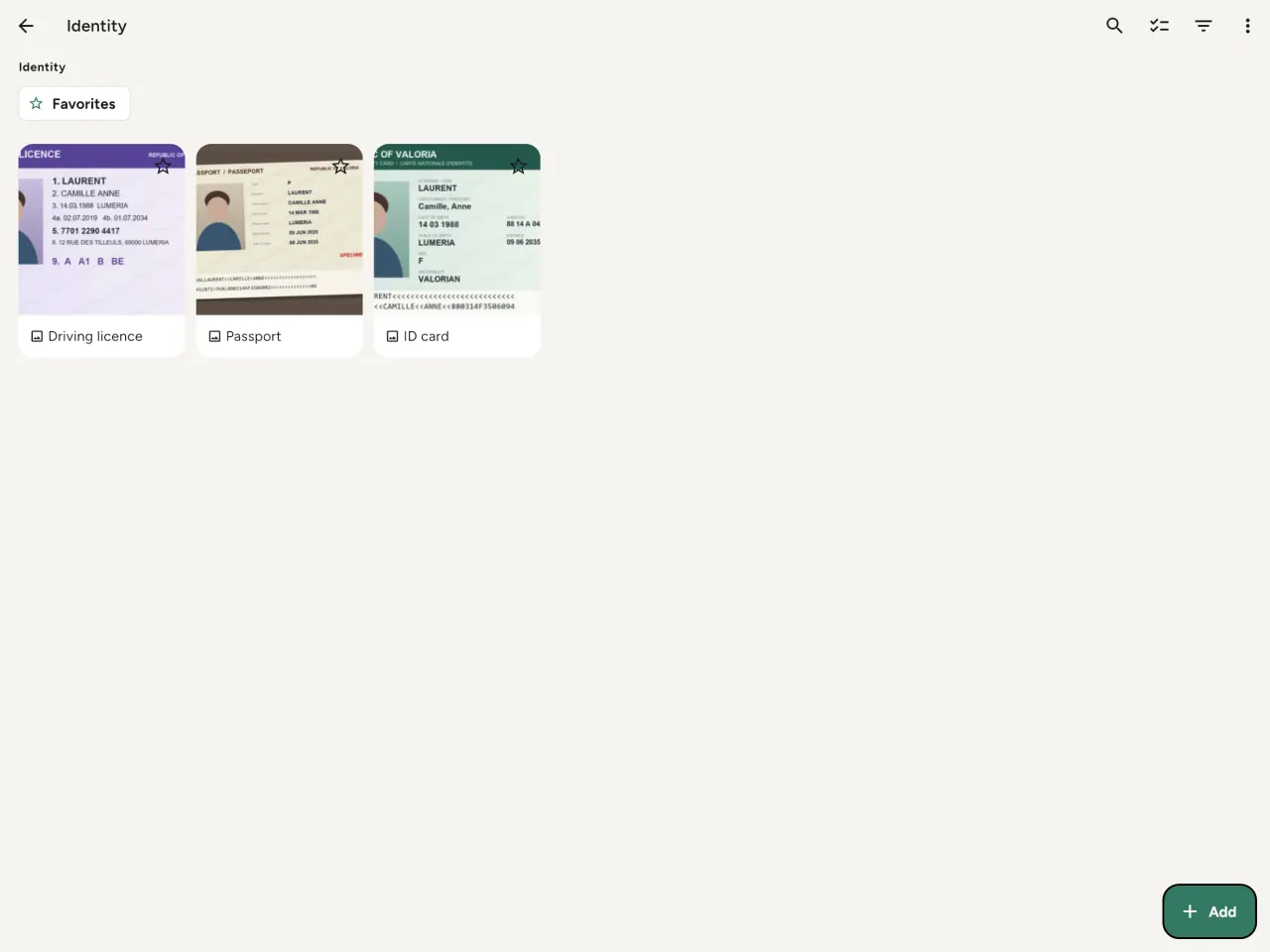
Arovy ny kara-panondronao, fifanarahana, taratasim-karama ary taratasy ara-pahasalamana alohan'ny handefasana azy, ary hidio ao anaty tahiry voaaro amin'ny fanafenana ao amin'ny findainao.
VaultMark dia tahirin-taratasy manokana. Mijanona ao amin'ny fitaovanao ny zava-drehetra: tsy misy kaonty, cloud, dokambarotra na fanarahana, ary tsy mila tambajotra ny fampiasana andavanandro.
Asa ataon'i VaultMark
Skanio, asio mari-drano ny taratasy ary arovy alohan'ny handefasana
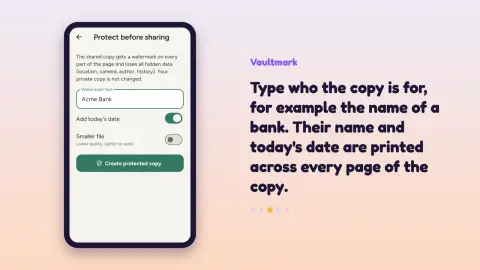
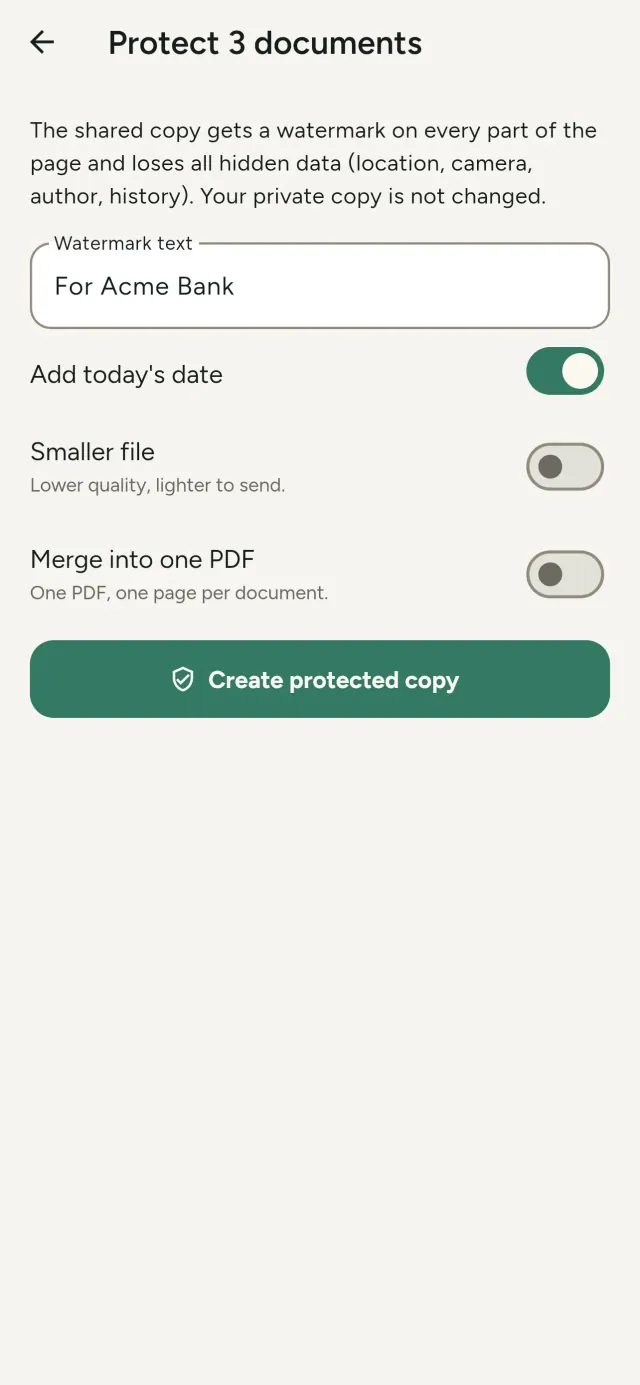
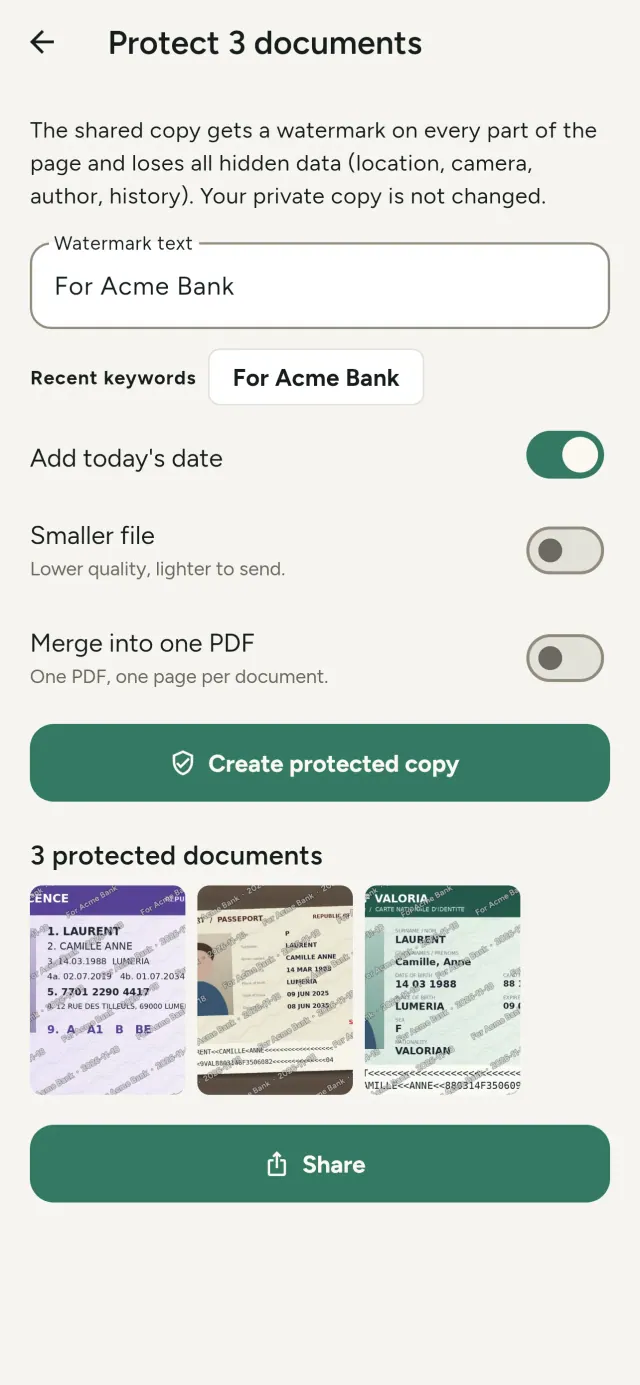
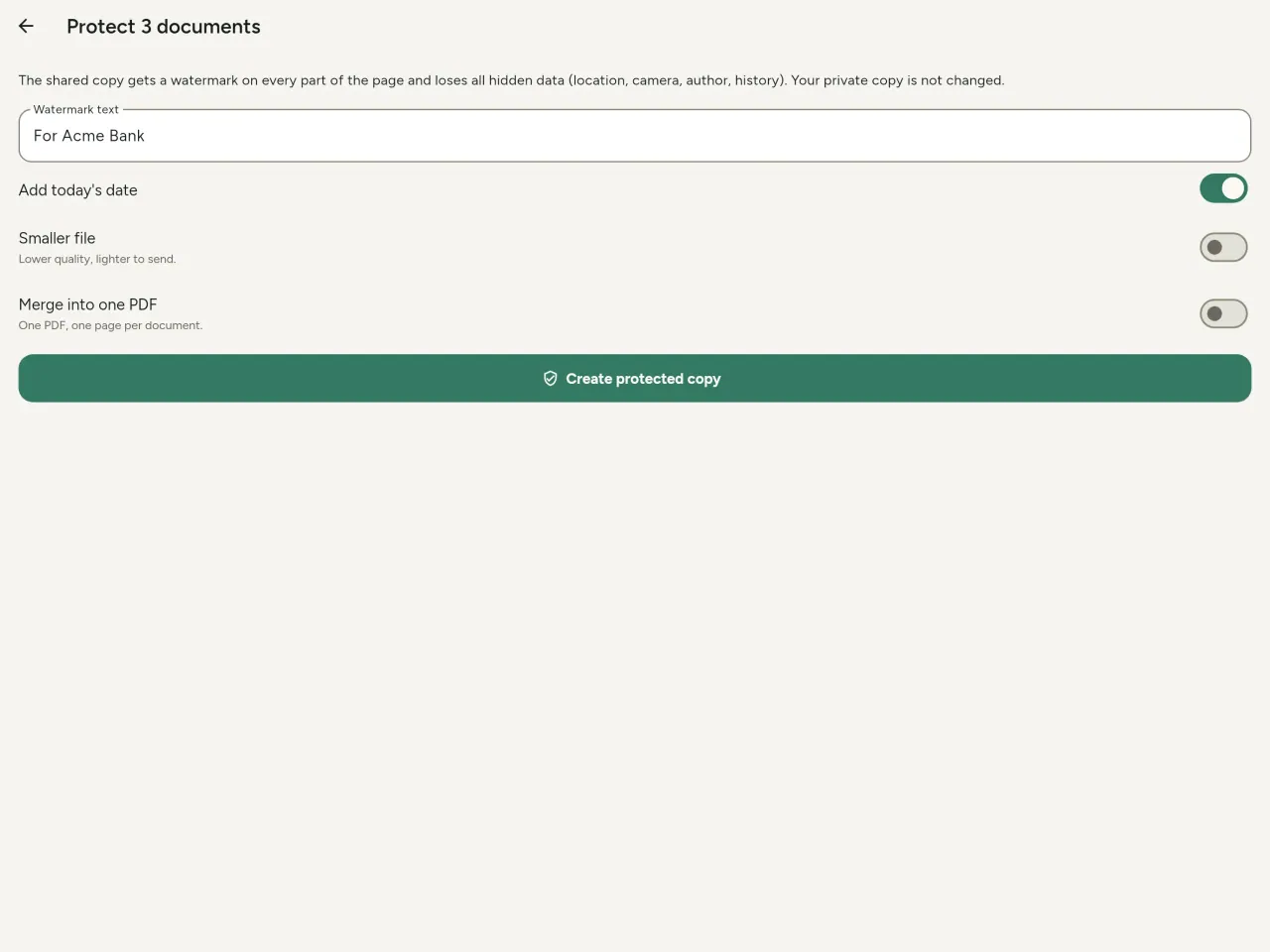
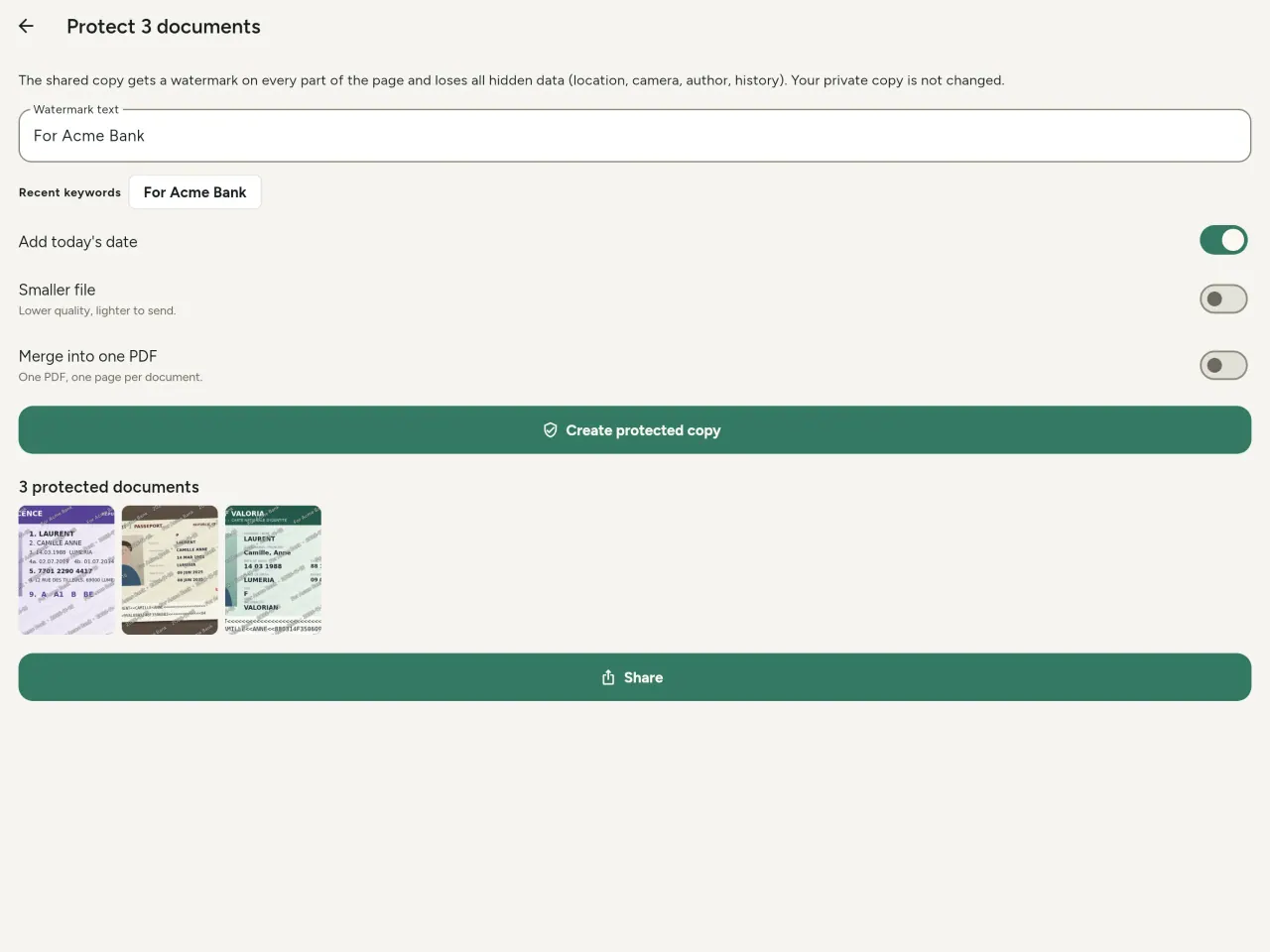
Misy taratasy eo ambony latabatra? Atombohy amin'ny faskana azy amin'ny fakantsarinao, na fidio ny PDF na sary efa ao amin'ny findainao. VaultMark dia mametraka mari-drano manerana ny pejy amin'ny soratra fidinao (ohatra "Ho an'ny Banky Ohatra, fangatahana fampindramam-bola") sy ny datin'andro, avy eo manala ny angona miafina rehetra: toerana, maodelin'ny fitaovana, mpanoratra, tantaran'ny fanovana. Ampiasao amin'ny kopian'ny kara-panondro, porofon-toerana onenana na taratasim-karama izany, mba tsy hampiasana indray ny kopia amin'ny zavatra hafa. Ity no fomba haingana indrindra hanesorana metadata alohan'ny handefasana rakitra.
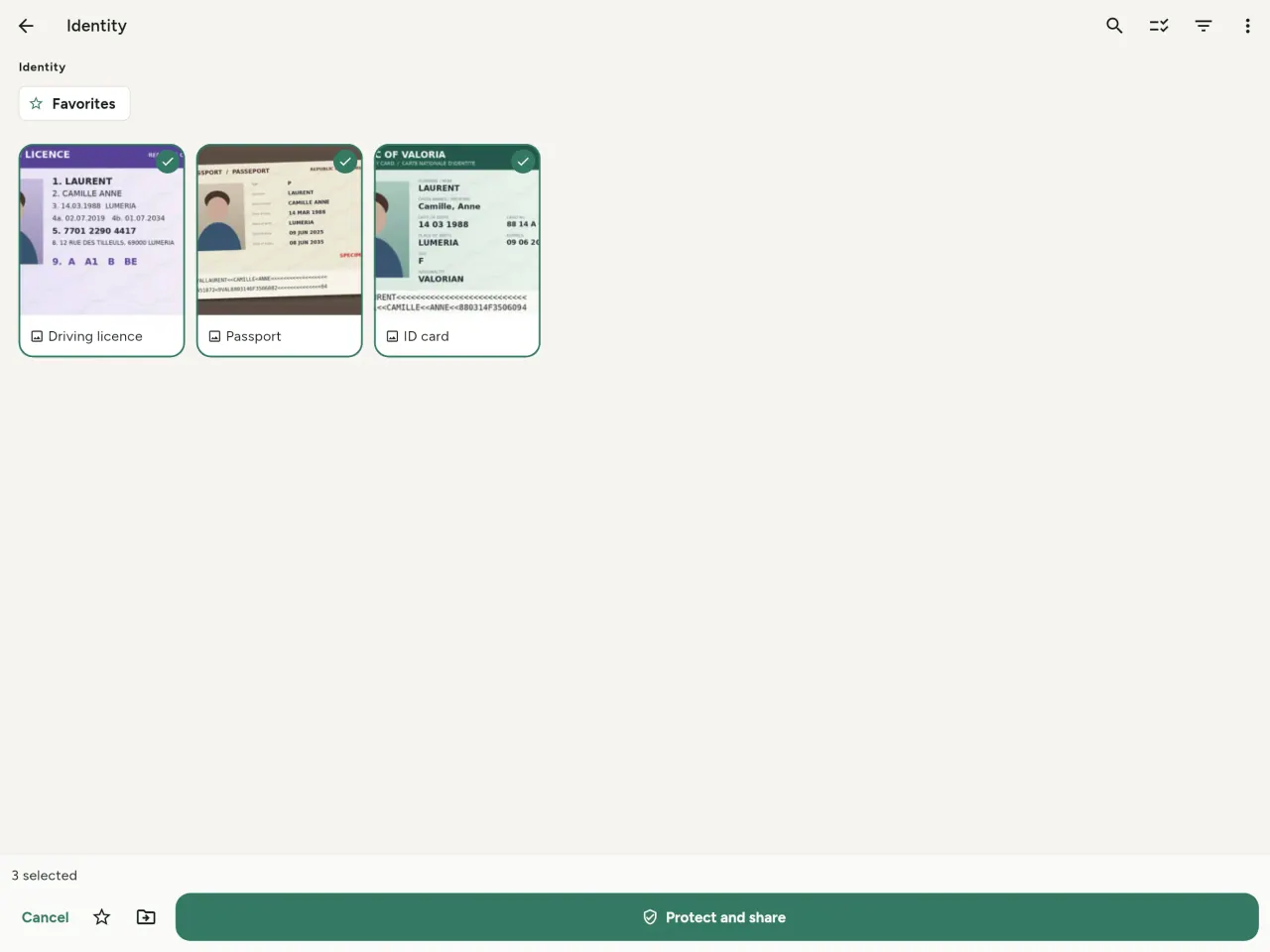
Averina amboarina avy amin'ny piksel ny rakitra zaraina: tsy azo esorina ny mari-drano ary lasa ny metadata. Mandefa taratasy maromaro? Atambaro ho PDF iray izy ireo ary, raha tianao, hidio amin'ny tenimiafina AES-256. Tsy ovaina mihitsy ny kopia manokananao.
Fomba fanao sy lahatahiry azo antoka ho an'ny taratasy tsirairay
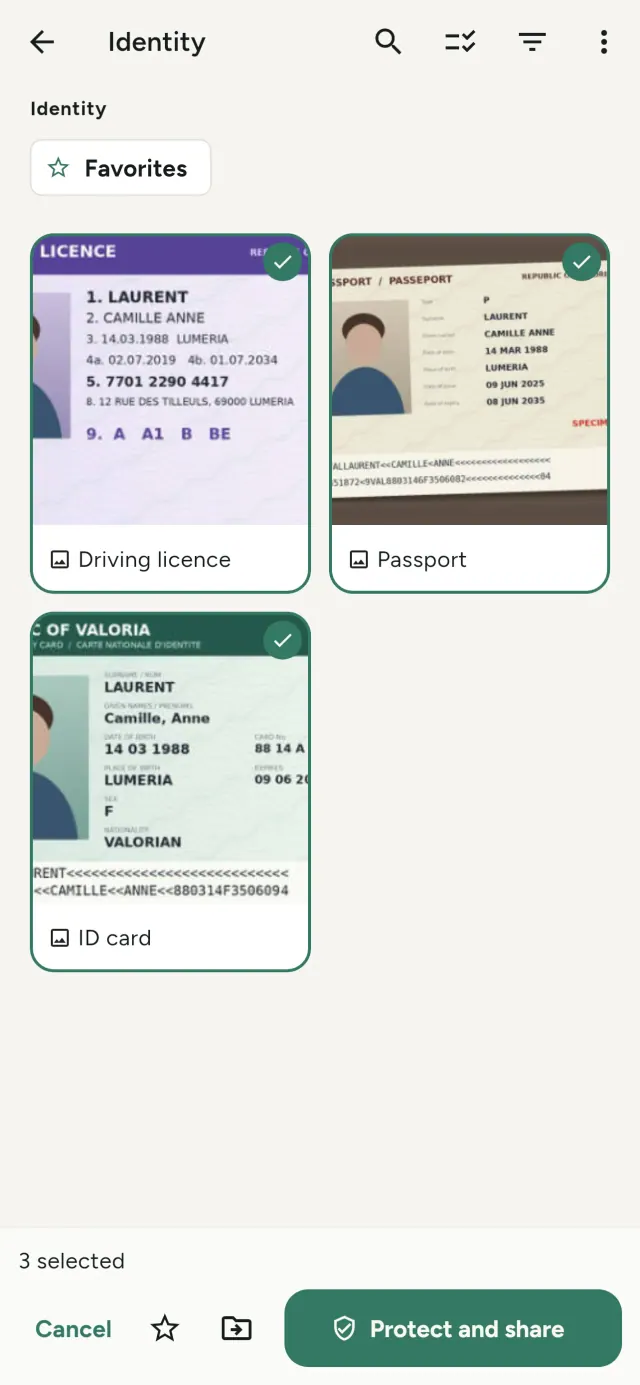
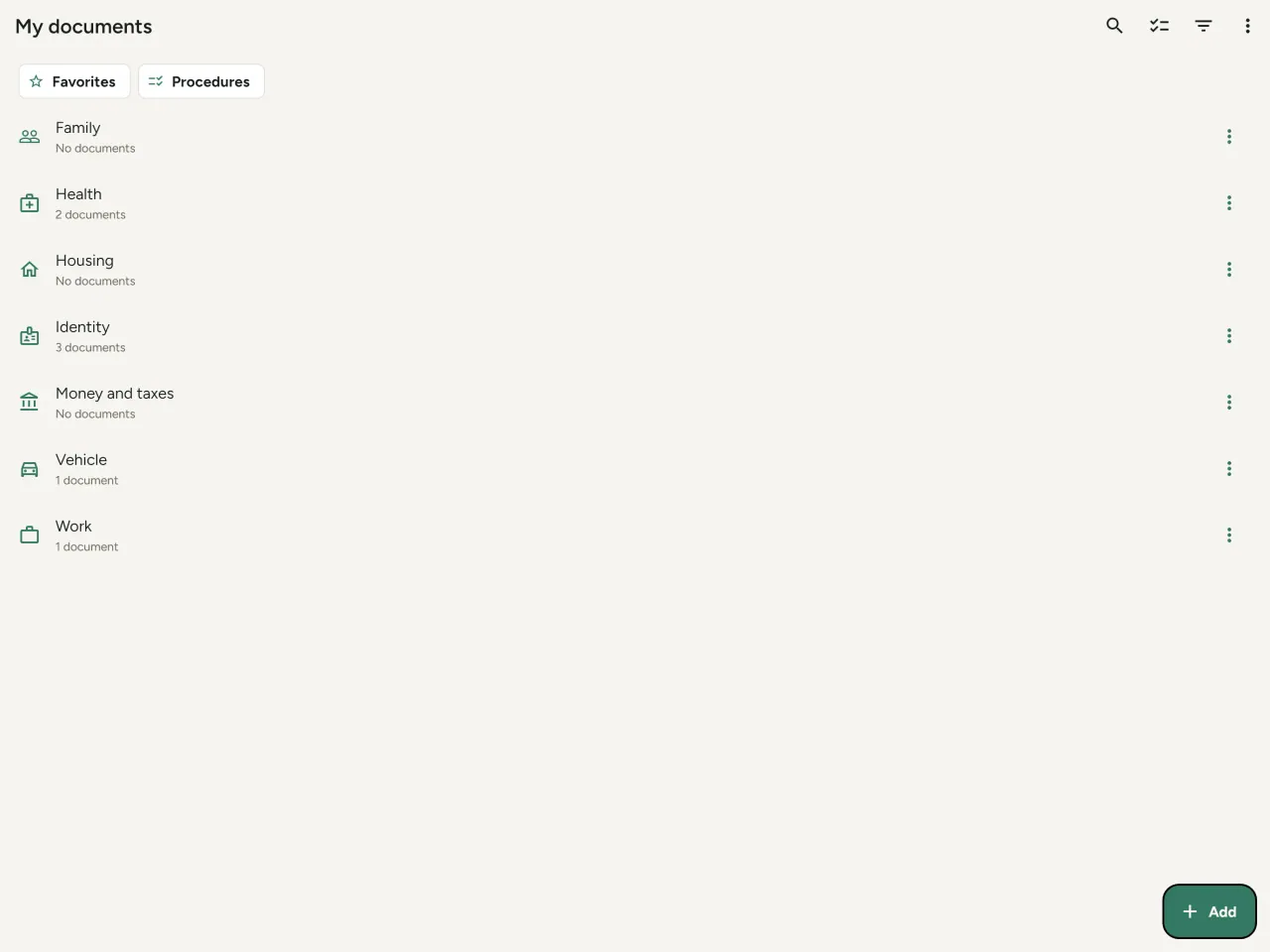
Omano ny asa mahazatra amin'ny lisitra fanamarinana efa ao anatiny (trano, asa, banky, dia), ampio taratasy avy ao amin'ny tahirinao, ary arovy sy zarao indray mandeha ny fitambarany. Alamino ao amin'ny lahatahiry efa vonona (mombamomba, trano, fahasalamana, vola sy hetra, asa, fiara, fianakaviana) na ao amin'ny firafitrao manokana, miaraka amin'ny tag, ankafizina ary fikarohana eo noho eo.
Mizara avy amin'ny rindranasa hafa
Nahazo PDF na sary? Ampiasao ny Mizara na Sokafy amin'ny, fidio VaultMark, ary arovy avy hatrany izany, na dia tsy ampidirina ao amin'ny tahiry aza.
Manasonia sy mikaroka ny taratasinao
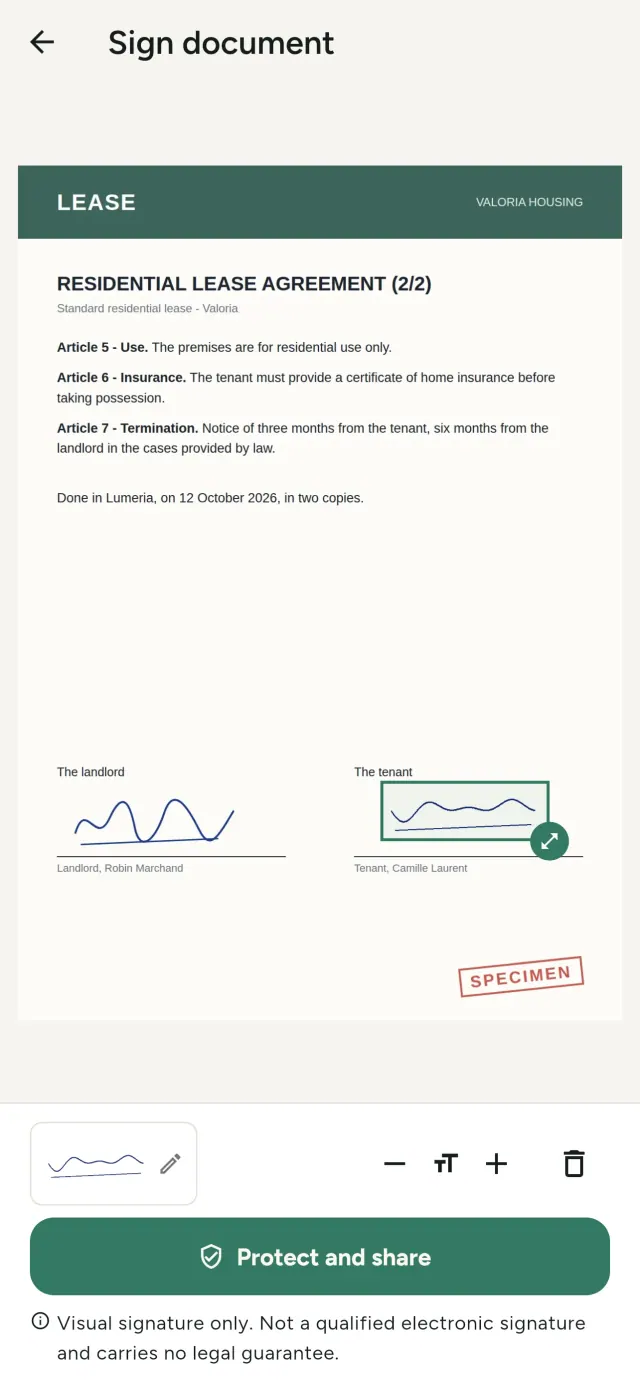
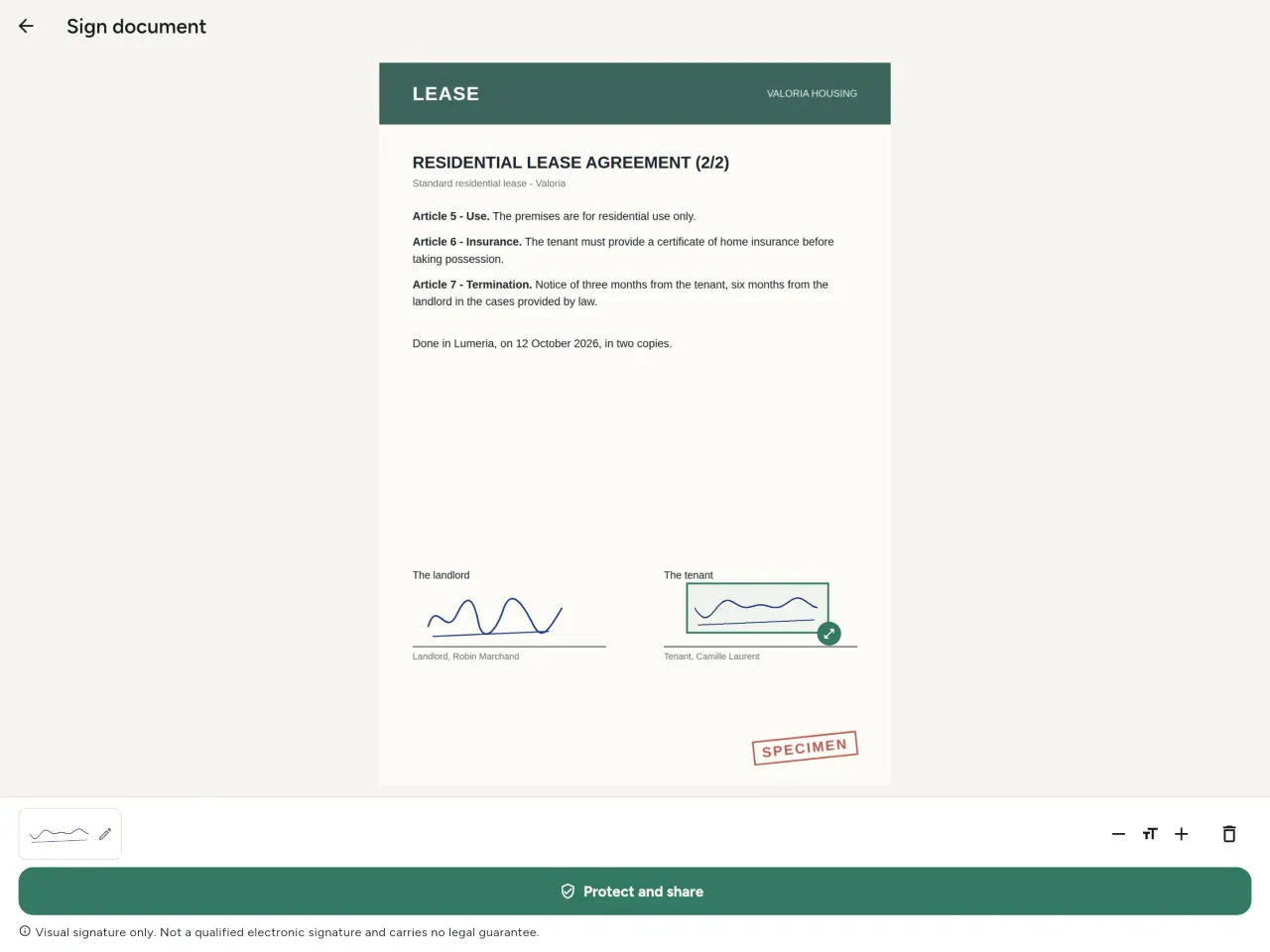
Soraty amin'ny tanana ny sonianao na ampidiro sary, avy eo apetraho eo amin'ny pejin'ny PDF na sary skanina iray amin'ny taratasy izany, mivantana ao amin'ny findainao. Tehirizina voafina ao amin'ny tahiry ny sonia voatahiry, ary ny kopia zarainao dia fisaka, misy mari-drano ary tsy misy metadata (sonia hita maso fotsiny, tsy manana lanja ara-dalàna). Mila mikaroka skana? Alefaso ny OCR rehefa ilaina mba hamoronana PDF azo karohina, karakaraina ao amin'ny findainao ary tsy alefa na aiza na aiza. Misy amin'ny fiteny 75 ny rindranasa.
Azo antoka hatramin'ny famolavolana
Tsara ho fantatra: tsy misy famerenana kaody hadino, niniana natao izany. Tehirizo any an-kafa ny originalin'ny taratasy rehetra. Manakivy ny fampiasana tsy ara-dalàna ny mari-drano, saingy tsy mahasakana olona efa manana ilay rakitra.
Tohanana ny rakitra PDF sy ny sary. Lasa sary misy mari-drano ny pejin'ny PDF, ka tsy azo safidiana intsony ny soratra.
- Fanafenana AES-256-GCM, tehirizina ao amin'ny fitahirizana azo antoka an'ny findainao ny fanalahidy
- Sokafy amin'ny dian-tanana na tarehy, miaraka amin'ny kaody misy tarehimarika 6 ho solony
- Mihidy ho azy ny tahiry rehefa miala amin'ny rindranasa ianao, ka tsy misy mijanona misokatra
- Rakitra backup voafina (.vmbk), voaaro amin'ny tenimiafina azy manokana
- Famindrana voafina hatramin'ny farany eo amin'ny finday roa amin'ny alalan'ny kaody QR rehefa manova fitaovana; mijanona ivelan'ny tambajotra ao anaty tahiry azo antoka ny fampiasana andavanandro
Torolalana momba ny VaultMark
Ho an'iza
- Izao rehetra afaka mandefa dika taratasy mari-pahaizana, porofo adiresy, na karama (fangatahana trano, banky, mpampiasa, fitantanan-draharaha).
- Ireo leo fivoahan-drahara sy mila mifehy tanteraka izay rakitra manokana sy maniry fiarovana amin'ny fizarana.
- Ireo mila mitahiry fifanekena, taratasy ara-pahasalamana sy antontan-taratasy manan-danja hafa amin'ny endrika mangina amin'ny findainy.
- Ireo mahazo PDF na sary ka te hametaka fiarovana avy hatrany, tsy ilaina manampy ao amin'ny vault.
Nahoana no misafidy an'i VaultMark
- Antontan-taratasy manokana no ilain'ny mpangalatra mombamomba mba hanao carte crédit, sonia fifanarahana na manofa anarana. Dika iray na karama voarain'ny olona tsy misy fiarovana dia azo ampiasaina amin'ny zavatra hafa, ela taorian'ny nanananao azy. VaultMark dia mametaka mari-pamantarana (watermark) amin'ny pejy manontolo misy anaran'ny mpandray sy ny daty (ohatra "Ho an'i Example Bank, fangatahana trano, 2026-10-05"), ka ho lasa tsy misy ilàna azy ny dika very ho amin'ny tanjona hafa, ary azo arahina amin'izay tanjona natokana hisy azy io.
- Averina atambatra avy amin'ny pixel ilay rakitra zaraina: tsy ho azo esorina intsony ny mari-pamantarana, ary tsy misy metadata (toerana, mpanoratra, tantara) voatahiry. Tsy ovaina mihitsy ny dika manokana.
- Encryption AES-256-GCM, ny lakile dia ao amin'ny tahiry azo antoka an'ny finday. Tsy misy kaonty, tsy misy rahona, tsy misy fitsikilovana.
Zavatra tsy mbola ataon'ny app
- Tsy mbola misy fitahirizana na synchronisation amin'ny fitaovana maro: ao amin'ny finday ihany ny vault.
- Ny mari-pamantarana (watermark) dia manakana ny fampiasana tsy mety sy manamora ny fanarahana dika. Tsy afaka manakana olona iray hitazona dika rehefa nasainao izy.
Fitsipika Pixeon. App Pixeon dia atao amin'ny fitsipika hoe: eo an-toerana voalohany - tsy misy kaonty, tsy misy fitsikilovana, ny tahirinanao dia mijanona amin'ny findainao. Raha sendra misy app mampifandray amin'ny tambajotra dia rehefa misafidy hanokatra endri-javatra iray ianao ihany, ary havaozina ny politika fiarovana mialoha ny hamoahana azy.
Jereo VaultMark miasa.
Makà VaultMark.
Maimaim-poana amin'ny iPhone sy Android.
Privacy policy
Ny lahatsoratra eto ambany dia amin'ny teny anglisy. Ny dikan-teny anglisy no mitombina.
Last updated: 2026-11-19
VaultMark stores your personal documents on your phone and adds a watermark to a copy before you share it. Your documents stay encrypted on your phone by default, and we collect no personal data, analytics, or tracking information.
What the app handles
Images and PDF files that you add yourself (from your files, or sent to the app from another app). They are encrypted with AES-256-GCM and stored in the app's private storage on your phone. The encryption key is kept in the secure storage of your phone (Android Keystore, iOS Keychain). There is no account, no permanent server storage and no cloud backup.
When you create a protected copy, the app redraws the image or the PDF pages with a watermark (the text you type and, if you choose, today's date) and writes a new file without hidden data (location, camera model, author, history). That file is handed to the app you pick in the system share sheet. Your private copy is never modified.
You can also scan a paper document with the camera. On Android the scan is done by Google's document scanner, which runs on your phone through Google Play services; on iOS it is done by the system scanner. The pages come back to the app and are encrypted like any other document. The scanner's own copies are deleted.
Favourites, tags, checklists for a procedure (the documents to gather, with the ones you attach), an optional saved signature (drawn or imported from an image, deletable in Settings) and backup files are kept inside the app, encrypted with your documents. When you sign a document, you place the signature manually on a page and share a flattened, watermarked, metadata-free copy without modifying your private original. Signing adds a visual image signature only, with no qualified electronic signature or legal guarantee.
You can also ask the app to recognise the text of a document (OCR). Nothing is recognised unless you start it. Printed Latin text is processed on your phone, with a bundled model on Android or Apple Vision on iOS: no image or text is sent to a server and no model is downloaded. The result is a new encrypted searchable PDF, your private original is not modified, and recognition stops if you cancel, leave the app or lock the vault.
What we collect and network use
We collect no analytics, no advertising identifier, no crash reporting and no third-party tracking SDK. All everyday features (storing, viewing, scanning, watermarking and local backup export or import) work without any internet connection. Network access is used only when you initiate one of these actions:
Transfer to another phone: when you choose to send or receive documents in
Settings, encrypted chunks transit ephemerally through our relay
(https://relay.pixeon.net, hosted on Cloudflare Workers and Durable Objects). The
archive is end-to-end encrypted on your device before upload using an ephemeral key carried only in
the one-time QR code, which the relay never sees. Temporary channel data is deleted when the
transfer finishes or is cancelled, or expires automatically (at most 90 days if abandoned).
Optional tips: optional tip purchases processed by Apple or Google Play (see Optional support), or opening our external support page in your browser on direct APK builds.
Permissions
Biometrics (fingerprint or face): only to unlock the vault, if you turn it on. The biometric data is handled by your phone's system; the app only receives a yes or no. Your 6-digit code always remains available.
Camera (iOS only): asked when you scan a paper document or scan a QR code for phone-to-phone transfer. On Android both document scanning and QR scanning run through Google Play services without declaring camera permission in the app.
Internet (Android): declared and used only for user-initiated encrypted
phone-to-phone transfer via https://relay.pixeon.net. No location, contacts,
microphone or shared storage permission. Files are added through the system file picker or the
share sheet, which give the app access to the files you choose only.
Files, backups, phone transfer and deletion
The app's data is excluded from Android and iOS cloud backups on purpose. If you lose or reset the phone, the vault is lost with it, unless you made a backup file or transferred documents yourself. There is no recovery of a forgotten code: keep an original of every document elsewhere.
Backup file: in Settings you can export the whole vault to one file, encrypted with a password you choose (it is not stored and cannot be recovered). The file goes to the share sheet, so you decide where it is kept. Importing it on another phone, with the same password, restores your documents. The app sends nothing. You can also change your 6-digit code in Settings; your documents are not re-encrypted, only the wrapping of the key changes.
Transfer to another phone: in Settings you can transfer selected documents (up to
100 MiB per session) to another phone running VaultMark. The sending phone creates a fresh
random 256-bit key and a single-use 5-minute QR code, displays a 4-digit verification code that
you verify on both screens before anything is uploaded, and transfers HKDF-SHA-256 / AES-256-GCM
encrypted chunks via https://relay.pixeon.net. The relay cannot decrypt documents or
see file or folder names. Existing documents on the receiving phone with the same internal id are
never overwritten, and procedure checklists and any saved signature are omitted.
Protected copies are written to a temporary folder, handed to the share sheet, and deleted when the vault locks and at the next launch. A copy that you sent to another app is then in that app's hands.
Deleting a document in the app removes its encrypted file. Uninstalling the app removes everything.
A watermark discourages misuse and shows where a copy came from. It cannot stop someone who already has the file from sharing it. Screenshots are blocked inside the app on Android release builds.
Optional support
Tips go through in-app purchase, processed by Apple on iOS and by Google Play on Android, under their own terms and privacy policy (the app only learns that a purchase succeeded). Versions installed outside Google Play may instead show a button that opens an external donation page in your browser; nothing from the app is sent to it. A tip unlocks nothing. A small reminder may appear after you have used the app a few times; it stays away for a while once you close it. The app is free and every feature works without tipping.
Contact form on this website
If you write to us through this site, we use your message and the email address you optionally give only to reply. Bot protection is provided by Cloudflare and email delivery by Resend.
Language choice on this website
When you choose a language, or when this site opens a page in your browser's language, it stores
one small functional cookie (pxl, a language code, one year) so that your choice is
remembered. If this site suggests a page in your browser's language and you close that suggestion,
your browser also keeps a local note (pxl-banner-off, in local storage, 30 days) so the
suggestion does not come back. Neither identifies anyone, neither is used for tracking or advertising,
and neither is shared. You can delete them in your browser at any time.
Website statistics
This website uses Cloudflare Web Analytics to count visits (pages viewed, country, browser type, loading speed). It sets no cookie, does not use local storage, does not fingerprint your device, does not follow you across sites and does not build a profile of you. Search engines (for example Google Search Console) give us aggregated search statistics, without any data about individual visitors. Our own web server also counts the pages it serves: for each page it keeps the page address, the site or social network that sent you (only its name, or the campaign tag written in the link), the country, the type of device and whether the request came from a robot. It keeps no IP address, no identifier and no cookie, and these counts are anonymous. We use no advertising or other analytics service. None of this concerns the app itself, which collects nothing.
Children
The app is a general-purpose tool and is not directed at children.
Changes
An updated policy will be published at this URL with a new date above.
Contact
Questions about privacy: vaultmark-contact@pixeon.net
Fanohanana
Nohavaozina farany: 2026-11-19
VaultMark dia rindranasa kely tsy miankina. Ireto ambany ireto ny valin'ireo fanontaniana fahita indrindra.
Miezaka mamaly ao anatin'ny andro vitsy izahay. Mba hanampiana anay, lazao ny modely sy kinovan'ny rafitra ampiasainao ary ny zavatra nataonao tamin'izany fotoana izany. Aza mandefa antonta-taratasy na tahirin-kevitra manokana mihitsy.
Tena maimaim-poana ve ny VaultMark?
Eny. Azo alaina sy ampiasaina maimaim-poana ny VaultMark. Tsy misy doka na famandrihana.
Inona avy ny angona tehirizin’ny na alefan’ny rindranasa?
Mijanona voaaro amin’ny fanafenana ao amin’ny findainao ny antontan-taratasinao, ary mandeha tsy misy tambajotra ny asa andavanandro. Raha misafidy Famindrana finday amin’ny finday ao amin’ny Fikirana ianao, dia mandalo vetivety amin’ny relay-nay (relay.pixeon.net) ireo ampahany voafina, amin’ny alalan’ny lakile voatahiry ao amin’ilay kaody QR ampiasaina indray mandeha ihany, ary fafana avy eo. Jereo ny antsipiriany ao amin’ny politikan’ny tsiambaratelo.
Hadinoko ny kaodiko. Afaka mamerina ny antontan-taratasiko ve ianareo?
Tsia. Tsy misy famerenana niniana natao: tsy misy olona, na izahay aza, afaka manokatra ilay tahiry tsy misy kaody. Izany no antony anoloranay hevitra anao hitahiry kopia voalohany amin’ny antontan-taratasy rehetra any amin’ny toerana hafa.
Nanova na very finday aho. Aiza ny tahiriko?
Voasakana niniana ny tahiry anaty rahona. Alohan’ny hamerenana amin’ny laoniny na hanovana finday, avoahy ao amin’ny Fikirana, Tahiry ny rakitra tahiry voaaro (.vmbk, voaaro amin’ny tenimiafina azy manokana), na ampiasao ny Famindrana finday amin’ny finday ao amin’ny Fikirana handikana antontan-taratasy amin’ny kaody QR sy fanafenana farany ka hatrany amin’ny farany.
Ahoana no hampidirako mari-drano amin’ny kopian’ny kara-panondro na antontan-taratasy?
- Atombohy amin’ny kara-panondro taratasy, rakitra ao amin’ny findainao na rindranasa hafa: scano amin’ny fakantsary (dingana voalohany hiarovana azy alohan’ny handefasana), fidio PDF na sary, na ampiasao Zarao na Sokafy amin’ny VaultMark.
- Fidio ny antontan-taratasy iray na maromaro, tsindrio Arovy ary zarao, ampidiro ny mpandray sy daty raha ilaina, ary fidio raha hatambatra ho PDF iray ny pejy na hihidy amin’ny tenimiafina AES-256.
- Alefaso amin’ny pejy fizarana an’ny rafitra: esorina ny metadata miafina, averina amboarina avy amin’ny piksel ilay rakitra, ary tsy ovaina mihitsy ny kopia manokananao.
Afaka manao sonia antontan-taratasy eo an-toerana ve aho?
Eny. Sokafy ao amin’ny tahirinao ny sary na PDF ary tsindrio Sonia. Ataovy an-tsary ny sonia na ampidirina ny sary iray (tehirizina voafina ao amin’ny tahiry ary azo fafana ao amin’ny Fikirana), apetraho sy ovay amin’ny tanana eo amin’ny pejy, avy eo arovy sy zarao ny kopia voatambatra misy mari-drano sy metadata nesorina. Sonia hita maso ihany no ampiana, fa tsy sonia elektronika manan-kery ara-dalàna na antoka ara-pitsarana.
Afaka man-scan antontan-taratasy taratasy na manampy iray avy amin’ny rindranasa hafa ve aho?
Eny. Ao amin’ny VaultMark dia afaka man-scan pejy taratasy amin’ny fakantsary na mampiditra rakitra ianao, ary avy amin’ny rindranasa hafa dia afaka mampiasa Zarao na Sokafy amin’ny VaultMark hiarovana rakitra avy hatrany nefa tsy ampidirina ao amin’ny tahiry.
Rakitra inona no tohanana?
Sary sy rakitra PDF. Rehefa mizara ianao, avadika ho sary misy mari-drano ny pejy PDF, ka tsy azo esorina ilay mari-drano, ary azo atambatra ho PDF iray ny antontan-taratasy maro, izay azo arovana amin’ny tenimiafina AES-256. Lavina ny rakitra tena lehibe (hatramin’ny pejy 60 sy megapiksel 80).
Afaka mikaroka ny lahatsoratra ao amin’ny antontan-taratasy noscanina ve aho?
Eny. Sokafy ny antontan-taratasy ary atombohy rehefa ilaina ny fanekena lahatsoratra (OCR). Mamorona PDF vaovao voafina azo karohina izy io ary mamela ny niandohanao tsy miova. Ao amin’ny findainao no mandeha ny fanekena (lahatsoratra latina vita pirinty), tsy misy alefa any amin’ny mpizara ary tsy misy ekena raha tsy ianao no manomboka azy.
Miaro ahy tanteraka ve ny mari-drano?
Manakivy ny fampiasana ratsy izy ary mampiseho ny niavian’ny kopia, saingy tsy afaka manakana olona efa manana ilay rakitra tsy hizara azy. Zarao amin’ny olona atokisanao ihany ny antontan-taratasy.
Nahoana aho no tsy afaka maka pikantsary?
Amin’ny Android, voasakana ao anatin’ny rindranasa ny pikantsary sy ny fandraketana efijery mba hiarovana ny antontan-taratasinao.
Fiteny inona no misy?
Fiteny 75: Anglisy, Frantsay, Alemà, Espaniola, Italiana, Portiogey, Arabo, Sinoa (tsotra sy nentim-paharazana), Japoney, Koreana, Hindi, Rosiana ary maro hafa. Manaraka ny fitenin’ny findainao ny rindranasa, ary azonao ovaina ao amin’ny Fikirana izany. Ny fandikan-tenin’ireo fiteny vaovao kokoa dia ampian’ny milina ary hatsaraina amin’ny valin-kevitrao.
Tohano ny tetikasa
VaultMark dia maimaim-poana ary tsy misy dokam-barotra. Raha mahasoa anao ilay izy dia azonao tohanana ny fandrosoana (tsy voatery):
Buy Me a CoffeeExpense tracker and family budget planner. Free phone sync, no account.
Avy amin'i Pixeon ihany koaMetadata CleanerJereo, ovay, fafao ny metadata amin'ny sary.
Avy amin'i Pixeon ihany koaLittle RelayBreastfeeding, sleep and starting solids tracker. No account, works offline.
Avy amin'i Pixeon ihany koaMenuloopMeal planner and grocery list for the week. Recipes with photos, offline.
Avy amin'i Pixeon ihany koaIndie OfficeQuote maker and self-employed invoices. Offline, no account, no ads.
Avy amin'i Pixeon ihany koaFanionDiscover and share local events, concerts, markets and weekend outings nearby