VaultMark: Kaxxa-forti tad-dokumenti
Kaxxa-forti ta' dokumenti kriptati. Żid filigrana mad-dokumenti, neħħi l-metadata qabel taqsamhom.
B’xejn. Ebda reklami. Ebda abbonament.

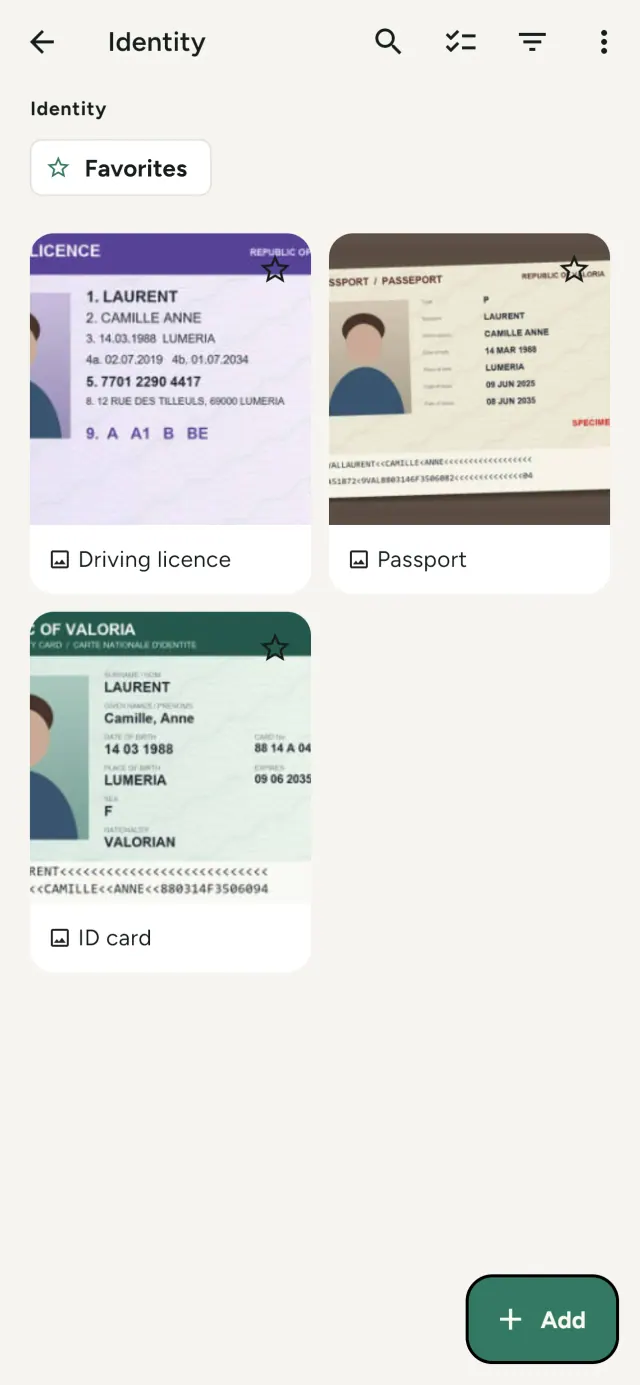
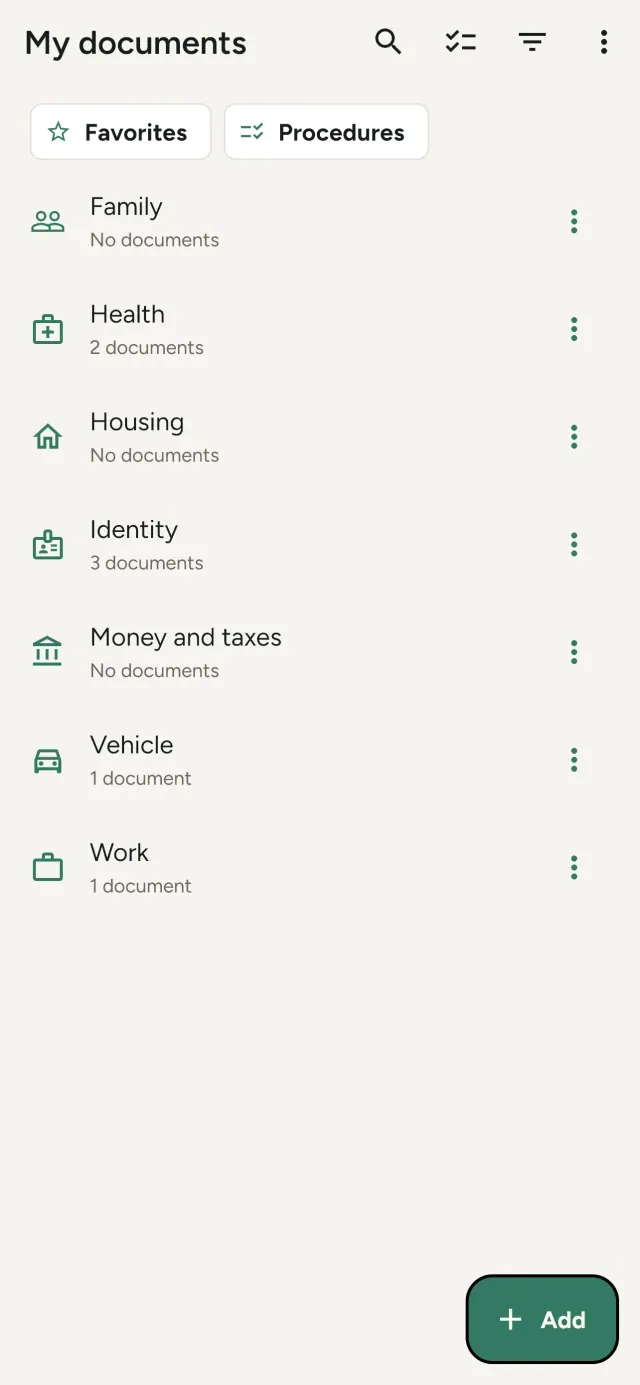
Ipproteġi l-karta tal-identità, il-kuntratti, il-payslips u l-karti mediċi tiegħek qabel tibgħathom, u ssakkarhom f'kaxxa-forti kriptata fuq it-telefon tiegħek.
VaultMark hija kaxxa-forti privata għad-dokumenti. Kollox jibqa' fuq it-tagħmir tiegħek: l-ebda kont, l-ebda cloud, l-ebda reklami, l-ebda traċċar, u l-użu ta' kuljum ma jeħtieġx netwerk.
X'jagħmel VaultMark
Skennja, żid filigrana mad-dokumenti u pproteġihom qabel tibgħathom
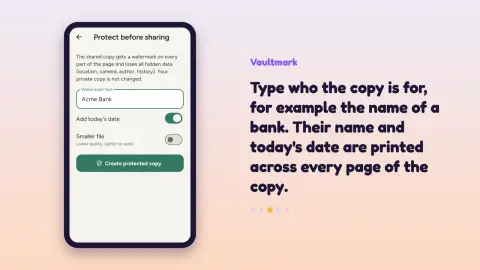
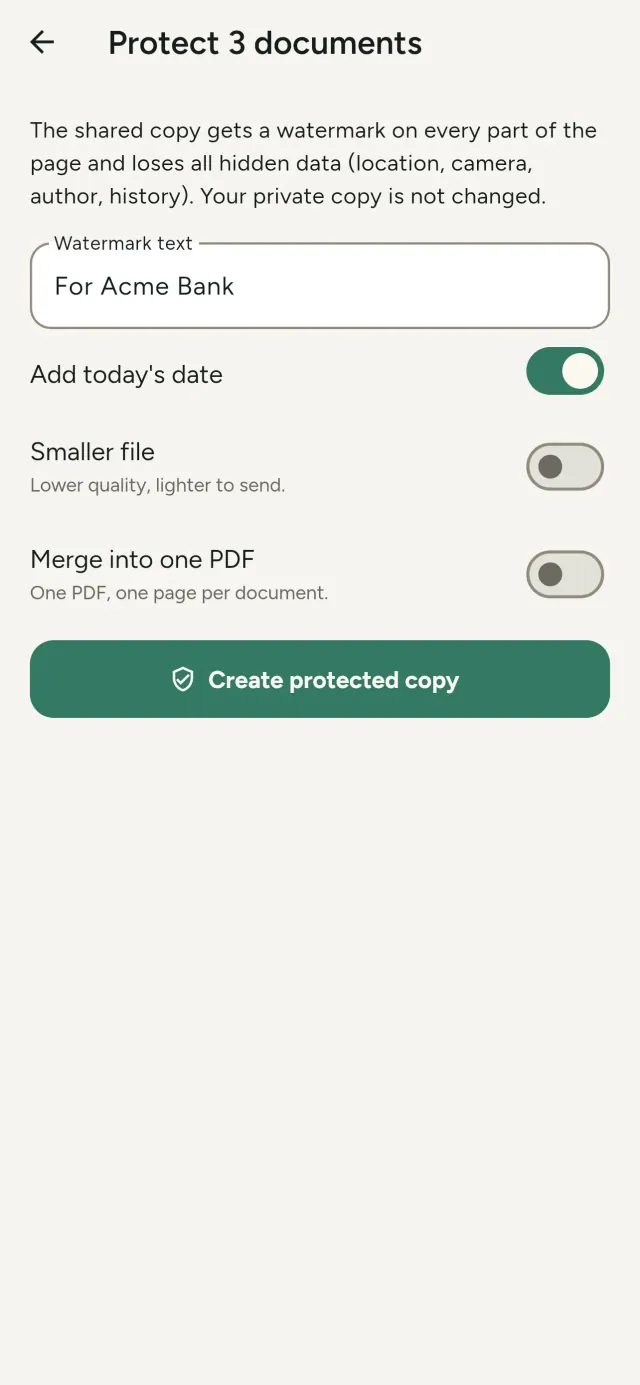
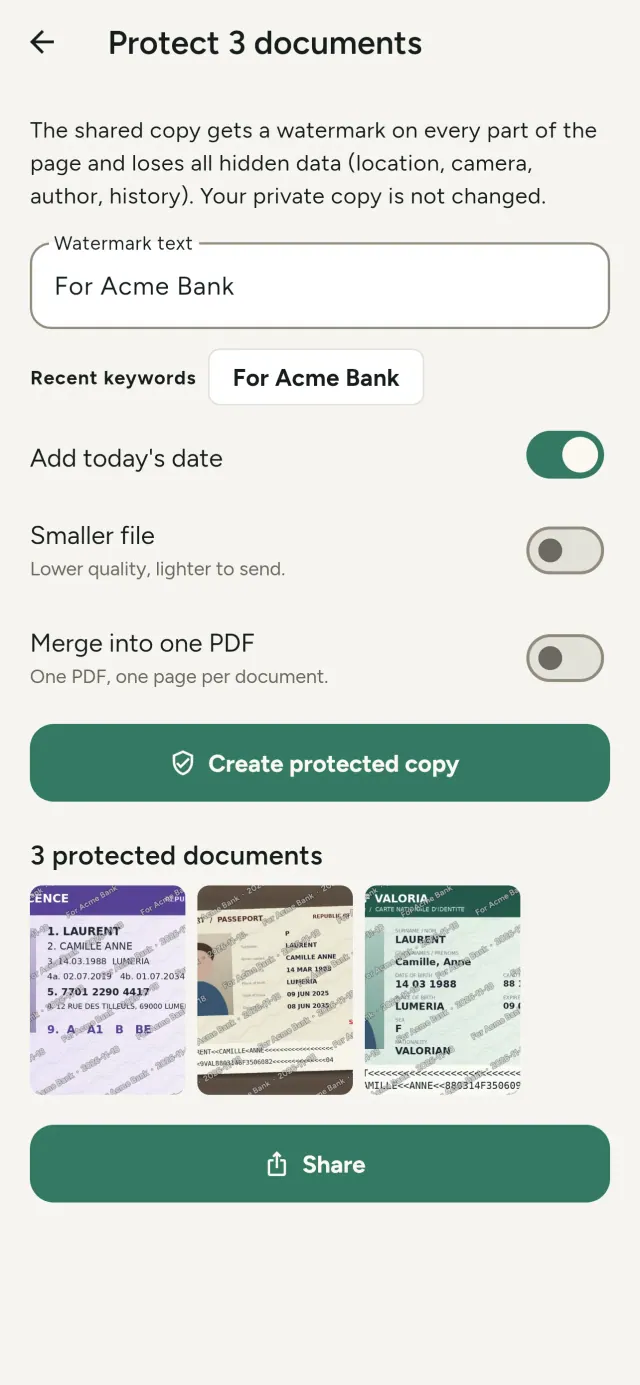
Għandek karta fuq il-mejda? Ibda billi tiskennjaha bil-kamera tiegħek, jew agħżel PDF jew immaġni li diġà għandek fuq it-telefon. VaultMark tpoġġi filigrana fuq il-paġna kollha bit-test li tagħżel (pereżempju "Għall-Bank Eżempju, applikazzjoni għal self") u bid-data tal-lum, imbagħad tneħħi kull biċċa ta' dejta moħbija: il-post, il-mudell tat-tagħmir, l-awtur u l-istorja tal-editjar. Użaha fuq kopja tal-identità, prova tal-indirizz jew payslip, sabiex kopja ma tkunx tista' tintuża mill-ġdid għal xi ħaġa oħra. Dan huwa l-aktar mod mgħaġġel biex tneħħi l-metadata qabel tibgħat fajl.
Il-fajl kondiviż jerġa' jinbena mill-pixels: il-filigrana ma tistax titneħħa u l-metadata tkun spiċċat. Se tibgħat diversi karti? Għaqqadhom f'PDF wieħed u, jekk trid, issakkru b'password AES-256. Il-kopja privata tiegħek qatt ma tinbidel.
Proċeduri u folder sigur għal kull karta
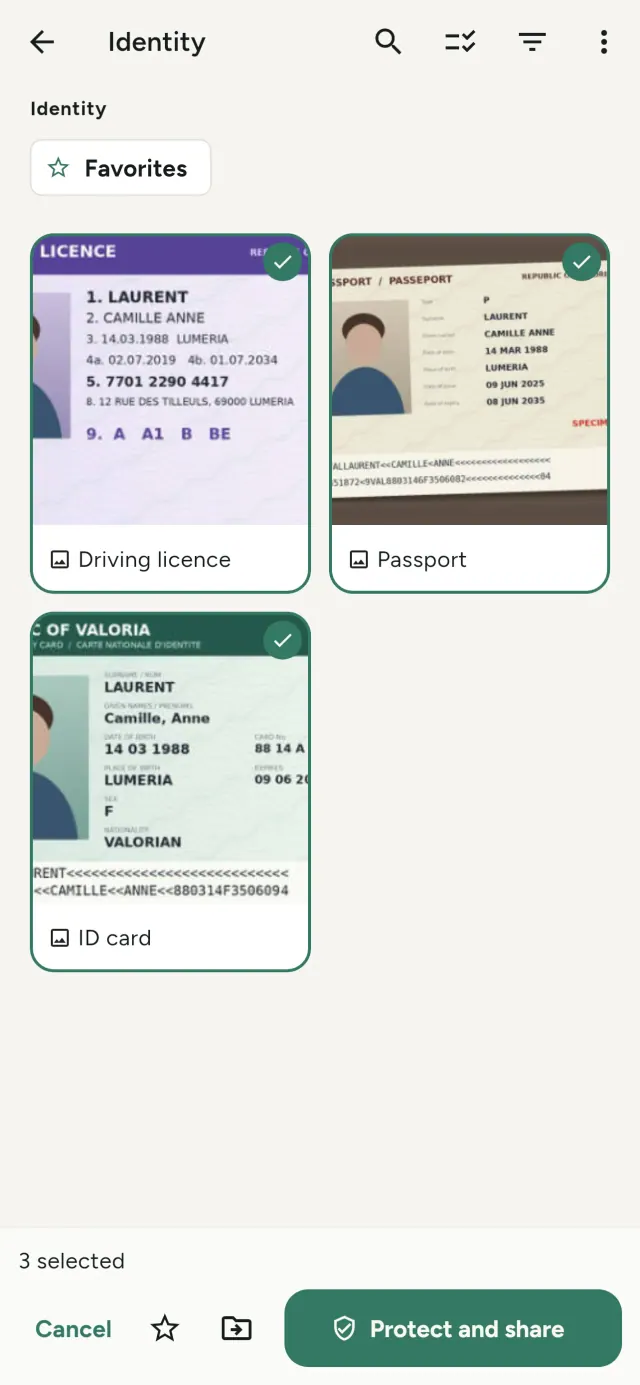
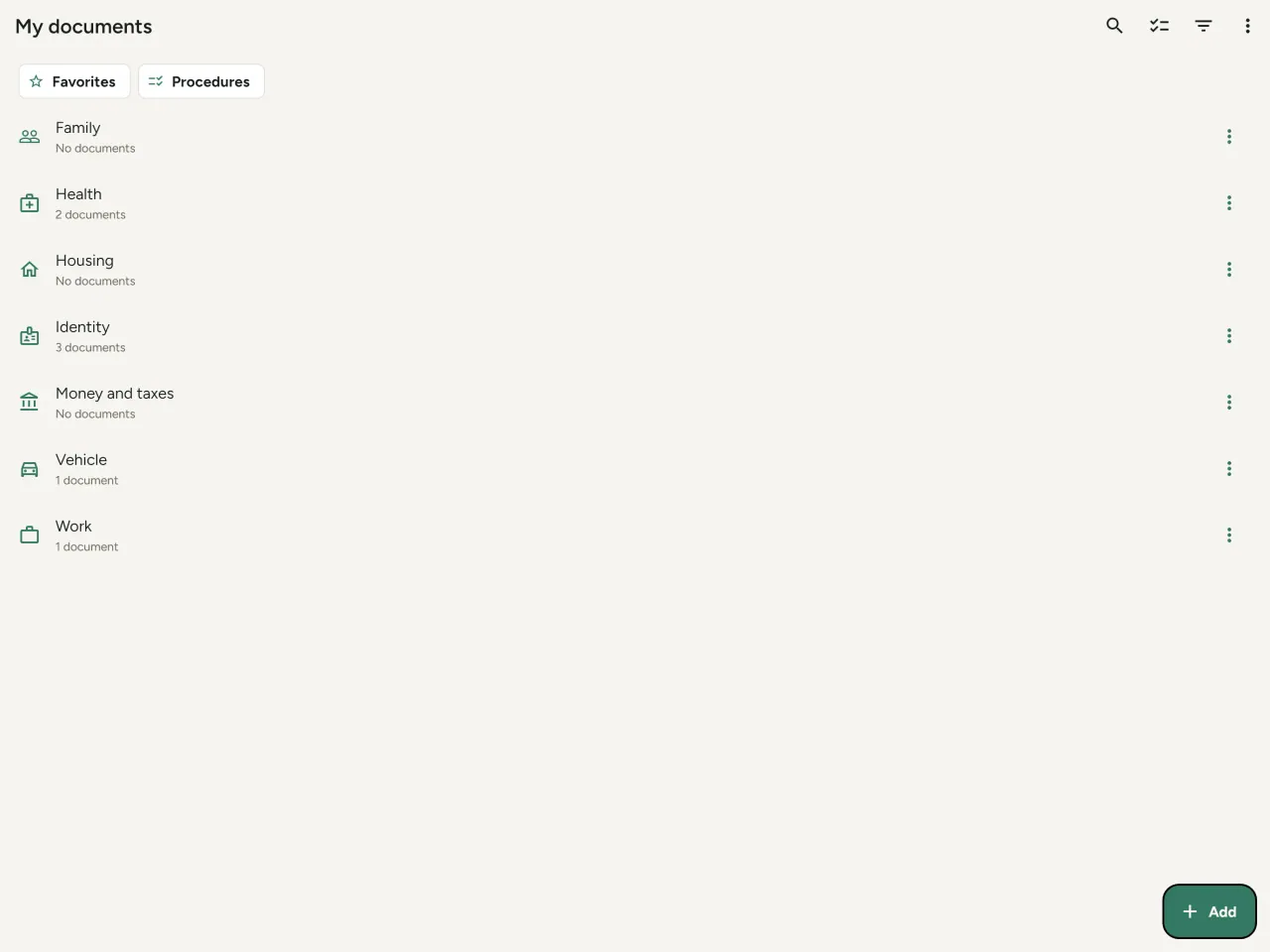
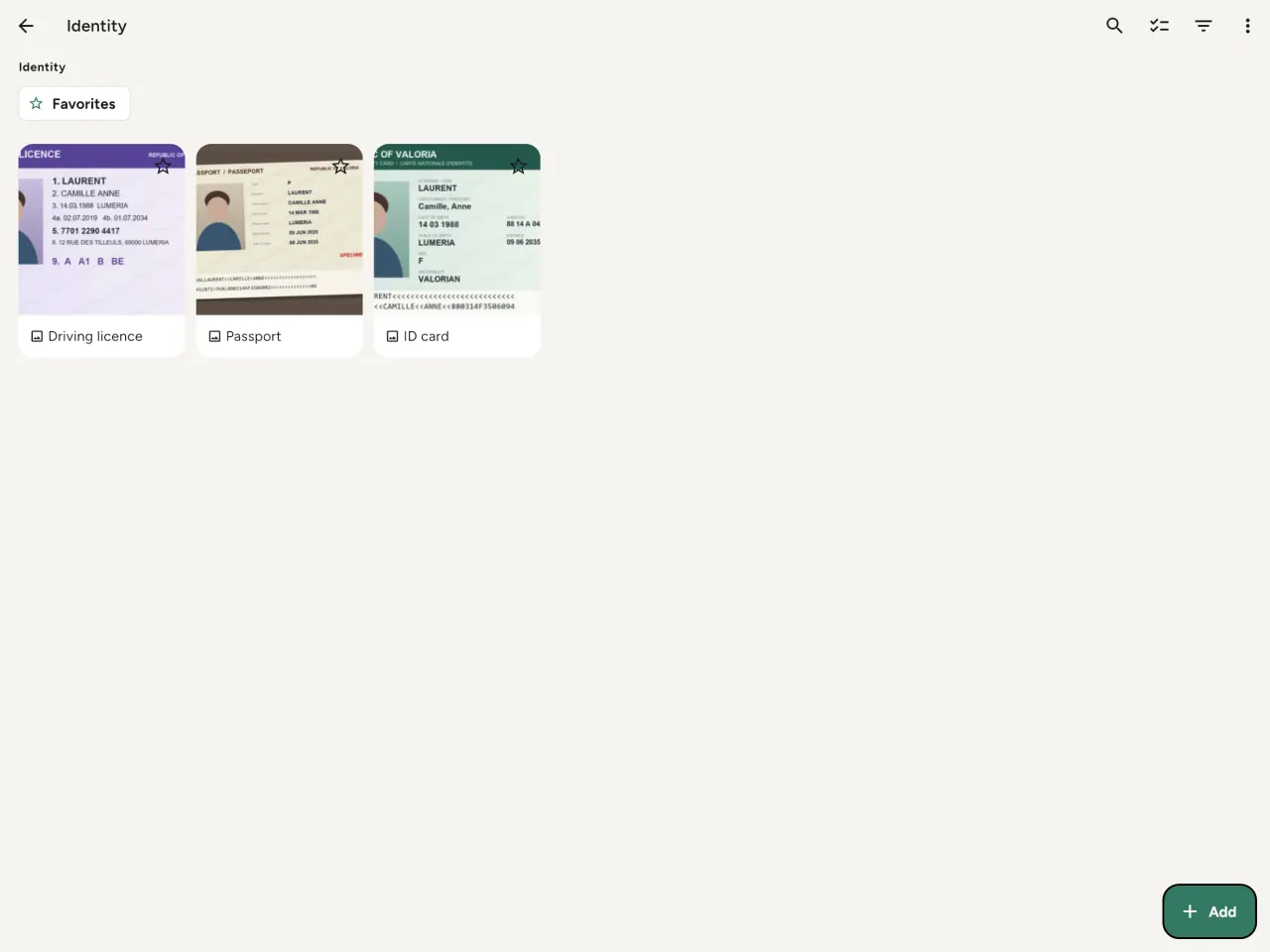
Ipprepara kompiti komuni b'listi ta' kontroll tal-proċeduri mibnija fl-app (akkomodazzjoni, xogħol, bank, vjaġġar), ehmeż dokumenti mill-kaxxa-forti tiegħek, u pproteġi u aqsam is-sett kollu f'daqqa. Organizza kollox f'folders lesti (identità, akkomodazzjoni, saħħa, flus u taxxi, xogħol, vettura, familja) jew fis-siġra tiegħek, b'tags, favoriti u tfittxija immedjata.
Aqsam minn apps oħra
Irċevejt PDF jew immaġni? Uża Aqsam jew Iftaħ bi, agħżel VaultMark, u pproteġiha mill-ewwel mingħajr lanqas iżżidha mal-kaxxa-forti.
Iffirma u fittex fid-dokumenti tiegħek
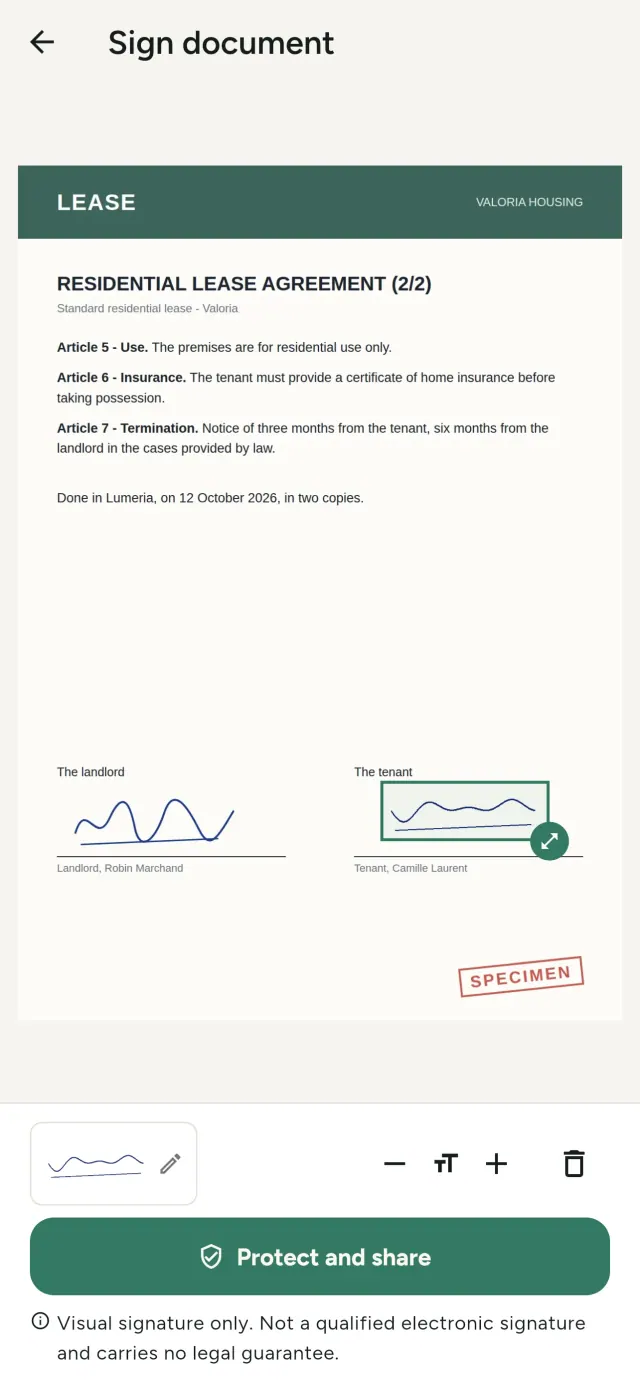
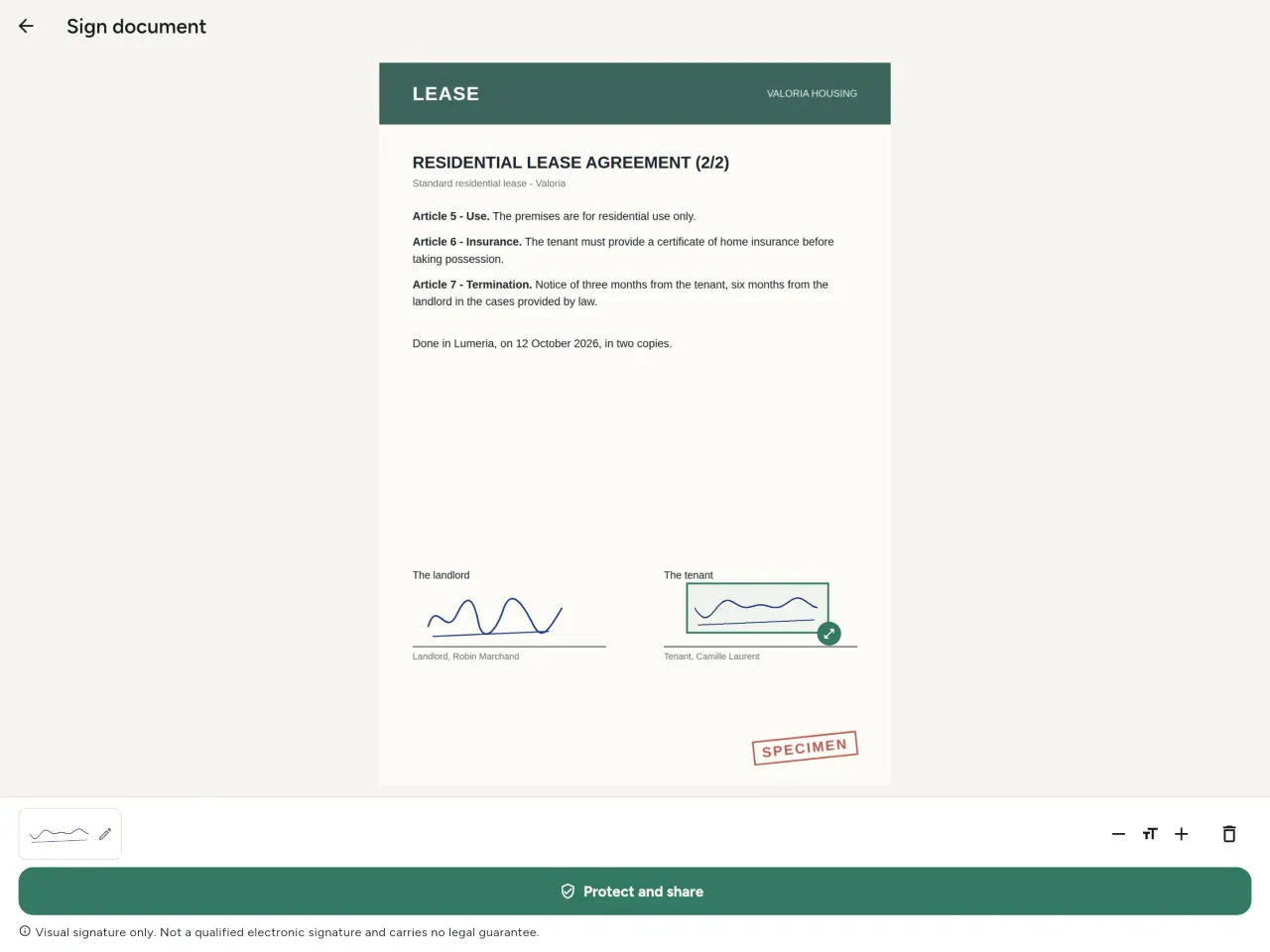
Pinġi l-firma tiegħek jew importa immaġni, imbagħad poġġiha fuq paġna ta' PDF jew fuq immaġni skannjata ta' dokument, direttament fuq it-telefon tiegħek. Il-firma ssejvjata tiegħek tinħażen kriptata fil-kaxxa-forti, u l-kopja li taqsam tkun ċatta, bil-filigrana u ħielsa mill-metadata (firma viżiva biss, mingħajr valur legali). Trid tfittex fi skan? Ħaddem OCR meta jkun meħtieġ biex toħloq PDF li jista' jitfittex, ipproċessat fuq it-telefon tiegħek u qatt ma jintbagħat imkien. L-app hija disponibbli f'75 lingwa.
Sigura mid-disinn
Tajjeb li tkun taf: m'hemmx irkupru ta' kodiċi minsi, apposta. Żomm oriġinal ta' kull dokument x'imkien ieħor. Filigrana tiskoraġġixxi l-użu ħażin, iżda ma tistax twaqqaf lil xi ħadd li diġà għandu l-fajl.
Fajls PDF u immaġini huma appoġġjati. Il-paġni ta' PDF isiru immaġnijiet bil-filigrana, u għalhekk it-test ma jistax jibqa' jintgħażel.
- Kriptaġġ AES-256-GCM, iċ-ċavetta tinżamm fil-ħażna sigura tat-telefon tiegħek
- Iftaħ bil-marki tas-swaba' jew bil-wiċċ, b'kodiċi ta' 6 ċifri bħala riżerva
- Il-kaxxa-forti tissakkar waħedha meta titlaq mill-app, għalhekk xejn ma jibqa' miftuħ
- Fajl ta' backup kriptat (.vmbk) protett bil-password tiegħu stess
- Trasferiment kriptat minn tarf sa tarf minn telefon għal telefon permezz ta' kodiċi QR meta tibdel it-tagħmir; l-użu ta' kuljum jibqa' offline f'kaxxa-forti sigura
Gwidi ta' VaultMark
Għal min hi
- Kull min irid jibgħat kopja ta' ID, provi ta' indirizz jew payslip (applikazzjoni, bank, impjieg, amministrazzjoni).
- Min xeba' leaks u jixtieq jieħu kontroll mill-ġdid tad-dejta personali u jżommha protetta meta jkun obbligat jaqsamha.
- Min jixtieq iżomm kuntratti, papri mediċi u dokumenti oħra importanti enkriptati fuq il-mowbajl tiegħu.
- Min jirċievi PDF jew ritratt u jixtieq jipproteġih immedjatament, mingħajr ma jżiduh mal-vault.
Għaliex tagħżel lil VaultMark
- Id-dokumenti personali huma dak li hemm bżonn biex min jisraqlok l-identità jiftaħ kreditu, jiffirma kuntratt jew jikri f'ismek. Kopja bla protezzjoni ta' ID jew payslip tista' tintuża għal skopijiet oħra anke wara li nibgħathu. VaultMark iħalli watermark fuq il-paġna kollha bl-isem tar-riċevitur u d-data (eżempju: 'Għal Eżempju Bank, applikazzjoni, 2026-10-05'), sabiex kopja leaked ma tkunx utli għal skop ieħor u tkun rintraċċabbli għal x'ġiet maqsumha.
- Il-fajl maqsum jinbena mill-ġdid mill-pixels: il-watermark ma tistax tinqata', u l-metadata moħbija (post, awtur, storja tal-editjar) titneħħa. Il-kopja privata tiegħek qatt ma tinbidel.
- Encryption AES-256-GCM, bil-key maħżuna bl-iSigurtà tal-apparat. L-ebda kont, l-ebda cloud, l-ebda tracking.
X'għadha ma tagħmilx l-app
- Għadha m’hemmx ħażna fuq cloud jew sinkronizzazzjoni bejn apparat: il-vault jgħix fuq il-mowbajl biss.
- Il-watermark tagħmilha diffiċli għal min jirċievi kopja biex jużaha għal xi ħaġa oħra, imma ma tistax twaqqaf min iżomm kopja li ddeċidejt tibgħat inti.
Il-prinċipju ta’ Pixeon. L-apps ta’ Pixeon jagħtu prijorità lill-lokal: l-ebda kont, l-ebda tracking, u d-dejta tiegħek tibqa' fuq it-telefon tiegħek. Jekk app qatt tikkonnettja man-netwerk, jiġri biss meta tagħżel li tixgħel funzjoni li għandek bżonn, u l-politika tal-privatezza tiġi aġġornata qabel ma tinħareġ.
Ara lil VaultMark fl-azzjoni.
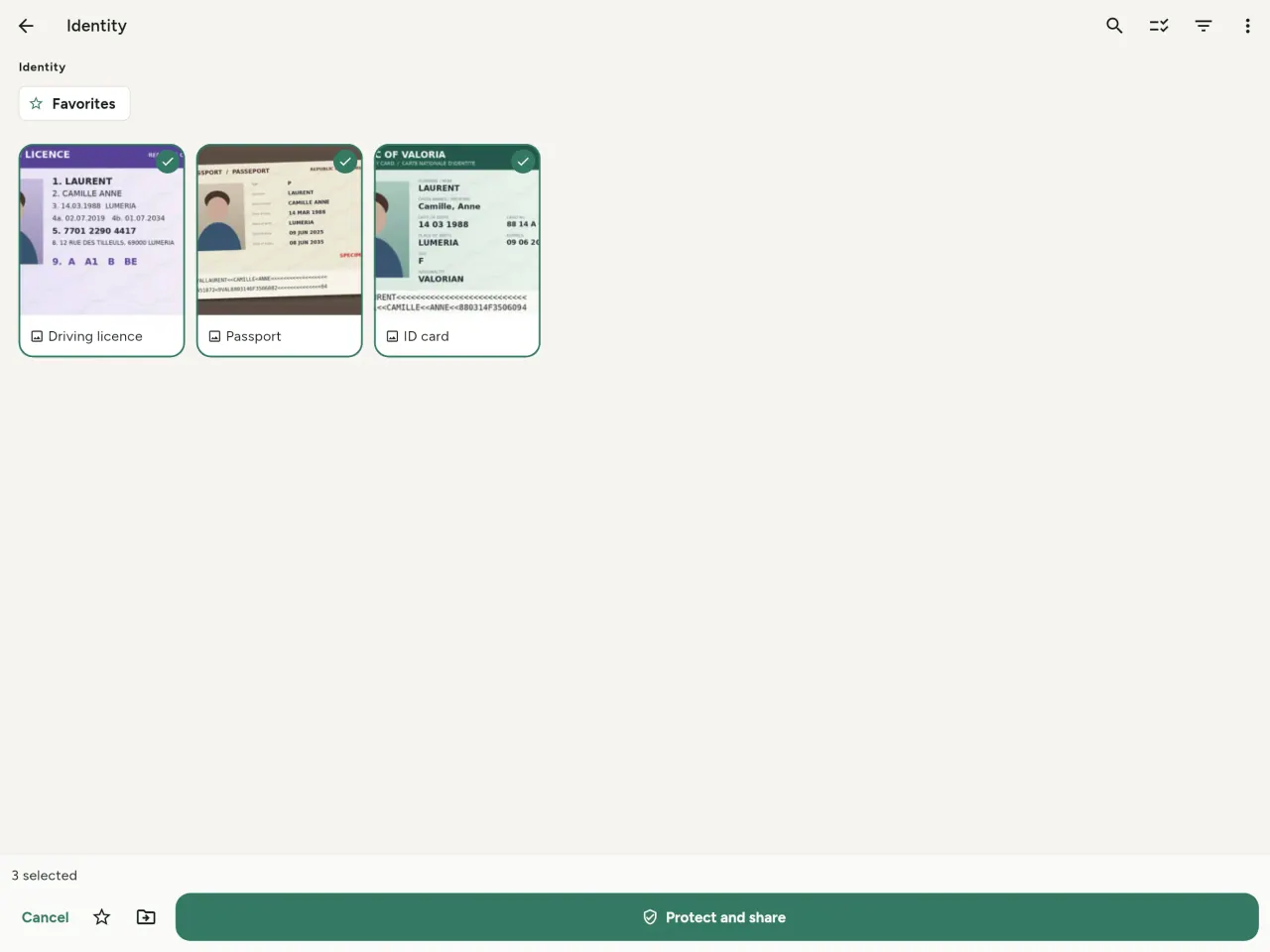
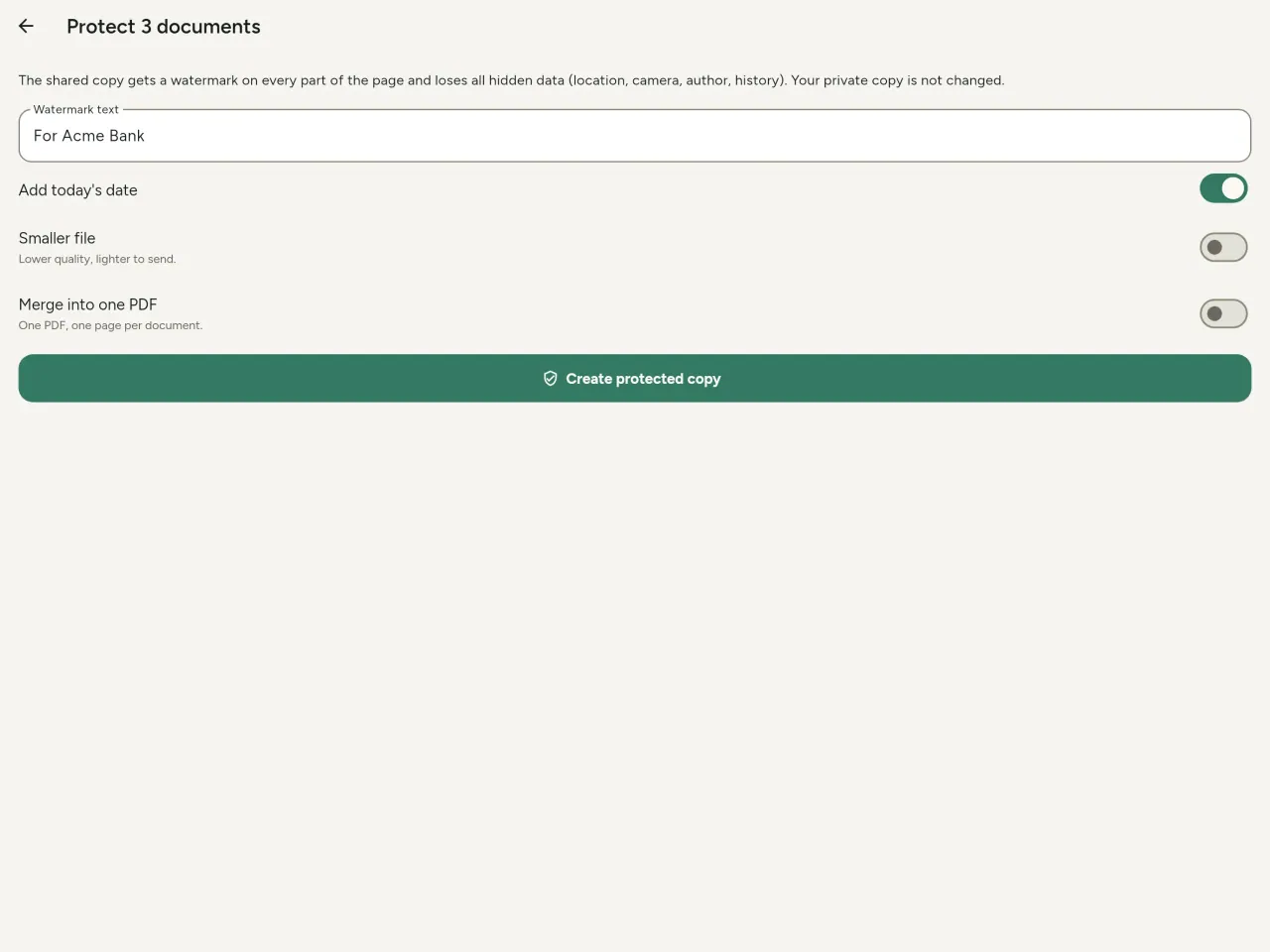
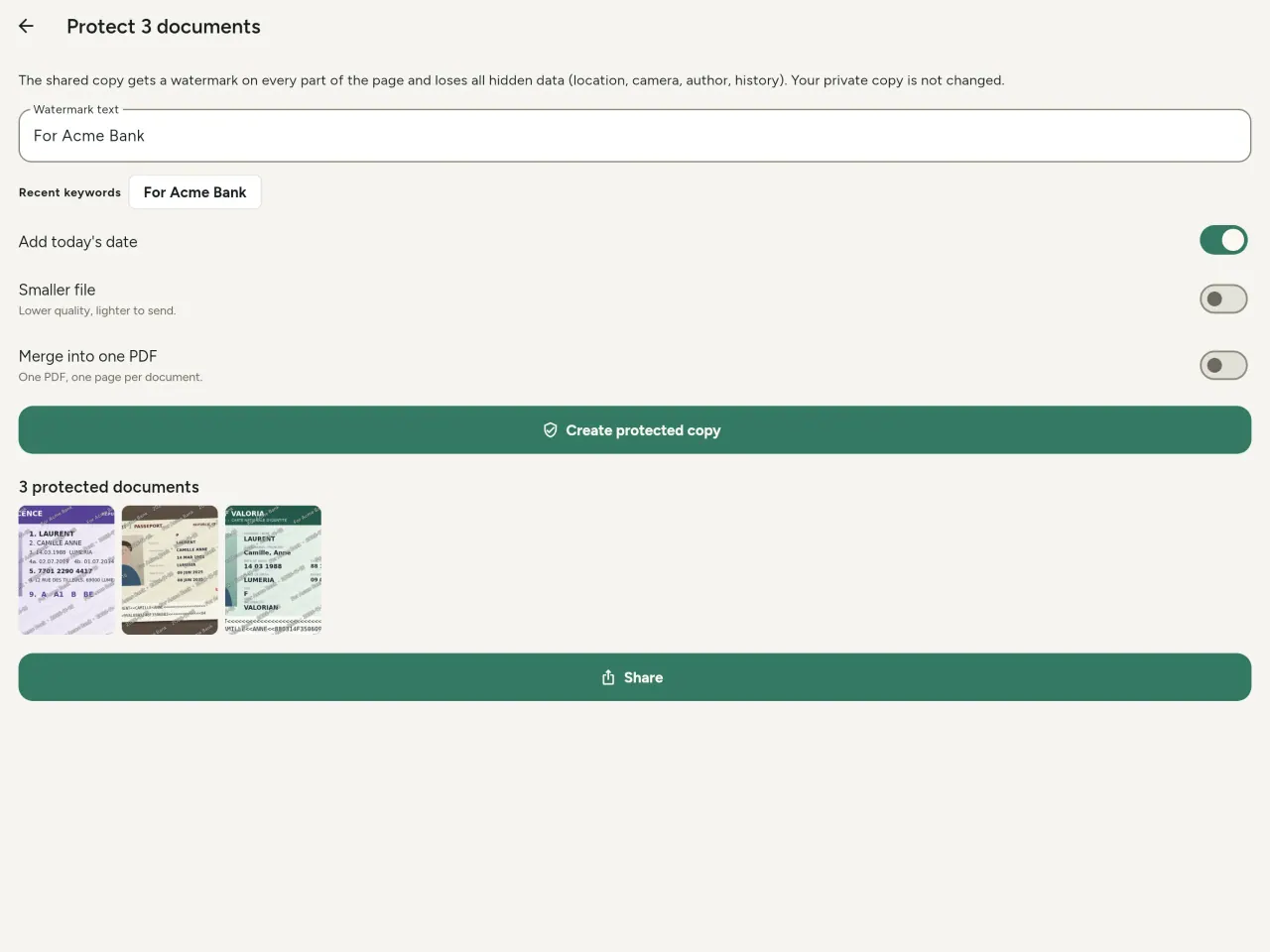
Niżżel lil VaultMark.
B'xejn fuq iPhone u Android.
Privacy policy
It-test t'hawn taħt huwa bl-Ingliż. Il-verżjoni bl-Ingliż għandha valur preferut.
Last updated: 2026-11-19
VaultMark stores your personal documents on your phone and adds a watermark to a copy before you share it. Your documents stay encrypted on your phone by default, and we collect no personal data, analytics, or tracking information.
What the app handles
Images and PDF files that you add yourself (from your files, or sent to the app from another app). They are encrypted with AES-256-GCM and stored in the app's private storage on your phone. The encryption key is kept in the secure storage of your phone (Android Keystore, iOS Keychain). There is no account, no permanent server storage and no cloud backup.
When you create a protected copy, the app redraws the image or the PDF pages with a watermark (the text you type and, if you choose, today's date) and writes a new file without hidden data (location, camera model, author, history). That file is handed to the app you pick in the system share sheet. Your private copy is never modified.
You can also scan a paper document with the camera. On Android the scan is done by Google's document scanner, which runs on your phone through Google Play services; on iOS it is done by the system scanner. The pages come back to the app and are encrypted like any other document. The scanner's own copies are deleted.
Favourites, tags, checklists for a procedure (the documents to gather, with the ones you attach), an optional saved signature (drawn or imported from an image, deletable in Settings) and backup files are kept inside the app, encrypted with your documents. When you sign a document, you place the signature manually on a page and share a flattened, watermarked, metadata-free copy without modifying your private original. Signing adds a visual image signature only, with no qualified electronic signature or legal guarantee.
You can also ask the app to recognise the text of a document (OCR). Nothing is recognised unless you start it. Printed Latin text is processed on your phone, with a bundled model on Android or Apple Vision on iOS: no image or text is sent to a server and no model is downloaded. The result is a new encrypted searchable PDF, your private original is not modified, and recognition stops if you cancel, leave the app or lock the vault.
What we collect and network use
We collect no analytics, no advertising identifier, no crash reporting and no third-party tracking SDK. All everyday features (storing, viewing, scanning, watermarking and local backup export or import) work without any internet connection. Network access is used only when you initiate one of these actions:
Transfer to another phone: when you choose to send or receive documents in
Settings, encrypted chunks transit ephemerally through our relay
(https://relay.pixeon.net, hosted on Cloudflare Workers and Durable Objects). The
archive is end-to-end encrypted on your device before upload using an ephemeral key carried only in
the one-time QR code, which the relay never sees. Temporary channel data is deleted when the
transfer finishes or is cancelled, or expires automatically (at most 90 days if abandoned).
Optional tips: optional tip purchases processed by Apple or Google Play (see Optional support), or opening our external support page in your browser on direct APK builds.
Permissions
Biometrics (fingerprint or face): only to unlock the vault, if you turn it on. The biometric data is handled by your phone's system; the app only receives a yes or no. Your 6-digit code always remains available.
Camera (iOS only): asked when you scan a paper document or scan a QR code for phone-to-phone transfer. On Android both document scanning and QR scanning run through Google Play services without declaring camera permission in the app.
Internet (Android): declared and used only for user-initiated encrypted
phone-to-phone transfer via https://relay.pixeon.net. No location, contacts,
microphone or shared storage permission. Files are added through the system file picker or the
share sheet, which give the app access to the files you choose only.
Files, backups, phone transfer and deletion
The app's data is excluded from Android and iOS cloud backups on purpose. If you lose or reset the phone, the vault is lost with it, unless you made a backup file or transferred documents yourself. There is no recovery of a forgotten code: keep an original of every document elsewhere.
Backup file: in Settings you can export the whole vault to one file, encrypted with a password you choose (it is not stored and cannot be recovered). The file goes to the share sheet, so you decide where it is kept. Importing it on another phone, with the same password, restores your documents. The app sends nothing. You can also change your 6-digit code in Settings; your documents are not re-encrypted, only the wrapping of the key changes.
Transfer to another phone: in Settings you can transfer selected documents (up to
100 MiB per session) to another phone running VaultMark. The sending phone creates a fresh
random 256-bit key and a single-use 5-minute QR code, displays a 4-digit verification code that
you verify on both screens before anything is uploaded, and transfers HKDF-SHA-256 / AES-256-GCM
encrypted chunks via https://relay.pixeon.net. The relay cannot decrypt documents or
see file or folder names. Existing documents on the receiving phone with the same internal id are
never overwritten, and procedure checklists and any saved signature are omitted.
Protected copies are written to a temporary folder, handed to the share sheet, and deleted when the vault locks and at the next launch. A copy that you sent to another app is then in that app's hands.
Deleting a document in the app removes its encrypted file. Uninstalling the app removes everything.
A watermark discourages misuse and shows where a copy came from. It cannot stop someone who already has the file from sharing it. Screenshots are blocked inside the app on Android release builds.
Optional support
Tips go through in-app purchase, processed by Apple on iOS and by Google Play on Android, under their own terms and privacy policy (the app only learns that a purchase succeeded). Versions installed outside Google Play may instead show a button that opens an external donation page in your browser; nothing from the app is sent to it. A tip unlocks nothing. A small reminder may appear after you have used the app a few times; it stays away for a while once you close it. The app is free and every feature works without tipping.
Contact form on this website
If you write to us through this site, we use your message and the email address you optionally give only to reply. Bot protection is provided by Cloudflare and email delivery by Resend.
Language choice on this website
When you choose a language, or when this site opens a page in your browser's language, it stores
one small functional cookie (pxl, a language code, one year) so that your choice is
remembered. If this site suggests a page in your browser's language and you close that suggestion,
your browser also keeps a local note (pxl-banner-off, in local storage, 30 days) so the
suggestion does not come back. Neither identifies anyone, neither is used for tracking or advertising,
and neither is shared. You can delete them in your browser at any time.
Website statistics
This website uses Cloudflare Web Analytics to count visits (pages viewed, country, browser type, loading speed). It sets no cookie, does not use local storage, does not fingerprint your device, does not follow you across sites and does not build a profile of you. Search engines (for example Google Search Console) give us aggregated search statistics, without any data about individual visitors. Our own web server also counts the pages it serves: for each page it keeps the page address, the site or social network that sent you (only its name, or the campaign tag written in the link), the country, the type of device and whether the request came from a robot. It keeps no IP address, no identifier and no cookie, and these counts are anonymous. We use no advertising or other analytics service. None of this concerns the app itself, which collects nothing.
Children
The app is a general-purpose tool and is not directed at children.
Changes
An updated policy will be published at this URL with a new date above.
Contact
Questions about privacy: vaultmark-contact@pixeon.net
Appoġġ
Aġġornat l-aħħar: 2026-11-19
VaultMark hija app żgħira indipendenti. Tweġibiet għall-aktar mistoqsijiet komuni jinsabu hawn taħt.
Nagħmlu l-almu tagħna biex inwieġbu fi ftit jiem. Biex tgħinna, għidilna l-mudell tal-apparat tiegħek, il-verżjoni tas-sistema tiegħu, u x'int kont qed tagħmel. Jekk jogħġbok, qatt tibgħatx id-dokumenti jew id-dejta personali tiegħek.
VaultMark huwa verament b’xejn?
Iva. VaultMark jista’ jitniżżel u jintuża b’xejn. M’hemmx reklami u l-ebda abbonament.
Liema dejta taħżen jew tibgħat l-app?
Id-dokumenti tiegħek jibqgħu kriptati fuq it-telefon tiegħek, u l-funzjonijiet ta’ kuljum jaħdmu mingħajr netwerk. Jekk tagħżel Trasferiment minn telefon għal telefon fis-Settings, biċċiet kriptati jgħaddu temporanjament mir-relay tagħna (relay.pixeon.net) permezz ta’ ċavetta maħżuna biss fil-kodiċi QR li jintuża darba, u mbagħad jitħassru. Dettalji fil-politika tal-privatezza.
Insejt il-kodiċi tiegħi. Tistgħu tirkupraw id-dokumenti tiegħi?
Le. M’hemm l-ebda rkupru, apposta: ħadd, inkluż aħna, ma jista’ jiftaħ il-vault mingħajr il-kodiċi. Għalhekk nirrakkomandaw li żżomm oriġinal ta’ kull dokument xi mkien ieħor.
Bdilt jew tlift it-telefon tiegħi. Fejn hu l-vault tiegħi?
Il-backups fis-sħab huma diżattivati apposta. Qabel tirrisettja jew tibdel it-telefon, esporta fajl ta’ backup kriptat (.vmbk, protett bil-password tiegħu stess) fis-Settings, Backup, jew uża Trasferiment minn telefon għal telefon fis-Settings biex tikkopja d-dokumenti permezz ta’ kodiċi QR b’kriptar minn tarf sa tarf.
Kif inżid watermark ma’ kopja ta’ ID jew dokument?
- Ibda minn ID tal-karta, fajl fuq it-telefon tiegħek jew app oħra: skanjah bil-kamera (l-ewwel pass biex tipproteġih qabel tibagħtu), agħżel PDF jew immaġni, jew uża Aqsam jew Iftaħ b’VaultMark.
- Agħżel dokument wieħed jew aktar, agħfas Ipproteġi u aqsam, daħħal lir-riċevitur u data mhux obbligatorja, u agħżel jekk tgħaqqadx il-paġni f’PDF wieħed jew tissakkarhomx b’password AES-256.
- Ibgħat permezz tal-paġna tas-sehem tas-sistema: il-metadata moħbija titneħħa, il-fajl jerġa’ jinbena mill-pixels, u l-kopja privata tiegħek qatt ma tinbidel.
Nista’ niffirma dokument lokalment?
Iva. Iftaħ immaġni jew PDF fil-vault tiegħek u agħfas Iffirma. Pinġi firma jew importa immaġni (miżmuma kriptata fil-vault u tista’ titħassar fis-Settings), poġġiha u biddel id-daqs tagħha manwalment fuq paġna, imbagħad ipproteġi u aqsam kopja ċċattjata b’watermark u metadata mneħħija. Dan iżid firma viżwali biss, mingħajr firma elettronika kwalifikata jew garanzija legali.
Nista’ niskennja dokument tal-karta jew inżid wieħed minn app oħra?
Iva. Ġewwa VaultMark tista’ tiskennja paġni tal-karta bil-kamera jew timporta fajls, u minn app oħra tista’ tuża Aqsam jew Iftaħ b’VaultMark biex tipproteġi fajl minnufih mingħajr ma żżidu mal-vault.
Liema fajls huma appoġġjati?
Immaġnijiet u fajls PDF. Meta taqsam, il-paġni PDF jinbidlu f’immaġnijiet b’watermark, sabiex il-watermark ma tkunx tista’ titneħħa, u diversi dokumenti jistgħu jingħaqdu f’PDF wieħed protett b’password AES-256 jekk trid. Fajls kbar ħafna jiġu rrifjutati (sa 60 paġna u 80 megapixel).
Nista’ nfittix fit-test ta’ dokument skannjat?
Iva. Iftaħ dokument u ibda r-rikonoxximent tat-test (OCR) meta titlob. Joħloq PDF ġdid kriptat li jista’ jitfittex u jħalli l-oriġinal tiegħek mhux mibdul. Ir-rikonoxximent isir fuq it-telefon tiegħek (test Latin stampat), ma jintbagħat xejn lil server u ma jiġi rikonoxxut xejn sakemm ma tibdiehx int.
Il-watermark jipproteġini kompletament?
Jiskoraġġixxi l-użu ħażin u juri minn fejn ġiet kopja, iżda ma jistax iwaqqaf lil xi ħadd li diġà għandu l-fajl milli jaqsmu. Aqsam dokumenti biss ma’ nies li tafda.
Għaliex ma nistax nieħu screenshot?
Fuq Android, screenshots u reġistrazzjoni tal-iskrin huma mblukkati ġewwa l-app biex jipproteġu d-dokumenti tiegħek.
Liema lingwi huma disponibbli?
75 lingwa: Ingliż, Franċiż, Ġermaniż, Spanjol, Taljan, Portugiż, Għarbi, Ċiniż (simplifikat u tradizzjonali), Ġappuniż, Korean, Ħindi, Russu u ħafna oħrajn. L-app issegwi l-lingwa tat-telefon tiegħek u tista’ tibdilha fis-Settings. It-traduzzjonijiet tal-lingwi l-ġodda huma megħjuna mill-magni u jitjiebu bil-feedback tiegħek.
Appoġġja l-proġett
VaultMark jibqa' ħieles u mingħajr reklami. Jekk jgħinek, tista' tappoġġja l-iżvilupp tiegħu (mhux obbligatorju):
Buy Me a CoffeeExpense tracker and family budget planner. Free phone sync, no account.
Ukoll minn PixeonMetadata CleanerAra, ibdel u neħħi l-metadata mir-ritratti.
Ukoll minn PixeonLittle RelayBreastfeeding, sleep and starting solids tracker. No account, works offline.
Ukoll minn PixeonMenuloopMeal planner and grocery list for the week. Recipes with photos, offline.
Ukoll minn PixeonIndie OfficeQuote maker and self-employed invoices. Offline, no account, no ads.
Ukoll minn PixeonFanionDiscover and share local events, concerts, markets and weekend outings nearby