VaultMark 文件保险箱
本地加密文件保险箱,扫描文档并添加文档水印与清除元数据后分享。
免费。无广告。无需订阅。

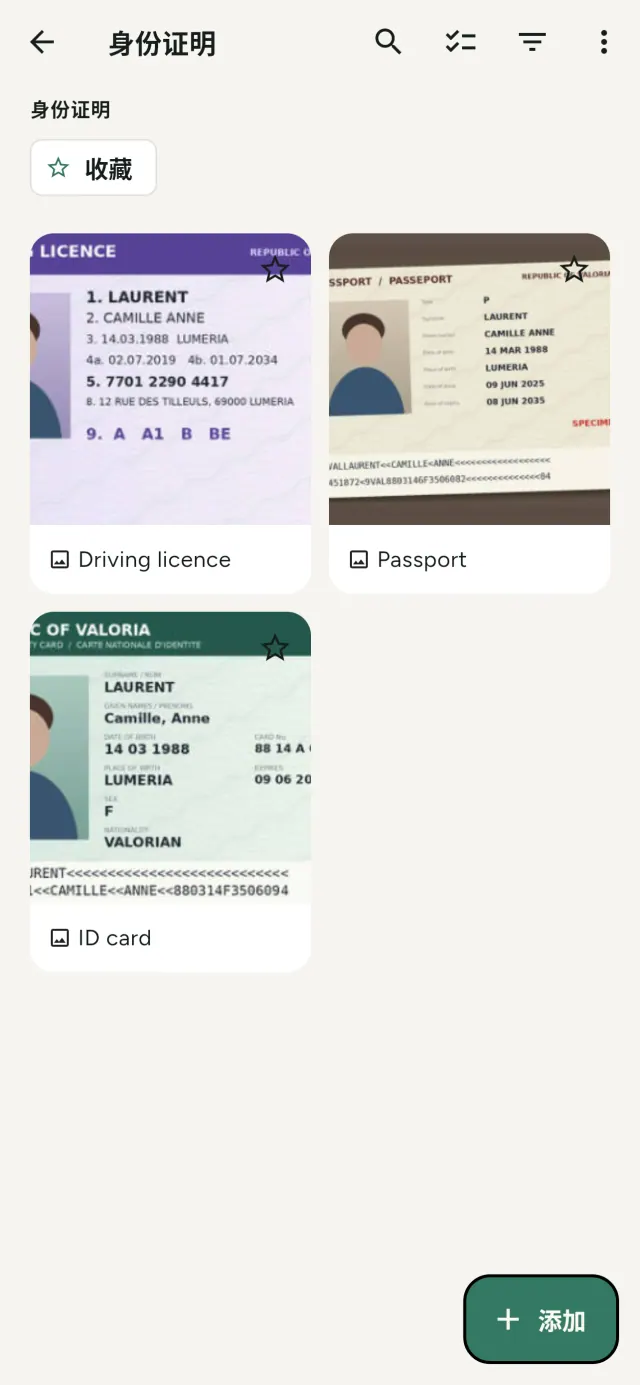
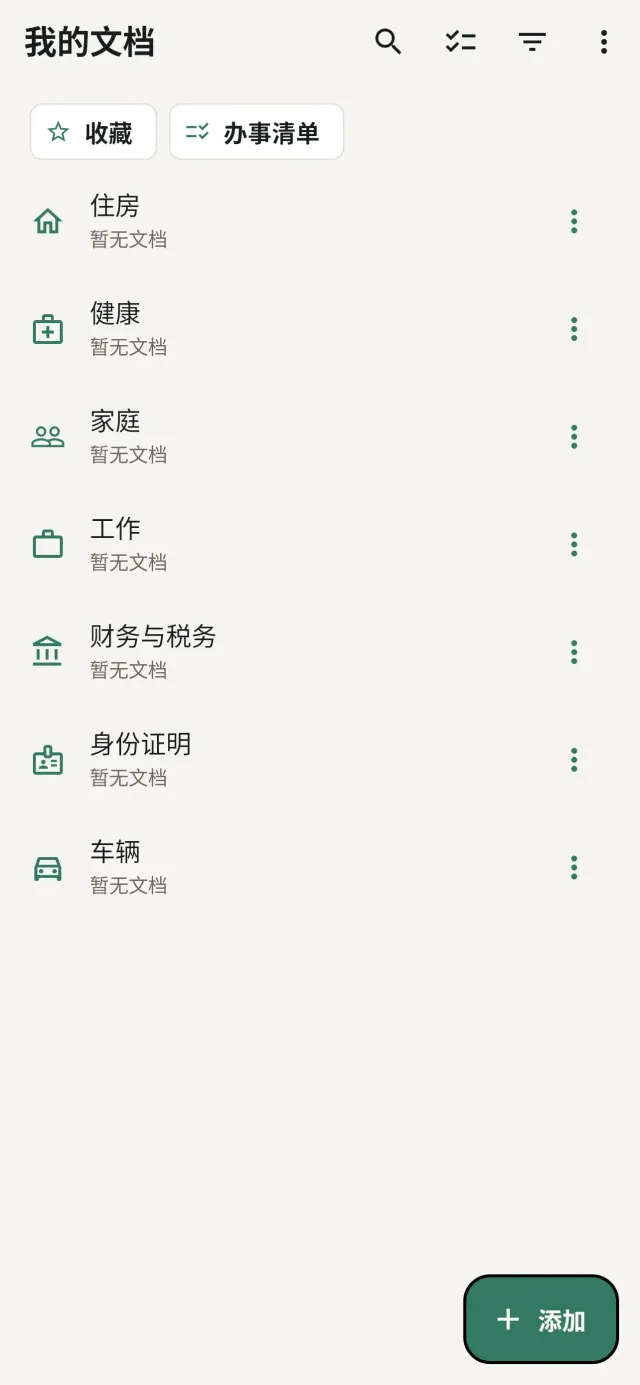
VaultMark 是一款专为敏感证件、合同与私人 PDF 打造的本地加密文件保险箱,从收纳到对外发送全程离线守护隐私。
VaultMark 的功能
本地加密文件保险箱
- 使用 AES-256-GCM 直接在设备本地加密保存证件、账单、合同与 PDF,无需云端服务器。
- 通过 6 位数字密码锁及生物识别解锁,支持离开后自动上锁。
- 请牢记您的密码:应用不设云端账号或后台找回机制,忘记密码将无法恢复保险箱数据。
发送前先添加文档水印并清除元数据
- 内置相机扫描文档:拍摄纸质证件或收据,即可纳入安全流程处理。
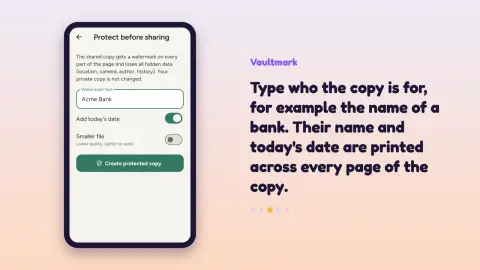
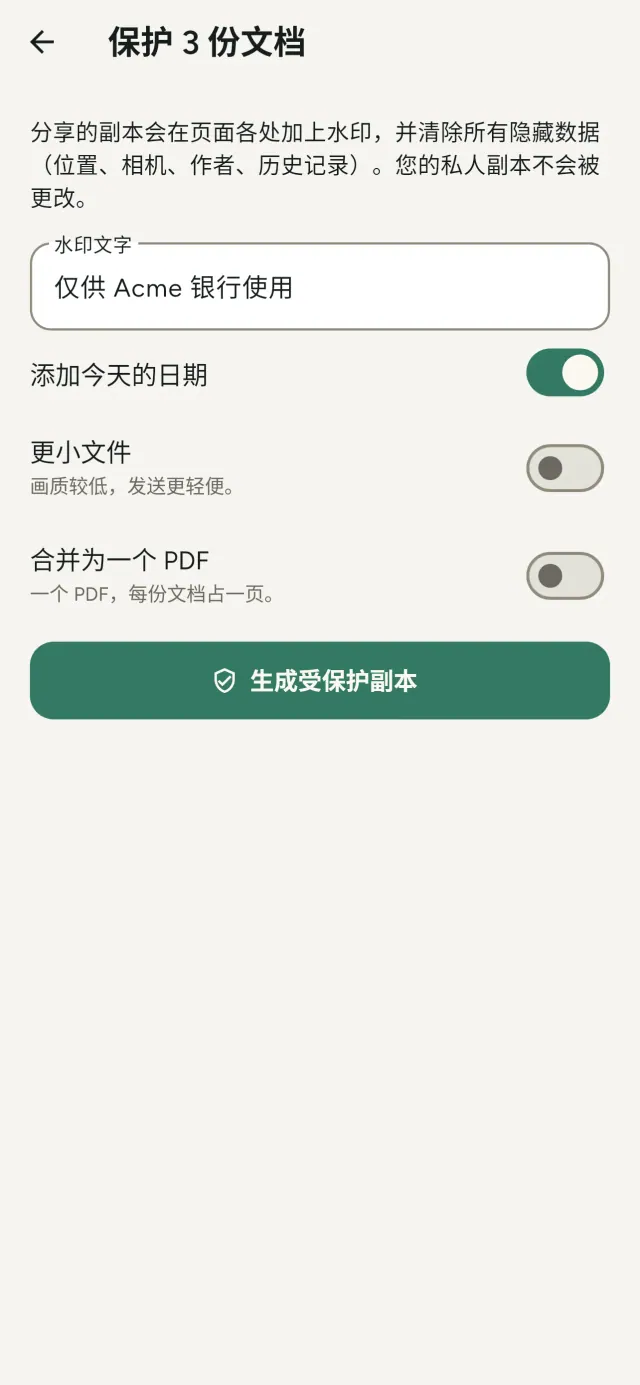
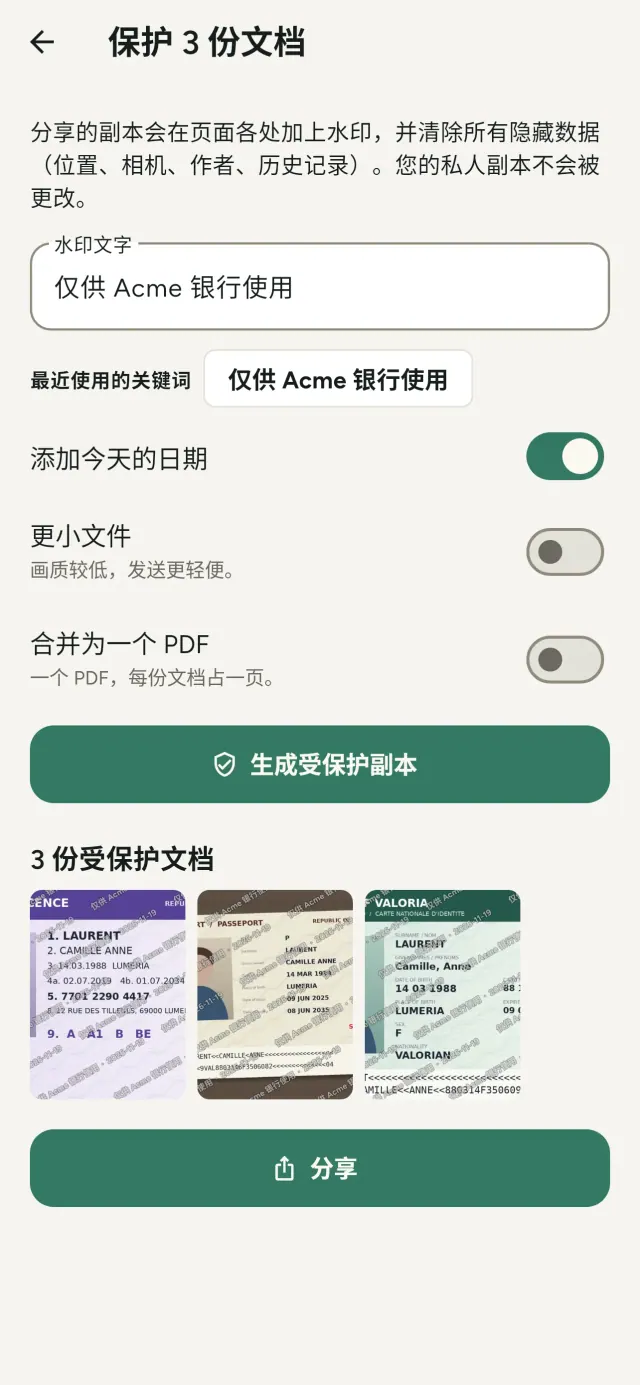
- 自定义全页防泄密文档水印:自由设置水印文字(例如收件方与用途)、透明度、角度与密度,有效降低被转用风险。
- 彻底清除元数据:通过重绘图像位图并把 PDF 栅格化重建为干净页面,清除 EXIF、GPS 定位、作者与设备信息,再生成副本安全分享。
- 合并多份 PDF 并在需要时为导出文件添加 AES-256 PDF 打开密码。
专为高频办事场景设计
- 通过其他应用的“分享”或“打开方式”直接导入文件,或从系统文件选取器添加。
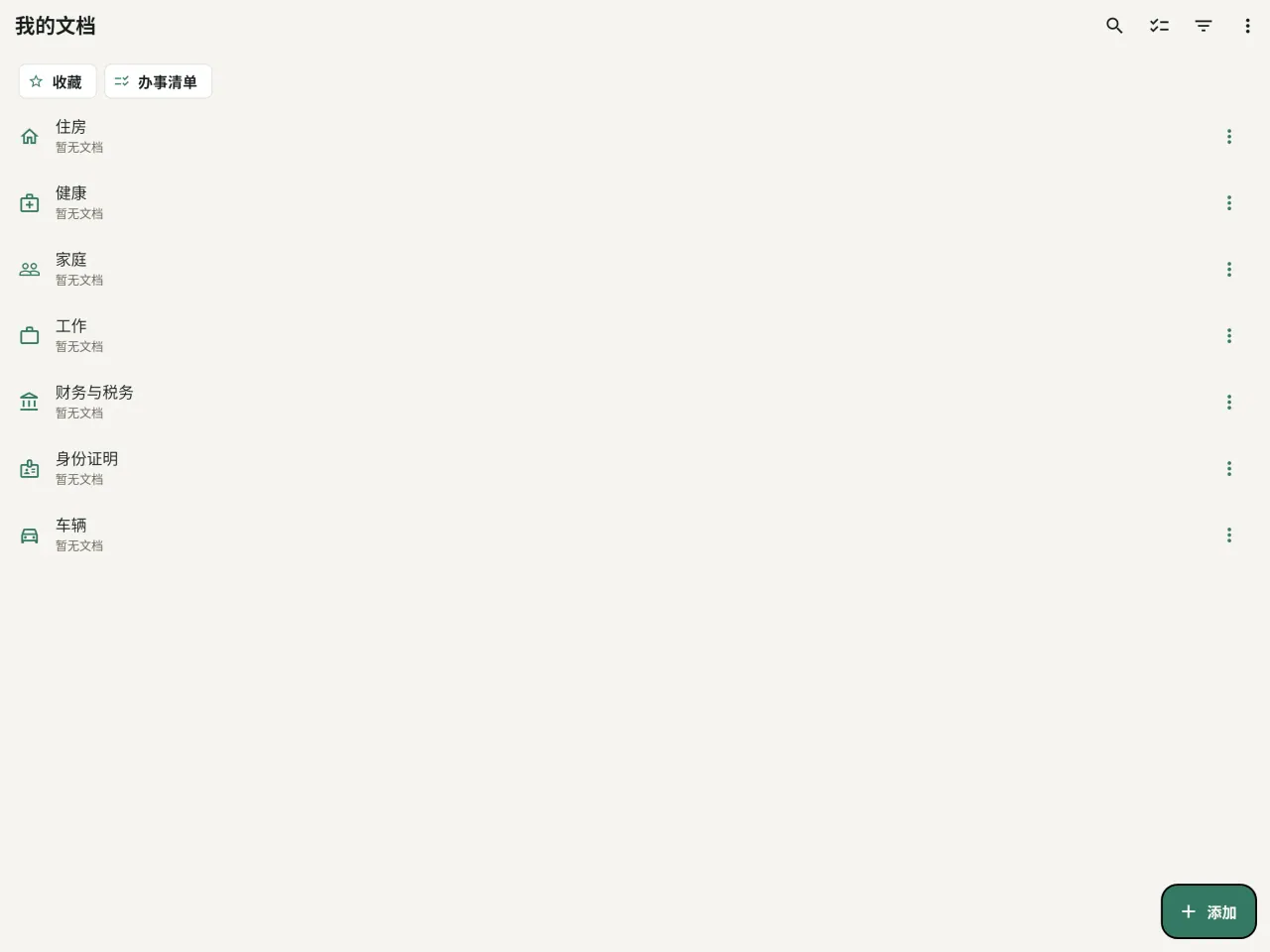
- 内置常用办事材料清单(租房、银行开户、行政申请等),可关联保险箱内已有文件,查漏补缺一目了然。
- 生成加密备份(.vmbk)归档保存,或通过加密二维码直接在两台手机之间点对点传输文档。
签署并检索您的文档
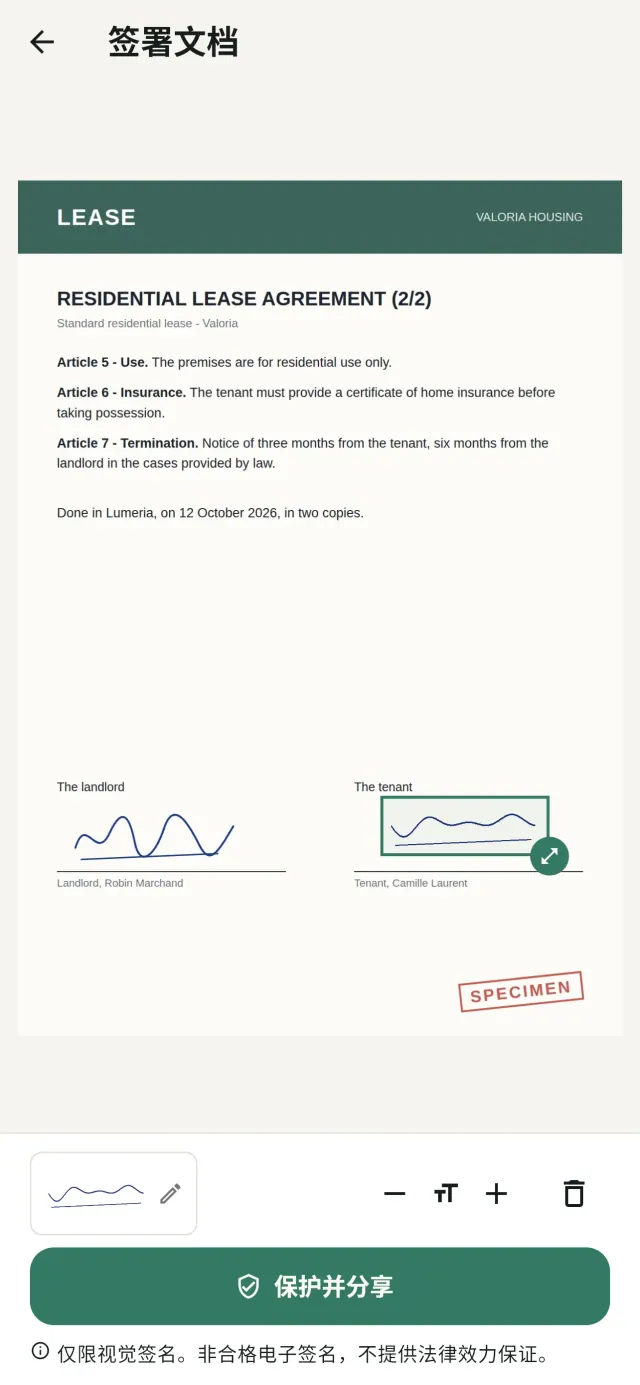
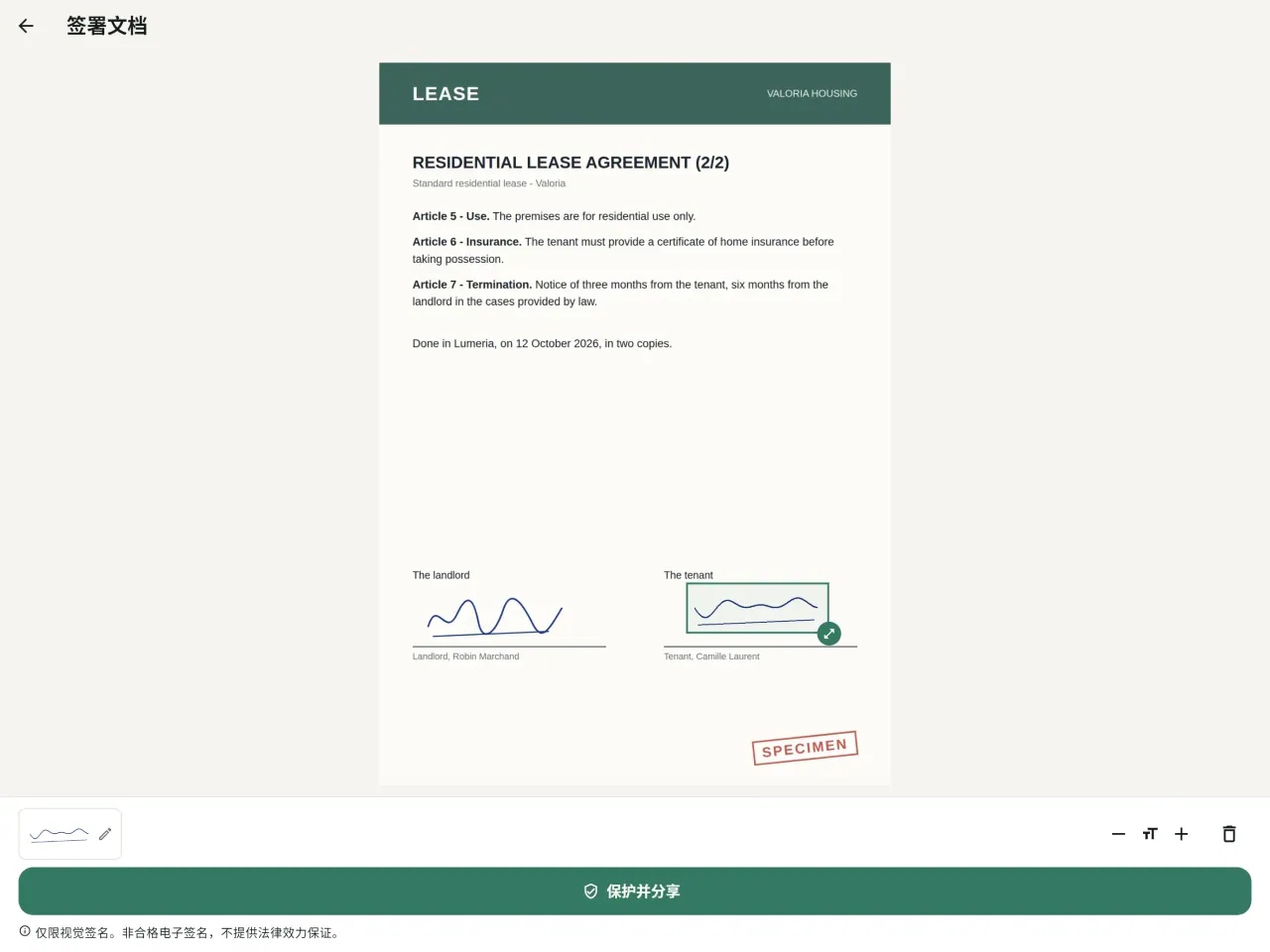
- 手绘签名或导入图片,直接在手机上将其放置到 PDF 页面或文档扫描图像上。
- 已保存的签名加密存放在保险箱中;分享的副本为扁平化、带水印且不含元数据(仅为视觉签名,不具法律效力)。
- 需要检索扫描件?按需运行 OCR 生成可搜索的 PDF,全部在手机本地处理,绝不外传。
- 应用支持 75 种语言。
零云端、零追踪的隐私设计
- 无需注册账号,无广告、无行为分析统计。
- 日常保险箱使用、扫描文档、文档水印与清除元数据完全离线运行;仅在您主动发起手机间加密二维码传输时通过加密中继临时转发密文。
VaultMark 指南
适合哪些人
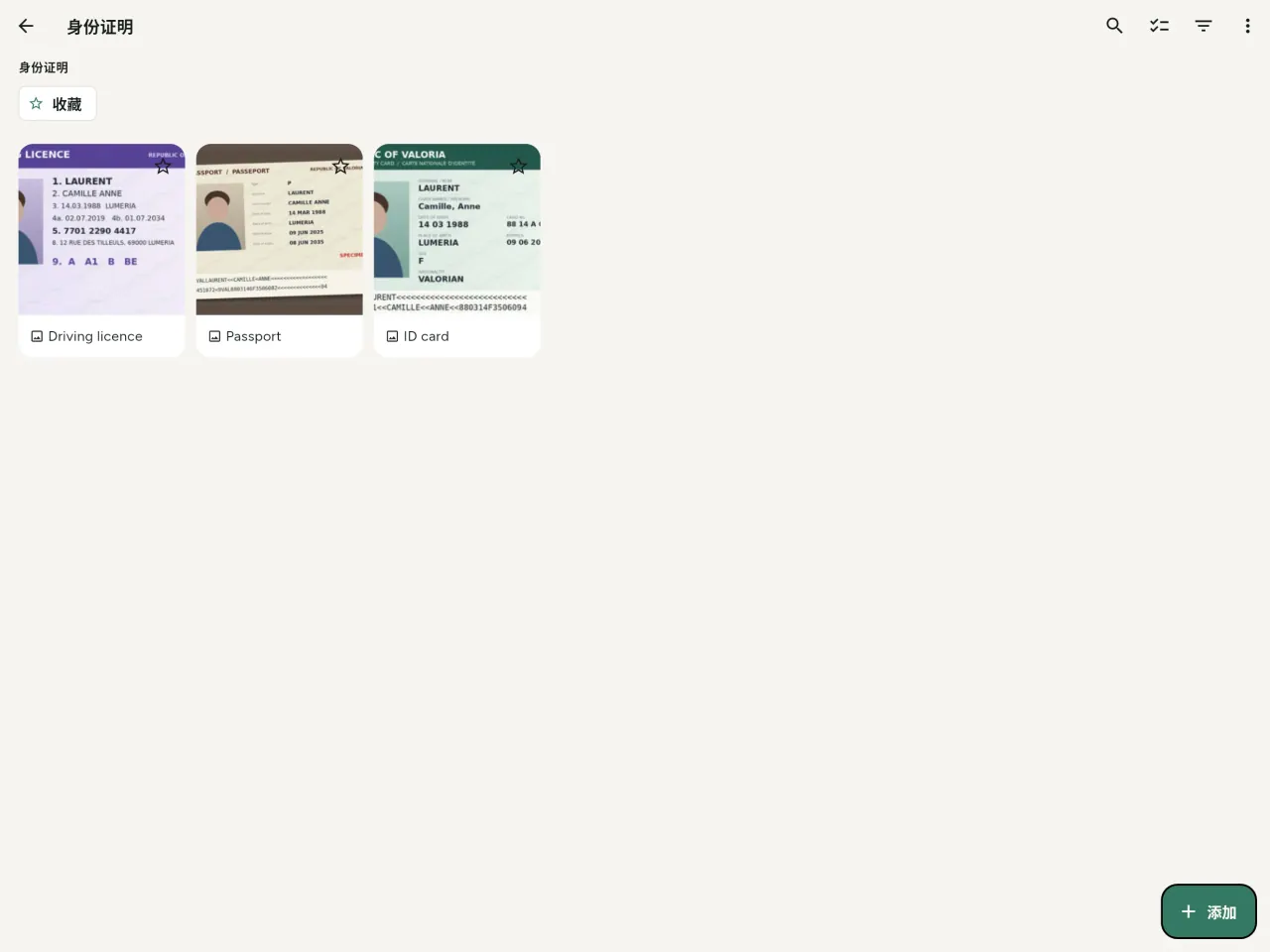
- 需要发送身份证件、住址证明或工资单副本的人(租房申请、银行、雇主、行政手续)。
- 厌倦了数据泄露、想自己掌控个人数据,并且在不得不分享时希望更好地保护它的人。
- 想把合同、医疗文件和其他重要文件加密保存在手机上的人。
- 收到 PDF 或照片后,想不放进保险库就立即加以保护的人。
为什么选择VaultMark
- 个人文件正是身份盗用者用来以您的名义申请贷款、签订合同或租房所需要的东西。未加保护就发出去的证件或工资单副本,可能在很久以后被挪作他用。VaultMark 会在整页铺上带有收件方和日期的水印(例如“提交给 Example Bank,租房申请,2026-10-05”),因此泄露的副本无法用于其他目的,还能追溯到当初分享的用途。
- 分享出去的文件是根据像素重新生成的:水印无法去除,隐藏的元数据(位置、作者、编辑历史)也已清除。您自己保存的副本不会被改动。
- 采用 AES-256-GCM 加密,密钥保存在手机的安全存储中。没有账号,没有云端,没有跟踪。
目前还不支持的功能
- 暂不支持云存储或设备间同步:保险库只存在于手机上。
- 水印让副本难以被再次利用,也更容易追溯。但它无法阻止他人留存您选择发送的那份副本。
Pixeon 的原则. Pixeon 的应用以本地优先:无需账号,没有跟踪,您的数据只保存在手机里。如果某个应用将来需要联网,也只会在您主动开启所需功能时才会连接,并且在该功能发布之前,我们会先更新隐私政策。
体验 VaultMark 的实际效果。
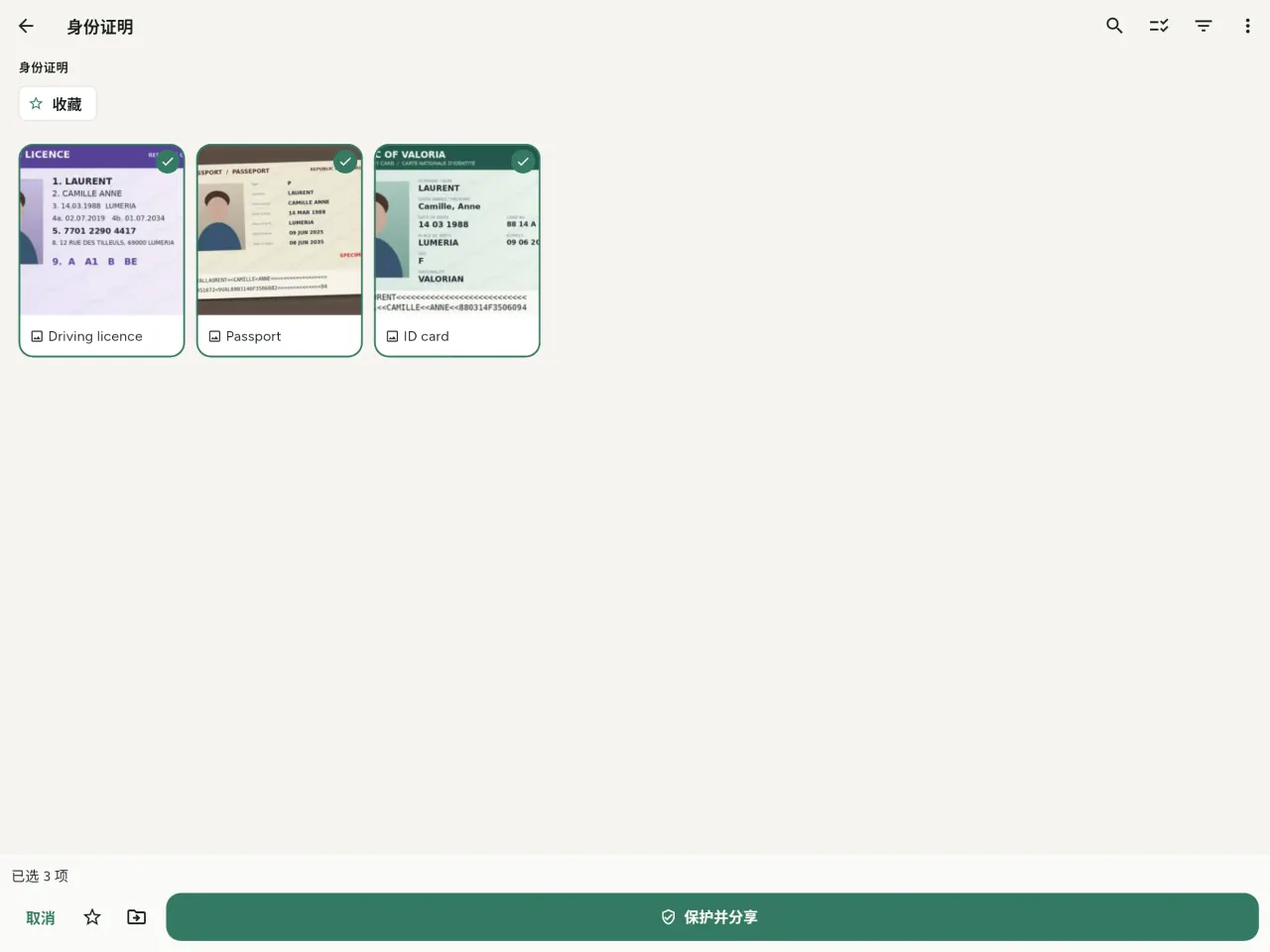
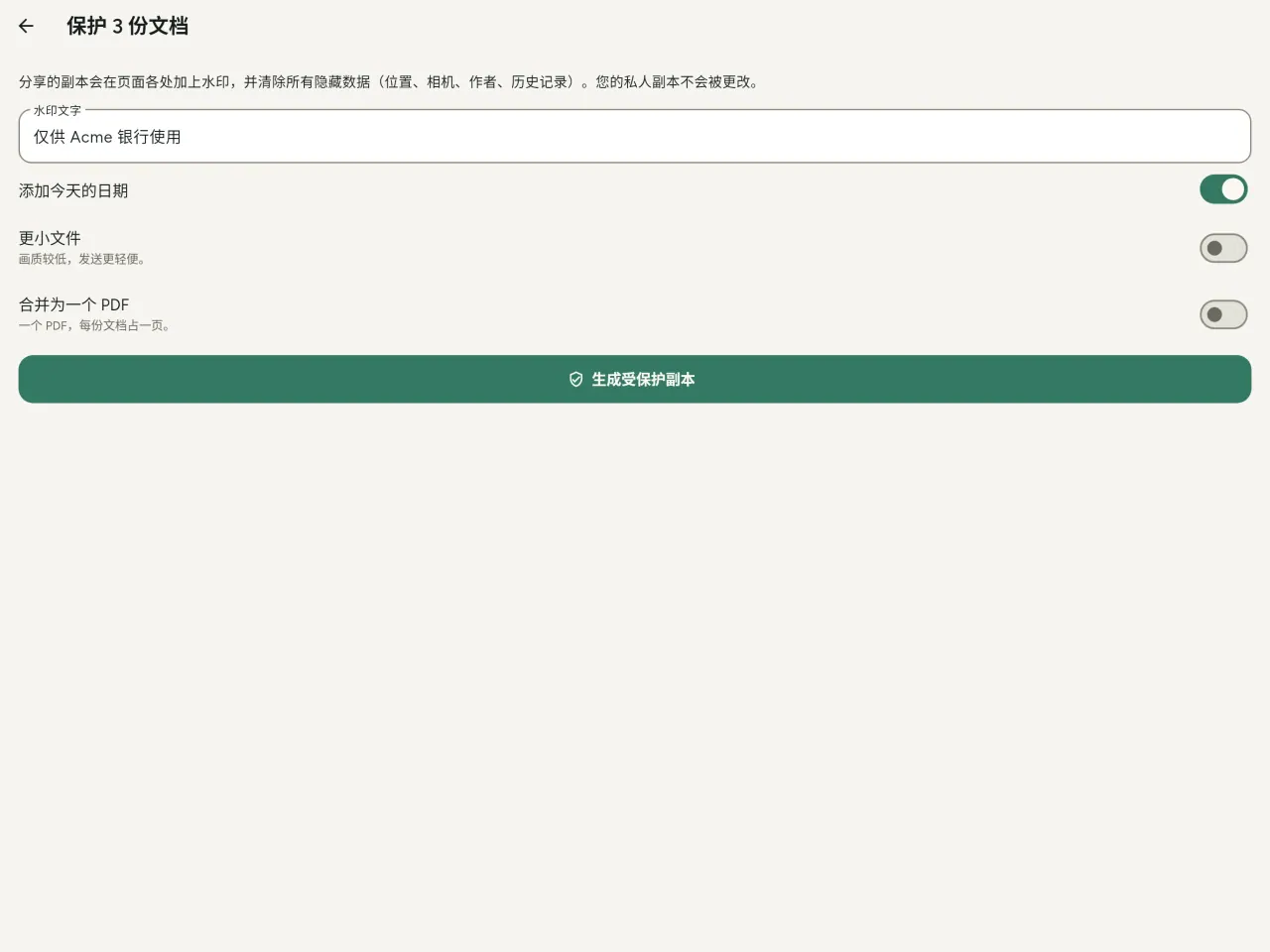
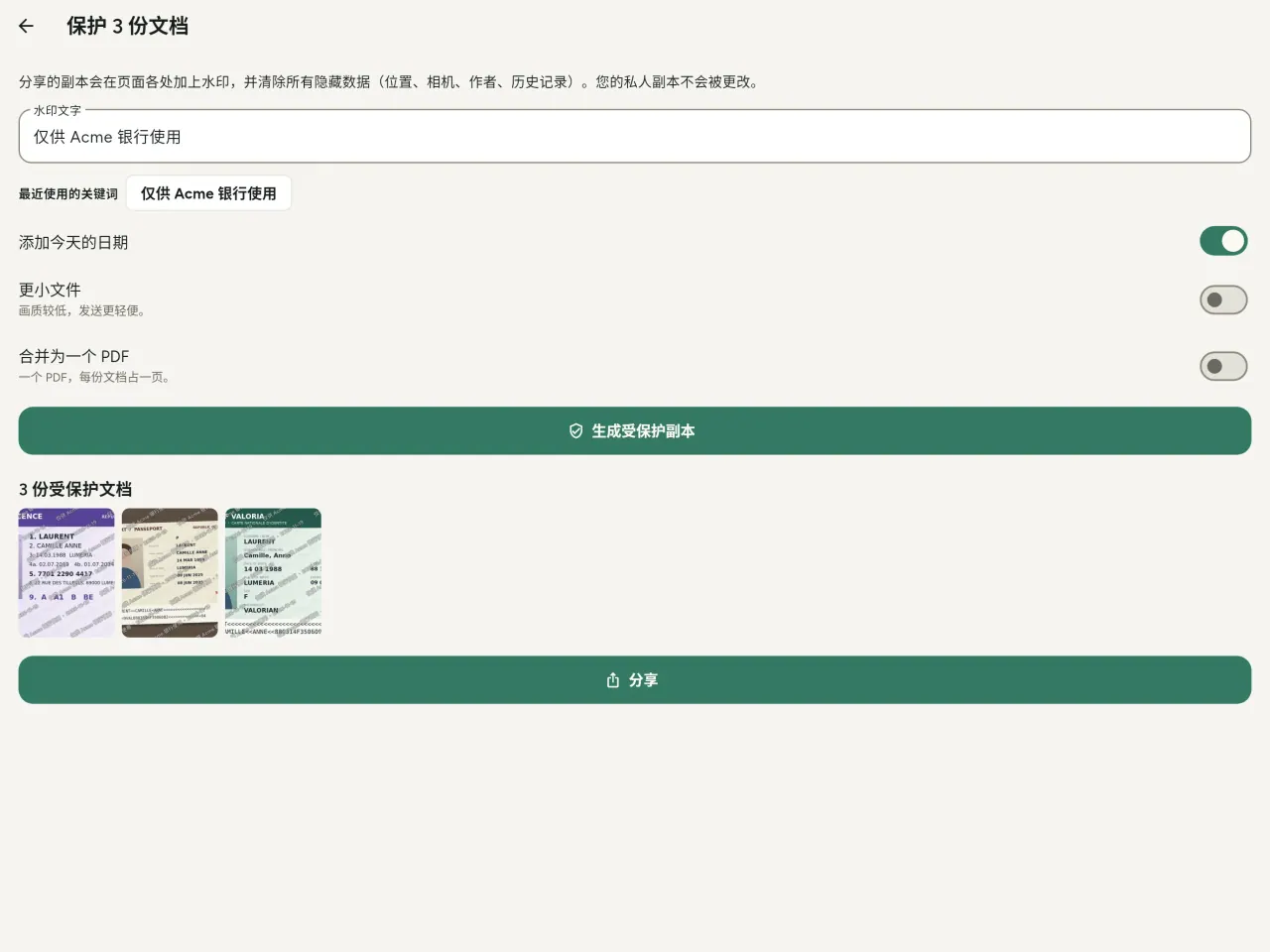
获取 VaultMark。
iPhone 和 Android 免费。
Privacy policy
以下文本为英文版本。英文版本为准。
Last updated: 2026-11-19
VaultMark stores your personal documents on your phone and adds a watermark to a copy before you share it. Your documents stay encrypted on your phone by default, and we collect no personal data, analytics, or tracking information.
What the app handles
Images and PDF files that you add yourself (from your files, or sent to the app from another app). They are encrypted with AES-256-GCM and stored in the app's private storage on your phone. The encryption key is kept in the secure storage of your phone (Android Keystore, iOS Keychain). There is no account, no permanent server storage and no cloud backup.
When you create a protected copy, the app redraws the image or the PDF pages with a watermark (the text you type and, if you choose, today's date) and writes a new file without hidden data (location, camera model, author, history). That file is handed to the app you pick in the system share sheet. Your private copy is never modified.
You can also scan a paper document with the camera. On Android the scan is done by Google's document scanner, which runs on your phone through Google Play services; on iOS it is done by the system scanner. The pages come back to the app and are encrypted like any other document. The scanner's own copies are deleted.
Favourites, tags, checklists for a procedure (the documents to gather, with the ones you attach), an optional saved signature (drawn or imported from an image, deletable in Settings) and backup files are kept inside the app, encrypted with your documents. When you sign a document, you place the signature manually on a page and share a flattened, watermarked, metadata-free copy without modifying your private original. Signing adds a visual image signature only, with no qualified electronic signature or legal guarantee.
You can also ask the app to recognise the text of a document (OCR). Nothing is recognised unless you start it. Printed Latin text is processed on your phone, with a bundled model on Android or Apple Vision on iOS: no image or text is sent to a server and no model is downloaded. The result is a new encrypted searchable PDF, your private original is not modified, and recognition stops if you cancel, leave the app or lock the vault.
What we collect and network use
We collect no analytics, no advertising identifier, no crash reporting and no third-party tracking SDK. All everyday features (storing, viewing, scanning, watermarking and local backup export or import) work without any internet connection. Network access is used only when you initiate one of these actions:
Transfer to another phone: when you choose to send or receive documents in
Settings, encrypted chunks transit ephemerally through our relay
(https://relay.pixeon.net, hosted on Cloudflare Workers and Durable Objects). The
archive is end-to-end encrypted on your device before upload using an ephemeral key carried only in
the one-time QR code, which the relay never sees. Temporary channel data is deleted when the
transfer finishes or is cancelled, or expires automatically (at most 90 days if abandoned).
Optional tips: optional tip purchases processed by Apple or Google Play (see Optional support), or opening our external support page in your browser on direct APK builds.
Permissions
Biometrics (fingerprint or face): only to unlock the vault, if you turn it on. The biometric data is handled by your phone's system; the app only receives a yes or no. Your 6-digit code always remains available.
Camera (iOS only): asked when you scan a paper document or scan a QR code for phone-to-phone transfer. On Android both document scanning and QR scanning run through Google Play services without declaring camera permission in the app.
Internet (Android): declared and used only for user-initiated encrypted
phone-to-phone transfer via https://relay.pixeon.net. No location, contacts,
microphone or shared storage permission. Files are added through the system file picker or the
share sheet, which give the app access to the files you choose only.
Files, backups, phone transfer and deletion
The app's data is excluded from Android and iOS cloud backups on purpose. If you lose or reset the phone, the vault is lost with it, unless you made a backup file or transferred documents yourself. There is no recovery of a forgotten code: keep an original of every document elsewhere.
Backup file: in Settings you can export the whole vault to one file, encrypted with a password you choose (it is not stored and cannot be recovered). The file goes to the share sheet, so you decide where it is kept. Importing it on another phone, with the same password, restores your documents. The app sends nothing. You can also change your 6-digit code in Settings; your documents are not re-encrypted, only the wrapping of the key changes.
Transfer to another phone: in Settings you can transfer selected documents (up to
100 MiB per session) to another phone running VaultMark. The sending phone creates a fresh
random 256-bit key and a single-use 5-minute QR code, displays a 4-digit verification code that
you verify on both screens before anything is uploaded, and transfers HKDF-SHA-256 / AES-256-GCM
encrypted chunks via https://relay.pixeon.net. The relay cannot decrypt documents or
see file or folder names. Existing documents on the receiving phone with the same internal id are
never overwritten, and procedure checklists and any saved signature are omitted.
Protected copies are written to a temporary folder, handed to the share sheet, and deleted when the vault locks and at the next launch. A copy that you sent to another app is then in that app's hands.
Deleting a document in the app removes its encrypted file. Uninstalling the app removes everything.
A watermark discourages misuse and shows where a copy came from. It cannot stop someone who already has the file from sharing it. Screenshots are blocked inside the app on Android release builds.
Optional support
Tips go through in-app purchase, processed by Apple on iOS and by Google Play on Android, under their own terms and privacy policy (the app only learns that a purchase succeeded). Versions installed outside Google Play may instead show a button that opens an external donation page in your browser; nothing from the app is sent to it. A tip unlocks nothing. A small reminder may appear after you have used the app a few times; it stays away for a while once you close it. The app is free and every feature works without tipping.
Contact form on this website
If you write to us through this site, we use your message and the email address you optionally give only to reply. Bot protection is provided by Cloudflare and email delivery by Resend.
Language choice on this website
When you choose a language, or when this site opens a page in your browser's language, it stores
one small functional cookie (pxl, a language code, one year) so that your choice is
remembered. If this site suggests a page in your browser's language and you close that suggestion,
your browser also keeps a local note (pxl-banner-off, in local storage, 30 days) so the
suggestion does not come back. Neither identifies anyone, neither is used for tracking or advertising,
and neither is shared. You can delete them in your browser at any time.
Website statistics
This website uses Cloudflare Web Analytics to count visits (pages viewed, country, browser type, loading speed). It sets no cookie, does not use local storage, does not fingerprint your device, does not follow you across sites and does not build a profile of you. Search engines (for example Google Search Console) give us aggregated search statistics, without any data about individual visitors. Our own web server also counts the pages it serves: for each page it keeps the page address, the site or social network that sent you (only its name, or the campaign tag written in the link), the country, the type of device and whether the request came from a robot. It keeps no IP address, no identifier and no cookie, and these counts are anonymous. We use no advertising or other analytics service. None of this concerns the app itself, which collects nothing.
Children
The app is a general-purpose tool and is not directed at children.
Changes
An updated policy will be published at this URL with a new date above.
Contact
Questions about privacy: vaultmark-contact@pixeon.net
支持
最后更新:2026-11-19
VaultMark 是一款独立的小型应用。常见问题的解答如下。
我们会尽力在几天内回复您。为帮助我们,请说明您的设备型号、系统版本和操作过程。请勿发送您的文件或个人信息。
VaultMark真的免费吗?
是的。VaultMark可以免费下载和使用,没有广告,也无需订阅。
应用会存储或发送哪些数据?
您的文档会以加密形式保存在手机上,日常功能无需网络即可使用。如果您在设置中选择手机到手机传输,加密数据块会使用仅存储在一次性二维码中的密钥,暂时通过 relay.pixeon.net 传输,之后会被删除。详情请参阅隐私政策。
我忘记了密码。你们能恢复我的文档吗?
不能。这是经过设计的,无法恢复:没有密码,任何人,包括我们在内,都无法打开保险库。因此,我们建议您在其他地方保留每份文档的原件。
我换了手机或手机丢失了。我的保险库在哪里?
云备份是专门禁用的。重置或更换手机前,请在设置、备份中导出加密备份文件(.vmbk,使用其独立密码保护),或者在设置中使用手机到手机传输,通过二维码和端到端加密复制文档。
如何给身份证复印件或文档添加水印?
- 从纸质身份证件、手机上的文件或其他应用开始:用相机扫描(发送前的第一道保护步骤),选择 PDF 或图片,或者使用分享或用 VaultMark 打开。
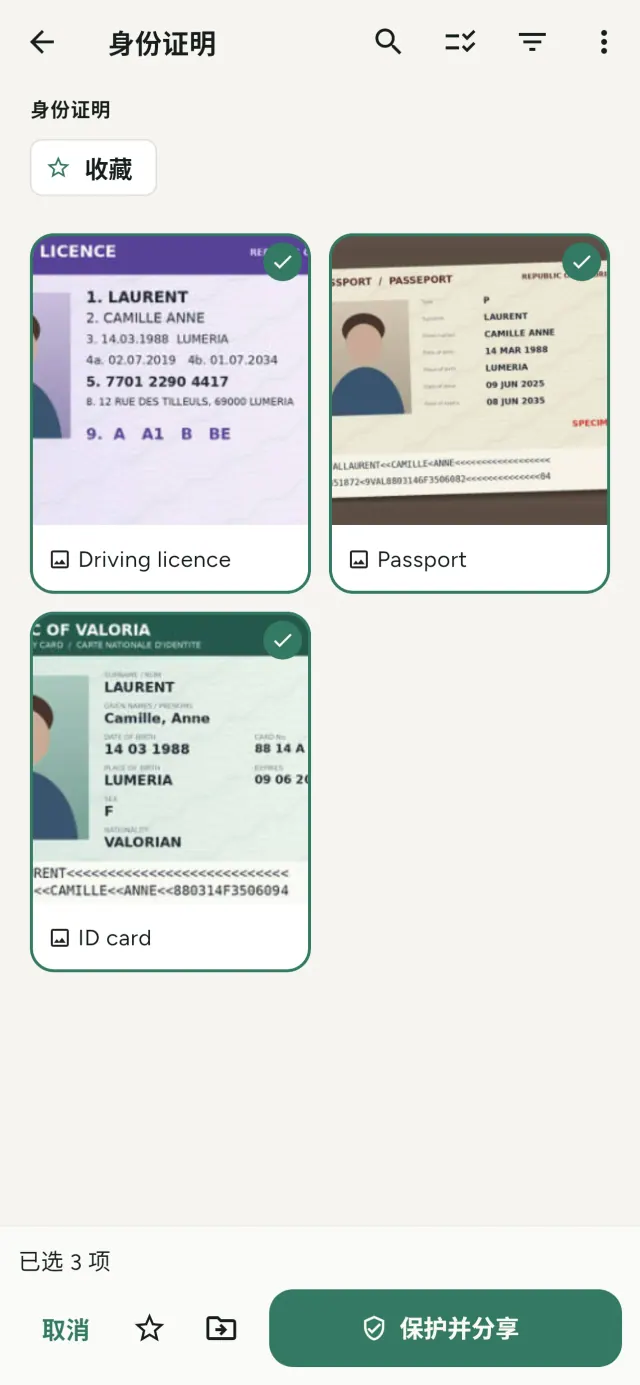
- 选择一份或多份文档(来自文件夹或流程清单),点击保护并分享,输入接收人和可选日期,然后选择将页面合并为一个 PDF,或使用 AES-256 密码锁定。
- 通过系统分享面板发送:隐藏元数据会被移除,文件会根据像素重新生成,您的私人副本不会被修改。
我可以在本地签署文档吗?
可以。在保险库中打开图片或 PDF,然后点击签名。绘制签名或导入图片(图片会在保险库中加密保存,也可以在设置中删除),在页面上手动放置并调整大小,然后保护并分享带水印且已移除元数据的扁平化副本。这只会添加可视签名,不属于合格电子签名,也不提供法律保证。
我可以扫描纸质文档或从其他应用添加文档吗?
可以。在 VaultMark 中,您可以用相机扫描纸张,或导入文件;在其他应用中,您可以使用分享或用 VaultMark 打开,立即保护文件,而无需将其添加到保险库。
支持哪些文件?
图片和 PDF 文件。分享时,PDF 页面会转换为带水印的图片(因此无法去除水印),多个文档也可以合并为一个 PDF,并可选择使用 AES-256 密码保护。过大的文件会被拒绝(最多 60 页和 80 兆像素)。
我可以搜索扫描文档中的文字吗?
可以。打开文档,并按需开始文字识别(OCR)。它会创建一个新的加密可搜索 PDF,同时保留原文档不变。识别在您的手机上运行(印刷的拉丁文字),不会向服务器发送任何内容,除非您启动识别,否则不会识别任何内容。
水印能完全保护我吗?
水印可以减少滥用,并显示副本的来源,但无法阻止已经拥有文件的人分享文件。请只与您信任的人分享文档。
为什么我无法截图?
在 Android 上,为了保护您的文档,应用内会阻止截图和屏幕录制。
有哪些语言可用?
75 种语言:英语、法语、德语、西班牙语、意大利语、葡萄牙语、阿拉伯语、中文(简体和繁体)、日语、韩语、印地语、俄语等。应用会跟随您手机的语言,您也可以在设置中更改语言。较新语言的翻译由机器辅助完成,并会根据您的反馈不断改进。
家庭预算、预算规划,轻松 记账,收支情况一目了然,数据仅保存在本机。
来自 Pixeon 的其他产品Metadata Cleaner照片元数据、exif 与 exif viewer:安全清除照片位置。
来自 Pixeon 的其他产品Little Relay母乳喂养、睡眠和辅食记录,无需账号,离线使用。
来自 Pixeon 的其他产品Menuloop规划菜单,生成购物清单,管理食谱,一站式解决。
来自 Pixeon 的其他产品Indie OfficeQuote maker and self-employed invoices. Offline, no account, no ads.
来自 Pixeon 的其他产品FanionDiscover and share local events, concerts, markets and weekend outings nearby