
VaultMark: Ebe Nchekwa Akwụkwọ
Ebe nchekwa akwụkwọ e zoro ezo. Tinye akara mmiri n'akwụkwọ, wepụ metadata tupu ịkekọrịta ha.
N'efu. Enweghị mgbasa ozi. Enweghị ndenye aha akwụ ụgwọ.

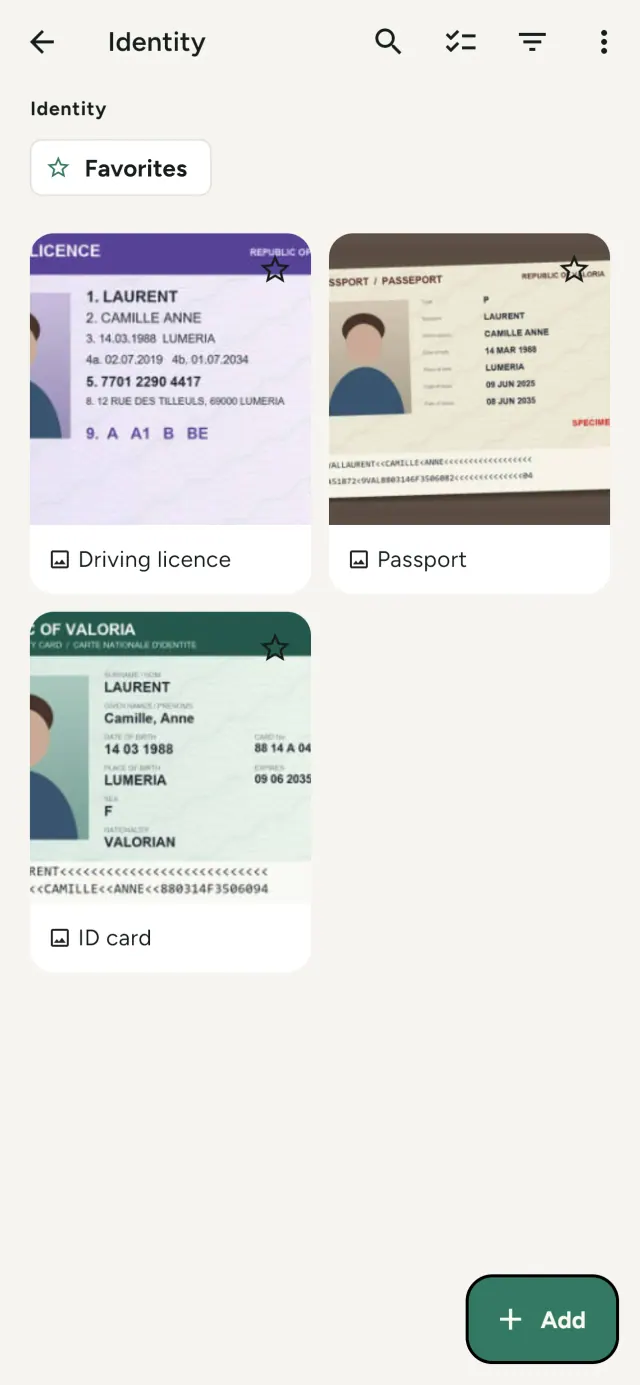
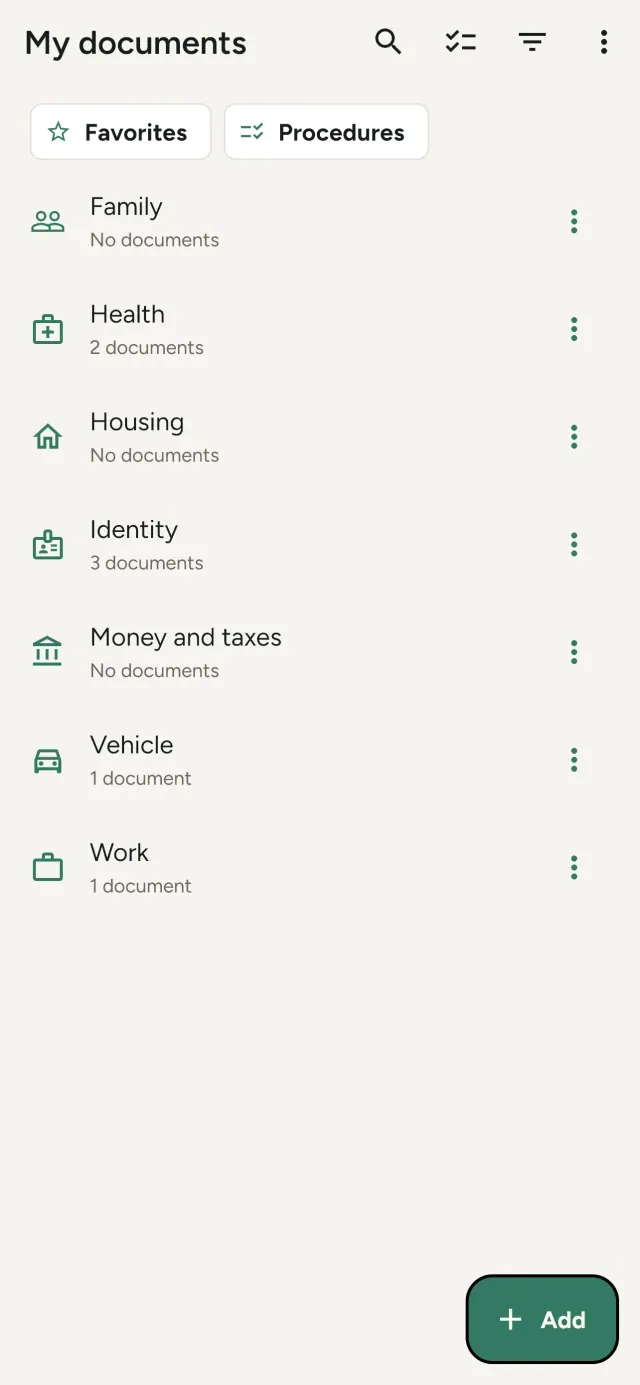
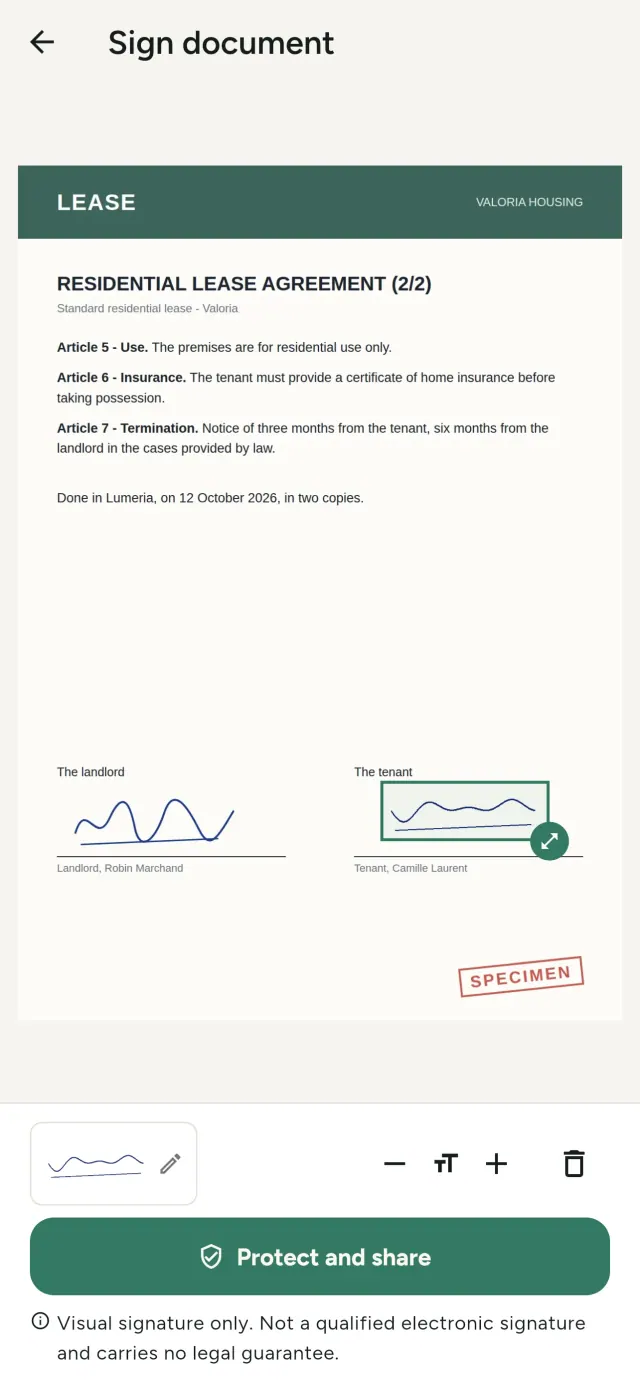
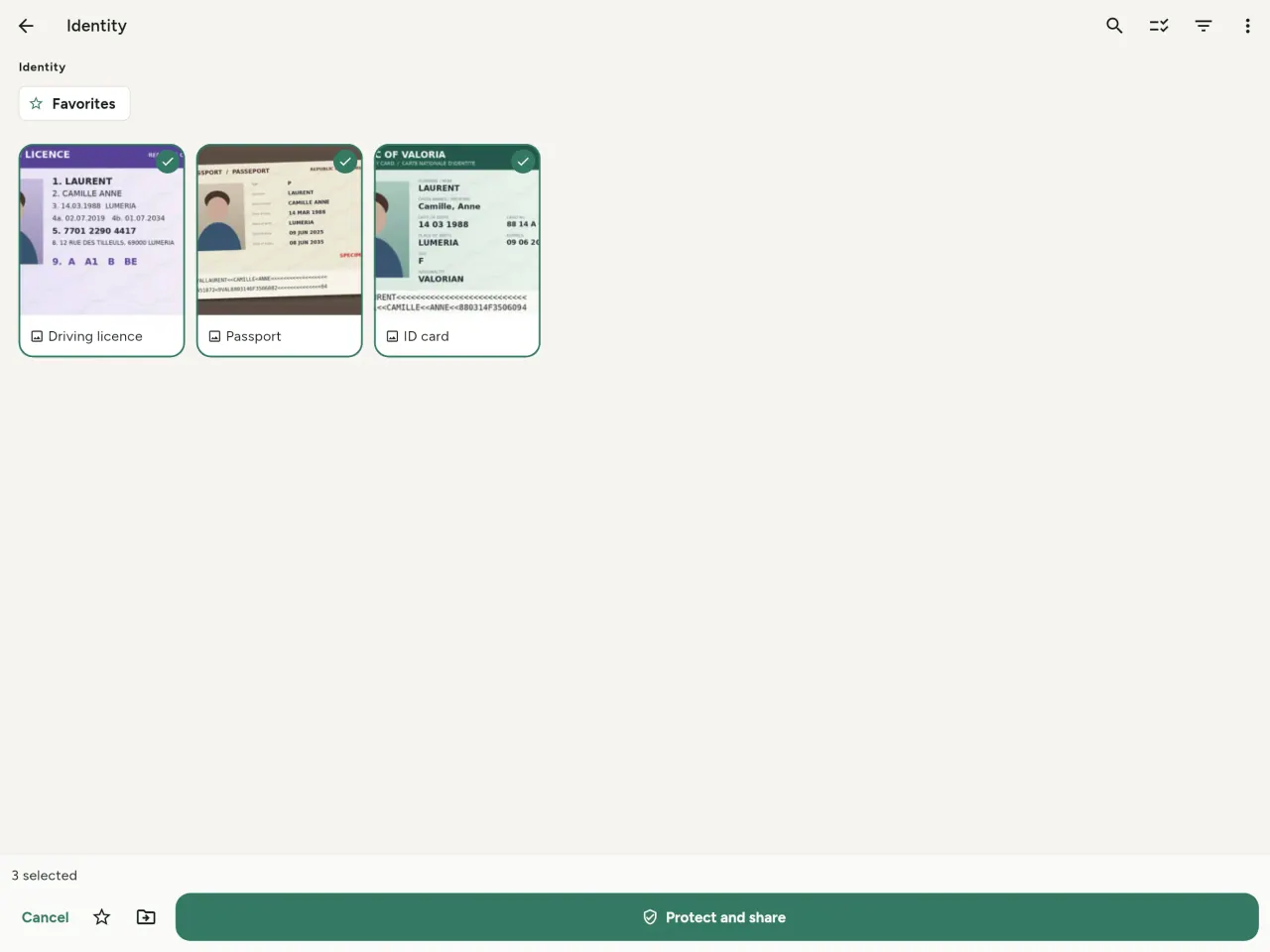
Chebe kaadị njirimara gị, nkwekọrịta, akwụkwọ ụgwọ ọnwa na akwụkwọ ahụike tupu iziga ha, ma kpọchie ha n'ebe nchekwa e zoro ezo na ekwentị gị.
VaultMark bụ ebe nchekwa akwụkwọ nkeonwe. Ihe niile na-anọ na ngwaọrụ gị: enweghị akaụntụ, enweghị igwe ojii, enweghị mgbasa ozi, enweghị nsuso, na ojiji kwa ụbọchị anaghị achọ netwọk.
Ihe VaultMark na-eme
Nyochaa, tinye akara mmiri n'akwụkwọ ma chebe ha tupu iziga ha
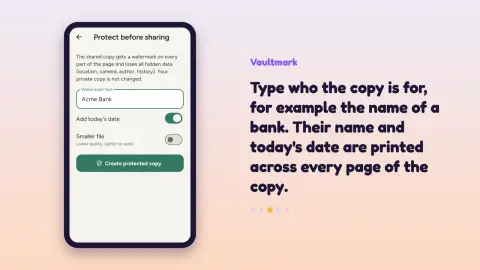
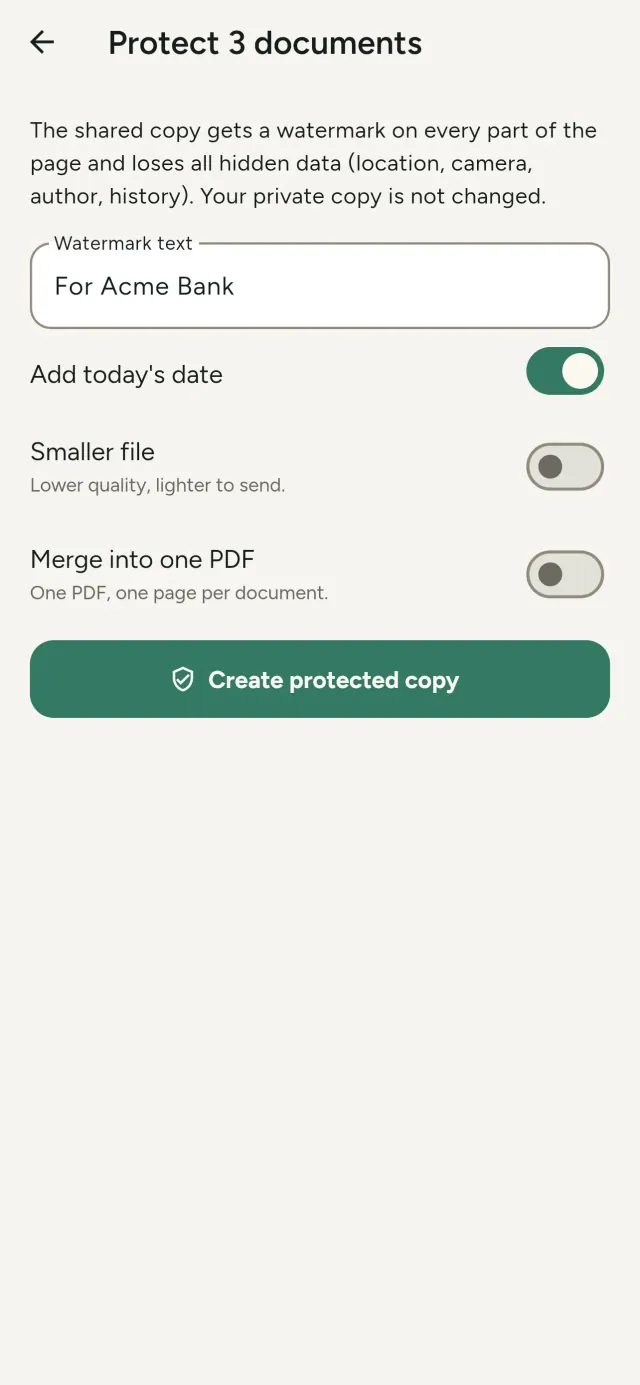
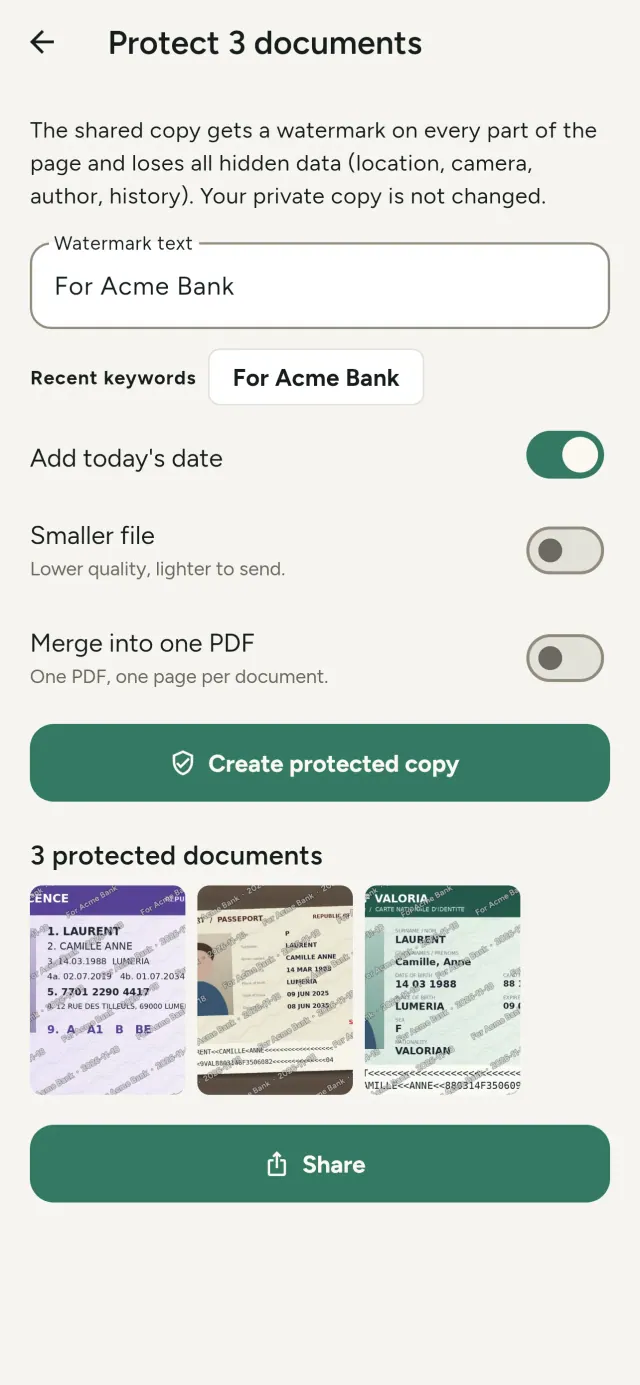
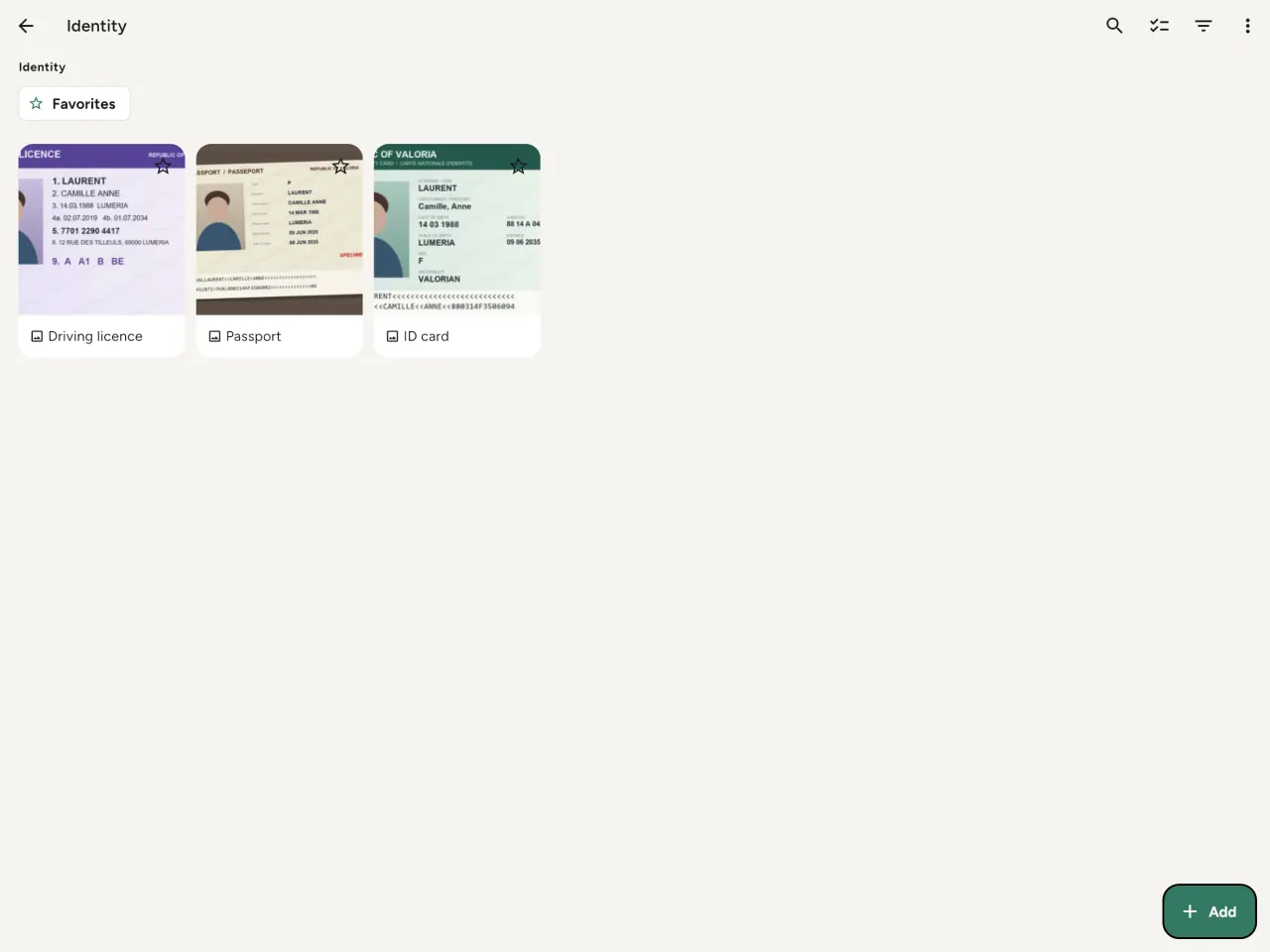
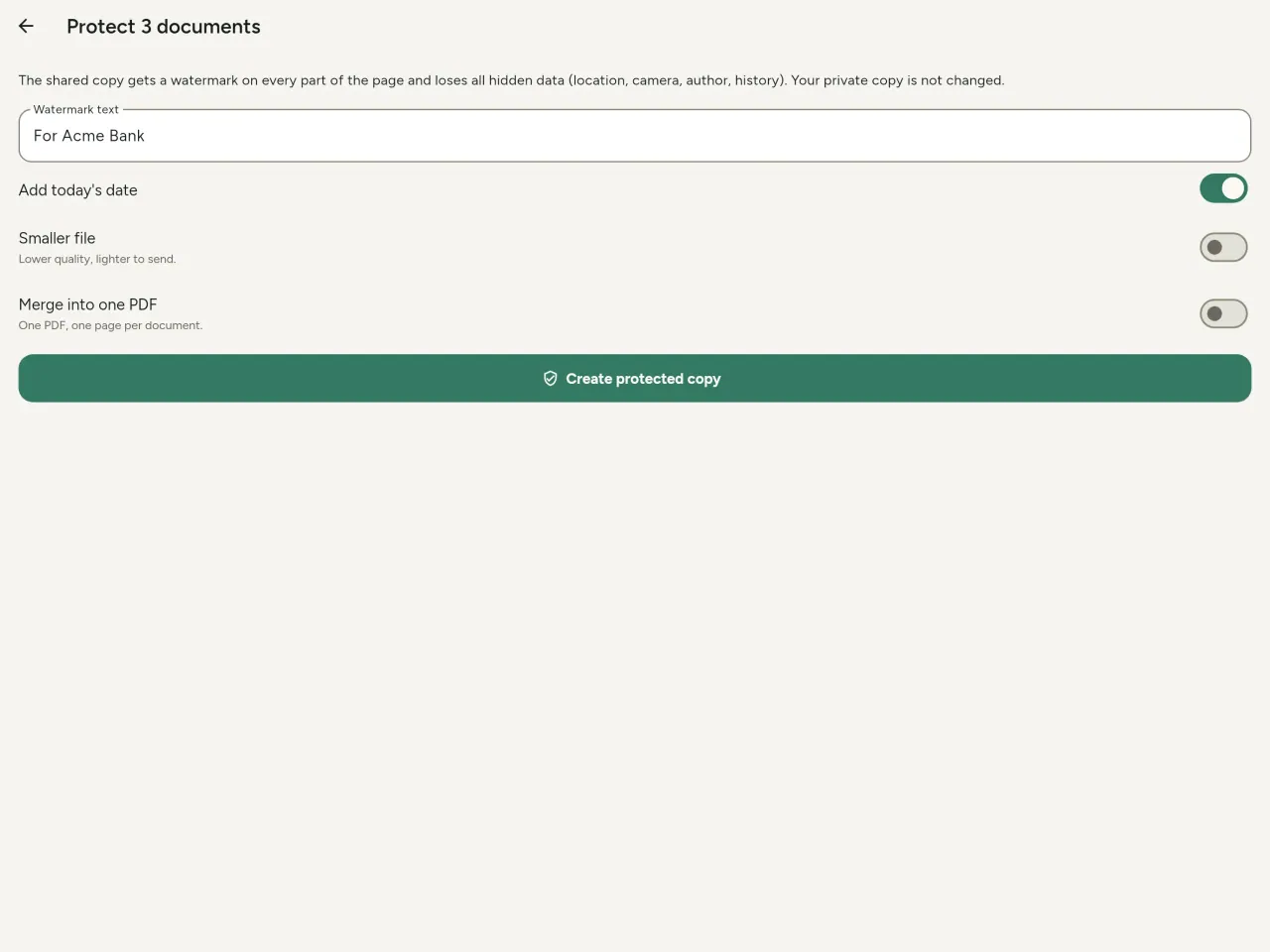
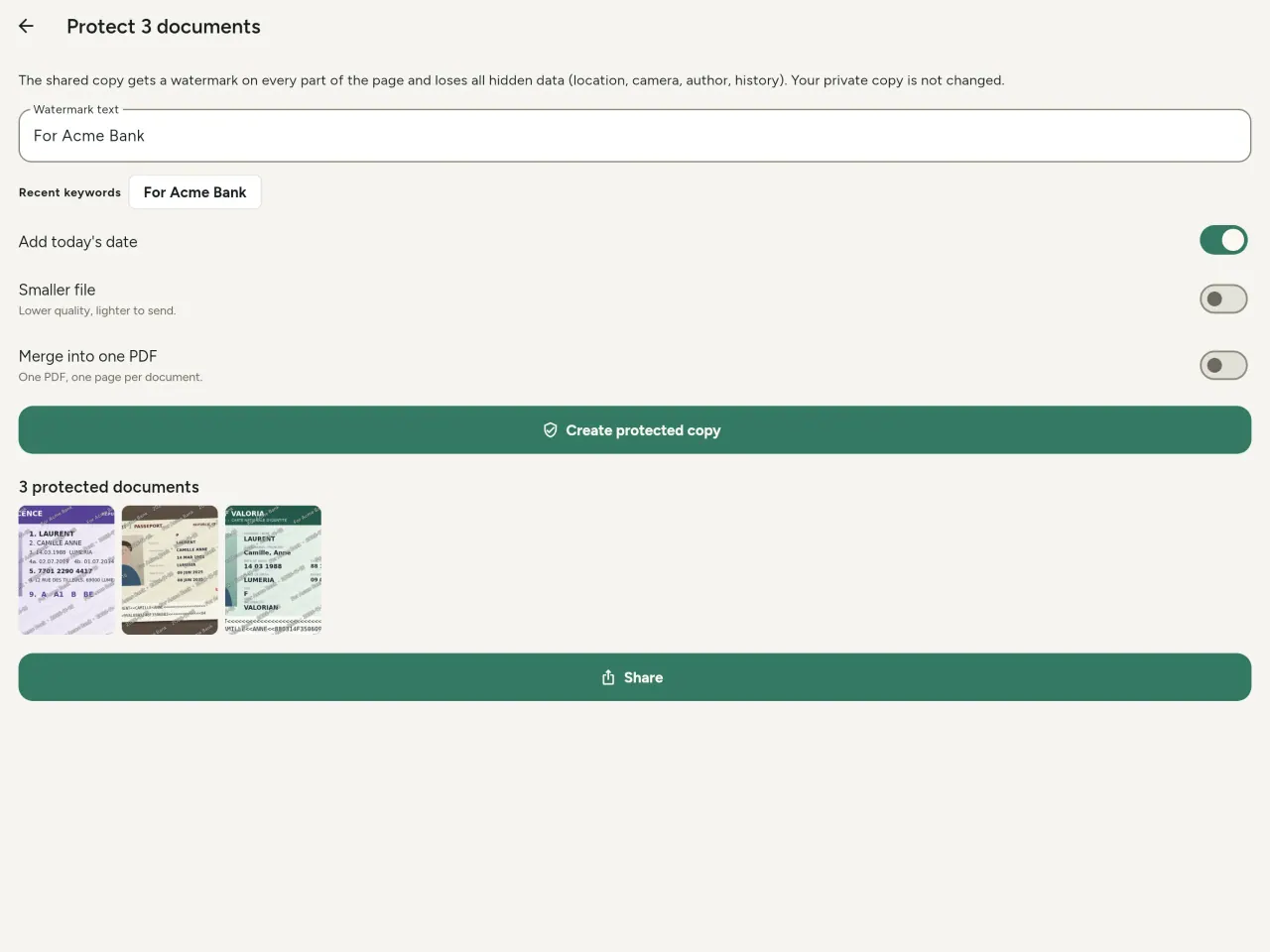
Ị nwere akwụkwọ dị n'elu tebụl? Malite site na iji igwefoto gị nyochaa ya, ma ọ bụ họrọ PDF ma ọ bụ onyonyo dịworị na ekwentị gị. VaultMark na-etinye akara mmiri n'ofe ibe ahụ dum jiri ederede ị họọrọ (dịka ọmụmaatụ "Maka Ụlọ Akụ Dị Ihe Nlereanya, arịrịọ mbinye ego") na ụbọchị taa, ma wepụzie data zoro ezo niile: ebe, ụdị ngwaọrụ, onye dere ya, akụkọ ndezi. Jiri ya na mbipụta kaadị njirimara, ihe akaebe adreesị ma ọ bụ akwụkwọ ụgwọ ọnwa ka a ghara iji mbipụta ahụ ọzọ mee ihe ọzọ. Nke a bụ ụzọ kacha ọsọ isi wepụ metadata tupu iziga faịlụ.
A na-ewughachi faịlụ a kesara site na pikselụ: a pụghị iwepụ akara mmiri ahụ n'ụzọ dị mfe, metadata ahụ agwụkwala. Ị na-eziga akwụkwọ dị iche iche? Jikọta ha ka ha bụrụ otu PDF ma jiri okwuntughe AES-256 kpọchie ya ma ọ bụrụ na ịchọrọ. A naghị agbanwe mbipụta nkeonwe gị ma ọlị.
Usoro ọrụ na nchekwa nchekwa maka akwụkwọ ọ bụla
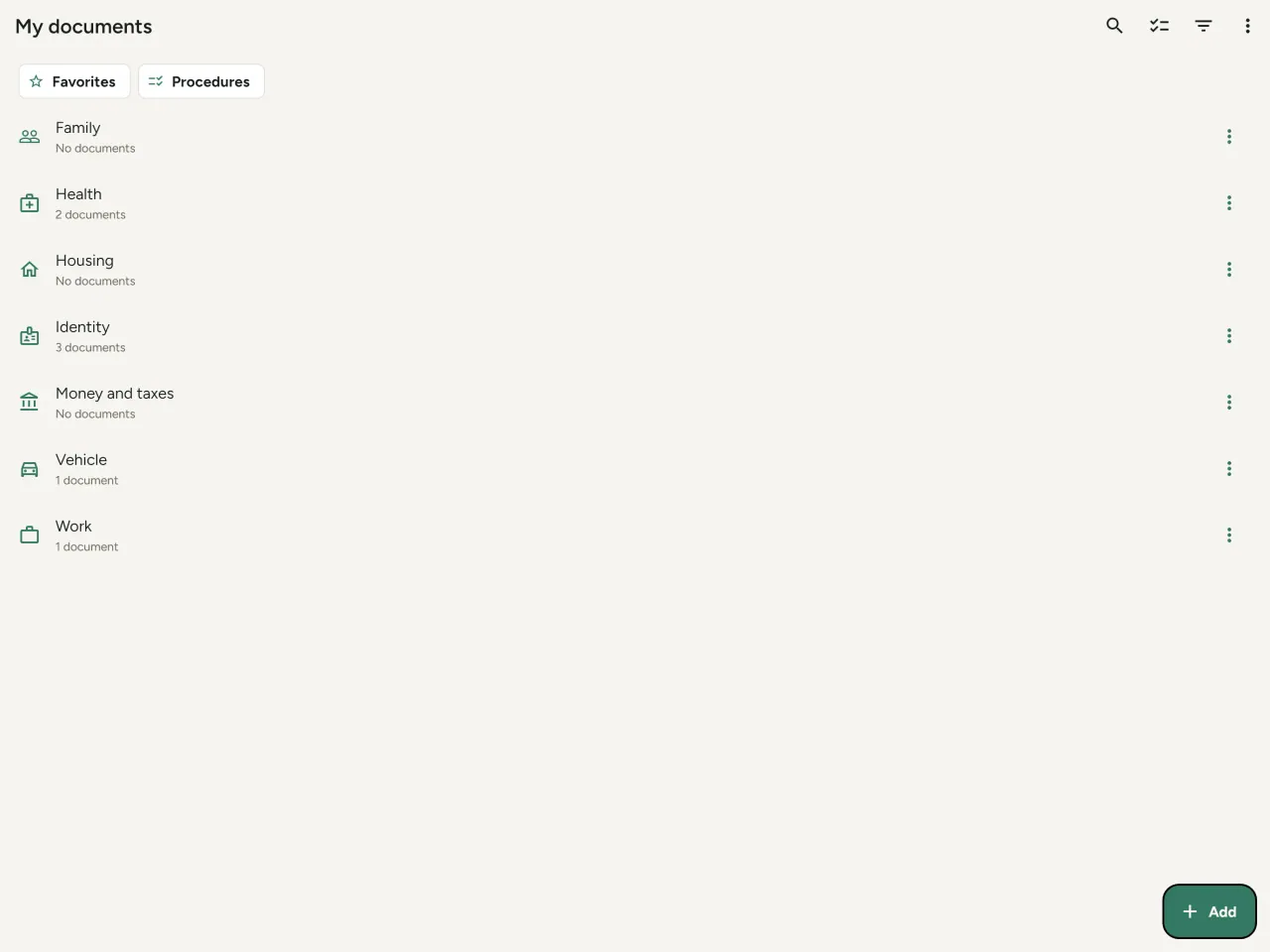
Jiri ndepụta nlele usoro ọrụ e wuru n'ime ya kwadebe ọrụ ndị a na-emekarị (ụlọ, ọrụ, ụlọ akụ, njem), tinye akwụkwọ sitere n'ebe nchekwa gị, ma chebe ma kesaa ngwugwu ahụ dum n'otu oge. Hazie ihe niile n'ime nchekwa ndị akwadoro (njirimara, ụlọ, ahụike, ego na ụtụ isi, ọrụ, ụgbọala, ezinụlọ) ma ọ bụ osisi nchekwa nke gị, jiri mkpado, ọkacha mmasị na ọchụchọ ozugbo.
Kekọrịta site na ngwa ndị ọzọ
Ị natara PDF ma ọ bụ onyonyo? Jiri Kekọrịta ma ọ bụ Mepee na, họrọ VaultMark, ma chebe ya ozugbo n'ebughị ụzọ tinye ya n'ebe nchekwa ahụ.
Banye aha ma chọọ akwụkwọ gị
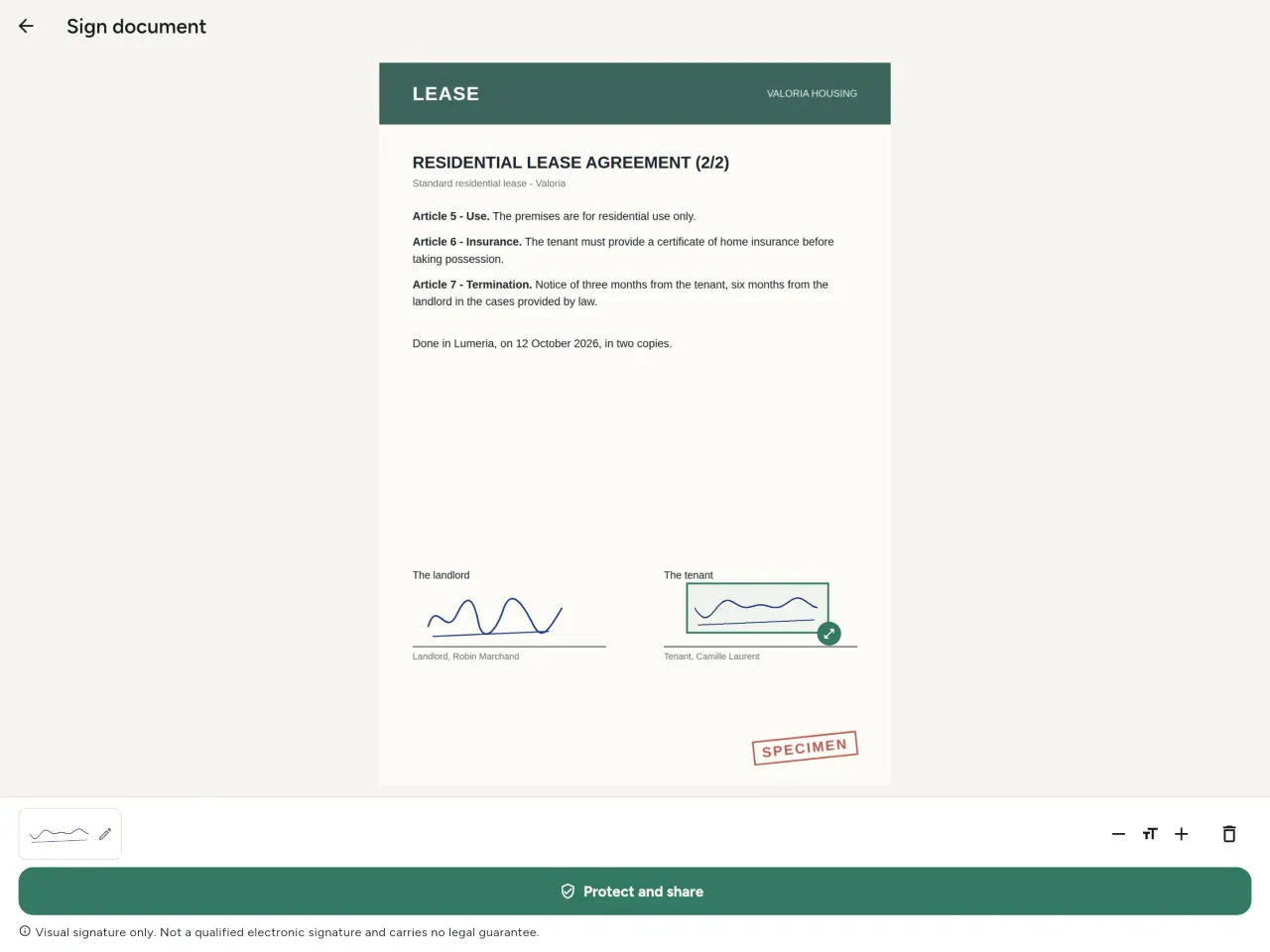
See mbinye aka gị ma ọ bụ bubata onyonyo, wee tinye ya na ibe PDF ma ọ bụ onyonyo akwụkwọ a nyochara, ozugbo na ekwentị gị. A na-echekwa mbinye aka ị chekwara n'ụdị e zoro ezo n'ebe nchekwa ahụ, mbipụta ị kesara dị larịị, nwere akara mmiri ma enweghị metadata (mbinye aka anya naanị, enweghị uru iwu). Ị chọrọ ịchọ n'ime scan? Gbaa OCR mgbe ịchọrọ iji mepụta PDF a pụrụ ịchọ, a na-ahazi ya na ekwentị gị, ọ dịghịkwa mgbe a na-eziga ya ebe ọ bụla. Ngwa ahụ dị n'asụsụ 75.
E mere ya ka ọ dị nchebe
Ihe dị mma ịmara: enweghị iweghachite koodu echefuru, a kpachapụrụ anya mee ya otu a. Debe nke mbụ nke akwụkwọ ọ bụla n'ebe ọzọ. Akara mmiri na-akụda mmụọ iji ya mee ihe n'ụzọ na-ezighị ezi, ma ọ pụghị ịkwụsị onye nwere faịlụ ahụ ugbua.
A na-akwado faịlụ PDF na onyonyo. Ibe PDF na-aghọ onyonyo nwere akara mmiri, ya mere enweghịzi ike ịhọrọ ederede.
- Nzobe AES-256-GCM, a na-edebe igodo ahụ n'ebe nchekwa echekwara nke ekwentị gị
- Jiri mkpịsị aka ma ọ bụ ihu mepee ya, yana koodu ọnụọgụ 6 dịka nkwado
- Ebe nchekwa ahụ na-akpọchi onwe ya mgbe ị hapụrụ ngwa ahụ, ya mere ọ dịghị ihe na-anọ n'ime ya mepere emepe
- Faịlụ nkwado e zoro ezo (.vmbk) nke okwuntughe nke ya na-echebe
- Nyefe ekwentị gaa ekwentị e zoro ezo site na njedebe ruo na njedebe site na koodu QR mgbe ị na-agbanwe ngwaọrụ; ojiji kwa ụbọchị na-anọghị n'ịntanetị n'ebe nchekwa dị nchebe
Nduzi VaultMark
Ònye ọ bụ maka
- Ndị nwere ike izipu oyiri nke ID, ebe obibi ma ọ bụ akwụkwọ ụgwọ (ọrụ akwụkwọ, bank, onye ọrụ, ọchịchị).
- Ndị nwere iwe na-esi n'eweputa data chọrọ ijikwa data onwe ha tọpụtara na ichebe ya mgbe ha kwesiri ịkekọrịta ya.
- Ndị chọrọ idobe nkwekọrịta, akwụkwọ ọgwụ na faịlụ dị mkpa n'ime ekwentị ha mkpuchi.
- Ndị natara PDF ma ọ bụ foto ma chọọ ichebe ya ozugbo, na-enweghị itinye ya n'ime vault.
Gịnị mere họrọ VaultMark
- Akwụkwọ onwe onye bụ ihe ndị ohi maara nwere ike iji nweta kredit, dee nkwekọrịta ma ọ bụ zụọ ụlọ n'aha gị. Oyiri nke ID ma ọ bụ akwụkwọ ụgwọ ezipụtara na-enweghị nchebe nwere ike iji ya eme ihe ọzọ, ọbụna ka ọ dị ogologo. VaultMark na-etinyekarị watermark gafee peeji niile na onye natara na ụbọchị (dịka "Maka Bank Aha, arịrịọ mgbazinye, 2026-10-05"), ya mere oyiri furu efu agaghịzi ekwe omume iji ya n'oge ọzọ na a pụrụ ịchọta ya.
- Faịlụ e kesara na-akpọgharịghị kemgbe pixel: watermark anaghị ewepụ ma metadata emechibidoro (ebe, onye dere, akụkọ mgbanwe) apụ. Oyiri gị onwe gị agaghị agbanwe.
- AES-256-GCM encryption, mkpọrọgwụ ihe nzuzo ekwentị. Enweghị akaụntụ, igwe ojii, ma ọ bụ inyocha.
Ihe ngwa ahụ ka na-enweghị
- Enweghị nchekwa igwe ojii ma ọ bụ nsoro ngwaọrụ. Vault nọ naanị na ekwentị.
- Watermark na-eme ka oyiri sie ike iji, dị mfe ịchọta. Ọ naghị egbochi onye ị họpụtara izipu ka o chekwa oyiri ya.
Akụkụ Pixeon. Ngwa Pixeon na-eme ihe niile n'eme ụlọ mbụ: enweghi akaụntụ, enweghị inyocha, data gị na-anọgide na ekwentị gị. Ọ bụrụ na ngwa kpọọ netwọk, ọ bụ naanị ma ị họrọ ịgbanye atụmatụ ịchọrọ, a ga-emelite iwu nzuzo tupu ewepụta ya.
Hụ VaultMark n'ọrụ.
Nweta VaultMark.
N'efu na iPhone na Android.
Privacy policy
Okwu dị n'okpuru bụ Bekee. Nsụgharị Bekee kwesiri ntụkwasị obi.
Last updated: 2026-11-19
VaultMark stores your personal documents on your phone and adds a watermark to a copy before you share it. Your documents stay encrypted on your phone by default, and we collect no personal data, analytics, or tracking information.
What the app handles
Images and PDF files that you add yourself (from your files, or sent to the app from another app). They are encrypted with AES-256-GCM and stored in the app's private storage on your phone. The encryption key is kept in the secure storage of your phone (Android Keystore, iOS Keychain). There is no account, no permanent server storage and no cloud backup.
When you create a protected copy, the app redraws the image or the PDF pages with a watermark (the text you type and, if you choose, today's date) and writes a new file without hidden data (location, camera model, author, history). That file is handed to the app you pick in the system share sheet. Your private copy is never modified.
You can also scan a paper document with the camera. On Android the scan is done by Google's document scanner, which runs on your phone through Google Play services; on iOS it is done by the system scanner. The pages come back to the app and are encrypted like any other document. The scanner's own copies are deleted.
Favourites, tags, checklists for a procedure (the documents to gather, with the ones you attach), an optional saved signature (drawn or imported from an image, deletable in Settings) and backup files are kept inside the app, encrypted with your documents. When you sign a document, you place the signature manually on a page and share a flattened, watermarked, metadata-free copy without modifying your private original. Signing adds a visual image signature only, with no qualified electronic signature or legal guarantee.
You can also ask the app to recognise the text of a document (OCR). Nothing is recognised unless you start it. Printed Latin text is processed on your phone, with a bundled model on Android or Apple Vision on iOS: no image or text is sent to a server and no model is downloaded. The result is a new encrypted searchable PDF, your private original is not modified, and recognition stops if you cancel, leave the app or lock the vault.
What we collect and network use
We collect no analytics, no advertising identifier, no crash reporting and no third-party tracking SDK. All everyday features (storing, viewing, scanning, watermarking and local backup export or import) work without any internet connection. Network access is used only when you initiate one of these actions:
Transfer to another phone: when you choose to send or receive documents in
Settings, encrypted chunks transit ephemerally through our relay
(https://relay.pixeon.net, hosted on Cloudflare Workers and Durable Objects). The
archive is end-to-end encrypted on your device before upload using an ephemeral key carried only in
the one-time QR code, which the relay never sees. Temporary channel data is deleted when the
transfer finishes or is cancelled, or expires automatically (at most 90 days if abandoned).
Optional tips: optional tip purchases processed by Apple or Google Play (see Optional support), or opening our external support page in your browser on direct APK builds.
Permissions
Biometrics (fingerprint or face): only to unlock the vault, if you turn it on. The biometric data is handled by your phone's system; the app only receives a yes or no. Your 6-digit code always remains available.
Camera (iOS only): asked when you scan a paper document or scan a QR code for phone-to-phone transfer. On Android both document scanning and QR scanning run through Google Play services without declaring camera permission in the app.
Internet (Android): declared and used only for user-initiated encrypted
phone-to-phone transfer via https://relay.pixeon.net. No location, contacts,
microphone or shared storage permission. Files are added through the system file picker or the
share sheet, which give the app access to the files you choose only.
Files, backups, phone transfer and deletion
The app's data is excluded from Android and iOS cloud backups on purpose. If you lose or reset the phone, the vault is lost with it, unless you made a backup file or transferred documents yourself. There is no recovery of a forgotten code: keep an original of every document elsewhere.
Backup file: in Settings you can export the whole vault to one file, encrypted with a password you choose (it is not stored and cannot be recovered). The file goes to the share sheet, so you decide where it is kept. Importing it on another phone, with the same password, restores your documents. The app sends nothing. You can also change your 6-digit code in Settings; your documents are not re-encrypted, only the wrapping of the key changes.
Transfer to another phone: in Settings you can transfer selected documents (up to
100 MiB per session) to another phone running VaultMark. The sending phone creates a fresh
random 256-bit key and a single-use 5-minute QR code, displays a 4-digit verification code that
you verify on both screens before anything is uploaded, and transfers HKDF-SHA-256 / AES-256-GCM
encrypted chunks via https://relay.pixeon.net. The relay cannot decrypt documents or
see file or folder names. Existing documents on the receiving phone with the same internal id are
never overwritten, and procedure checklists and any saved signature are omitted.
Protected copies are written to a temporary folder, handed to the share sheet, and deleted when the vault locks and at the next launch. A copy that you sent to another app is then in that app's hands.
Deleting a document in the app removes its encrypted file. Uninstalling the app removes everything.
A watermark discourages misuse and shows where a copy came from. It cannot stop someone who already has the file from sharing it. Screenshots are blocked inside the app on Android release builds.
Optional support
Tips go through in-app purchase, processed by Apple on iOS and by Google Play on Android, under their own terms and privacy policy (the app only learns that a purchase succeeded). Versions installed outside Google Play may instead show a button that opens an external donation page in your browser; nothing from the app is sent to it. A tip unlocks nothing. A small reminder may appear after you have used the app a few times; it stays away for a while once you close it. The app is free and every feature works without tipping.
Contact form on this website
If you write to us through this site, we use your message and the email address you optionally give only to reply. Bot protection is provided by Cloudflare and email delivery by Resend.
Language choice on this website
When you choose a language, or when this site opens a page in your browser's language, it stores
one small functional cookie (pxl, a language code, one year) so that your choice is
remembered. If this site suggests a page in your browser's language and you close that suggestion,
your browser also keeps a local note (pxl-banner-off, in local storage, 30 days) so the
suggestion does not come back. Neither identifies anyone, neither is used for tracking or advertising,
and neither is shared. You can delete them in your browser at any time.
Website statistics
This website uses Cloudflare Web Analytics to count visits (pages viewed, country, browser type, loading speed). It sets no cookie, does not use local storage, does not fingerprint your device, does not follow you across sites and does not build a profile of you. Search engines (for example Google Search Console) give us aggregated search statistics, without any data about individual visitors. Our own web server also counts the pages it serves: for each page it keeps the page address, the site or social network that sent you (only its name, or the campaign tag written in the link), the country, the type of device and whether the request came from a robot. It keeps no IP address, no identifier and no cookie, and these counts are anonymous. We use no advertising or other analytics service. None of this concerns the app itself, which collects nothing.
Children
The app is a general-purpose tool and is not directed at children.
Changes
An updated policy will be published at this URL with a new date above.
Contact
Questions about privacy: vaultmark-contact@pixeon.net
Nkwado
Emelitere ikpeazụ: 2026-11-19
VaultMark bụ ngwa nta dị iche iche. Azịza ajụjụ ndị a na-ajụkarị dị n'okpuru.
Anyị na-agbalị imeghachi azịza n'ime ụbọchị ole na ole. Iji nyere anyị aka, gwa anyị ụdị ngwaọrụ gị, nsụgharị sistemụ na ihe ị na-eme. Biko ebughị akwụkwọ gị ma ọ bụ ozionwe gị.
VaultMark ọ bụ n'efu n'ezie?
Ee. Ị nwere ike ibudata ma jiri VaultMark n'efu. Enweghị mgbasa ozi ma ọ bụ ndebanye aha akwụ'ụgwọ.
Kedu data ngwa ahụ na-echekwa ma ọ bụ zitere?
Ihe ndị akwụkwọ gị nọgide na-echekwa na ekwentị gị nke e zoro (encrypted), na ọrụ kwa ụbọchị na-arụ ọrụ na-enweghị netwọk. Ọ bụrụ na ịhọrọ Nyefe ekwentị-na-ekwentị na Ntọala, ihe egoro-egoro na-eso ụzọ na-agafe nwa oge site na relay anyị (relay.pixeon.net) jiri igodo echedoro naanị na koodu QR otu oge, mgbe ahụ a na-edegharị ha. Nkọwa dị na usoro nzuzo.
Achọrọ m koodu m. Ì nwere ike iweghachi akwụkwọ m?
Mba. Enweghị mgbake, n'echiche: ọ nweghị onye, gụnyere anyị, nwere ike imeghe vault ahụ na-enweghị koodu. Nke a bụ ihe mere anyị ji akwado ịchekwa mbipụta mbụ nke akwụkwọ ọ bụla n'ebe ọzọ.
Agbanweela m ma ọ bụ tufuru ekwentị m. Ebee ka vault m dị?
Nchekwa igwe ojii arụchabeghị na mgbalị. Tupu imegharịa ma ọ bụ gbanwee ekwentị, bufee faịlụ ndabere echebere (.vmbk, echekwara ya site n'okwu igodo ya), na Ntọala, Ndabere, ma ọ bụ jiri Nyefe ekwentị-na-ekwentị na Ntọala iji detuo akwụkwọ site na koodu QR na njikọ njedebe-na-njedebe.
Kedu ka m ga-esi tinye watermark na otu ID ma ọ bụ akwụkwọ?
- Bido site na ID akwụkwọ, faịlụ na ekwentị gị ma ọ bụ ngwa ọzọ: sụgharịa ya na igwefoto (nzọụkwụ mbụ iji chebe tupu izipu), họrọ PDF ma ọ bụ onyonyo, ma ọ bụ jiri Kekọrịta ma ọ bụ Mepee na VaultMark.
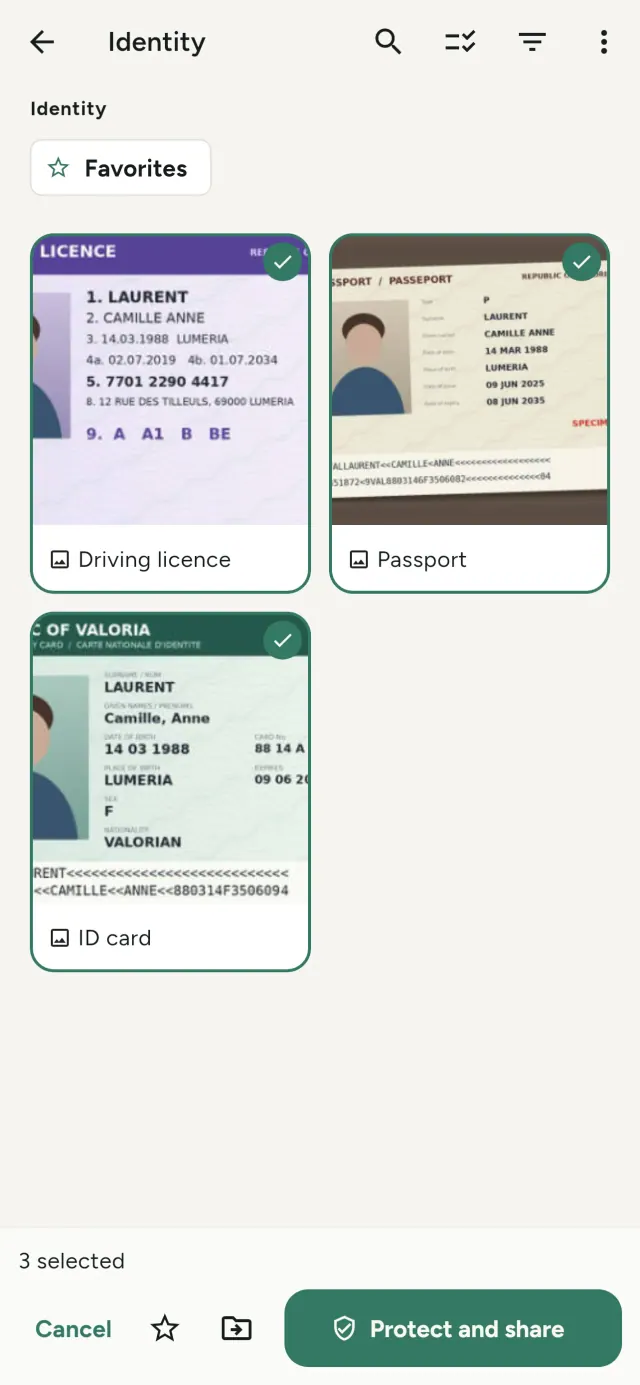
- Họrọ otu ma ọ bụ ọtụtụ akwụkwọ (site n'ime folda gị ma ọ bụ ndepụta ọrụ), pịa Chebe ma kesaa, dee onye natara na ụbọchị nhọrọ, ma họrọ ma ịchọrọ ịjikọta ibe n'ime otu PDF ma ọ bụ mechie ya na okwuntughe AES-256.
- Ziga site na sistemu share sheet: a na-ehichapụ metadata zoro ezo, a na-ewughachi faịlụ ahụ site na pixel, na ihe oyiyi gị nkeonwe anaghị agbanwe.
Enwere m ike ịbanye akwụkwọ na mpaghara?
Ee. Mepee onyonyo ma ọ bụ PDF na vault gị ma pịa Banye. Chepụta aka ma ọ bụ bufee onyonyo (chekwara ya nke ọma na vault, a pụkwara ihichapụ ya na Ntọala), debe ma gbanwee nha ya n'ahịrị na ibe, wee chebe ma kesaa oyiyi tụgharịrị nwere watermark na metadata ehichapụ. Nke a na-agbakwunye naanị akara aka anya, na-enweghị akara aka eletrọnịk kwadoro ma ọ bụ nkwa iwu.
Enwere m ike sụpụtara akwụkwọ akwụkwọ ma ọ bụ tinye otu site na ngwa ọzọ?
Ee. N'ime VaultMark ị nwere ike sụpụta ibe akwụkwọ na igwefoto ma ọ bụ bugharịa faịlụ, ma site na ngwa ọzọ ị nwere ike iji Kekọrịta ma ọ bụ Mepee na VaultMark iji chebe faịlụ ozugbo na-enweghị itinye ya na vault.
Kedu faịlụ akwado?
Onyonyo na faịlụ PDF. Mgbe ị kesara, a na-eme ibe PDF ka onyonyo nwere watermark (ya mere a pụghị iwepụ watermark), na ọtụtụ akwụkwọ nwere ike ijikọghachi n'ime otu PDF nke, ma ọ bụrụ na ịchọrọ, echekwara site na okwuntughe AES-256. A na-ajụ faịlụ buru ibu nke ukwuu (ruo 60 ibe na 80 megapixel).
Enwere m ike ịchọta ederede nke akwụkwọ a sụpụtara?
Ee. Mepee akwụkwọ ma malite njirimara ederede (OCR) mgbe arịrịọ. Ọ na-eme PDF ọhụrụ a na-echekwa nke nwere ike ịchọta ma hapụ isi gị na-enweghị mgbanwe. Njirimara na-agba na ekwentị gị (ede akwụkwọ Latin ebiprintụrụ), a naghị eziga ihe ọ bụla na sava ma ọ bụ ihe a chọpụtara ma ọ bụrụ na ị malitere ya.
does the watermark protect me completely?
Ọ na-eme ka ojiji adịghị mma bụrụ ihe na-egbochi ma gosipụta ebe e si nweta otu oyiyi, mana ọ pụghị igbochi onye nwere faịlụ ahụ ịkekọrịta ya. Kekọrịta akwụkwọ naanị na ndị ị na-achọsi ike ịtụkwasị obi.
Gịnị kpatara na enweghị m ike were screenshot?
N'Android, a na-egbochi ịse foto ihuenyo na ndekọ ihuenyo n'ime ngwa iji chebe akwụkwọ gị.
Kedu asụsụ dị?
Asụsụ 75: Bekee, Fränk, Jaman, Spani, Italian, Portuguese, Arabic, Chinese (simplified and traditional), Japanese, Korean, Hindi, Russian na ọtụtụ ndị ọzọ. Ngwa ahụ na-eso asụsụ ekwentị gị ị nwere ike gbanwee ya na Ntọala. Ntughari nke asụsụ ọhụụ nyere site na igwe na a na-emezi ha site na nzaghachi gị.
Kwado oru ngo a
VaultMark na-anọgide n'efu na enweghị mgbasa ozi. Ọ bụrụ na ọ bara uru, ịnwere ike kwado mmepe ya (nhọrọ):
Buy Me a CoffeeExpense tracker and family budget planner. Free phone sync, no account.
Nwoke ọzọ sitere PixeonMetadata CleanerOnye na-ele, edezi ma na-ehichapụ EXIF: gụọ, dozie ma ọ bụ wepụ metadata foto.
Nwoke ọzọ sitere PixeonLittle RelayBreastfeeding, sleep and starting solids tracker. No account, works offline.
Nwoke ọzọ sitere PixeonMenuloopMeal planner and grocery list for the week. Recipes with photos, offline.
Nwoke ọzọ sitere PixeonIndie OfficeQuote maker and self-employed invoices. Offline, no account, no ads.
Nwoke ọzọ sitere PixeonFanionDiscover and share local events, concerts, markets and weekend outings nearby