
VaultMark: Indawo yokugcina amaxwebhu
Indawo yokugcina amaxwebhu efihliweyo. Faka uphawu kumaxwebhu, susa imethadatha phambi kokwabelana.
Mahala. Akukho ntengiso. Akukho mrhumo wobhaliso.


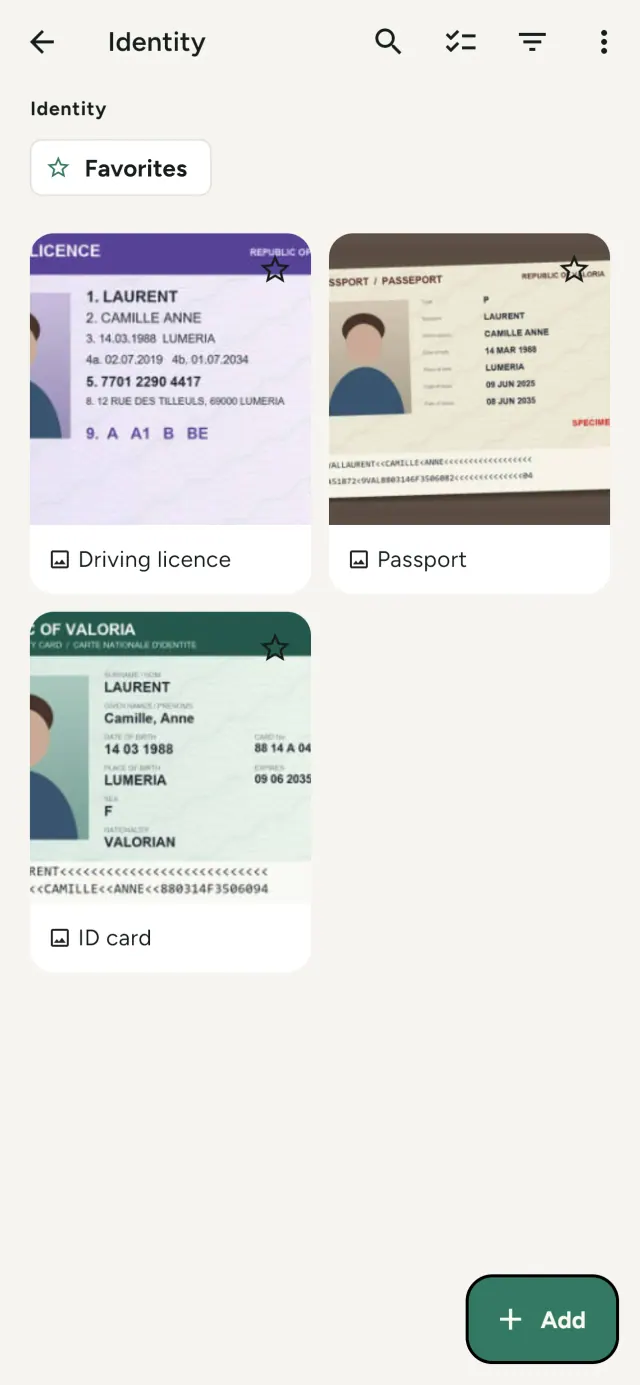
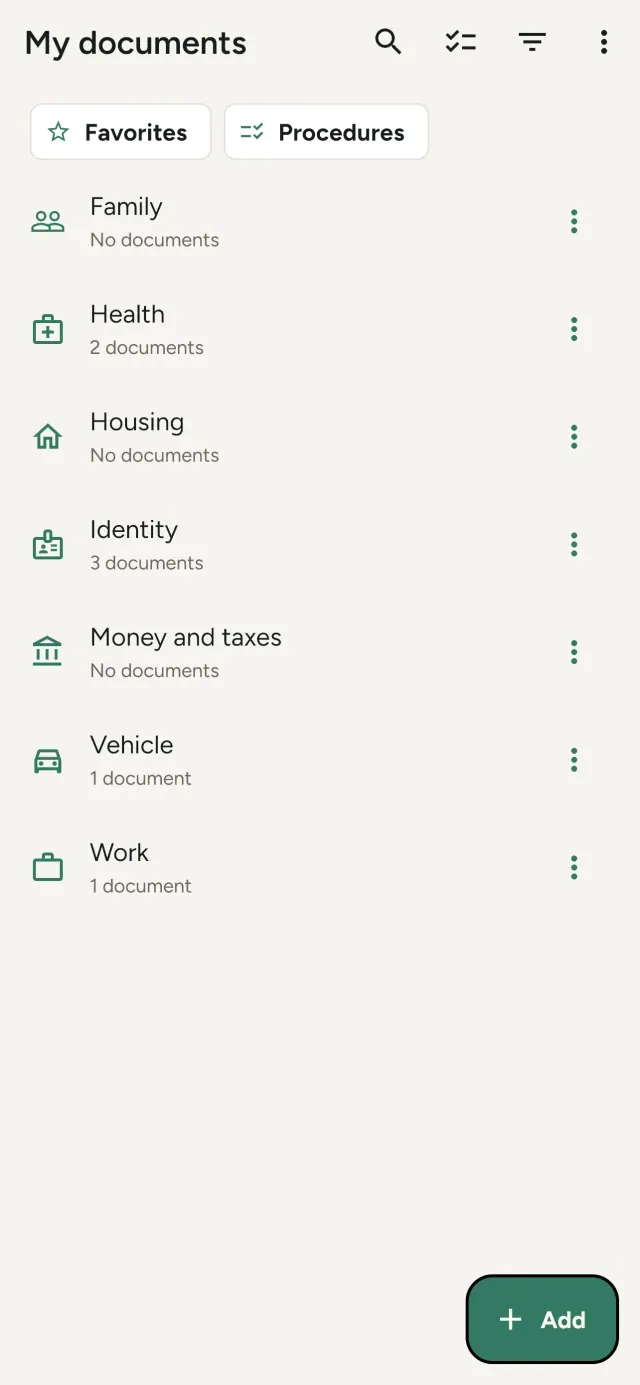
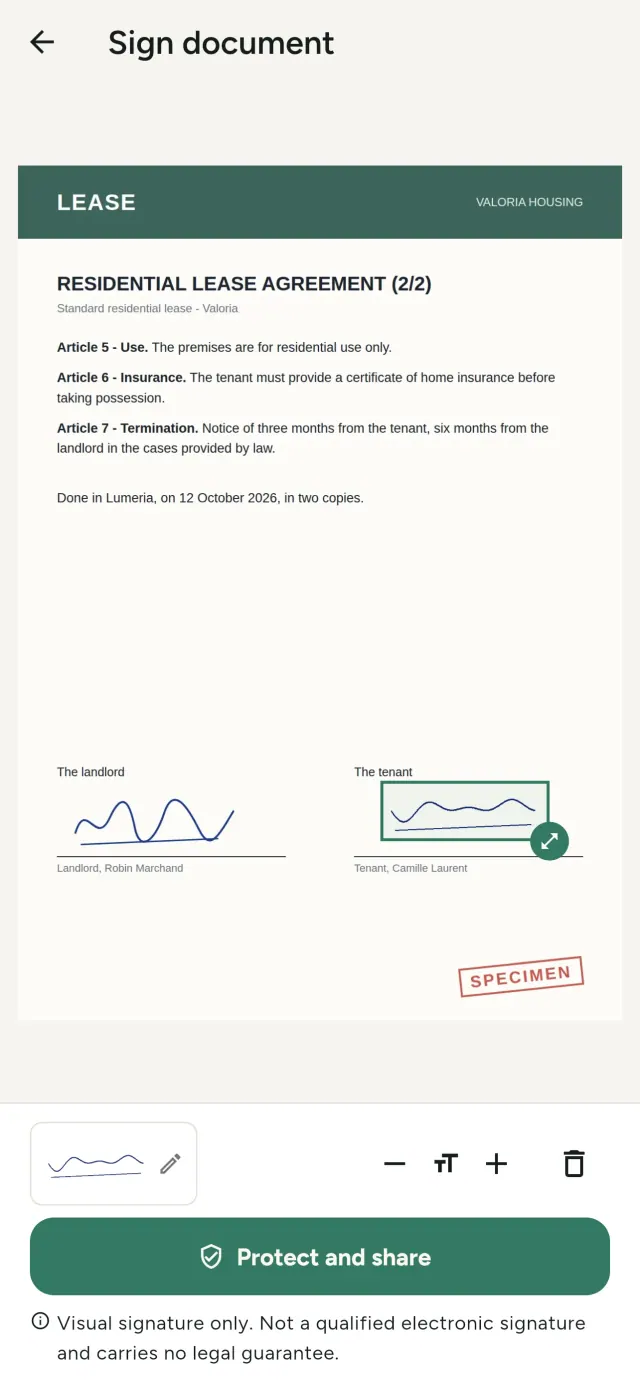
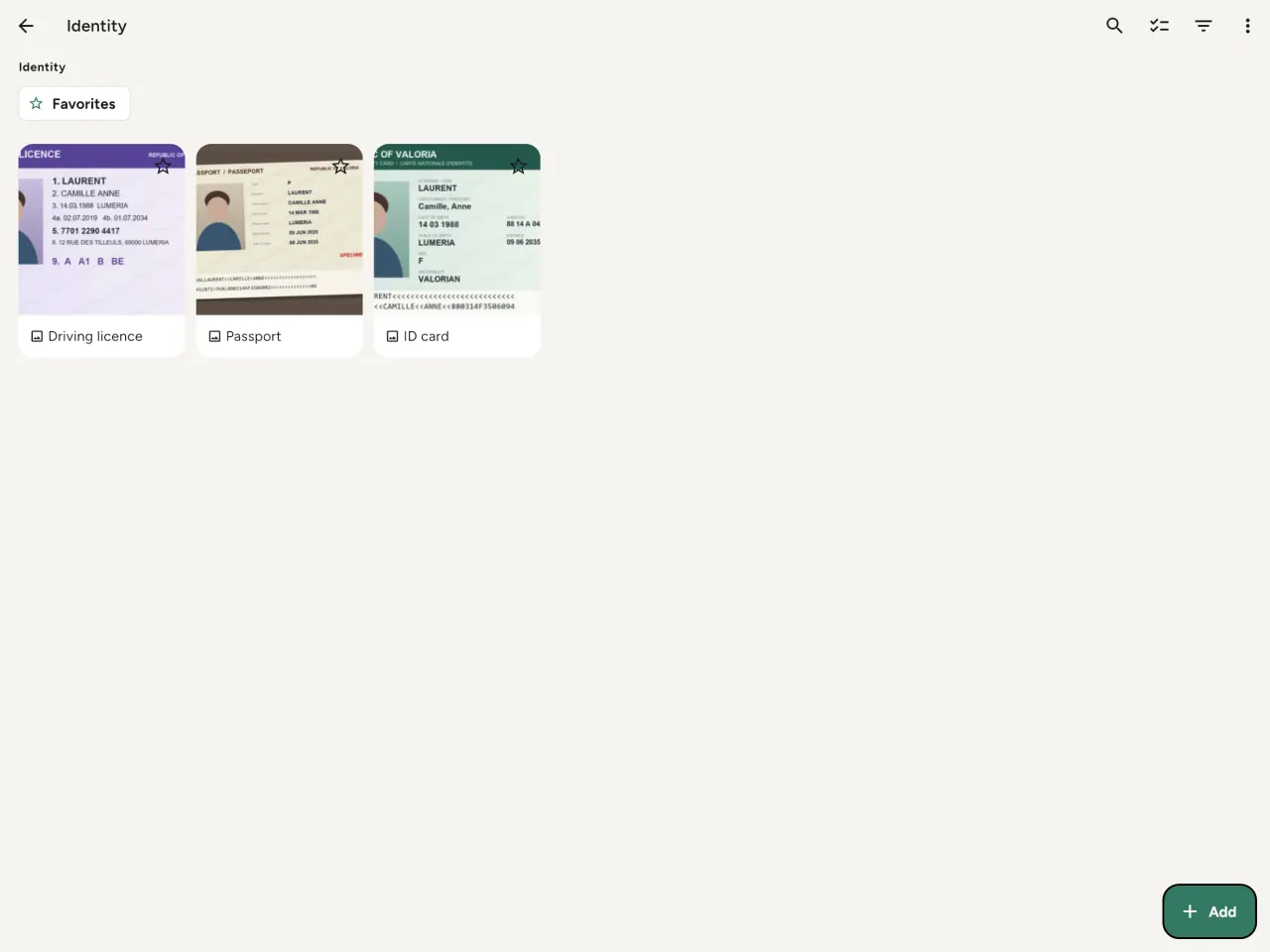
Khusela ikhadi lakho lesazisi, iikhontrakthi, iziliphu zemivuzo namaphepha onyango ngaphambi kokuba uzithumele, uze uzitshixe kwindawo yokugcina efihliweyo kwifowuni yakho.
IVaultMark yindawo yabucala yokugcina amaxwebhu. Yonke into ihlala kwisixhobo sakho: akukho akhawunti, akukho lifu, akukho ntengiso, akukho kulandelelwa, kwaye ukusetyenziswa kwemihla ngemihla akudingi nethiwekhi.
Okwenza VaultMark
Skena amaxwebhu, faka uphawu uze uwakhusele ngaphambi kokuwathumela
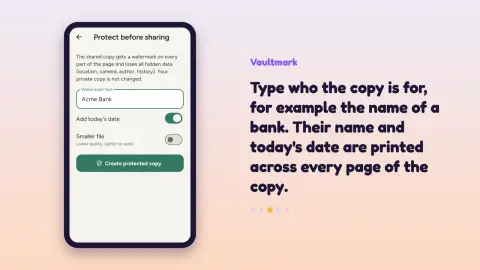
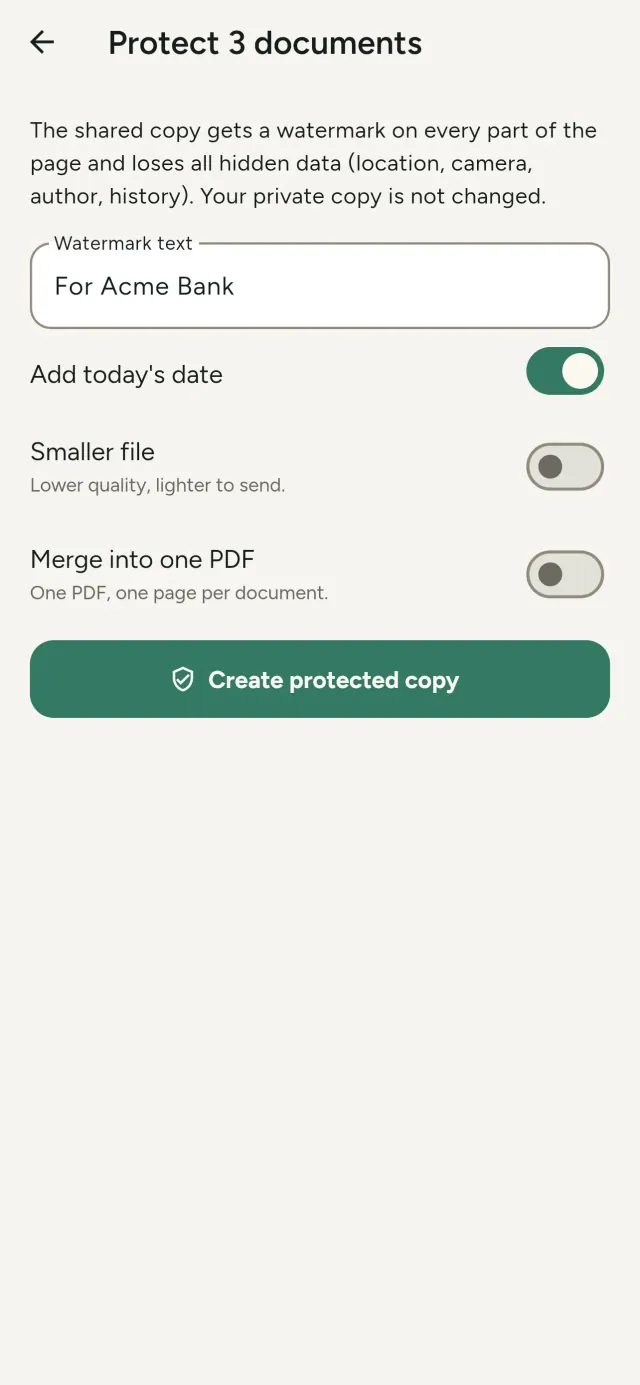
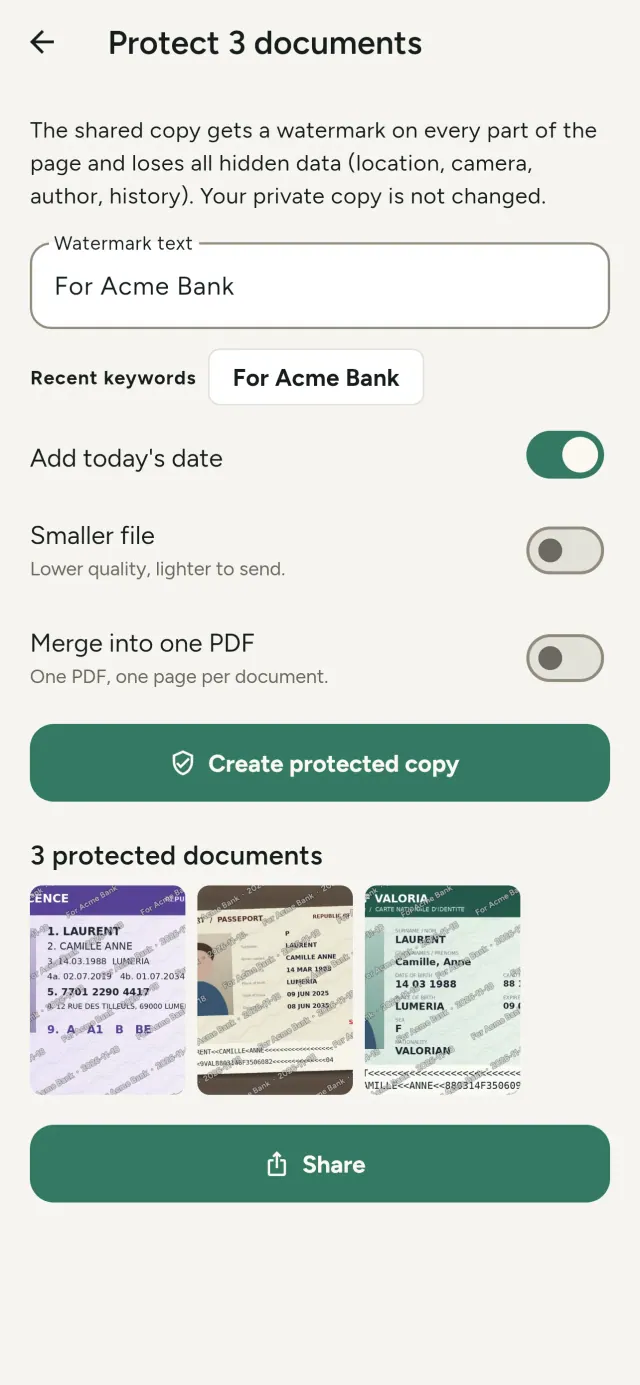
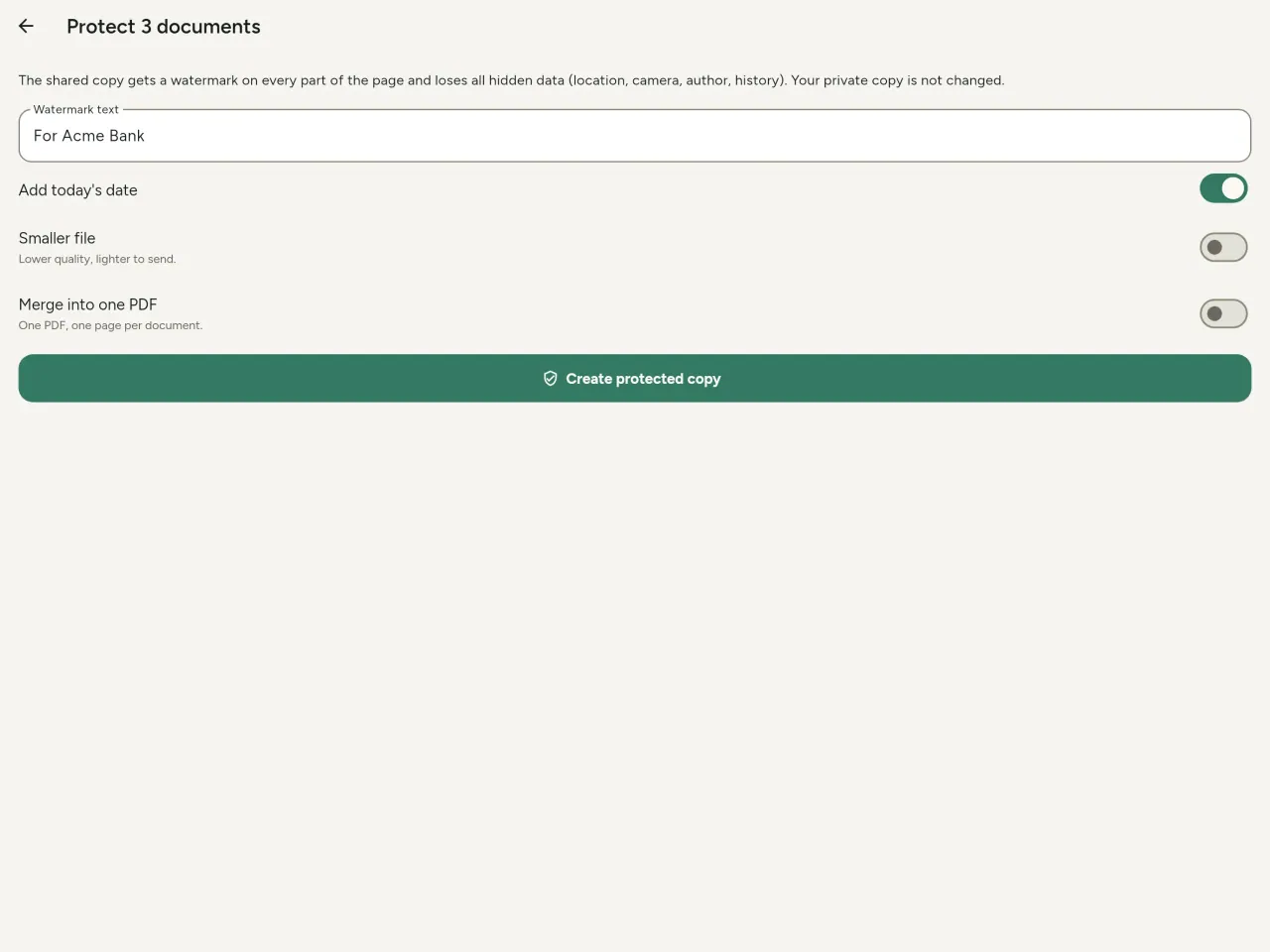
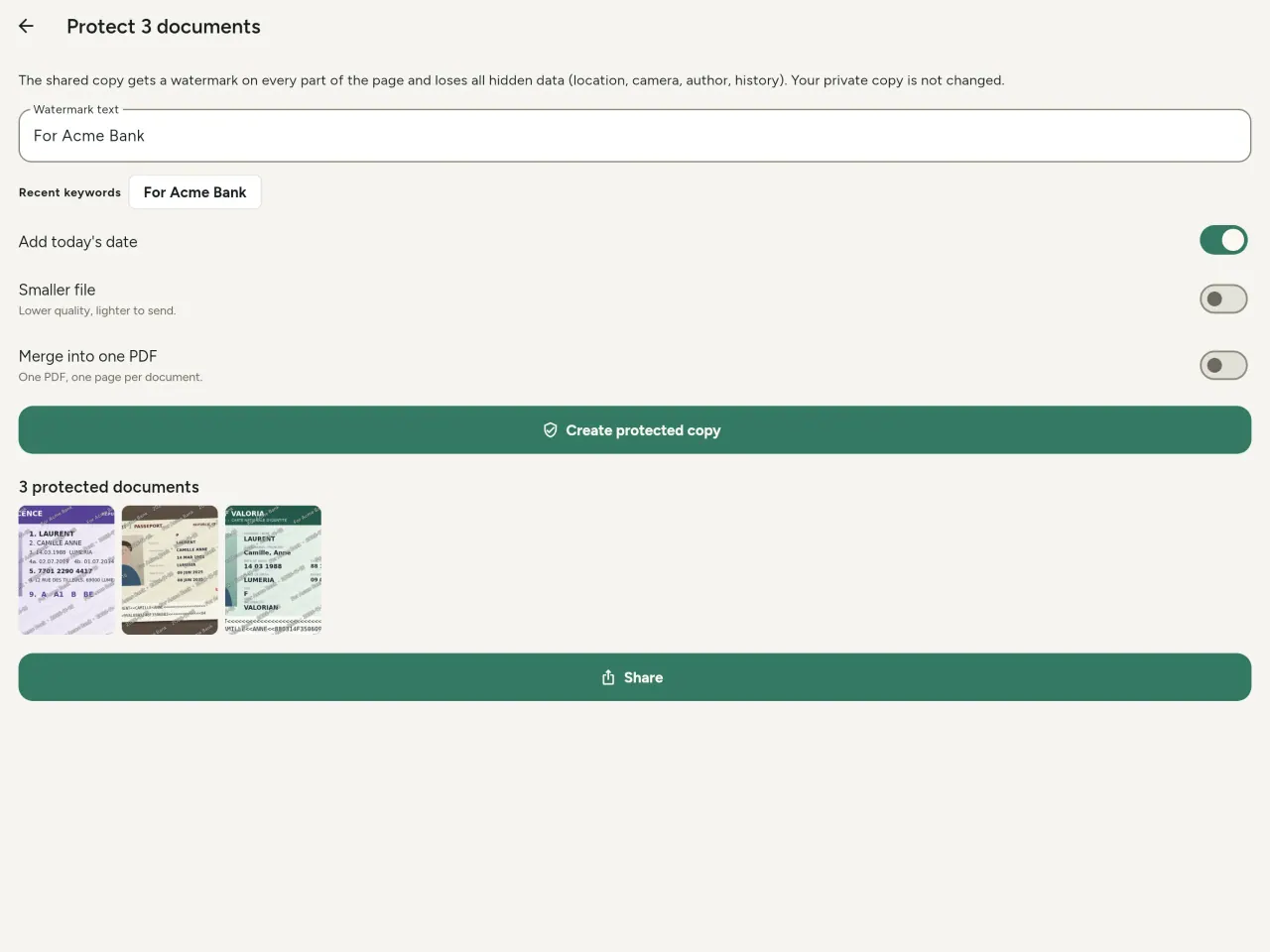
Unalo iphepha etafileni? Qala ngokuliskena ngekhamera yakho, okanye ukhethe iPDF okanye umfanekiso okhoyo kwifowuni yakho. IVaultMark ibeka uphawu kuwo wonke umphandle wephepha ngombhalo owukhethayo (umzekelo "Yenzelwe iBhanki yoMzekelo, isicelo semali-mboleko") kunye nomhla wanamhlanje, ize isuse yonke idatha efihliweyo: indawo, imodeli yesixhobo, umbhali, nembali yohlelo. Yisebenzise kwikopi yesazisi, kubungqina bedilesi okanye kwisilipu somvuzo ukuze ikopi ingaphindi isetyenziselwe enye into. Le yeyona ndlela ikhawulezayo yokususa imethadatha ngaphambi kokuthumela ifayile.
Ifayile ekwabelwana ngayo yakhiwa ngokutsha ngeepikseli: uphawu alunakuxotyulwa kwaye imethadatha ayisekho. Uthumela amaphepha aliqela? Dibanisa abe yiPDF enye uze uyitshixe ngephasiwedi ye-AES-256 ukuba uyafuna. Ikopi yakho yabucala ayitshintshwa.
Iinkqubo nefolda ekhuselekileyo yephepha ngalinye
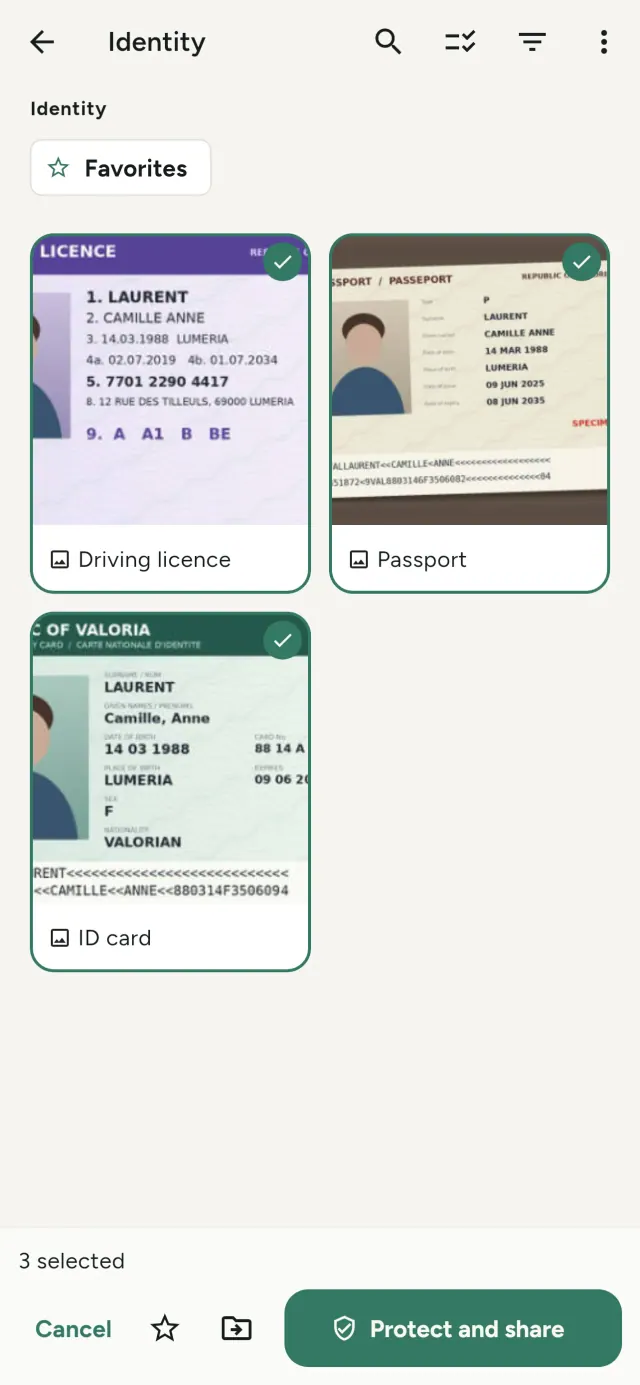
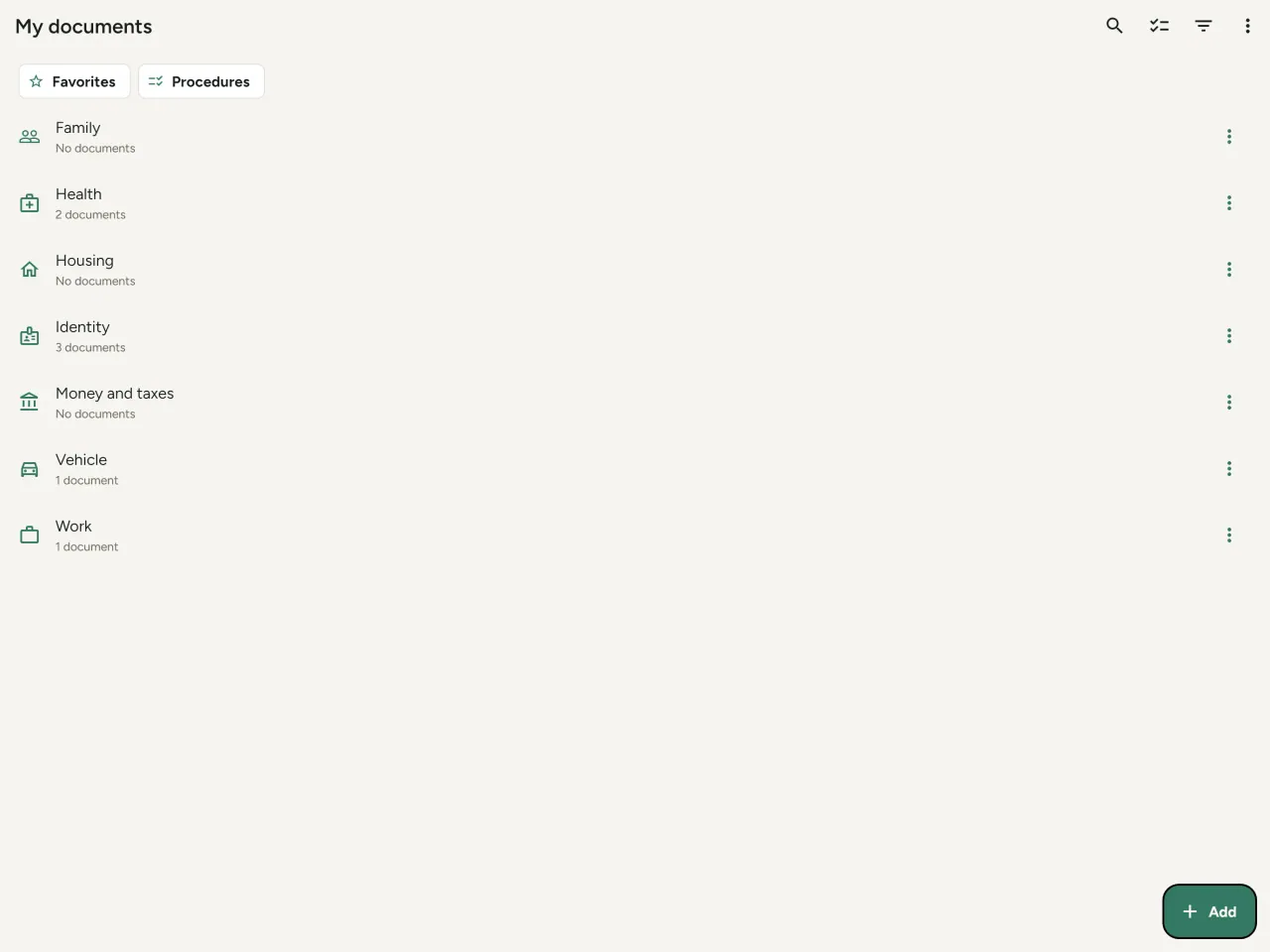
Lungiselela imisebenzi eqhelekileyo ngoluhlu lweenkqubo olwakhelwe ngaphakathi (izindlu, umsebenzi, ibhanki, uhambo), fakela amaxwebhu asuka kwindawo yakho yokugcina, uze ukhusele kwaye wabelane ngeseti yonke ngaxeshanye. Lungisa yonke into kwiifolda ezilungiselelwe kwangaphambili (isazisi, izindlu, impilo, imali neerhafu, umsebenzi, isithuthi, usapho) okanye kumthi wakho, usebenzisa iithegi, ezithandwayo nokukhangela ngoko nangoko.
Yabelana ngokusuka kwezinye ii-apps
Ufumene iPDF okanye umfanekiso? Sebenzisa uYabelana okanye uVula nge, khetha iVaultMark, uze uyikhusele ngoko nangoko ngaphandle kokuyongeza nakwindawo yokugcina.
Sayina uze ukhangele amaxwebhu akho
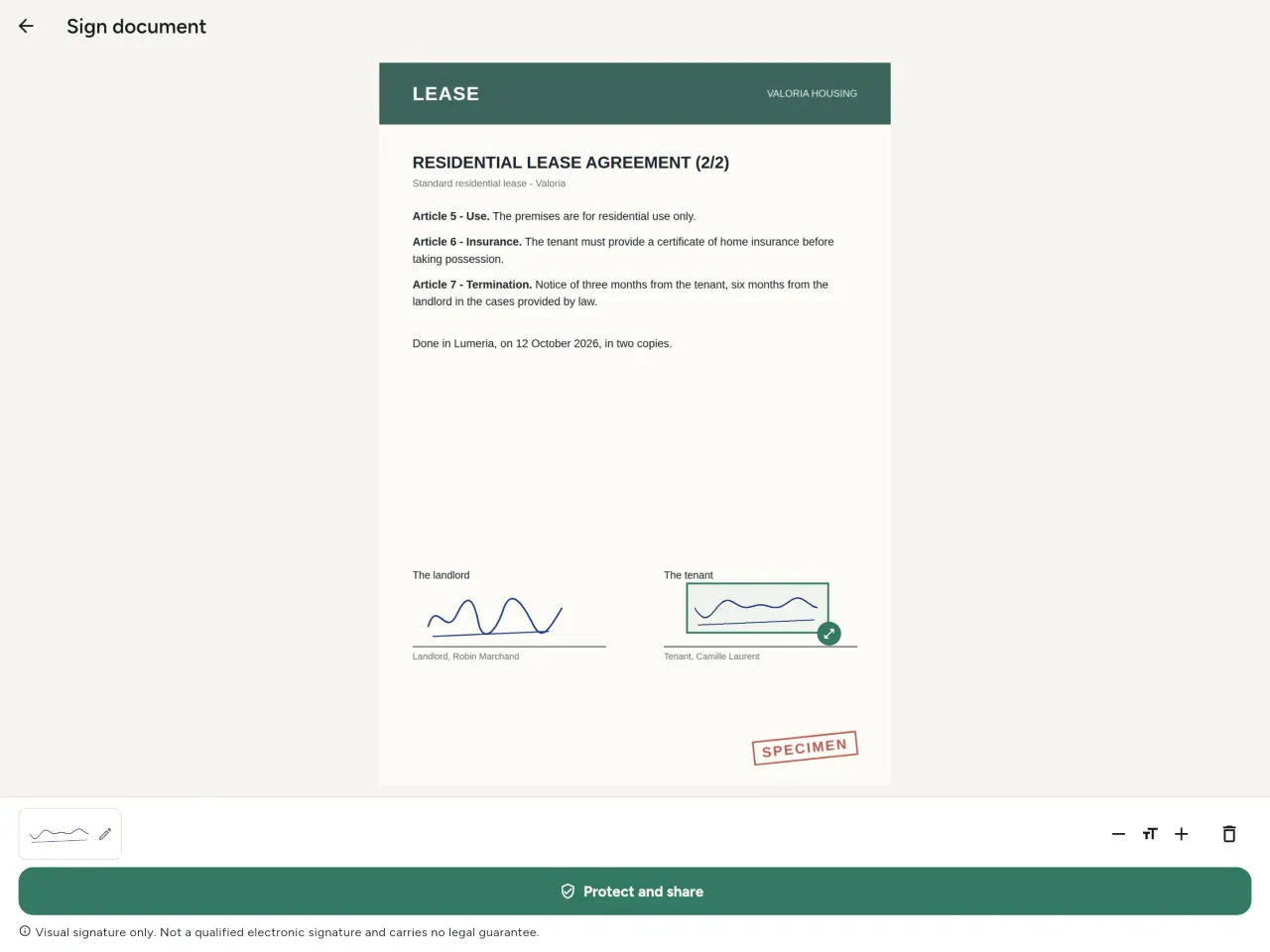
Zoba utyikityo lwakho okanye ungenise umfanekiso, uze ulubeke kwiphepha lePDF okanye kumfanekiso oskeniweyo wexwebhu, kanye kwifowuni yakho. Utyikityo olugciniweyo lugcinwa lufihliwe kwindawo yokugcina, kwaye ikopi owabelana ngayo ithe tyaba, inophawu kwaye ayinayo imethadatha (utyikityo olubonakalayo kuphela, alunaxabiso lasemthethweni). Ufuna ukukhangela iskeni? Sebenzisa i-OCR xa uyifuna ukuze wenze iPDF enokukhangelwa, iqhutywa kwifowuni yakho kwaye ayithunyelwa ndawo. Le app ifumaneka ngeelwimi ezingama-75.
Ikhuselekile ngokoyilo
Kuhle ukwazi: akukho kubuyiselwa kwekhowudi oyilibele, ngabom. Gcina ikopi yoqobo yalo lonke uxwebhu kwenye indawo. Uphawu luthomalalisa ukusetyenziswa gwenxa, kodwa alunakumnqanda umntu osele enefayile.
Iifayile zePDF nemifanekiso ziyaxhaswa. Amaphepha ePDF aba yimifanekiso enophawu, ngoko umbhalo awusenakukhethwa.
- Uguqulelo oluntsonkothileyo lwe-AES-256-GCM, isitshixo sigcinwe kwindawo ekhuselekileyo yesixhobo sakho
- Vula ngomnwe okanye ngobuso, ikhowudi enamanani ama-6 isetyenziswa njengogcino
- Indawo yokugcina iyazitshixa xa uphuma kwi-app, ngoko akukho nto ishiyeka ivuliwe
- Ifayile yogcino olufihliweyo (.vmbk) ekhuselwe ngephasiwedi yayo
- Ugqithiso olufihliweyo ukusuka ekupheleni ukuya ekupheleni phakathi kweefowuni ngekhowudi ye-QR xa utshintsha izixhobo; ukusetyenziswa kwemihla ngemihla kuhlala kungaxhunyiwe kwinethiwekhi kwindawo yokugcina ekhuselekileyo
Izikhokelo zika-VaultMark
Yeyobani
- Nabani na ofuna ukuthumela ikopi yesazisi, ubungqina bendawo yokuhlala okanye ipayslip (isicelo sokuqesha, ibhanki, umqeshi, ulawulo).
- Abantu abadinwe kukuvuza kwedatha abafuna ukuthatha ulawulo kwakhona kweenkcukacha zabo zobuqu kunye nokuqinisekisa ukhuseleko xa kufuneka babelane ngayo.
- Abantu abafuna ukugcina izivumelwano, amaxwebhu ezempilo kunye namanye amaxwebhu abalulekileyo etshixiwe kwiselfowuni yabo.
- Abantu abafumana iPDF okanye ifoto kwaye bafuna ukuyikhusela ngoko nangoko, ngaphandle kokuyongeza kwi-vault.
Kutheni ukhethe VaultMark
- Amaxwebhu obuqu yinto efunekayo ngabaqhekezi bombindi ukuze bavule ityala letyala, basayine isivumelwano okanye baqeshe igumbi egameni lakho. Ikopi yesazisi okanye payslip ethunyelwe ngaphandle kokukhuselwa inokusetyenziswa kwakhona ngokwento eyahlukileyo, emva kwexesha elide uyithumele. VaultMark ibeka i-watermark kuyo yonke iphepha enomamkeli nomhla (umz. 'YeBhanki Yemizekelo, isicelo sokuqesha, 2026-10-05'), ngoko ikopi ekuvuza ayinanto isetyenziselwa enye injongo kwaye inokulandelwa injongo oyabelane ngayo.
- Ifayile esabelwana ngayo yakhiwe kwakhona ukusuka kwiipikseli: i-watermark ayinakususwa kwaye i-metadata efihliweyo (indawo, umbhali, imbali yokuhlela) iyanyamalala. Ikopi yakho yabucala ayitshintshwa nooit.
- Ukutshixa kwe-AES-256-GCM, isitshixo sigcinwa kwindawo ekhuselekileyo kweselfowuni. Akukho akhawunti, akukho lifu, akukho kulandelela.
Usetyenziso alukwenzi oku okwamanje
- Akukho kugcinwa kwilifu okanye ukulungelelanisa phakathi kwezixhobo okwamanje: i-vault ihlala kwiselfowuni kuphela.
- I-watermark yenza ikopi inzima ukuyisebenzisa kwakhona kwaye kube lula ukuyilandelela. Ayinakuyeka umntu kugcina ikopi oyithumele ngenjongo.
Umgaqo wePixeon. Ii-apps zePixeon ziqala ngokubaluleka kobumfihlo: akukho akhawunti, akukho kulandelela, kwaye idatha yakho ihlala kwiselfowuni yakho. Ukuba lusetyenziso lufuna ukudibanisa nenethiwekhi, loo nto yenzeka kuphela xa ukhetha ukuvulela umsebenzi owufunayo, kwaye umgaqo-nkqubo wabucala uhlaziywa ngaphambi kokuba ukhutshwe.
Bona VaultMark isebenza.
Fumana VaultMark.
Simahla kwi-iPhone naku-Android.
Privacy policy
Umbhalo ongezantsi useNgesi. Guqulelo lwesiNgesi olusetyenziswa.
Last updated: 2026-11-19
VaultMark stores your personal documents on your phone and adds a watermark to a copy before you share it. Your documents stay encrypted on your phone by default, and we collect no personal data, analytics, or tracking information.
What the app handles
Images and PDF files that you add yourself (from your files, or sent to the app from another app). They are encrypted with AES-256-GCM and stored in the app's private storage on your phone. The encryption key is kept in the secure storage of your phone (Android Keystore, iOS Keychain). There is no account, no permanent server storage and no cloud backup.
When you create a protected copy, the app redraws the image or the PDF pages with a watermark (the text you type and, if you choose, today's date) and writes a new file without hidden data (location, camera model, author, history). That file is handed to the app you pick in the system share sheet. Your private copy is never modified.
You can also scan a paper document with the camera. On Android the scan is done by Google's document scanner, which runs on your phone through Google Play services; on iOS it is done by the system scanner. The pages come back to the app and are encrypted like any other document. The scanner's own copies are deleted.
Favourites, tags, checklists for a procedure (the documents to gather, with the ones you attach), an optional saved signature (drawn or imported from an image, deletable in Settings) and backup files are kept inside the app, encrypted with your documents. When you sign a document, you place the signature manually on a page and share a flattened, watermarked, metadata-free copy without modifying your private original. Signing adds a visual image signature only, with no qualified electronic signature or legal guarantee.
You can also ask the app to recognise the text of a document (OCR). Nothing is recognised unless you start it. Printed Latin text is processed on your phone, with a bundled model on Android or Apple Vision on iOS: no image or text is sent to a server and no model is downloaded. The result is a new encrypted searchable PDF, your private original is not modified, and recognition stops if you cancel, leave the app or lock the vault.
What we collect and network use
We collect no analytics, no advertising identifier, no crash reporting and no third-party tracking SDK. All everyday features (storing, viewing, scanning, watermarking and local backup export or import) work without any internet connection. Network access is used only when you initiate one of these actions:
Transfer to another phone: when you choose to send or receive documents in
Settings, encrypted chunks transit ephemerally through our relay
(https://relay.pixeon.net, hosted on Cloudflare Workers and Durable Objects). The
archive is end-to-end encrypted on your device before upload using an ephemeral key carried only in
the one-time QR code, which the relay never sees. Temporary channel data is deleted when the
transfer finishes or is cancelled, or expires automatically (at most 90 days if abandoned).
Optional tips: optional tip purchases processed by Apple or Google Play (see Optional support), or opening our external support page in your browser on direct APK builds.
Permissions
Biometrics (fingerprint or face): only to unlock the vault, if you turn it on. The biometric data is handled by your phone's system; the app only receives a yes or no. Your 6-digit code always remains available.
Camera (iOS only): asked when you scan a paper document or scan a QR code for phone-to-phone transfer. On Android both document scanning and QR scanning run through Google Play services without declaring camera permission in the app.
Internet (Android): declared and used only for user-initiated encrypted
phone-to-phone transfer via https://relay.pixeon.net. No location, contacts,
microphone or shared storage permission. Files are added through the system file picker or the
share sheet, which give the app access to the files you choose only.
Files, backups, phone transfer and deletion
The app's data is excluded from Android and iOS cloud backups on purpose. If you lose or reset the phone, the vault is lost with it, unless you made a backup file or transferred documents yourself. There is no recovery of a forgotten code: keep an original of every document elsewhere.
Backup file: in Settings you can export the whole vault to one file, encrypted with a password you choose (it is not stored and cannot be recovered). The file goes to the share sheet, so you decide where it is kept. Importing it on another phone, with the same password, restores your documents. The app sends nothing. You can also change your 6-digit code in Settings; your documents are not re-encrypted, only the wrapping of the key changes.
Transfer to another phone: in Settings you can transfer selected documents (up to
100 MiB per session) to another phone running VaultMark. The sending phone creates a fresh
random 256-bit key and a single-use 5-minute QR code, displays a 4-digit verification code that
you verify on both screens before anything is uploaded, and transfers HKDF-SHA-256 / AES-256-GCM
encrypted chunks via https://relay.pixeon.net. The relay cannot decrypt documents or
see file or folder names. Existing documents on the receiving phone with the same internal id are
never overwritten, and procedure checklists and any saved signature are omitted.
Protected copies are written to a temporary folder, handed to the share sheet, and deleted when the vault locks and at the next launch. A copy that you sent to another app is then in that app's hands.
Deleting a document in the app removes its encrypted file. Uninstalling the app removes everything.
A watermark discourages misuse and shows where a copy came from. It cannot stop someone who already has the file from sharing it. Screenshots are blocked inside the app on Android release builds.
Optional support
Tips go through in-app purchase, processed by Apple on iOS and by Google Play on Android, under their own terms and privacy policy (the app only learns that a purchase succeeded). Versions installed outside Google Play may instead show a button that opens an external donation page in your browser; nothing from the app is sent to it. A tip unlocks nothing. A small reminder may appear after you have used the app a few times; it stays away for a while once you close it. The app is free and every feature works without tipping.
Contact form on this website
If you write to us through this site, we use your message and the email address you optionally give only to reply. Bot protection is provided by Cloudflare and email delivery by Resend.
Language choice on this website
When you choose a language, or when this site opens a page in your browser's language, it stores
one small functional cookie (pxl, a language code, one year) so that your choice is
remembered. If this site suggests a page in your browser's language and you close that suggestion,
your browser also keeps a local note (pxl-banner-off, in local storage, 30 days) so the
suggestion does not come back. Neither identifies anyone, neither is used for tracking or advertising,
and neither is shared. You can delete them in your browser at any time.
Website statistics
This website uses Cloudflare Web Analytics to count visits (pages viewed, country, browser type, loading speed). It sets no cookie, does not use local storage, does not fingerprint your device, does not follow you across sites and does not build a profile of you. Search engines (for example Google Search Console) give us aggregated search statistics, without any data about individual visitors. Our own web server also counts the pages it serves: for each page it keeps the page address, the site or social network that sent you (only its name, or the campaign tag written in the link), the country, the type of device and whether the request came from a robot. It keeps no IP address, no identifier and no cookie, and these counts are anonymous. We use no advertising or other analytics service. None of this concerns the app itself, which collects nothing.
Children
The app is a general-purpose tool and is not directed at children.
Changes
An updated policy will be published at this URL with a new date above.
Contact
Questions about privacy: vaultmark-contact@pixeon.net
Inkxaso
Igqitywe ukuhlaziywa: 2026-11-19
VaultMark lusetyenziso oluzimeleyo oluncinci. Iimpendulo zemibuzo exhaphakileyo zikwi aşağı.
Sizama ukuphendula kwiintsuku ezimbalwa. Ukunceda, sixelele imodeli yesixhobo sakho, uguqulelo lwenkqubo kunye nento obuyenza. Nceda ungathumeli uxwebhu lwakho okanye idatha yobuqu.
Ngaba i-VaultMark isimahla ngokwenene?
Ewe. I-VaultMark inokukhutshelwa ize isetyenziswe simahla. Akukho ntengiso okanye mrhumo.
Zeziphi idatha ezigcinwa okanye ezithunyelwa li-app?
Amaxwebhu akho ahlala ekhuselweyo kwifowuni yakho, kwaye imisebenzi yemihla ngemihla isebenza ngaphandle konxibelelwano. Ukuba ukhetha iPhone-to-phone transfer kuIzicwangciso (Settings), iziqwenga ezigcinwe zicociweyo zihamba okwexeshana nge-relay yethu (relay.pixeon.net) kusetyenziswa isitshixo esigcinwe kuphela kwiQR yekhowudi yokusetyenziswa kube kanye, emva koko ziyasuswa. Iinkcukacha zikwipolisi yobumfihlo ipolisi yobumfihlo.
Ndilibele ikhowudi yam. Ngaba ningaziqokelela amaxwebhu am?
Hayi. Akukho ndlela yokubuyisa, ngokoyilo: akukho namnye, kuquka nathi, onokuvula i-vault ngaphandle kwekhowudi. Yingako sincoma ukugcina ikopi yemvelaphi yawo onke amaxwebhu kwenye indawo.
Ndiguqule okanye ndilahle ifowuni yam. I-vault yam ikuphi?
I-backups efwini ziyavaliwe ngenjongo. Phambi kokuba uphinde usete okanye utshintshe ifowuni, thumela ifayile yokugcinwa ebhaliweyo (.vmbk, ekhuselekileyo ngegama eligqithisiweyo) kuIzicwangciso, Backup, okanye usebenzise iPhone-to-phone transfer kuIzicwangciso ukuze ukopishe amaxwebhu ngeQR usebenzisa i-end-to-end encryption.
Ndingabeka njani i-watermark kwi-copy ye-ID okanye kuxwebhu?
- Qala nge-ID yephepha, ifayile kwifowuni yakho okanye kwenye i-app: scan usebenzisa ikhamera (inyathelo lokuqala lokukhusela ngaphambi kokuthumela), khetha i-PDF okanye umfanekiso, okanye usebenzisa Yabelana (Share) okanye Vula nge (Open with) VaultMark.
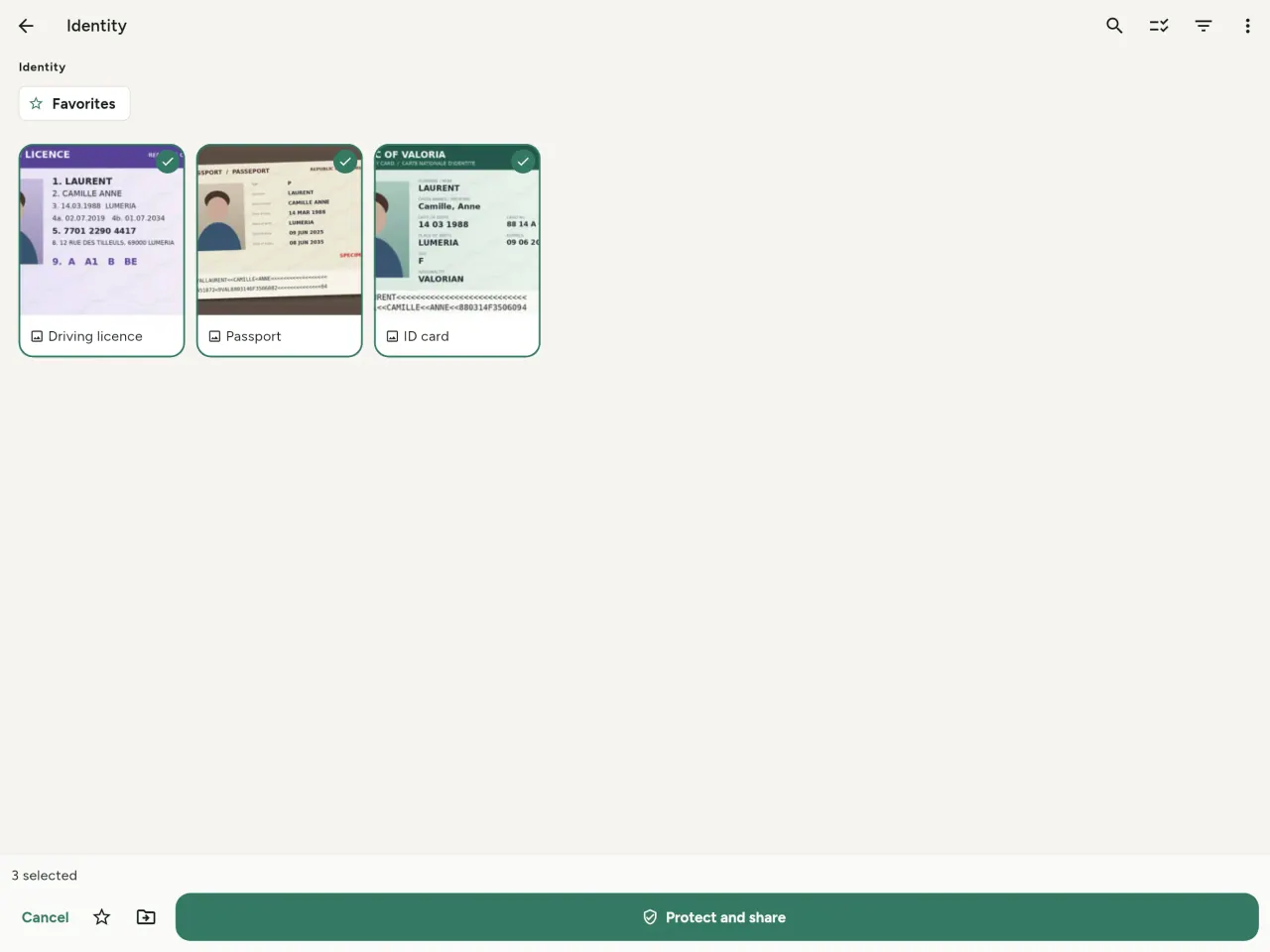
- Khetha uxwebhu olunye okanye ezininzi (kwifolda zakho okanye kuluhlu lwamanyathelo), cofa Khusela kwaye wabelane (Protect and share), chwetheza umntu oza kufumana kunye nomhla onokukhethwa, kwaye ukhethe ukuba ngaba ufuna ukudibanisa amaphepha ube yi-PDF enye okanye ukuvimbela nge-password ye-AES-256.
- Thumela usebenzisa i-system share sheet: i-metadata efihliweyo iyasuswa, ifayile yakhiwa kwakhona ukusuka kwimipikseli, kwaye ikopi yakho yabucala ayisosulelwanga.
Ndingayisayina na uxwebhu kwindawo?
Ewe. Vula umfanekiso okanye i-PDF kwi-vault yakho uze ucofe Sign. Zoba isiginesha okanye ngenise umfanekiso (ugcinwa ukhuselekile kwi-vault, kwaye unokucinywa kuIzicwangciso), ubeke kwaye usayine ubungakanani ngesandla kwiphepha, emva koko khusela kwaye wabelane ngekopi ehlanganisiweyo ene-watermark kunye ne-metadata ecinyiweyo. Oku kongeza isiginesha esibonakalayo kuphela, hayi isiginesha yombane efanelekileyo okanye iwaranti esemthethweni.
Ndingayiskena uxwebhu lwephepha okanye ndongeze olunye oluvela kwenye i-app?
Ewe. Ngaphakathi VaultMark unokukhangela amaphepha ephepha usebenzisa ikhamera okanye ngenise iifayile, kwaye kwenye i-app unokusebenzisa Yabelana (Share) okanye Vula nge (Open with) VaultMark ukugcina ifayile kwangoko ngaphandle kokuyongeza kwi-vault.
Zeziphi iifayile ezixhaswayo?
Imifanekiso kunye neefayile ze-PDF. Xa wabelana, amaphepha e-PDF aguqulwa abe yimifanekiso ene-watermark (ukuze i-watermark ingasuswa), kwaye amaxwebhu ambalwa anokudityaniswa abe yi-PDF enye ekhuselweyo nge-password ye-AES-256 ukuba kuyafuneka. Iifayile ezinkulu kakhulu ziyala (kufikelela kuma-60 amaphepha kunye ne-80 megapixels).
Ndingaphanda umbhalo woxwebhu oluskene?
Ewe. Vula uxwebhu uze uqale inkqubo yokwazi umbhalo (OCR) ngokucela. Idala i-PDF entsha ekhuselweyo enokukhangelwa kwaye igcina eyakho yokuqala ingatshintshanga. Ukwazi kombhalo kusebenza kwifowuni yakho (umbhalo oprintiweyo we-Latin), akukho nto ithunyelwa kuseva kwaye akukho nto iyaziwayo ngaphandle kokuba uyinyuse.
Ngaba i-watermark indikhusela ngokupheleleyo?
Iyacinezela ukusetyenziswa okungeyomfanelo kwaye ibonisa apho ikopi ivela khona, kodwa ayinakuthintela umntu osele enefayile ekwabelana ngayo. Yabelana amaxwebhu nabantu obathembayo kuphela.
Kutheni ndingakwazi ukuthatha isikrini?
Ku-Android, ukuthatha izikrini kunye nokuqopha isikrini kuyavalelwa ngaphakathi kwi-app ukuze kukhuselwe amaxwebhu akho.
Zeziphi iilwimi ezikhoyo?
Iilwimi ezili-75: English, French, German, Spanish, Italian, Portuguese, Arabic, Chinese (simplified and traditional), Japanese, Korean, Hindi, Russian kunye nezinye ezininzi. I-app ilandela ulwimi lwefowuni yakho kwaye ungatshintsha kuIzicwangciso (Settings). Iinguqulelo zeelwimi ezintsha zixhaswe ngumshini kwaye zihlaziywa ngempendulo yakho.
Xhasa iprojekthi
VaultMark isala simahla kwaye ayinalo intengiso. Ukuba iyanceda, ungayixhasa kuphuhliso lwayo (ngokhetho):
Buy Me a CoffeeExpense tracker and family budget planner. Free phone sync, no account.
Iyeza nakwiPixeonMetadata CleanerFunda, hlela okanye cima i-metadata yesithombe (GPS, umhla).
Iyeza nakwiPixeonLittle RelayBreastfeeding, sleep and starting solids tracker. No account, works offline.
Iyeza nakwiPixeonMenuloopMeal planner and grocery list for the week. Recipes with photos, offline.
Iyeza nakwiPixeonIndie OfficeQuote maker and self-employed invoices. Offline, no account, no ads.
Iyeza nakwiPixeonFanionDiscover and share local events, concerts, markets and weekend outings nearby